 US – English
 UK – English
 Canada – English
 Australia – English
 Danmark – Dansk
 DACH - Deutsch
 France – Français
 España – Español
 Sverige – Svenska
 Italia – Italiano
 Nederland – Nederlands
 Portugal – Português
 Suomi – Suomi
 Norge – Norsk
 日本 – 日本語
 Romanian – Română












#Practice management, #Productivity
Best apps for accountants and bookkeepers: features, benefits, and how to choose

Run your entire firm on one platform
The last decade has seen an explosion of new apps, as software providers scramble to meet the growing needs of businesses and individuals. In 2015, organizations used an average of eight software-as-a-service (SaaS) apps. By 2024, that number peaked at over 140 apps, leading to what experts call “SaaS fatigue.” In 2026, the most successful accounting firms are no longer adding more apps – they are consolidating. The focus has shifted from finding “an app for everything” to finding “one platform that does it all.”
Accountants now use apps to streamline processes, improve accuracy, and save time. Better still, apps can connect and share information in real time. This allows firms to use practice management platforms like TaxDome as a central hub for their workflows, tools, and data.
With so many apps available, it can be difficult to know where to start. That’s why we’ve created this guide. Read on to explore the best apps for accountants, chosen based on the preferences and feedback of our very own clients.
Table of сontents
- Why accountants need dedicated accounting apps
- How to choose the right accounting app
- Apps for communication and collaboration
- Apps to streamline client communication
- Accounting and bookkeeping apps
- Project management apps
- Time-tracking apps
- Document and file management apps
- Payment and invoicing apps
- Apps for employee payroll and benefits
- Apps for expense tracking and mileage management
- AI Copilots and Assistants
- Apps for password and data security
- Finding the right apps for your accounting practice
Table of сontents
- Why accountants need dedicated accounting apps
- How to choose the right accounting app
- Apps for communication and collaboration
- Apps to streamline client communication
- Accounting and bookkeeping apps
- Project management apps
- Time-tracking apps
- Document and file management apps
- Payment and invoicing apps
- Apps for employee payroll and benefits
- Apps for expense tracking and mileage management
- AI Copilots and Assistants
- Apps for password and data security
- Finding the right apps for your accounting practice
Why accountants need dedicated accounting apps
Accuracy and efficiency have always been crucial in the accounting industry. But traditionally, accountants were limited by their ability to handle repetitive tasks manually. This led to significant pain points, including:
- Manual errors. Handling data entry or calculations manually is prone to accounting errors, which can lead to all manner of problems.
- Inefficient processes. Repeating tedious processes wastes valuable hours that could be spent on more high-value work.
- Compliance challenges. Staying updated with ever-evolving regulations becomes overwhelming without proper systems in place.
This all changed in recent years with the explosion of accounting apps. These apps help accountants by automating repetitive tasks, improving data accuracy, and ensuring compliance with the latest regulations. They also enhance communication and collaboration, both internally and with clients.
As a result, accountants can do more with less. They can grow their firms in what is a highly competitive and fast-moving industry. And they can meet their clients’ growing expectations around service delivery.
How to choose the right accounting app
There are several factors to consider when choosing the right accounting app for your practice. Some of these factors are subjective and depend on your specific needs and goals. Others are universally important, like security. Let’s look at some examples:
- Features. Do the app’s features align with your needs? Are they suitable for your business size and service offerings?
- Ease of use. Is the app intuitive and user-friendly for your team and clients (if applicable)?
- Integrations. Can the app seamlessly connect with other systems you use, like your CRM or tax preparation software?
- Security. Does the app provide robust data protection features and comply with the latest industry standards?
- Cost. Is the pricing structure clear and transparent? Will it allow app usage to scale as your business grows?
- AI Native Capabilities. Does the app have built-in AI to summarize meetings, categorize expenses, or draft emails autonomously?
- Consolidation Potential. Can this app replace 2-3 other tools in your current stack to reduce costs and data silos?
- API and Agent Compatibility. Is the app “open” enough to work with the next generation of AI agents and automated workflows?
Apps for communication and collaboration
With the rise of cloud accounting and remote teams, effective communication has never been more important. Various tools have risen to prominence in recent years to enable real-time interactions and information-sharing between team members.
Below, we’ve picked our two favorite communication and collaboration tools for modern accounting teams.
Slack — Team communication made easy
Slack is one of the most popular collaboration platforms in the business world. It offers a range of tools to aid real-time communication between teams, including:
- The ability to create channels for specific projects or clients
- Threads within conversations to explore ideas in more detail
- File sharing within conversations, with a 1 GB file size limit
- More than 2,600 native integrations
- Simple, no-code automations that you can customize to your needs
Slack’s user-friendly interface and ability to integrate with other apps make it a go-to tool for modern teams. It’s an excellent choice if your firm primarily relies on synchronous text-based communication. That said, its video conferencing capabilities are somewhat limited.
Microsoft Teams — meetings, chats, and collaboration
Widely seen as Slack’s direct competitor, Microsoft Teams offers excellent video conferencing tools in addition to real-time chats. This makes it an effective tool not only for internal collaboration but also for conversing with clients in a digital-first world. Here are its core features:
- Slick video meetings with clients or team members
- Web conferencing for virtual events with up to 10,000 attendees
- Real-time conversations and file-sharing
- More than 600 integrations with third-party apps
Teams’ robust video and web conferencing features make it an excellent choice for accounting firms looking to replicate in-person meetings with staff and clients. While it doesn’t offer as many integrations as Slack, we see Teams as an excellent choice if you already use Microsoft’s suite of tools.
Apps to streamline client communication
Without the right tools, client communication can be disjointed and inefficient. This is why you need dedicated apps to streamline the client communication process. Here are two standout examples:
Calendly — simplify meeting scheduling

Calendly is one of the most popular scheduling tools on the market. By connecting directly to your calendar, it offers a simple and intuitive way to automate the scheduling of meetings, client calls, interviews, and more. Here’s what it offers:
- Automated scheduling and a slick client experience
- Integrations with Google Suite, Microsoft Suite, CRMs, and more
- Automated reminders before meetings — and follow-ups afterwards
Calendly is a solid choice for accountants looking to automate repetitive tasks. By removing the time-consuming back-and-forth associated with meeting scheduling, you can save time and ensure a professional client experience.
Zoom — video calls for virtual meetings

Zoom is the leading platform for video calls, with a market share of over 55%. Its user-friendly approach and stable yet powerful video resolution allow you to engage with clients in a digital environment. Here’s what it offers:
- Host client meetings, consultations, or team discussions — all participants need to join is a link
- Share your screen to present financial reports or explain processes in real time
- Zoom now features advanced AI-companion tools that not only summarize meetings but also create action items directly in your project management tool.
- Almost 2,500 integrations, enabling you to create joined-up workflows
Zoom offers similar video conferencing capabilities to Teams, but where Teams focuses more on internal collaboration, Zoom is more geared towards external meetings with clients.
Accounting and bookkeeping apps
There are plenty of apps that help accountants with day-to-day accounting work. They take the manual strain out of tasks such as account reconciliation, expense tracking, report preparation, and payroll. As a result, accounting firms can save time, improve accuracy, and build compliance into their workflows. Here are some of the top options to consider:
QuickBooks — comprehensive accounting software for US accountants
QuickBooks (QBO) is the marketing-leading accounting platform for small businesses. Thanks to its user-friendly interface and broad range of capabilities, it’s popular with business owners and professional accountants alike. QBO offers everything you’d expect from an accounting platform, including:
- Bank feeds for access to real-time financial data
- Tax tracking, automated calculations, and one-click tax reports
- Inventory management so you never get caught short
- Expense management, including a mobile receipt scanner
- Custom-branded invoices and auto payment reminders
- Detailed financial reports and real-time analytics
Xero — cloud-based accounting for global teams
Behind QBO, Xero is one of the most popular cloud accounting apps for small businesses. It stands out for its adaptability and collaboration tools. While it offers a slightly narrower feature set compared to QBO, there are several advantages it offers over the market leader, including:
- Unlimited users across all plans
- More cost-effective than QBO
- More than 1,000 integrations with third-party apps
- More focused on accountants than small-business owners
- A slightly higher average rating on online review sites
FreshBooks — simplified invoicing and expense tracking

FreshBooks offers a relatively simple bookkeeping app with a strong focus on usability. It’s also one of the most cost-effective options on the market, making it a solid choice for freelancers and small businesses on a budget. While you don’t get the breadth of capabilities that QBO or Xero offer, FreshBooks excels for the following reasons:
- Simple invoicing and payments
- One of the most user-friendly interfaces available
- Time tracking is available on all plans (unlike QBO)
- A decent mobile app
Synder — automation for bookkeeping and payment reconciliation
Synder is an accounting platform that automates the process of recording and reconciling sales and subscriptions. It’s popular with small and medium-sized businesses, especially those that offer consumer goods and SaaS products. Here’s what it offers:
- Integrations with more than 30 sales, payment, and inventory platforms
- GAAP-compliant revenue recognition
- Automated account reconciliation
- Invoicing and payments
Project management apps
Effective project management is key in accounting. With the right project and task management apps, you can gain visibility into deadlines, delegate work, and ensure positive client relationships. Below are two of the best tools to help manage your accounting projects and boost collaboration:
TaxDome — all-in-one time and workflow management
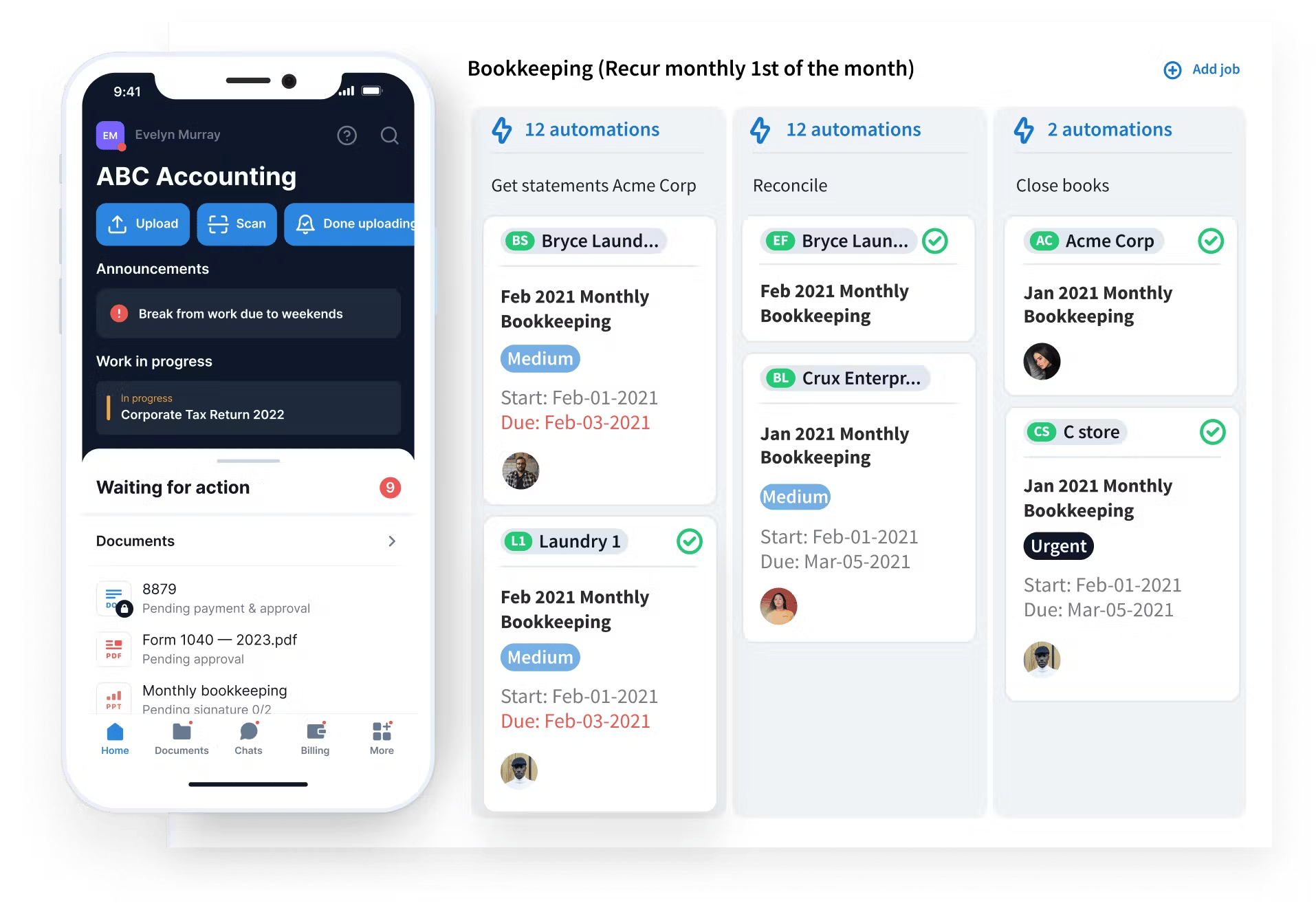
TaxDome is comprehensive practice management software designed to streamline the day-to-day running of your accounting firm. In addition to a broad range of capabilities, it offers tools for managing teams, tasks, and projects, including:
- Automated workflows. Automate all the recurring steps in client onboarding, tax preparation, and other key projects.
- Project management. Gain complete visibility into who’s working on what and when.
- Time and billing. Track how much time your team spends on tasks and client projects, auto-generate accurate invoices, and get paid in one seamless workflow.
- Client portal. Collaborate with clients in a secure environment for document sharing and communication.
- Client communication. Keep clients in the loop on project progress with real-time messaging, synced email, or SMS.
TaxDome empowers accounting teams. It helps them stay organized, work together more effectively, and deliver exceptional client service. This makes it a standout solution for managing accounting workflows.
Asana — project management for accounting teams

Asana is one of the most popular project management platforms. While not designed specifically with accountants in mind, it offers a range of handy tools for tracking tasks and collaborating as a team. With Slack, you can:
- Use Gantt charts, kanban boards, and timelines to visualize and track project progress
- Assign responsibilities, set deadlines, and prioritize tasks
- Share updates and communicate directly within the app
Asana is one of the most intuitive project management tools on the market. There’s very little by way of a learning curve, making it a solid choice for firms looking for quick collaboration and task management improvements.
Time-tracking apps
Accountants and bookkeepers often charge per hour, making accurate time tracking essential. Not only does time-tracking ensure that you get paid for the work you do, but it also helps you understand how long your team takes to complete different tasks.
Time-tracking apps provide a simple way to monitor hours worked, manage billable time, and generate detailed reports. Here are two of the best options for accounting professionals.
Harvest — time tracking with invoicing integration
Harvest is a user-friendly tool for tracking hours worked across different projects. It integrates with tools such as Asana and Slack, enabling you to track time directly in your project management or collaboration platform of choice. With Harvest, you can:
- Generate accurate invoices based on your time-tracking data
- Get paid through integrations with PayPal and Stripe
- Create detailed reports on projects, budgets, costs, and team performance
Toggl — easy time tracking for accountants
Toggl is a user-friendly tool designed to help accountants track their time effortlessly. With more than 100 integrations, it fits neatly into your existing workflows, enabling you to track time on any device. Here are its key features:
- Track time across multiple devices either in real time or retrospectively
- Simple invoicing capabilities for accurate billing
- Time-tracking reporting and analytics
Document and file management apps
Accountants handle sensitive financial and client documents on a daily basis. Having a secure way to exchange and store these documents is essential. Document management apps streamline file storage, sharing, and collaboration. At the same time, they ensure data security and compliance. Here are three of the best examples:
Google Drive — secure cloud-based file sharing
Google Drive is an excellent free document management tool for accounting firms on a budget. It integrates seamlessly with other Google Workplace applications, and most third-party apps offer Google Drive integrations as well. With Google Drive, you can:
- Collaborate on documents with team members and clients in real time
- Keep sensitive files safe with encryption and access controls
- Automatically backup files in the cloud to prevent data loss
Dropbox — simplified document collaboration
Dropbox is one of the best-known document management apps, with more than 700 million users worldwide. Like Google Docs, it offers a seamless way to share and collaborate on files securely. You also get several standout features, including:
- Password-protected files for an extra layer of security
- Outstanding file organization options
- Seamless integration with other Dropbox apps, including Dropbox Sign
Content Snare — collect and organize client documents

Content Snare is a data collection app that’s widely used by accountants and tax professionals. It streamlines the process of gathering client information and documents. Its key features include:
- Drag-and-drop form builder with conditional logic
- Automatic reminders set at times and intervals of your choosing
- In-app questions and answers to ensure clients know what information they need to provide
This handy tool eliminates the back-and-forth typically associated with collecting client information, saving you time and effort.
While these standalone document management tools are great at what they do, adding additional apps to your tech stack can result in overly complicated workflows and high costs. With TaxDome, you get robust document management features as part of a wider practice management platform, including:
- Unlimited file storage
- Secure document exchange via our custom-branded client portal
- Legally binding e-signatures
- Customizable organizers for automatically gathering client data and documents
To see how TaxDome can take your document management to the next level, request a demo today!
Payment and invoicing apps
Ensuring timely and accurate payment is crucial to the smooth running of any accounting business. Once upon a time, this process involved all sorts of manual effort, with huge potential for human error. Now, payment and invoicing apps simplify and automate most of the process for you. Here are three solid options to consider:
Zoho Invoice — create and send invoices effortlessly

Zoho Invoice is a user-friendly tool designed to simplify the invoicing process. It’s also completely free, making it an attractive option if you’re a freelancer or own a small business. Here’s what it offers:
- Customizable invoice templates that you can tailor to your business
- Professional quotes to outline your payment terms and deliverables
- Automated payment reminders
- Seamless integration with other Zoho tools and a range of third-party apps
Wave — free invoicing and payment processing
Wave is another free invoicing solution that’s perfect for small businesses and freelancers. On the Pro plan, you also get a range of features to help you manage your books and get paid, including:
- Online payments via bank deposit, credit card, or Apple Pay
- Unlimited bank and credit card connections
- Robust reports for small businesses
- Intuitive dashboard for tracking income, expenses, payments, and invoices
PayPal — easy payment processing for clients worldwide

PayPal is one of the most well-known online payment platforms. Although commonly used in e-commerce, its reliability and familiarity make it a solid choice for accountants looking to streamline payments — especially those who work with international clients. Its key advantages include:
- Global reach — process payments from clients worldwide in multiple currencies
- Rapid transfers — receive payments almost instantly
- Integrations with accounting platforms, including QuickBooks and Xero
Apps for employee payroll and benefits
For accountants who run payroll, the right app can do most of the heavy lifting for you. By automating salary, tax, and benefits administration, you can reduce manual errors and ensure compliance with regulations. Here are two top payroll and benefits management tools to consider:
Gusto — streamlined payroll and HR management

Gusto is an all-in-one payroll and HR solution that simplifies employee management for small and medium-sized businesses. Its key features include:
- Automated payroll calculations, processing, and payments
- Employee benefits management and distribution
- Automated tax calculations and filings
- Native integrations with Xero, QuickBooks, and more
QuickBooks Payroll — integrated payroll for accountants

QuickBooks Payroll is an obvious app to use if you’re already a QuickBooks customer. With seamless integration with its flagship accounting software, you get a unified solution for managing payroll and financial records. Here’s what QuickBooks Payroll offers:
- Automated payroll processing
- Tax calculations and filing with an accuracy guarantee
- Tax penalty protection
- Direct deposits for paying employees quickly and securely
- Integration with QuickBooks’ time-tracking software for accurate payments
Apps for expense tracking and mileage management
Without the right app, tracking expenses can be a time-consuming hassle. The apps we’ve included below help by automating expense tracking and mileage management. The result is improved accuracy, built-in compliance, and optimized tax deductions. What’s more, these apps provide detailed insights into spending and travel expenses.
Expensify — automate expense reporting
Expensify is a complete spend management platform designed to help businesses simplify the way they track and report business expenses. Here’s what it offers:
- A single platform for managing expenses, vendors, and invoices
- Travel management — schedule flights, book accommodation, and more
- Mobile receipt scanner for expense tracking on the go
- Chat with teams and clients via instant messaging, email, or phone
MileIQ — track mileage for accurate deductions

MileIQ is a handy app that helps you track, manage, and report miles driven with minimal manual effort. With more than one million active users, it has helped businesses reimburse over $10 billion. Its key features include:
- Automatic trip detection that logs mileage using GPS tracking
- Simple trip classification — swipe right for business trips and left for personal ones
- Generate IRS-compliant mileage reports in a matter of seconds
TripLog — advanced mileage and expense tracking

Another app dedicated to tracking mileage and expenses, TripLog features a range of powerful features available on any device, including:
- Automated GPS mileage tracking for businesses and individuals
- Automated trip classification based on preset work hours
- Tax-compliant mileage reports
- Separate tools for tracking expenses and time
AI Copilots and Assistants
AI copilots are rapidly becoming essential tools for accountants and bookkeepers. These intelligent assistants help automate repetitive tasks, provide instant insights, answer complex questions in natural language, and free up time for higher-value advisory work.
Sage Copilot — intelligent finance assistant
Sage Copilot is Sage’s dedicated generative AI assistant designed specifically for finance and accounting teams. It excels at streamlining complex workflows and providing proactive insights.
Key features include:
- Real-time analysis and flagging of budget variances and anomalies
- Assistance with month-end close and financial reporting
- Automated task handling and workflow suggestions
- Natural language interaction for quick data exploration and report generation
- Contextual advice tailored to accounting and compliance requirements
Microsoft Copilot for Accountants
Microsoft Copilot (integrated with Microsoft 365 and Excel) has become one of the most powerful tools for accounting professionals. It works seamlessly with Excel, Word, Teams, and Outlook.
Its main strengths:
- Advanced Excel automation — create formulas, analyze large datasets, and generate charts with simple prompts
- Document review and drafting of financial reports or client emails
- Data analysis and trend identification across spreadsheets
- Custom AI agents that can be built for firm-specific workflows
TaxDome AI — intelligent practice management assistant
TaxDome AI is the built-in AI suite inside the TaxDome all-in-one platform. It acts as a powerful co-pilot that automates document-heavy workflows and delivers smart insights across the entire practice.
Key features include:
- Automatic document renaming, tagging, and categorization — client uploads are instantly organized without manual work
- AI-powered matching of documents to checklist items
- Natural language search and AI-powered reporting — ask questions like “Which clients are overdue?” and get instant answers
- Smart insights into firm performance, team productivity, and profitability
- Upcoming AI features for tax intake and data entry automation
Apps for password and data security
As an accountant, you are entrusted with highly sensitive data. If this data gets breached, it can lead to catastrophic consequences for your business and clients. Thankfully, there are plenty of apps to help you keep data secure at all times. Let’s look at a couple of leading examples:
LastPass — secure password management

LastPass provides a robust password management solution. Using zero-knowledge encryption, all your passwords are held securely in a vault that only you can access. LastPass offers several handy features, enabling you to:
- Automatically detect weak passwords and other vulnerabilities
- Safely share login credentials with teammates
- Access your passwords anywhere on all your devices
Dashlane — advanced security for financial professionals

Dashlane offers a comprehensive solution for managing passwords and protecting sensitive financial data. Its key advantages include:
- Powerful tools to detect and mitigate credential-related risks
- Real-time phishing alerts
- Zero-proof cryptography that ensures only you can see your passwords
The more passwords you have to manage, the higher the risk. With TaxDome, you can replace multiple standalone apps with a single hub for all your firm’s workflows. TaxDome also offers robust features designed to ensure data security at all times, including:
- A secure client portal for safely exchanging files
- End-to-end file encryption, two-factor authentication, and biometrics
- Granular permissions to ensure only authorized users access sensitive information
To explore TaxDome’s full capabilities, request a demo.
Finding the right apps for your accounting practice
In an increasingly tech-driven world, choosing the right apps can make all the difference. The best apps for accounting firms improve efficiency, accuracy, and collaboration. They also reduce the risk of error or compliance issues.
Selecting the right ones can be overwhelming. Hopefully, the examples we’ve provided in this guide will help speed up your search and narrow down the field.
Of course, the best accounting tech stacks are the simplest. Using TaxDome, you eliminate the need for separate document management, invoicing, time tracking, project management, and collaboration tools. Instead, you get a single powerful platform that spans all your practice management needs.
Request a demo to see how TaxDome could simplify your workflows, save you money, and transform the way your firm operates.

Nicholas produces TaxDome content focused on how technology improves accounting workflows and everyday firm operations.

Get your free guide

Thank you!
The guide copy has been sent to your email. Please check your inbox!
Recommended articles
Niche Business Accounting Report statistics: what business clients will pay for specialized expertise
9 best QuickBooks alternatives in 2026 for every business type

Buy Now, Pay Later: offer clients payment flexibility