
Send the proposal, get engaged
It starts with the client. Send a branded proposal and engagement letter, then collect the deposit or first payment in the same step, before any tax work begins.
Choose your country and language
 US – English
 UK – English
 Canada – English
 Australia – English
 Danmark – Dansk
 DACH - Deutsch
 France – Français
 España – Español
 Sverige – Svenska
 Italia – Italiano
 Nederland – Nederlands
 Portugal – Português
 Suomi – Suomi
 Norge – Norsk
 日本 – 日本語
 Romanian – Română
Tax season doesn’t have to bounce between five different tools or logins. TaxDome connects every stage into one workflow, under one secure login: engage, collect documents, run AI tax prep, review, deliver, sign and pay, and e-file. Send the proposal, get the data into your tax software, and deliver the finished, filed return, all without leaving TaxDome.
Thank you!
Please check your inbox for a confirmation.
It starts with the client. Send a branded proposal and engagement letter, then collect the deposit or first payment in the same step, before any tax work begins.
Once the client’s engaged, organizers ask exactly what their situation requires and turn it into a personalized document checklist, no generic templates.
Clients upload or scan documents from their phone, no printer or email required. Reminders follow up until everything’s in, and documents get organized and tagged as they arrive, so your team always sees what’s outstanding.
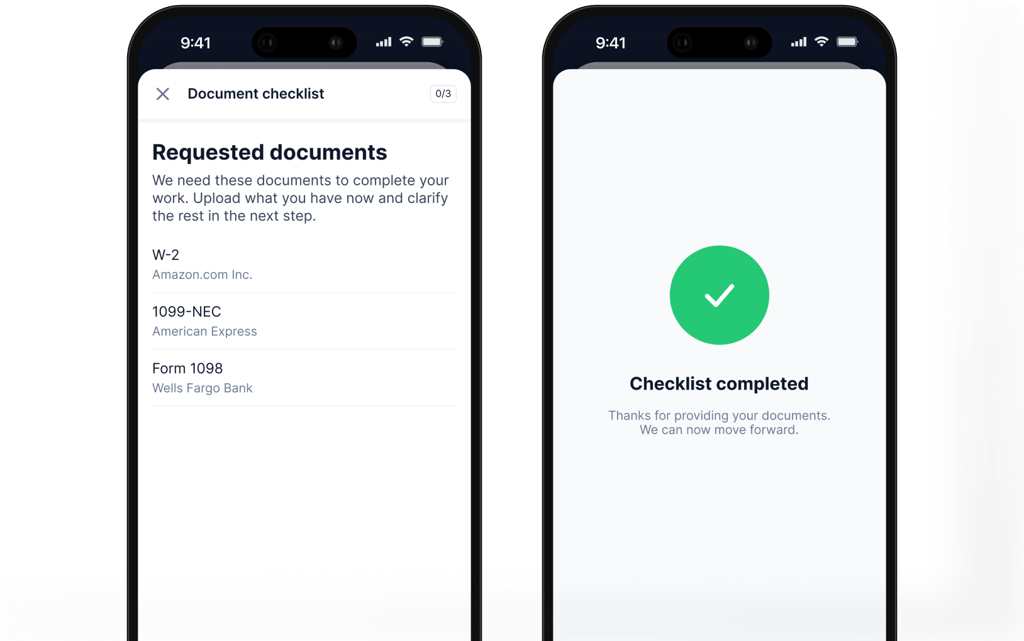
Once intake is complete, TaxDome connects to leading AI tax prep solutions that extract the data already collected and push it directly into your tax software, preparing a draft return ready for review.
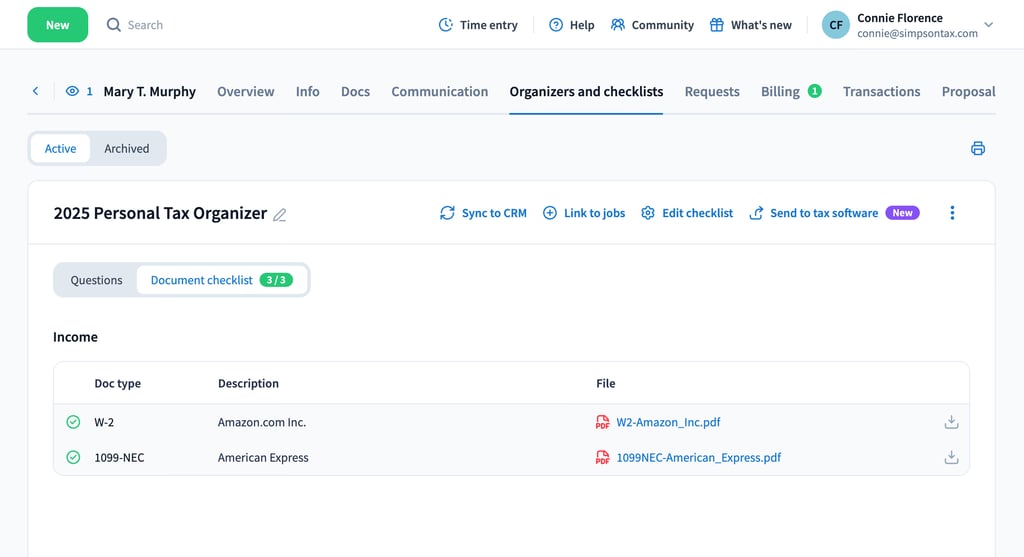
The return is ready, but the job isn’t finished. Your team reviews the draft in your tax software, makes any adjustments, and marks it ready for delivery, all without leaving TaxDome.
Present the completed return in a clear, branded, client-friendly format, so clients see exactly what they owe or get back, and by when.
Clients review the return, sign the 8879, and pay, all in one click from desktop or mobile.
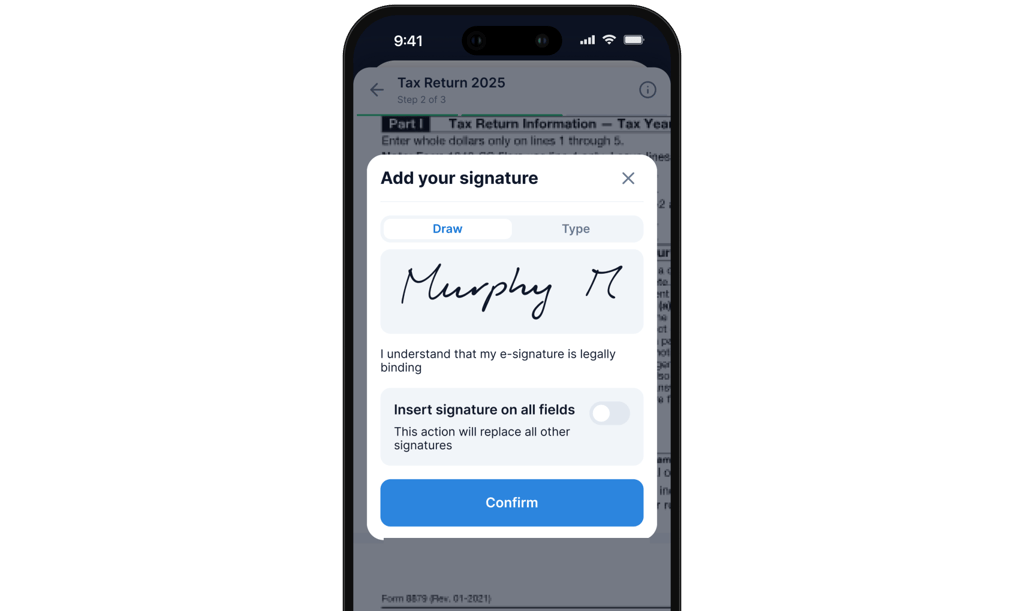
Once everything’s signed and paid, the job moves automatically toward e-file, no separate process, no manual handoff. Done.
“We were trying to be more proactive with our clients. We’re always trying to find ways to help inform them of any deadlines and new tax benefits that come down.”

Patrick Payne
Owner, Your Modern Accountant
“Our clients are really appreciating it as well. There’s like this backend portal that makes it easy for them to give us what we need, and keep them on track so they get their tax returns on time and are compliant.”

Corey Whitaker
Managing Partner, Evolved Finance
“The buy-in that we now have from clients completing organizers is exponentially larger than when we were using the static tax organizers.”

John Siebert
Owner, Siebert & Associates, CPAs
“I had a recent call from a client saying “I need all of these for an application. I need copies of my tax returns.” Everything’s in there. Just look in the previous folders, you’ll find all your tax returns. Like, oh, that’s easy, convenient for them. And that saves me a lot of time. So, yes, it’s a win-win for my customers, for us, and for my team as well.”

Ilie Batir
Director, BR Accountant
Clients never see your back-office software. They judge your firm by how secure and connected it feels. Schedule a firm-wide demo to see intake, AI-powered tax prep, and delivery running as one workflow.
Thank you for reaching out! Our sales representative will contact you soon.
| Feature / Experience | TaxDome | SafeSend | SurePrep + TaxCaddy | Drake + GruntWorx |
|---|---|---|---|---|
| Intake | ||||
|
Proposals and packages Create, send, and get signed proposals with built-in payment |
||||
|
Engagement letters Create and send engagement letters for e-signature. |
||||
|
Personalized document checklist Automatically generate tailored checklists based on client info and job type. |
||||
|
Smart organizers and reminders Collect client info with custom forms and send automated follow-ups. |
||||
|
Client portal Provide clients with a secure, intuitive portal to upload docs, sign forms, and communicate. |
Need manual support | |||
|
AI-document renaming and tagging Save time with AI that renames and tags uploaded files based on content. |
Need manual support | Need manual support | ||
|
AI-automatching Automatically match uploaded documents to the correct account and folder. |
Need manual support | |||
|
Monitoring intake status Track client onboarding progress in real time and spot bottlenecks instantly. |
||||
|
Mobile app with scanner, convert to PDF Scan documents on the go, convert to PDF, and upload directly to the portal. |
||||
| Preparation | ||||
|
AI document validation AI checks documents to ensure all required details are accurate and complete. |
Need manual support | |||
|
Tax software integration Push data from sourced documents directly into Lacerte, ProConnect, Drake, UltraTax, with CCH Axcess and ProSeries coming soon. |
Made via separate tool (Ultratax) | |||
|
1040 field auto-check Automatically validate each field on the 1040 form against data from source documents. |
Need manual support | |||
| Delivery | ||||
|
Invoice gating before signature Require invoice payment before clients can sign documents. |
||||
|
Unified package (docs + e-sign + invoice) Send documents, collect signatures, and request payment — all in one package. |
Coming soon | N/A | ||
|
E-sign 8879 (KBA, spouse flow) Securely e-sign Form 8879 with identity verification and spouse signing support. |
N/A | |||
|
Voucher table (payment links + status) Show clients upcoming payments with live status and direct payment links. |
Coming soon | N/A | ||
|
Automated reminders Send smart reminders for outstanding tasks like missing docs or unpaid invoices. |
N/A | |||
|
Auto-move Job to e-file ready Automatically update job status to “e-file ready” once all steps are complete. |
Coming soon | |||
It connects your entire tax prep workflow into one path: TaxDome handles proposals and onboarding, collects the right documents from each client, and sends them to Juno; Juno enters the data directly into your tax software and prepares a draft return; and the finished return comes back into TaxDome for delivery, signature, and invoicing.
With a proposal. Clients review, sign, and pay engagement letters and proposals in one click from desktop or mobile, and the signed proposal kicks off the job, so intake starts the moment the client says yes.
TaxDome integrates directly with your tax software to read each client’s prior-year return and build them a checklist of exactly the documents they need to send this year. Clients upload against that list from the app, and your team sees what’s still missing at a glance.
Seamlessly, through the native integration: documents clients upload to TaxDome flow straight into Juno, with nothing to export or re-upload. In the first quarter of 2026 alone, firms sent more than 100,000 tax documents from TaxDome to Juno this way.
Juno extracts the data and enters it directly into your tax software, handling form data like W-2s and 1099s with 99% accuracy and preparing a draft return before you open the file.
Through Juno, TaxDome integrates with Lacerte, ProConnect, Drake, and UltraTax, with more tax software and AI tax prep partners coming soon.
The finished return comes back into TaxDome for delivery. Tax return delivery runs the whole handoff in one flow: the client watches a video review of their return, approves it, pays the invoice, and signs, while AI assembles everything your team needs to turn returns around fast and give clients a great experience.
Log in to your portal
“Before TaxDome, we didn’t have any visibility as to where in the process or how long it was taking. We didn’t have a time entry system to track how long it was actually taking us to prepare a tax return, or monthly bookkeeping, or any other tasks that we were doing for clients.”
Ricardo Ardiles
Co-Founder, RX Dental Accountants