 US – English
 UK – English
 Canada – English
 Australia – English
 Danmark – Dansk
 DACH - Deutsch
 France – Français
 España – Español
 Sverige – Svenska
 Italia – Italiano
 Nederland – Nederlands
 Portugal – Português
 Suomi – Suomi
 Norge – Norsk
 日本 – 日本語
 Romanian – Română












The 14 best accountancy practice management software for UK firms (2026 update)
Run your entire firm on one platform
Key takeaways:
- TaxDome is the best practice management software for UK practices, offering the most robust automation features and client tools for MTD and AML workflows
- For small accounting teams wanting flat-fee pricing, Pixie charges by client count with unlimited users
- For firms already invested in other Sage or IRIS tools, implementing their practice management software may be the most convenient solution
Methodology: how do we choose these tools?
We analyze each product and customer reviews vs the top alternatives. The percentages below indicate the weighting of each feature category in our recommendations:
- Workflow automation — 25%
- Client features — 20%
- MTD and AML suitability — 15%
- Integrations — 10%
- Mobile apps — 10%
- Pricing — 10%
- Usability — 5%
- Reporting — 5%
Last Updated: July 2026
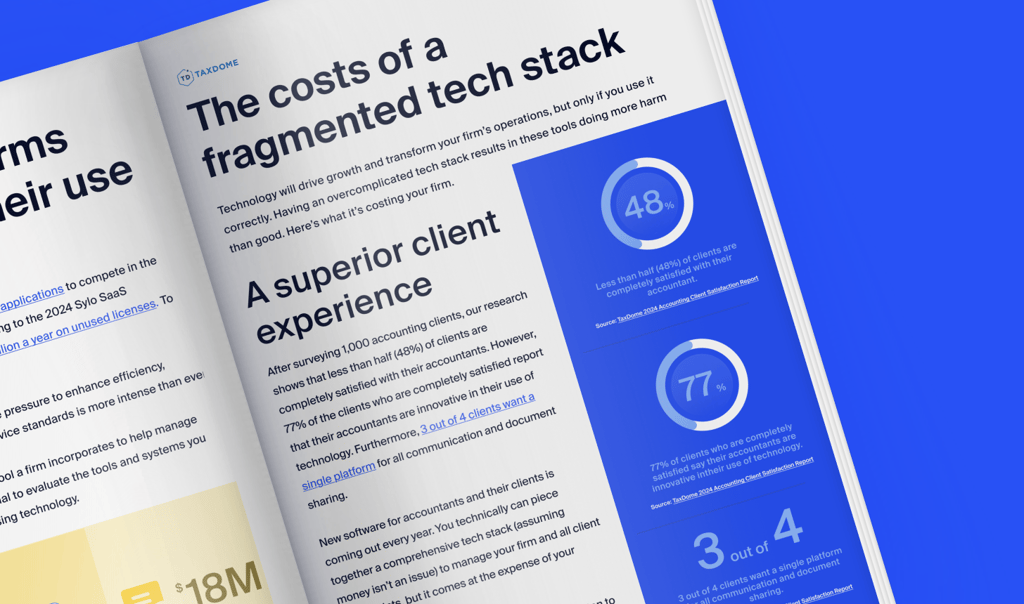
Successful firms use great technology and clients notice the difference, with 77% of satisfied clients crediting their accountant’s innovative use of technology. For most firms, this starts with choosing practice management software that enables your team to do more without risking the reputation you spent years carefully building.
In this article, we’ll look at the best accountancy practice management platforms for UK-based accounting firms. We delve into their key features, pros and cons, and how each platform helps you deal with the biggest workload burdens for UK firms, including MTD and AML checks.
Table of сontents
- What is accountancy practice management software?
- What are the advantages of using practice management software?
- What are the most important features of practice management software for accounting firms?
- Best 14 accountancy practice management software for UK firms
- TaxDome
- TaxDome pros and cons
- BrightManager
- Karbon
- Pixie
- Uku
- Financial Cents
- Silverfin
- Cone
- Capium
- Engager.app
- IRIS (formerly Senta)
- Ignition
- Xero Practice Manager
- Sage for Accountants
- How to choose the right practice management software for your firm
- FAQs: UK practice management software
- To sum up
Table of сontents
- What is accountancy practice management software?
- What are the advantages of using practice management software?
- What are the most important features of practice management software for accounting firms?
- Best 14 accountancy practice management software for UK firms
- TaxDome
- TaxDome pros and cons
- BrightManager
- Karbon
- Pixie
- Uku
- Financial Cents
- Silverfin
- Cone
- Capium
- Engager.app
- IRIS (formerly Senta)
- Ignition
- Xero Practice Manager
- Sage for Accountants
- How to choose the right practice management software for your firm
- FAQs: UK practice management software
- To sum up
What is accountancy practice management software?
As the name suggests, practice management software provides the tools you need to manage all aspects of your firm. Think of it like the software version of a Swiss army knife, combining multiple different tools in one centralised platform.
Most practice management platforms offer tools for client communication, document management, internal collaboration, time and billing, automation, and more. This allows you to simplify your accounting tech stack significantly and save time and money. If you choose the right software, you can run your firm using just your practice management platform and your accounting or tax software.
What are the advantages of using practice management software?
Practice management software brings a whole host of benefits to accounting firms, making it one of the most essential components of an accounting tech stack. Here are some key examples.
Improved efficiency and productivity
While most practice management platforms offer task automation, the best ones automate entire workflows, including all client communication, document gathering, task management, billing, and more.
This means you can set many of your accounting processes to autopilot, allowing your practice management software to handle all those repetitive tasks that typically take so much of an accountant’s time. In other words, you can get more done faster, with fewer resources.
Enhanced organisation and transparency
By centralising all your client information, documents, and communications in one place, practice management software makes it easier to manage client relationships. At the same time, you get complete visibility into tasks, responsibilities, deadlines, and workloads, providing greater transparency and accountability across your organisation.
An incredible client experience
By automating client communications, practice management software ensures that your clients are always kept in the loop. At the same time, features such as client portals and mobile apps provide a seamless digital space where your clients can interact with your firm. Gone are the days of paper forms, phone calls, and unsatisfied clients!
A consolidated tech stack
Practice management software combines multiple tools and capabilities in one platform. So instead of jumping between various apps to get a job done, you can manage everything in one centralised place. Not only does this simplify your accounting tech stack, but it also makes it much more cost-effective, replacing multiple software licences with just one.
What are the most important features of practice management software for accounting firms?
No two practice management platforms are the same. Some excel in certain areas, while others are great all-rounders. To help you understand what to look for, here are some key features to expect from a comprehensive practice management platform.
Workflow automation
As we mentioned already, workflow automation is an incredibly powerful tool that enables you to automate entire accounting processes, such as client onboarding or tax preparation. Note: this isn’t the same as task automation, which automates individual tasks.
The best platforms offer highly customisable workflow automation, with templates that enable you to get set up and implement best practices as quickly as possible.
For UK practices, this means automating recurring jobs such as Self Assessment returns, VAT returns and Corporation Tax filings, so deadlines are tracked and work moves forward without manual chasing.
Customer relationship management (CRM)
A CRM provides a centralised place to manage all your client data, documents, and communications. It also provides a complete historical record of all your interactions with accountants, providing your team with all the information they need in one place.
A CRM is an essential tool for any modern accounting practice, but not all practice management systems come with one. For those that don’t, users have to integrate with an external CRM, which often isn’t designed with accountants in mind.
Document management
Document management is an essential part of any decent practice management system, enabling you to store, organise, and exchange documents securely. Not all platforms offer the same document management features, however. While some offer unlimited file storage and e-signatures, others include strict limits that can hamper growth.
Team, task, and project management
Your practice management platform should replace the need for third-party project management apps, providing a powerful way to manage your team’s workload, increase visibility into progress and deadlines, and boost internal collaboration.
Time, billing, and payments
You want your practice management platform to completely replace any third-party apps you use for time-tracking, invoicing, and payments. This way, you can centralise all your data relating to the hours your team works, how much you’ve billed your clients, and whether they’ve paid or not.
Secure client portal
A client portal is a must-have feature for accounting firms looking to provide an outstanding client experience. Client portals provide a secure place where clients can view, upload, and e-sign documents, communicate with accountants via chats, receive invoices, and pay bills.
Your firm needs a portal that simplifies the most complex workflows, such as AML checks during the first phase of onboarding, both for your team and clients. A portal that helps your team deliver services throughout the working relationship, within an experience that keeps your clients coming back for more.
Reporting and analytics
Practice management platforms house a lot of data. The best ones enable you to turn that data into actionable insights that can power smarter decision-making across your firm, helping you to understand how your team is performing, which clients are the most lucrative, and more.
Integration options
Although comprehensive practice management platforms enable you to wave goodbye to a lot of your software licences, there are times when you’ll need to integrate with third-party tools, such as your accounting or tax software. Look for platforms that offer native integrations with your existing tools, so you can connect and share data seamlessly.
UK practices should look for integrations with tools supporting HMRC filings, Companies House for client data, and MTD-compatible software for VAT and Income Tax submissions.
Pricing
When looking for a practice management solution, pay close attention to pricing. Some offer simple, transparent pricing plans with no limits on usage, while others bamboozle you with overly complex pricing plans and strict usage limits that make it difficult to understand what you need, what you’ll pay, and how it will scale.
We’ve just scratched the surface of what practice management software can do in this section. To explore essential features in more detail, check out this guide: Key features of practice management software for accountants.
As a UK firm, you might also want to check that providers offer pricing in £GBP. You’ll be surprised how many companies that are based in the UK only offer pricing in $USD, leaving you with the conversion fees to pay.
Best 14 accountancy practice management software for UK firms
So which is the best accounting practice management software for you? In this section, we’ll guide you through some of the best options on the UK market — and what makes them stand out from the crowd.
Before we take a look at each platform individually, here’s a quick comparison table to see how these accountancy practice management systems hold up against each other:
| Best for | Starting price | Price model | MTD support | AML | Companies House | Client portal | Mobile app | G2 rating | Free trial | |
| TaxDome | All-in-one, strongest client experience | £560/year | Per user | Via workflows | ✅ | ✅ | ✅ | ✅ Firm + client | 4.7/5 | ✅ |
| BrightManager | Small UK/Ireland compliance | £409.25+VAT/year | Per user | Deadline tracking | ✅ | ✅ | ✅ | ❌ | — | ✅ |
| Karbon | Collaboration and email | £408/year | Per user | Via integrations | ❌ | ✅ | ✅ | Limited | 4.8/5 | ✅ |
| Pixie | Flat-fee small firms | $129/month | Per client | Via integrations | Via Xama | ✅ | ✅ | ❌ | 4.7/5 | ✅ |
| Uku | Time tracking and billing | £192/year | Per user | Via integrations | ✅ | ❌ | ✅ | ✅ | 4.7/5 | ✅ |
| Financial Cents | Affordable workflow | $228/year | Per user | ❌ | ❌ | ❌ | ✅ | ❌ | 4.7/5 | ✅ |
| Silverfin | Mid-large compliance | Quote | Per file | ✅ | ❌ | ✅ | ❌ | ❌ | — | ✅ |
| Cone | Low-cost all-in-one | £60/year | Per user | ❌ | ❌ | ❌ | ✅ | ❌ | — | ✅ |
| Capium | UK compliance suite | £1,680+VAT/year | Per client | ✅ | ✅ | ✅ | ❌ | ❌ | 4.8/5 | ✅ |
| Engager | Affordable new firms | £108+VAT/year | Per client | Via integrations | ❌ | ✅ | ✅ | ✅ Client | — | ✅ |
| IRIS | IRIS ecosystem | £156/year | Per module | ✅ | Add-on | ✅ | ✅ | ❌ | — | ✅ |
| Ignition | Proposals and payments | £348/year | Per practice | ❌ | ❌ | ❌ | ❌ | ❌ | 4.7/5 | ✅ |
| Xero PM | Xero-committed firms | Free | Free/partner | Via Xero | ❌ | ❌ | ❌ | ❌ | 4.5/5 | ✅ |
| Sage | Sage ecosystem | Free | Free/per client | ✅ | ❌ | ❌ | ❌ | ❌ | — | ✅ |
1. TaxDome
Best for: all-in-one practice management with the strongest client experience
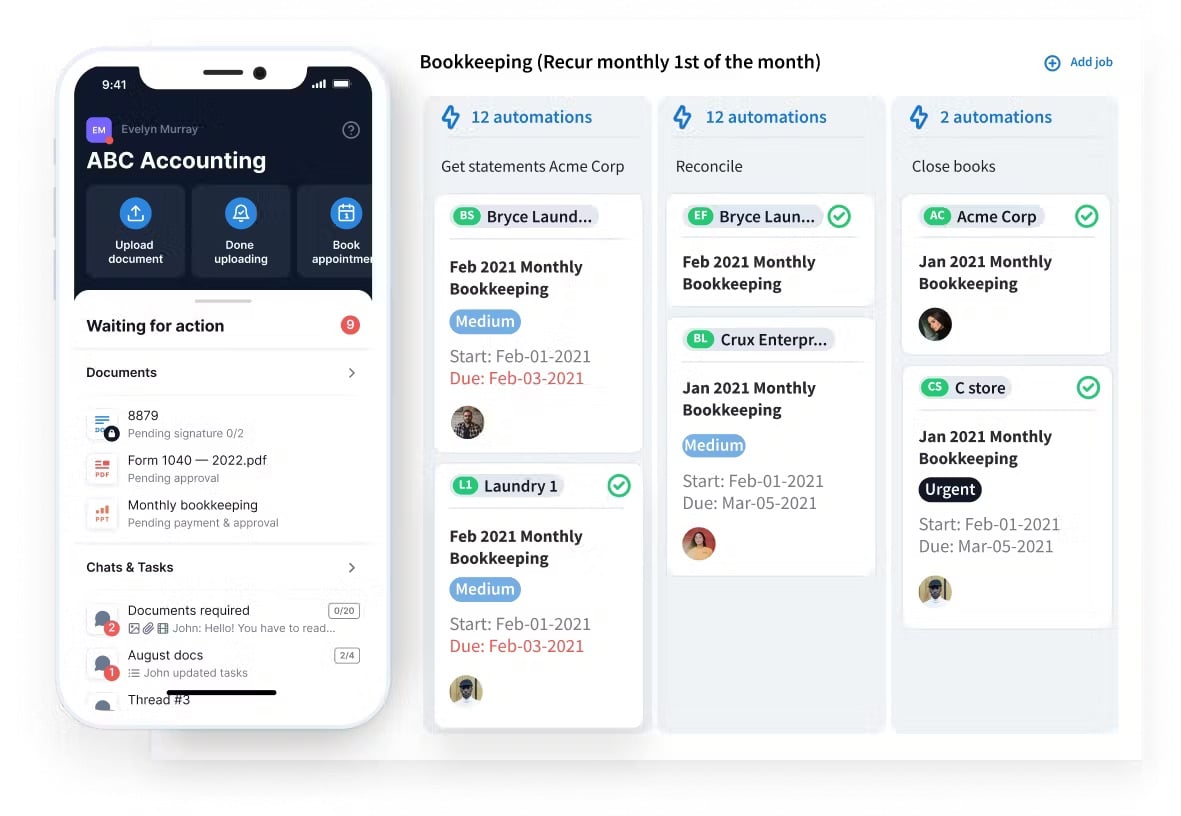
TaxDome is an award-winning practice management platform that boasts a comprehensive suite of tools designed to simplify and automate accounting workflows. With an average rating of 4.7/5 on popular software review sites G2 and Capterra, TaxDome is a market leader that serves accounting firms of all sizes.
For UK practices, TaxDome provides the most advanced automation system for client onboarding and accounting workflows. You can run the AML process on autopilot and quarterly MTD workflows without your team getting bogged down in the extra admin work.
TaxDome key features
- Companies House integration
- Customisable workflow automation and templates
- Simplify AML checks with onboarding automation
- Recurring services for MTD, annual filings, and other repeatable job
- Integrations with HMRC-compliant filing tools
- A built-in CRM designed with accountants in mind
- Firm mobile app for running your practice on the go
- Custom-branded client portal and client mobile app
- Synced email, secure chats, and two-way SMS
- Proposals and engagement letters
- AI-powered reporting
TaxDome pros and cons
| 👍 Pros | 👎 Cons |
| Class-leading automation for AML and MTD workflows | Annual pricing only |
| Top-rated client mobile app | TaxDome Payments currently only available in the US |
| Built-in CRM with unlimited contacts and GDPR compliance | |
| Companies House integration | |
| Replace multiple practice management tools with one complete system |
How much does TaxDome cost?
As of June 2026, TaxDome runs one single plan that gives UK firms access to the whole platform and all its features. Pricing is annual, with discounts for committing to a 2-year or 3-year subscription:
- 1-year subscription: from £600/year (equivalent to £50/month)
- 2-year subscription: from £580/year (equivalent to £48/month)
- 3-year subscription: from £560/year (equivalent to £46/month)
TaxDome reviews
TaxDome has an average rating of 4.7/5 on G2 from 700+ reviews, and 4.7/5 on Capterra from 2,700+ reviews. Firms praise the impact TaxDome has on team performance and client outcomes, driving growth for firms while maintaining quality standards and reputation.
Clients also appreciate their firms using TaxDome, particularly the client mobile app that provides a single platform for all interactions between clients and their accountant. The app is rated 4.9/5 by 38,000+ clients who praise their firms for delivering first-class experiences.
| What do customers like/dislike about TaxDome? | |||||
| 👍 Likes | ✅ Ease of use | ✅ Advanced automation | ✅ Client portal and app | ✅ Centralized communication | ✅ Customer support |
| 👎 Dislikes | ❌ Annual pricing only | ||||
Who should use TaxDome?
TaxDome suits UK tax, accounting and bookkeeping firms that want to consolidate a scattered tool stack into one system and deliver a polished client experience. It rewards firms ready to invest a few weeks in setup. Solo practitioners wanting something light may find it heavy.
2. BrightManager
Best for: small UK and Ireland firms prioritising local compliance and onboarding
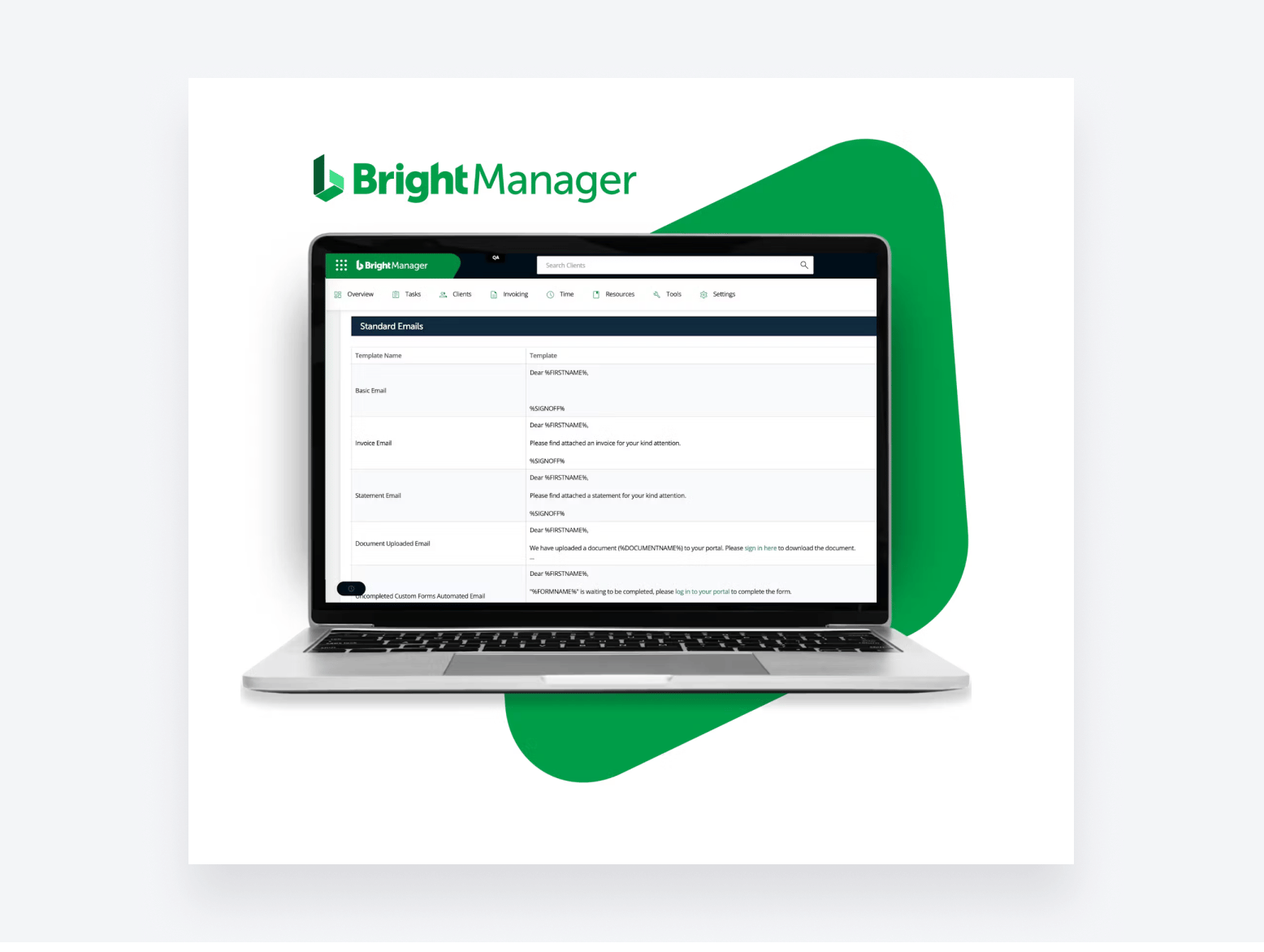
BrightManager is practice management software designed for accountants and bookkeepers in the UK and Ireland. It’s part of the wider Bright software suite, which includes solutions for payroll, proposals, accounting, and tax.
BrightManager key features
- Automated client onboarding and AML
- Workflow and job templates
- Companies House and HMRC deadlines
- Secure client portal with e-signatures
- Automated proposals and engagement letters
- Time tracking and invoicing
BrightManager pros and cons
| 👍 Pros | 👎 Cons |
| Built for UK and Ireland compliance | Limited workflow automation depth |
| Strong automated client onboarding | No firm or client mobile apps |
| Companies House and HMRC integration | Reporting is basic and fixed |
| Unlimited clients on per-user pricing | No @mention team collaboration |
| Easy to use, quick to set up | Add-ons raise the total cost |
How much does BrightManager cost?
As of June 2026, BrightManager runs three plans, charged per user:
- Essential: from £409.25+VAT/year (equivalent to £34/month)
- Premium: from £694.26+VAT/year (equivalent to £58/month)
- Advanced: from £694.26+VAT/year (equivalent to £58/month)
Now, you’re probably wondering why the Premium and Advanced plans run at the same price. It’s a good question, and the answer is: not much. You get the same features, but you’re signing up for a 24-month commitment with the Premium plan, while the Advanced plan is a typical 12-month subscription.
The only other difference is that you get a free additional user on the Premium plan.
BrightManager reviews
BrightManager itself doesn’t have a significant online review profile. Parent company, Bright, is rated 4.9/5 from 350 reviews on Capterra, which covers its whole suite of accounting and finance tools. Users typically praise the platform’s ease of use and simple automation features, especially among sole practitioners and very small firms.
| What do customers like/dislike about BrightManager? | |||||
| 👍 Likes | ✅ Ease of use | ✅ Automation | ✅ Deadline tracking | ✅ Client portal | |
| 👎 Dislikes | ❌ Limited automation | ❌ No mobile apps | ❌ Basic reporting | ❌ No collaboration | ❌ Scalability for growing firms |
Who should use BrightManager?
BrightManager suits small and growing UK and Ireland practices that want to automate onboarding, AML and deadline admin without a steep setup. It works best for compliance-focused firms with local clients. Larger or distributed teams may outgrow its reporting and collaboration limits.
3. Karbon
Best for: collaborative workflow and email management for growing teams
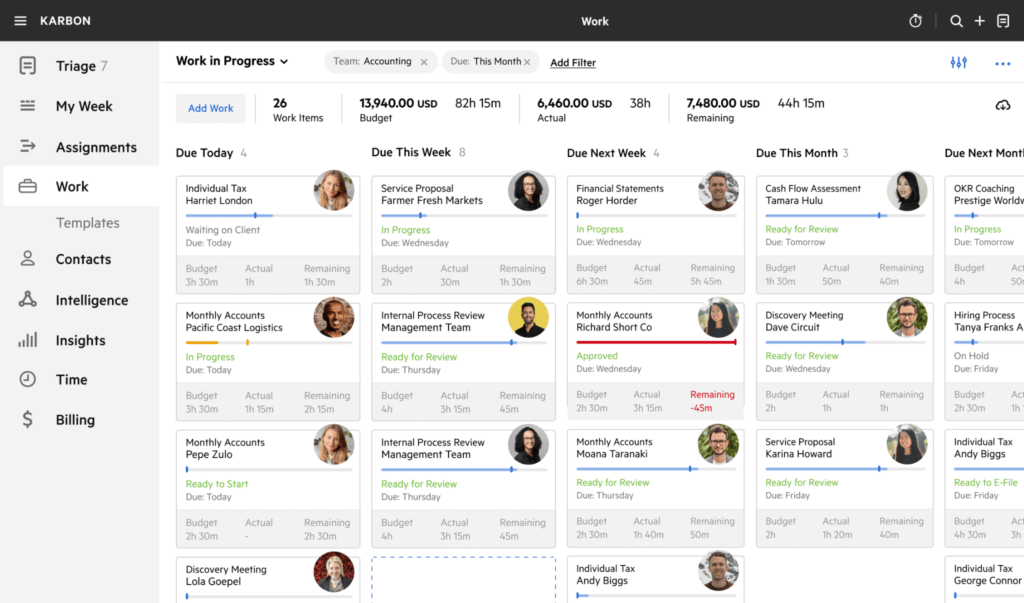
Karbon is a popular practice management software for accounting firms worldwide. While it has a fairly extensive list of features, it requires integration with other platforms to provide a complete practice management experience.
Karbon key features
- Email triage and collaboration
- Workflow automation and templates
- Practice management CRM
- Client tasks and document sharing
- Time tracking and budget reporting
- Karbon AI (Practice Intelligence)
Karbon pros and cons
| 👍 Pros | 👎 Cons |
| Best-in-class email and collaboration | Premium per-user pricing |
| Number one ranked on G2 | Key features need the Business tier |
| Deep workflow automation and templates | Paid add-ons raise the total cost |
| Strong reporting and analytics | Steeper learning curve |
| Native iOS and Android apps | Client portal is less developed |
How much does Karbon cost?
As of June 2026, Karbon runs three plans, charged per user, with a reduced rate for annual billing:
- Business: from £588/year (equivalent to £59/month)
- Team: from £408/year (equivalent to £34/month)
- Enterprise: custom pricing
The automation most firms want (automatic client reminders, task automation, API access) sits on Business or above. Add-ons like e-signature credits, Email Insights, custom reporting and a dedicated success manager cost extra.
Karbon reviews
Karbon has an average rating of 4.8/5 on G2 from 800+ reviews. Firms generally praise the platform’s team collaboration and workload management features, while complaints usually relate to pricing or a lack of depth in client facing features.
For example, Karbon recently launched its own client mobile app, but many reviews complain that the app lacks core functionality available in the web app.
| What do customers like/dislike about Karbon? | |||||
| 👍 Likes | ✅ Email triage | ✅ Collaboration | ✅ Automation | ✅ Time savings | |
| 👎 Dislikes | ❌ Expensive upgrades | ❌ Feature restrictions | ❌ Paid add-ons | ❌ Client management features | ❌ Limited client app |
Who should use Karbon?
Karbon suits UK accounting and bookkeeping firms with teams of five or more that want collaboration and email management at the centre of their workflow. It works best for firms ready to invest in setup. Solo practitioners may find it expensive and complex.
4. Pixie
Best for: small UK firms wanting flat-fee pricing by client count
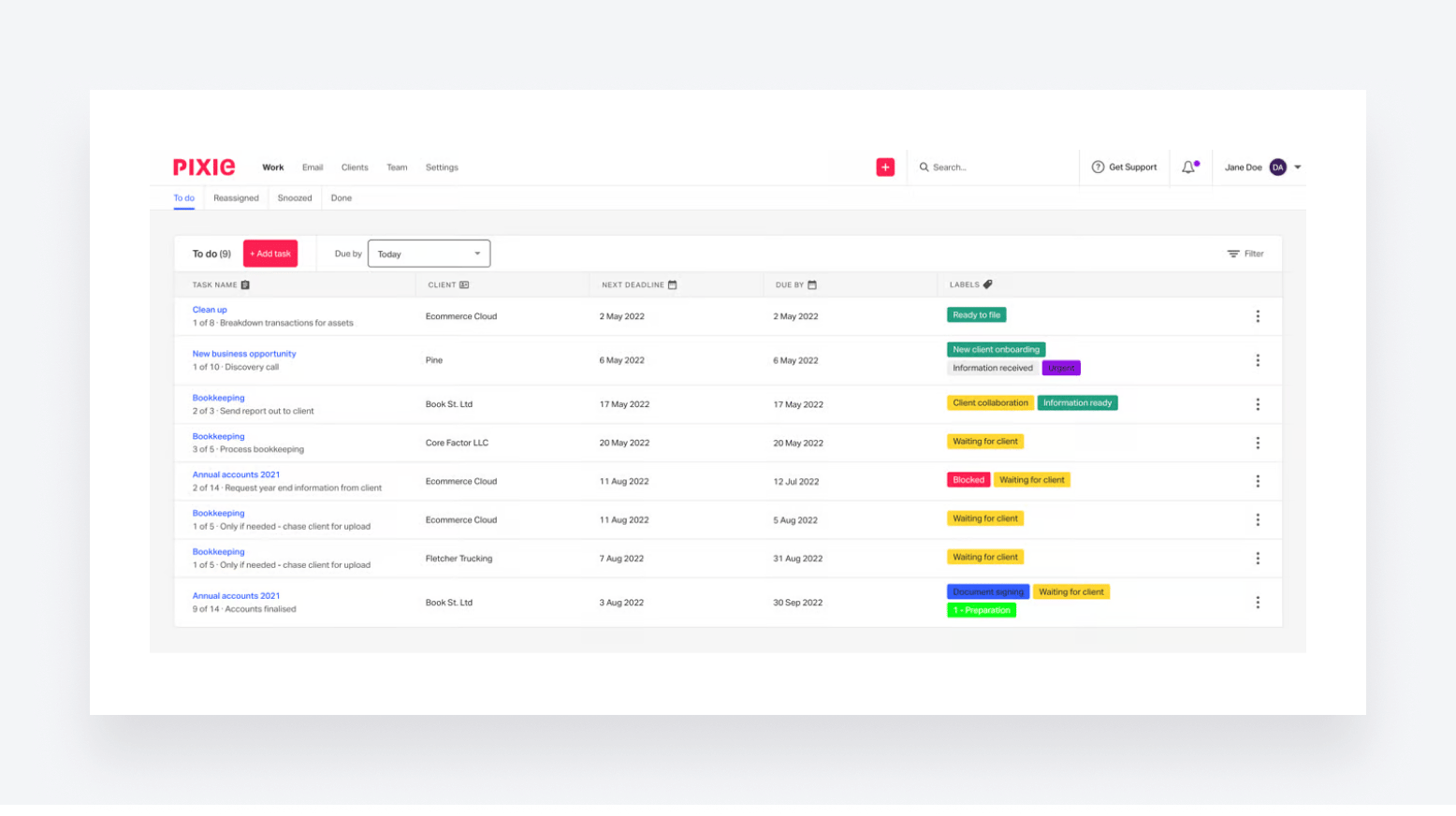
Pixie is another cloud-based practice management solution for accountants and bookkeepers. It’s known for its ease of use and a range of task-management features designed to save you time and improve organisation.
Pixie key features
- Companies House integration
- Workflow automation and recurring jobs
- Customisable client records (CRM)
- Email integration and templates
- Deadline tracking and reminders
- Client portal with e-signatures
Pixie pros and cons
| 👍 Pros | 👎 Cons |
| Flat fee with unlimited team members | No built-in MTD or AML features (AML automation supported via Xama integration) |
| Priced by client count, not per user | No deep native ledger sync |
| Very quick to set up | Client portal still maturing |
| Highly customisable workflows | Limited high-level dashboards |
| Praised, responsive UK support | Document management needs work |
| Less suited to large firms | |
| US pricing only |
How much does Pixie cost?
As of June 2026, Pixie charges one flat fee for the whole firm, billed monthly and priced by client count rather than user seats:
- Less than 250 clients: from $129/month
- 251-500 clients: from $199/month
- 500-1,000 clients: from $329/month
- 1,000+ clients: custom pricing
Pixie reviews
Pixie is rated 4.7/5 on G2 from only 12 reviews, and the platform lacks a complete review profile to draw reliable conclusions from. The development roadmap is very quiet, too, and the company hasn’t posted on its blog since June 2025, so we’re not sure how active product development can be in 2026.
From the reviews we can access, users appreciate the platform’s simplicity and how easy it is to create custom workflows. Solos and small firm owners appreciate the quick impact it has on practice management, but raise questions over its scalability for growing firms.
| What do customers like/dislike about Pixie? | |||||
| 👍 Likes | ✅ Ease of setup | ✅ Custom workflows | ✅ Deadline tracking | ✅ UK support | |
| 👎 Dislikes | ❌ Basic portal | ❌ Limited dashboards | ❌ Document management | ❌ No client app | ❌ Scalability for growing firms |
Who should use Pixie?
Pixie suits small and mid-sized UK accounting and bookkeeping practices that want unified practice management at a flat fee, with unlimited users and pricing tied to client count. It works best for firms under a few hundred clients. Larger firms needing native ledger sync may find it limiting.
5. Uku
Best for: time tracking, automated billing and client profitability
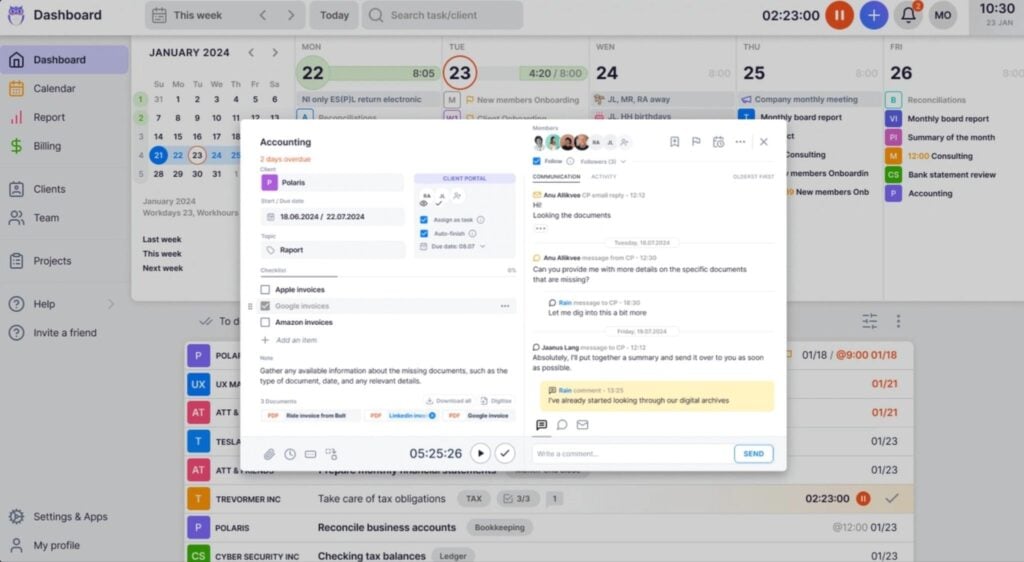
Uku is practice management software with a strong focus on time tracking, automated billing and client profitability. Firms use it to automate recurring workflows, track billable time by stopwatch or browser plugin, and turn tracked hours into invoices in minutes. The platform supports AML automation, although a lack of depth in recurring automation raises questions over its suitability for MTD workflows.
Uku key features
- AML automation
- Integrations with HMRC-compliant filing tools
- Time tracking with stopwatch
- Automated billing and invoicing
- Recurring task automation
- Client agreement and profitability monitoring
- CRM and client portal
- Real-time reporting and analytics
Uku pros and cons
| 👍 Pros | 👎 Cons |
| Excellent automated billing | Limited automation for MTD |
| Strong, flexible time tracking | Implementation takes time |
| Profitability monitoring per client | Recurring task setup is click-heavy |
| Easy to use, clean interface | Limited mobile apps |
| Multi-currency, used across the UK |
How much does Uku cost?
As of June 2026, Uku runs four plans at the following price points:
- Solo: £192/year (equivalent to £16/month — single user, up to 20 active clients)
- Team: from £348/year (equivalent to £29/month)
- Elite: from £468/year (equivalent to £39/month)
- Enterprise: from £948/year (equivalent to £79/month)
Uku reviews
Uku has an average review score of 4.7/5 on G2 from 100+ reviews. Firms praise the ease of use, task management, time tracking and the time saved on invoicing. The common criticisms are the implementation effort and challenges in managing workflows and recurring tasks.
| What do customers like/dislike about Uku? | |||||
| 👍 Likes | ✅ Ease of use | ✅ Task management | ✅ Time tracking | ✅ Time savings | |
| 👎 Dislikes | ❌ Learning curve | ❌ Click-heavy setup | ❌ Workflow management | ❌ User interface | ❌ Limited flexibility |
Who should use Uku?
Uku suits UK accounting and bookkeeping firms that bill by time or fixed fee and want automated invoicing and real profitability data per client. It works well from solo practitioners up to teams of 50. Firms wanting a deep client portal or heavy collaboration may prefer alternatives.
6. Financial Cents
Best for: affordable, easy workflow automation for small firms
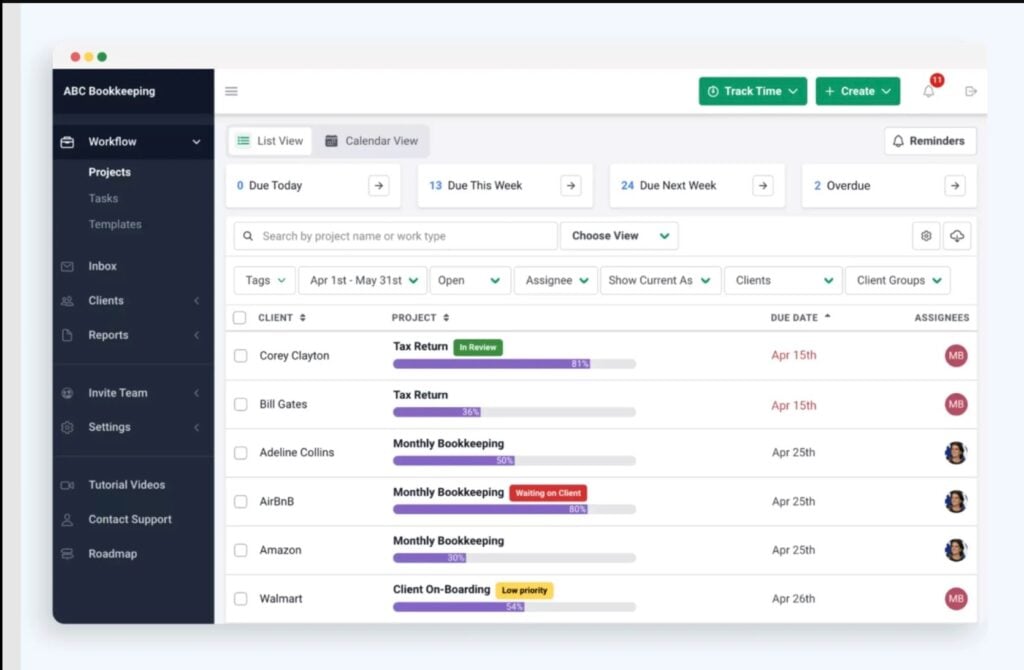
Financial Cents is an easy-to-use practice management platform for accounting and bookkeeping firms. It centralises client work, recurring workflows, document requests, time tracking and billing in one dashboard.
Financial Cents key features
- Workflow automation with templates
- Passwordless client portal
- Automated client task requests
- Time tracking and billing
- Capacity and team management
- QuickBooks Online integration
Financial Cents pros and cons
| 👍 Pros | 👎 Cons |
| Very easy to use | Built for North America |
| Affordable solo entry price | No native Xero integration |
| Passwordless portal clients actually use | Solo plan is annual only |
| Strong recurring workflow templates | Reporting and mobile feel limited |
| Responsive, helpful support | Per-user cost rises at scale |
| US pricing only |
How much does Financial Cents cost?
As of June 2026, Financial Cents runs four plans, priced per user in US dollars and billed annually:
- Solo: from $228/year (equivalent to $19/month)
- Team: from $588/year (equivalent to $49/month)
- Scale: from $828/year (equivalent to $69/month)
- Enterprise: custom pricing
Financial Cents focuses on North America and does not publish GBP pricing. Monthly billing on Team and Scale requires a minimum of five users.
Financial Cents reviews
Financial Cents has an average rating of 4.7/5 on G2 from 240+ reviews. Firms praise how easy it is to use, and the recurring workflow templates, although the depth of automation is a limitation vs more capable systems like TaxDome and Karbon.
The other main criticism is that features are locked to more expensive plans, where it’s harder to claim Financial Cents is an affordable alternative.
| What do customers like/dislike about Financial Cents? | |||||
| 👍 Likes | ✅ Ease of use | ✅ Workflow templates | ✅ Client portal | ✅ Affordability | |
| 👎 Dislikes | ❌ Limited automation capabilities | ❌ Feature restrictions | ❌ Expensive upgrades | ❌ US focus | ❌ Limited reporting |
Who should use Financial Cents?
Financial Cents suits small accounting and bookkeeping firms that want easy, affordable workflow management and a client portal clients will actually use. For UK firms, the catch is its North America focus and QuickBooks-first integration, with limited Xero support. UK practices reliant on Xero or local compliance should weigh that.
7. Silverfin
Best for: mid-to-large UK firms automating compliance and accounts production
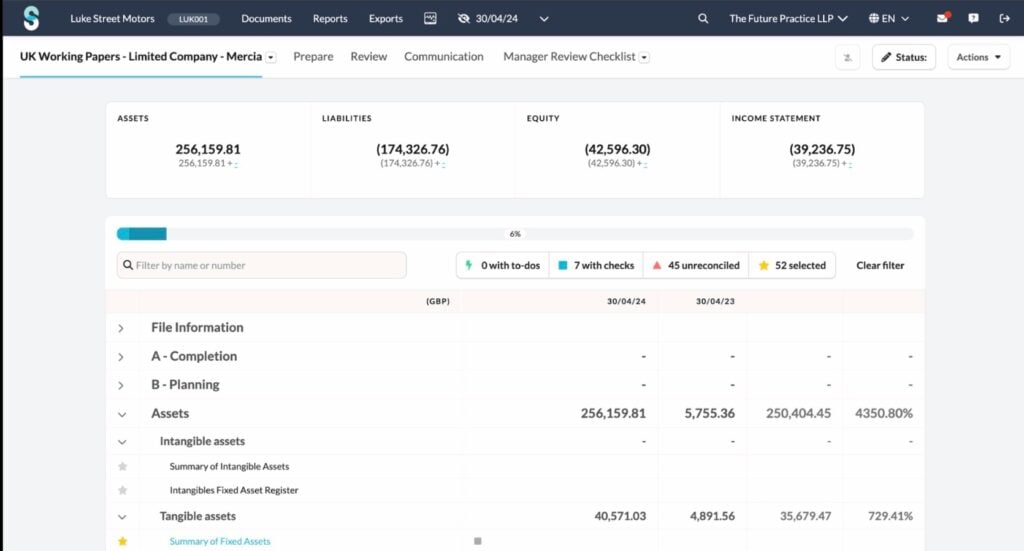
Silverfin is a cloud platform for compliance and accounts work rather than classic practice management. It pulls live client data into a single hub, then automates working papers, accounts production, corporation tax and management reports through smart templates.
Silverfin key features
- Cloud digital working papers
- Accounts production (iXBRL, MTD)
- Corporation tax computations (CT600)
- Live client data hub
- AI mapping and Silverfin Assistant
- Portfolio insights and reporting
Silverfin pros and cons
| 👍 Pros | 👎 Cons |
| Strong compliance and accounts automation | Not full practice management |
| Live client data, fewer re-entries | Built for mid-to-large firms |
| Cuts year-end and tax time | Quote-based, per-file pricing |
| Standardises work across offices | Setup and learning investment |
| Used by large UK firms | Thin public review presence |
How much does Silverfin cost?
As of June 2026, Silverfin doesn’t publicly disclose its pricing, so you’ll have to book a demo and speak to the sales team. Pricing is based on the volume of annual filings, rather than user seats, with starting prices based on 50+ files per year.
Silverfin reviews
Silverfin doesn’t have any active reviews on G2 or Capterra, although it’s well-regarded among online accounting communities, such as AccountingWEB.co.uk. It has a solid reputation among mid-to-large firms for accounts production and automating compliance. The most common complaints relate to the cost of the platform and its limited scope vs complete practice management platforms.
Who should use Silverfin?
Silverfin suits mid-sized and large UK firms that want to automate compliance, accounts production and corporation tax against live client data. It works best as a compliance engine alongside a practice management tool. Small practices or those wanting CRM and job tracking should look elsewhere.
8. Cone
Best for: low-cost all-in-one with strong proposals and billing
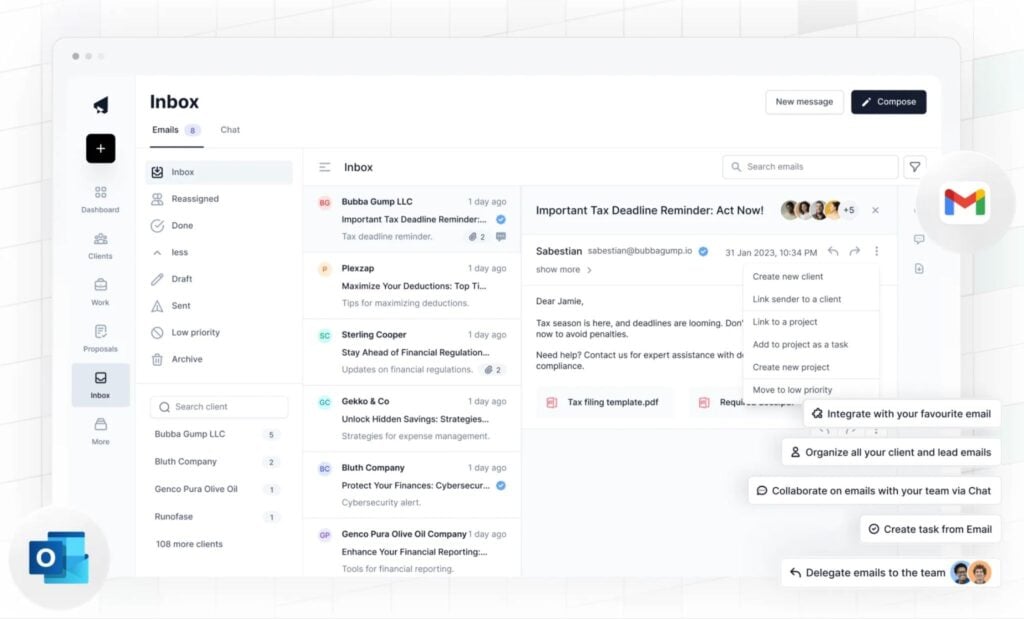
Cone is a low-cost, all-in-one practice management platform that pairs proposals and engagement letters with billing, payments, and workflows. It is used by accounting and bookkeeping firms across the UK, US and Australia, and stands out on price, starting near the bottom of the market with a free single-user tier.
Cone key features
- Proposals and engagement letters
- Billing, invoicing and payments
- Workflow automation and projects
- Client portal with e-signatures
- Email management
- Time tracking
Cone pros and cons
| 👍 Pros | 👎 Cons |
| Very low cost | Newer, smaller review base |
| Strong proposals and engagement letters | Some setup learning curve |
| All-in-one, replaces several tools | Fewer UK compliance features |
| Integrates with Xero and QuickBooks | Less depth than premium platforms |
| Responsive, helpful support | Reporting still developing |
How much does Cone cost?
As of June 2026, Cone runs a free tier plus low-cost paid plans, charged per user:
- Starter: from £60/year (equivalent to £5/month)
- Essential: from £120/year (equivalent to £10/month)
- Growth: from £180/year (equivalent to £15/month)
Cone’s proposals-only product, Cone Propose, is sold separately from around £168/user/year billed annually. A free trial is available with no card required.
Cone reviews
Cone is rated 4.9/5 on G2, although it only has 34 active reviews on its profile. It’s difficult to draw any conclusions from a small review profile, but the current feedback mostly praises the product’s usability and the company’s customer support.
Cone is generally considered an affordable alternative to more expensive practice management solutions, although the learning curve is raised in several reviews.
| What do customers like/dislike about Cone? | ||||
| 👍 Likes | ✅ Proposals | ✅ Affordability | ✅ Automation | ✅ Support |
| 👎 Dislikes | ❌ Learning curve | ❌ Limited reporting | ❌ Fewer compliance tools | ❌ Newer platform |
Who should use Cone?
Cone suits small and growing UK firms that want proposals, billing and practice management in one affordable platform, especially those tired of paying separately for proposal software. Firms needing deep UK compliance features or extensive reporting may find it lighter than the established platforms.
9. Capium
Best for: UK firms wanting compliance and practice management in one suite
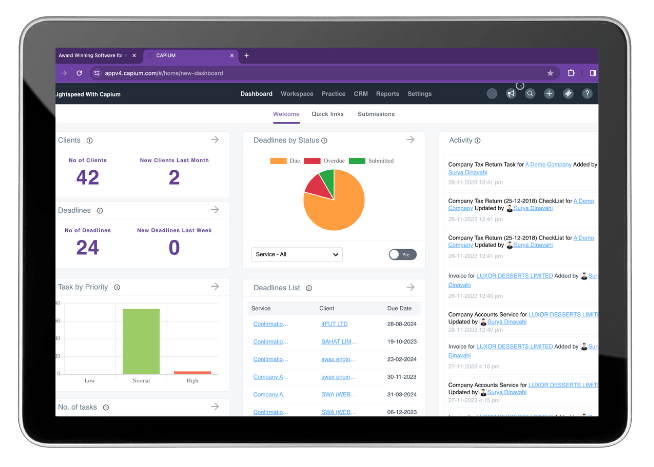
Capium is a suite of cloud-based software for accountants and SMEs, which includes solutions for practice management, tax, accounting, bookkeeping, payroll, and more.
Capium key features
- Integrated bookkeeping, payroll and tax
- Accounts production (Companies House)
- Self-assessment and corporation tax
- Practice management with CRM
- Deadline tracking and timesheets
- AML and company secretarial
Capium pros and cons
| 👍 Pros | 👎 Cons |
| Full UK compliance suite | Interface can feel dated |
| Modules share one dataset | Bookkeeping module is weaker |
| HMRC and Companies House recognised | Some modules less polished |
| Unlimited users, priced by clients | Cost adds up across modules |
| Responsive UK support | Steeper data-entry learning |
How much does Capium cost?
As of June 2026, Capium prices the full suite by client count, with unlimited users:
- Small: from £1,680+VAT/year (equivalent to £140+VAT/month — up to 100 clients)
- Medium: from £3,360+VAT/year (equivalent to £280+VAT/month — up to 100 clients)
- Large: from £5,040+VAT/year (equivalent to £420+VAT/month — up to 100 clients)
- Enterprise: custom pricing (700+ clients)
Capium reviews
Capium is rated 4.8/5 on G2, but from only six active reviews on its profile. Existing customers praise the platform’s capabilities as a tax and payroll solution for UK firms, while most complaints raise issues with usability and the overall experience.
| What do customers like/dislike about Capium? | ||||
| 👍 Likes | ✅ Integrated suite | ✅ Value for money | ✅ UK support | ✅ Companies House |
| 👎 Dislikes | ❌ Dated interface | ❌ Bookkeeping module | ❌ Module polish | ❌ Learning curve |
Who should use Capium?
Capium suits small and medium UK practices that want compliance and practice management in a single, HMRC-recognised system rather than stitching together separate tools. It works best for firms happy to trade some interface polish for an all-in-one UK suite. Bookkeeping-heavy firms may prefer Xero or QuickBooks alongside it.
10. Engager.app
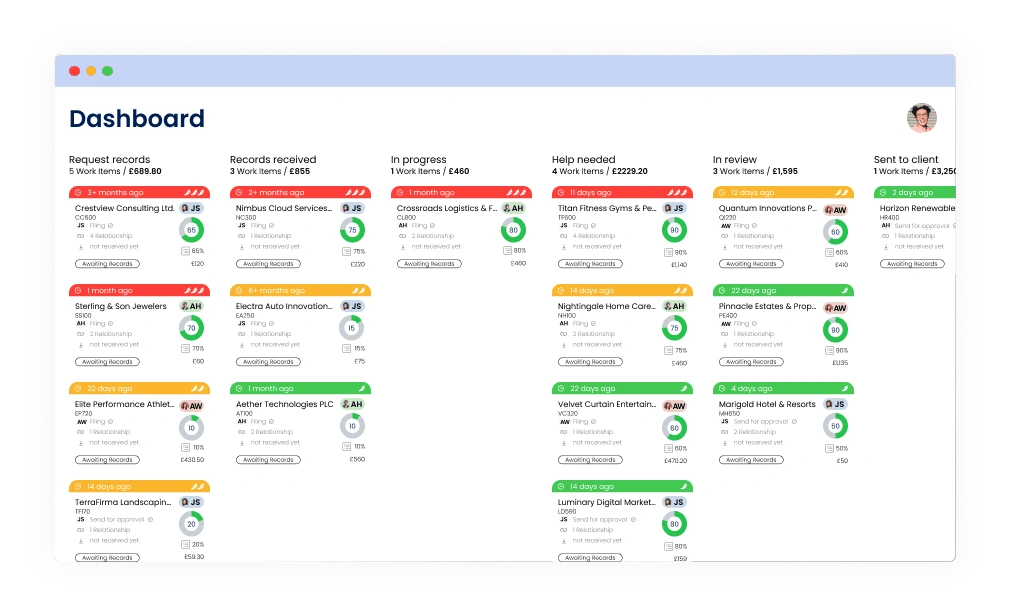
Client Engager is a practice management platform designed primarily for UK-based accounting and bookkeeping firms of all sizes.
Engager key features
- Companies House and HMRC integration
- Engagement letters and proposals
- Pricing calculator for services
- Client portal and mobile app
- Workflow and task management
- Bulk email and SMS
Engager pros and cons
| 👍 Pros | 👎 Cons |
| Affordable, built for new firms | Newer, still maturing product |
| Client-based pricing, unlimited users | Lighter document management |
| UK-built with local integrations | Some features recently added |
| Easy to use, quick onboarding | Xero integration costs extra |
| Pricing calculator and clearance letters | Limited reporting depth |
How much does Engager cost?
As of June 2026, Client Engager prices by client count rather than per user, with unlimited team members:
- Up to 5 clients: from £108+VAT/year (equivalent to £9+VAT/month)
- Up to 50 clients: from £420+VAT/year (equivalent to £35+VAT/month)
- Up to 500 clients: from £1,788+VAT/year (equivalent to £149+VAT/month)
- Up to 1,000 clients: from £2,988+VAT/year (equivalent to £249+VAT/month)
- Up to 2,000 clients: from £5,328+VAT/year (equivalent to £444+VAT/month)
- Up to 5,000 clients: from £12,408+VAT/year (equivalent to £1,034+VAT/month)
- Up to 10,000 clients: from £24,408+VAT/year (equivalent to £2,034+VAT/month)
- Up to 20,000 clients: from £48,408+VAT/year (equivalent to £4,034+VAT/month)
- Up to 30,000 clients: from £72,408+VAT/year (equivalent to £6,034+VAT/month)
- 30,000+ clients: custom pricing
A 28-day free trial is available with no card required. The Xero integration may carry an extra cost.
Engager reviews
Engager doesn’t have an online review profile, although it’s widely praised by UK accountants and bookkeepers, particularly for its client-facing features. However, the hottest topic among existing customers, since the company’s big rebrand from Client Engager, is the recent price increase.
Who should use Engager?
Client Engager suits small and newer UK firms that want affordable practice management with unlimited users and UK integrations from day one. It works well for practices setting up their first system. Firms needing deep document management or mature reporting may want a more established platform.
11. IRIS (formerly Senta)
Best for: UK firms already inside the IRIS ecosystem
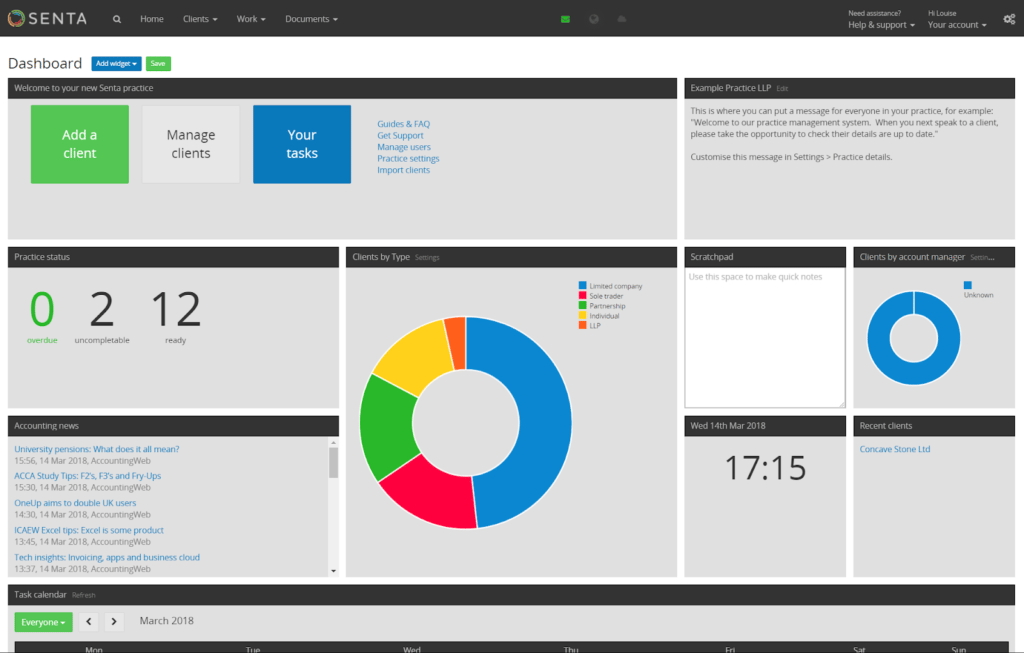
Another cloud-based practice management platform, Senta is built by Iris, a UK-based software provider that covers platforms for accountancy, education, HR, and payroll.
IRIS key features
- Part of the IRIS Elements suite
- Workflow and job templates
- CRM with bulk email and SMS
- Secure client portal and e-signatures
- Automated compliance reminders
- Live sync with Xero, QuickBooks, FreeAgent
IRIS pros and cons
| 👍 Pros | 👎 Cons |
| Strong UK compliance workflows | Senta closed to new sign-ups |
| Live data sync with ledgers | Support reduced since acquisition |
| Part of an end-to-end IRIS suite | Reporting is limited and cluttered |
| Every feature on every plan | Data not fully joined across Elements |
| Companies House integration | Uncertain long-term roadmap |
How much does IRIS cost?
As of June 2026, IRIS Elements is modular, so you pay per product and add more as needed:
- Elements Practice Management: from £156/year (equivalent to £13/month)
- Elements Tax: from £130/year (equivalent to £10.83/month)
- Elements Accounts Production: from £52/year (equivalent to £4.33/month)
- Trust Tax: from £272/year (equivalent to £22.67/month)
You’ve also got add-ons for AML checks, proposals, formations, and other purposes, charged on usage volumes.
IRIS reviews
IRIS Elements (the closest equivalent to Senta following the IRIS acquisition) is rated 3.9/5 on Capterra, but only from 15 reviews. It’s not easy to separate reviews for IRIS Elements from other IRIS products, which makes reliable information difficult to find. If you want to know what existing customers dislike about IRIS Elements, AccountingWEB.co.uk is the most telling source.
The biggest and most common complaints relate to technical issues and customer support.
| What do customers like/dislike about IRIS? | |||||
| 👍 Likes | ✅ Ease of use | ✅ Client management | ✅ UK compliance | ✅ Value for money | |
| 👎 Dislikes | ❌ Cluttered reporting | ❌ Slower support | ❌ Integration gaps | ❌ Uncertain roadmap | ❌ Customer support |
Who should use IRIS?
IRIS Elements Practice Management suits UK firms that already use IRIS tax or accounts products and want practice management on the same client list. It works best inside the IRIS ecosystem. Firms wanting a standalone tool with strong support and reporting may prefer a dedicated platform.
12. Ignition
Best for: proposals, engagement letters and automated payment collection
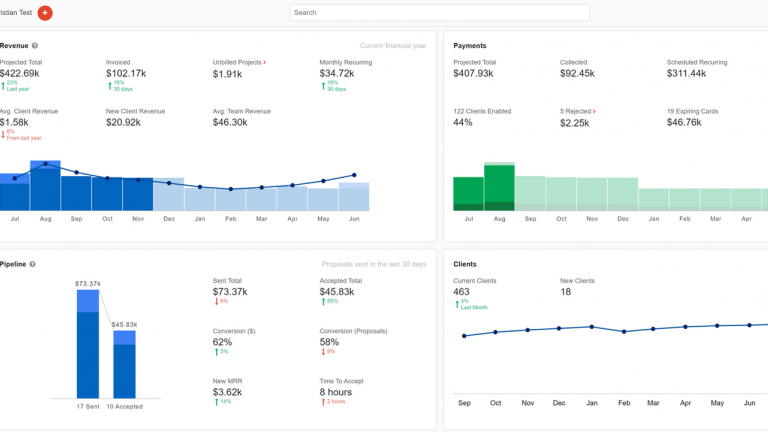
Ignition is a popular platform that specialises in a particular aspect of practice management: engaging new clients.
Ignition key features
- Xero and QuickBooks integration
- Branded proposals and engagement letters
- Automated billing and invoicing
- Upfront payment collection
- Recurring and one-off billing
- Templated contracts
Ignition pros and cons
| 👍 Pros | 👎 Cons |
| Best-in-class proposals and payments | Not full practice management |
| Collects payment on signing | No CRM or project management |
| Strong automation, less chasing | Premium pricing plus processing fees |
| Excellent onboarding and support | Payments via Stripe only |
| Integrates with Xero, QuickBooks, Karbon | Limited proposal customisation |
How much does Ignition cost?
As of June 2026, Ignition runs tiered plans charged per practice, billed monthly or annually:
- Solo: from £348/year (equivalent to £29/month)
- Core: from £948/year (equivalent to £79/month)
- Pro: from £2,028/year (equivalent to £169/month)
- Pro+: from £3,588/year (equivalent to £299/month)
Enterprise pricing is available for larger firms. Payment processing fees apply on collected payments, and the AI Price Insights tool is a paid add-on.
Ignition reviews
Ignition has an average rating of 4.7/5 on G2 from 120+ reviews. The product is widely praised for its ease of use and customer support, but feature limitations and overall cost of the platform are common complaints.
| What do customers like/dislike about Ignition? | ||||
| 👍 Likes | ✅ Ease of use | ✅ Customer support | ✅ Easy setup | ✅ Time savings |
| 👎 Dislikes | ❌ Expensive | ❌ Payment issues | ❌ Missing features | ❌ Limited customisation |
Who should use Ignition?
Ignition suits UK firms that want proposals, engagement letters and automated payment collection in one place, especially those tired of chasing late payments. It works best alongside a practice management or CRM tool rather than one. Price-sensitive sole traders may find it dear.
13. Xero Practice Manager
Best for: Xero-committed firms wanting job, time and billing management
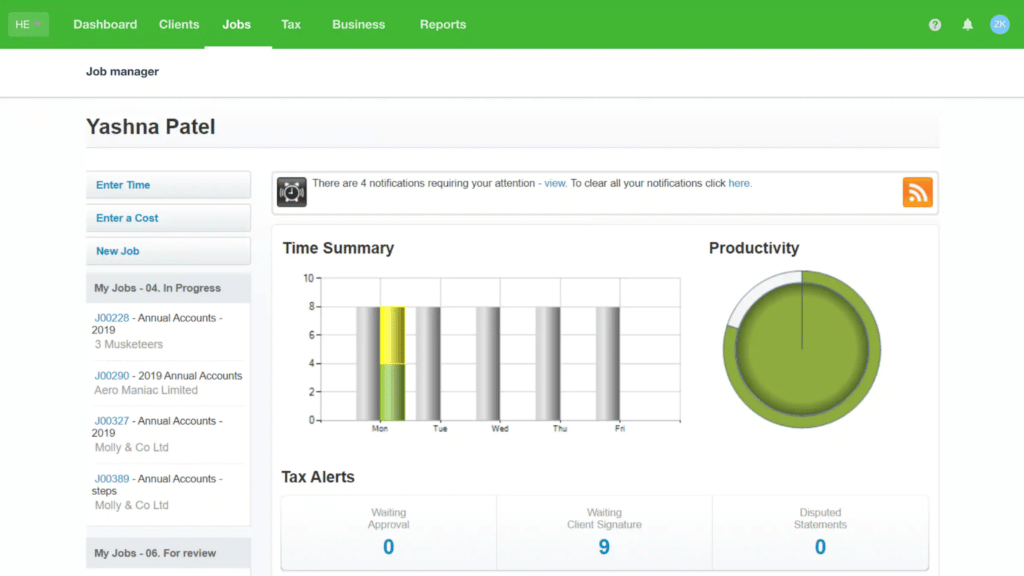
Chances are you’ve heard of Xero before — alongside QuickBooks Online, it’s one of the most popular accounting software providers in the world. Xero also offers a practice management platform called Xero Practice Manager.
Chances are you’ve heard of Xero before — alongside QuickBooks Online, it’s one of the most popular accounting software providers in the world. Xero also offers a practice management platform called Xero Practice Manager.
Xero Practice Manager key features
- Job and task management
- Time tracking and WIP
- Invoicing synced to Xero
- Shared client records with Xero HQ
- Custom reports and KPI dashboards
- Custom-branded documents
Xero Practice Manager pros and cons
| 👍 Pros | 👎 Cons |
| Free at Silver partner status | Dated, clunky interface |
| Native two-way Xero sync | Complex setup, often needs consulting |
| Strong time, billing and WIP | No native client portal |
| Customisable reports and templates | No document management or e-signatures |
| Xero Workpapers included | Tied to the Xero ecosystem |
How much does Xero Practice Manager cost?
Xero Practice Manager is free for Xero partner firms, with the caveat that you can only manage clients who are using Xero. Either your clients pay for their subscriptions, or you can cover the fee on their behalf and include it in your fees. As a Xero partner, you’re also eligible for Xero subscription discounts, ranging from 5% up to 20%.
Xero Practice Manager reviews
Xero Practice Manager is rated 4.5/5 on G2 from 45+ reviews. Heavy Xero users generally appreciate the clean integration and affordability of the tool, but limited features and usability issues are common complaints.
| What do customers like/dislike about Xero Practice Manager? | ||||
| 👍 Likes | ✅ Xero sync | ✅ Time tracking | ✅ Job visibility | ✅ Custom reports |
| 👎 Dislikes | ❌ Dated interface | ❌ Complex setup | ❌ No client portal | ❌ Reporting limits |
Who should use Xero Practice Manager?
XPM suits UK firms committed to Xero whose clients mostly use it too, especially those at Silver partner status where it is free. It works best for job, time and WIP billing. Firms wanting a client portal, document management or UK deadline automation will need add-ons.
14. Sage for Accountants
Best for: Sage-based firms wanting compliance and client management, free to start
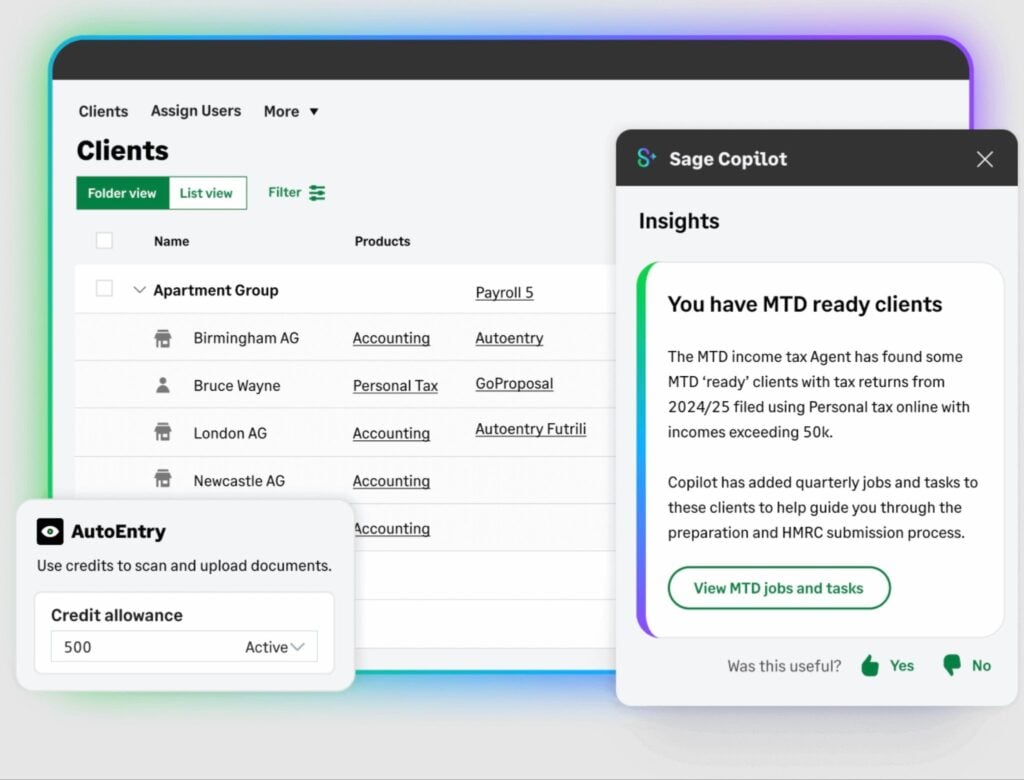
Sage for Accountants is Sage’s free platform for UK accountants and bookkeepers. It’s free to sign up, with compliance modules and client subscriptions paid per client as you use them. The focus is compliance and tax rather than deep practice management, so its workflow and client-management tools are lighter than dedicated platforms.
Sage for Accountants key features
- Bulk client management dashboard
- Final Accounts production
- Personal and corporation tax
- Bundled payroll
- MTD for VAT and ITSA filing
- Sage Copilot AI assistant
Sage for Accountants pros and cons
| 👍 Pros | 👎 Cons |
| Free to sign up | Practice management is basic |
| Strong UK compliance and MTD | Interface feels dated |
| Bundled payroll included | Per-client costs add up |
| UK-based phone support | AI features divide users |
| Familiar to Sage-trained accountants | Best mainly within the Sage ecosystem |
How much does Sage for Accountants cost?
Sage for Accountants is free to sign up for, but you have to pay usage fees for certain features depending on usage and client volumes. Check the Sage for Accountants pricing page for full details.
Sage for Accountants reviews
Sage consistently rebrands and repackages its products under different names, making it difficult to get specific review scores. The general consensus is that Sage for Accountants offers capable automation features for accountants, although the constant changes and AI implementation divide opinion.
| What do customers like/dislike about Sage for Accountants? | ||||
| 👍 Likes | ✅ HMRC and MTD | ✅ Bundled payroll | ✅ UK phone support | ✅ Sage familiarity |
| 👎 Dislikes | ❌ Dated interface | ❌ Basic practice management | ❌ Per-client costs | ❌ Divisive AI |
Who should use Sage for Accountants?
Sage for Accountants suits UK firms already in the Sage ecosystem, or whose clients use Sage, that want compliance, tax and payroll with client management in one free-to-start platform. Firms wanting deep workflow automation, a client portal or modern practice management will find it lighter than dedicated tools.
How to choose the right practice management software for your firm
All of the products we’ve recommended in this list make a good case for themselves, so how do you choose the right platform for your firm? To help you answer this question, let’s run through the key considerations for selecting a practice management platform that meets your needs.
1. Start with your firm size
Each practice management system is built with certain firm sizes and growth trajectories in mind. Platforms like Pixie and Cone are designed to solve the biggest challenges faced by sole practitioners and very small teams. At the other end of the spectrum, Silverfin markets to mid-to-large firms, with greater focus on compliance and documentation.
Then you have TaxDome, the growth platform for firms of all sizes that enables teams to multiply the output of every member. With TaxDome, a team of 10 can perform like a team of 15 or 20+ and deliver the same quality standards to every client as you scale.
Best practice management solution by firm size
| Firm size | Winner 🥇 | 2nd place 🥈 | 3rd place 🥉 |
| Solo practitioner | Pixie | Cone | Uku |
| Small teams (2–4) | TaxDome | BrightManager | Pixie |
| Growing firms (5+) | TaxDome | Karbon | Capium |
| Large firms (15+) | TaxDome | Karbon | Silverfin |
2. Look carefully at MTD and AML capability
Making Tax Digital and anti-money laundering checks are two of the biggest compliance burdens for UK firms. Some practice management platforms include dedicated tools for MTD and AML, but you need to know what this actually means.
For example, Pixie supports AML automation, but only through a third-party Xama integration.
On the other hand, TaxDome allows you to automate the AML process and MTD workloads, as with any other accounting workflow. You can fully integrate AML checks into onboarding and automate quarterly MTD cycles, with your team only getting involved when they have to make judgement calls.
Speak to sales teams about your workflow needs and push them for specific answers that you can hold them to.
Best practice management solution for MTD and AML
| Winner 🥇 | 2nd place 🥈 | 3rd place 🥉 |
| TaxDome | Capium | BrightManager |
3. Check integration and ecosystem fit
Practice management software becomes the control centre of your accounting firm. So, it needs to either connect with the other tools you use to run your firm or replace them with built-in capabilities.
Check the integration capabilities of potential practice management systems to see which tools you can connect with. Look for native integrations with accounting software, such as QuickBooks Online, and Companies House for automatically capturing business data.
Also, carefully assess the feature offerings across all plans offered by providers. For example, Karbon offers extensive integration options but many of its own features are limited to higher plans, while a lack of depth in other features is commonly raised in Karbon reviews (especially the client portal).
Alternatively, TaxDome replaces more tools than any other practice management platform with a single solution for teams and clients. This makes you less reliant on integrations and spiralling software fees, while your clients get the same benefit as your team from using one platform for everything.
Best practice management solution for integrations
| Winner 🥇 | 2nd place 🥈 | 3rd place 🥉 |
| TaxDome | Karbon | IRIS |
4. Weigh up pricing model and value for money
Pricing is one of the most complex comparison points between software products. Every platform offers different features and splits them across multiple plans, so you need a good understanding of your requirements to get a clear idea of the initial and ongoing costs.
The scope of practice management software varies greatly, too. Many platforms focus on internal efficiency and team collaboration, while others may prioritise workload management or client experience.
If you buy into a system that’s strong on workflow automation, but weak on client management, you may find yourself shopping again sooner than you would like.
The broad needs of accounting firms are central to our product development philosophy. We built TaxDome to be the only practice management platform you need to run your firm, manage clients, and maintain service quality as you scale.
Best practice management solution for value
| Winner 🥇 | 2nd place 🥈 | 3rd place 🥉 |
| TaxDome | Pixie | Cone |
5. Will your team and clients adopt the platform?
A product’s capabilities don’t guarantee that your team and clients will buy into the system. Your software fees, implementation costs, and training time all add to the total expense of integrating a new system. You need your team and your clients to get the most out of the system to reach a profitable return quickly, and get ongoing value from your new practice management platform.
There’s a paradox here, where the simplest platforms are often the easiest to use, but also the least capable. Meanwhile, the most advanced systems require your team and clients to abandon familiar tools workflows for an entirely new way of working.
After a decade of building the most complete practice management platform, we’ve cracked the adoption code for highly capable products. It starts with our onboarding team solving your biggest operational challenge in week one of implementing TaxDome, while setting you up to get ongoing value ahead of every tax season. Your team and clients are getting immediate value from the platform, while your firm adopts a system that unlocks new growth potential every year.
Best practice management solution for adoption
| Winner 🥇 | 2nd place 🥈 | 3rd place 🥉 |
| TaxDome | Pixie | Financial Cents |
FAQs: UK practice management software
What is the best accountancy practice management software for UK firms?
TaxDome is the highest-rated all-in-one platform for UK firms, covering workflow automation, client portal, document management and AML in one system. Pixie and Cone suit smaller practices; Capium and BrightManager are strongest for UK compliance.
How much does accountancy practice management software cost in the UK?
Pricing ranges from free for basic systems up to £100+/month for more complete practice management solutions. When comparing prices, evaluate features and plans carefully. A complete practice management platform like TaxDome can replace several tools with one software fee.
Which accountancy practice management software is best for sole practitioners in the UK?
Pixie, Cone and Uku are the most affordable practice management solutions for UK sole practitioners. They offer capable systems at lower starting prices, although the feature limitations may become more noticeable at higher client volumes.
Which practice management software integrates with Xero in the UK?
BrightManager, Karbon, Pixie, Uku, Cone and IRIS Elements all integrate with Xero. Xero Practice Manager offers the deepest integration but only works for clients already on Xero.
What is Making Tax Digital and how does it affect UK accountancy practices?
MTD for Income Tax is mandatory from April 2026 for sole traders earning over £50,000. Practices need software that supports quarterly digital submissions. Capium, Silverfin and Sage for Accountants offer the most direct MTD filing support.
What is the difference between accounting software and practice management software?
Accounting software handles your clients’ books. Practice management software runs your firm: workflows, onboarding, deadlines, billing and team management. Most firms need both and a practice management solution that integrates with their existing accounting solutions.
How do I choose accountancy practice management software for a UK firm?
Match the platform to your firm size, compliance needs and existing tools. Prioritise MTD support, AML capabilities, and integrations with your existing tools. Consider pricing vs feature offerings and whether you can replace multiple tools with one practice management platform.
To sum up
Practice management software has the power to transform the way your accounting firm operates. But despite many similarities, no two products are the same. Some offer limited features, meaning you’ll need to spend extra on additional apps to fill the gaps.
If you’re looking for a central hub for all of your accounting processes, complete with powerful features such as advanced workflow automation, top-rated apps for your firm and clients, a built-in CRM, and much more, look no further than TaxDome. Your clients will thank you, and you’ll thank us!

Aaron produces practical content for TaxDome, drawing on 11 years in SaaS copywriting and marketing. He helps accounting and tax professionals get the most from TaxDome and other tools, making complex topics clear and actionable.
Get your free guide

Thank you!
The guide copy has been sent to your email. Please check your inbox!
Recommended articles
9 best QuickBooks alternatives in 2026 for every business type
65+ key accounting statistics and insights for 2026

How to start an accounting firm: a step-by-step guide to running your own practice