 US – English
 UK – English
 Canada – English
 Australia – English
 Danmark – Dansk
 DACH - Deutsch
 France – Français
 España – Español
 Sverige – Svenska
 Italia – Italiano
 Nederland – Nederlands
 Portugal – Português
 Suomi – Suomi
 Norge – Norsk
 日本 – 日本語
 Romanian – Română












#Productivity, #TaxDome updates
April 2024 update

Run your entire firm on one platform

With the April 15 deadline finally behind us, we know your schedules have been crazier than ever. That’s why we’ve tried to make as few changes as possible during this busy period. Now that tax season is over, you can look forward to a host of major new feature releases in the coming weeks and months – all designed to increase your productivity and profitability.
In the meantime, we’ve got some helpful enhancements to tell you about that won’t interrupt your tax-season flow.
We’re thrilled to announce that TaxDome has been nominated in eight categories in the CPA Practice Advisor Readers’ Choice Awards. The survey gives readers the opportunity to spotlight the technologies they rely on and trust the most to manage their firms. If TaxDome is helping you take your practice to the next level, please vote for us using the link above.
Sneak peek:
- AI-powered reporting: unlock the full potential of your data in TaxDome, make smarter decisions across your firm, and gain real-time insights into your team’s output (currently in beta testing)
- Client-facing job status: keep clients aware of project status and reduce incoming questions to your team
- Granular access rights: protect sensitive data by managing access to specific files and documents on an individual basis, for both firm employees and client contacts
You can watch a video overview of all our new features and improvements here:
Table of сontents
Table of сontents
📞 CRM
Get to your clients quicker by assigning team members during import
First up, to save you time, we’ve improved the import process. You can now assign team members to accounts directly during import by pulling in information from your CSV import file.
This eliminates the extra steps involved in assigning team members to newly added accounts, so your team can get to your clients’ needs as quickly as possible.
📃 SOC 2 Certification
Rest easy with TaxDome’s SOC 2 certification
As part of our dedication to ensuring the utmost security and privacy for your firm and client data, we’re thrilled to announce that TaxDome has achieved SOC 2 certification.
Achieving SOC 2 is not easy. It requires an independent third-party evaluation of our data security protocols, including how we handle sensitive information, our disaster recovery plans, and our overall commitment to maintaining a secure and reliable platform.
What does this mean for your firm? Well, you and your clients can rest assured that your data is in safe hands with TaxDome — and that our service and software is always reliable and compliant. The certification also reflects our ongoing commitment to transparency and accountability in our operations.
Read more about our SOC 2 certification in this blog post >>
📑 Proposals
Gain more control with new formatting options
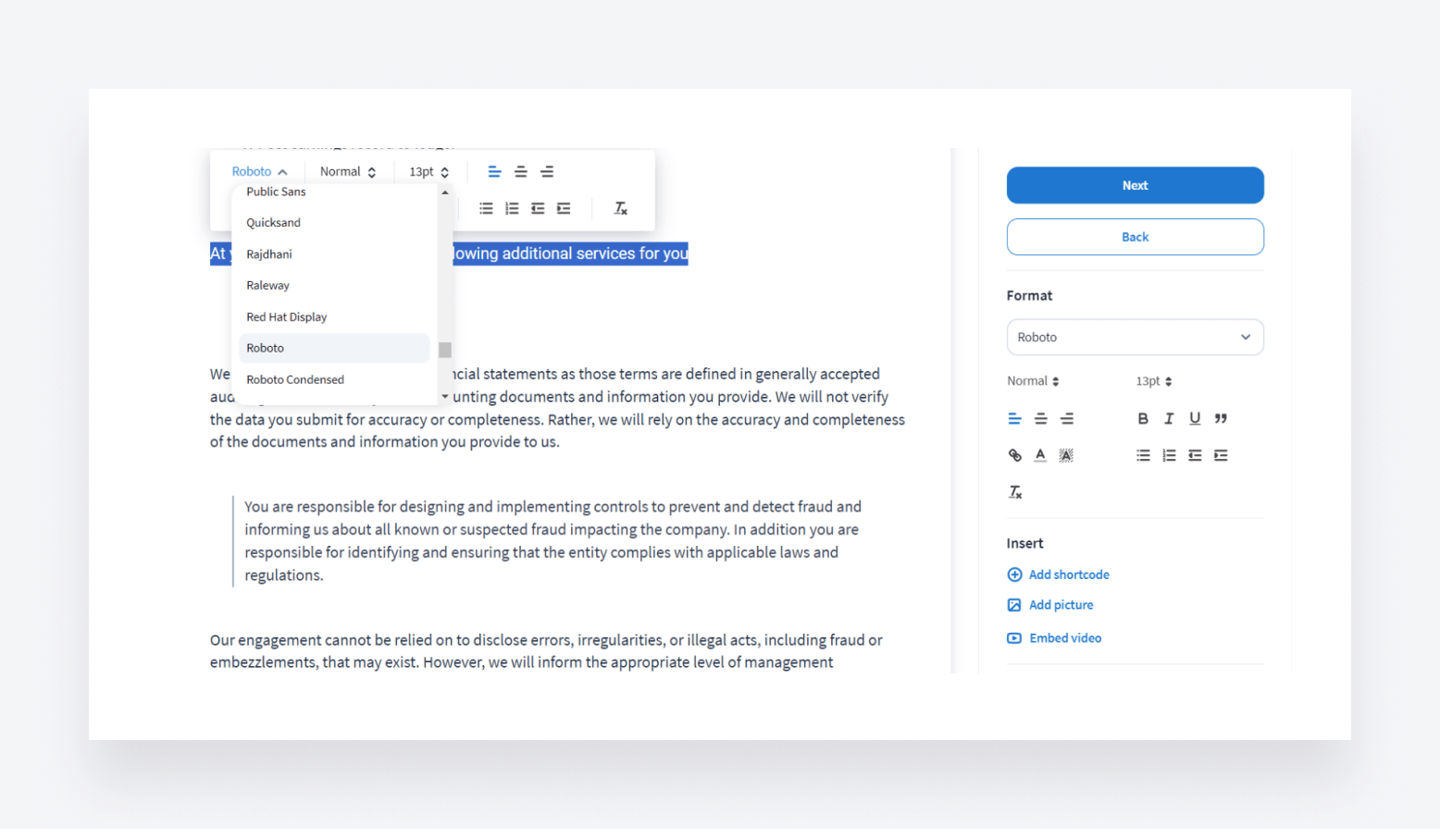
To give you more control over the look and feel of your proposals, we’ve added new formatting options to the proposals text editor. Now, you can:
- Choose from a range of different fonts
- Add headings of different sizes
- Adjust left and right indents
- Add quotations
These updates are in addition to the already-existing options to change font sizes, embed videos, add images, and more.
Save time with automated proposal naming
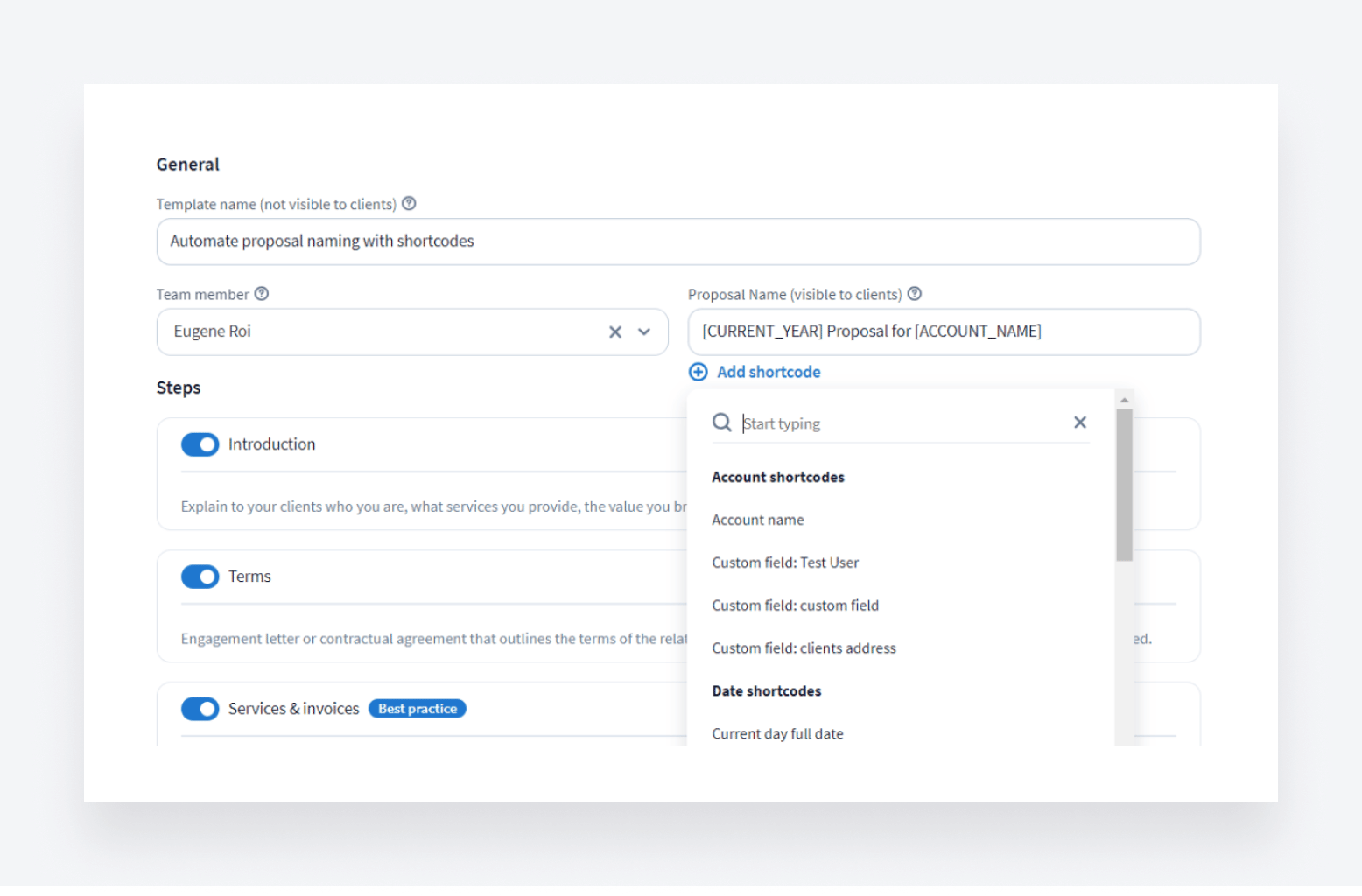
We’ve added shortcodes to the proposal name field, so that you can set TaxDome to automatically create relevant and consistent proposal names based on data — such as the client’s name, account name, or date — that’s already in the system.
Shortcodes are now available when naming one-off proposals and in proposal templates.
Read more about creating and applying proposal templates here >>
Customize proposal tables to meet your needs
We’ve given you more control over proposal tables in TaxDome. In addition to some visual improvements, you can now adjust and customize your proposal tables in the following ways:
- Add or remove columns
- Change the order in which columns are displayed
- Make columns wider or narrower
- Lock columns while scrolling
💡 Education
Workflow course and organizer webinar
Alongside the product enhancements we’ve covered today, we’d like to shine a spotlight on two new training tools available: the Workflow course (which you can find in the TaxDome Academy.) and an updated webinar on organizer best practices.
The workflow course has everything you need to set up automated workflows that can save you up to 40 hours per employee per month — allowing you to scale your business and drive revenue during tax season and beyond. We’ve also put together a simple checklist to ensure that you’ve got everything in place to implement automated workflows in your firm successfully.
The new webinar about organizers — the forms, questionnaires, and surveys used to collect info from clients — teaches you how these customizable forms can automate data and document collection and improve the client experience.
Register now or watch on demand >>
Post tax season bootcamp: master TaxDome’s core features with 5 live workshops
To set you up for success for the rest of the year and beyond, we’ll be hosting a bootcamp event where you can explore all of TaxDome’s core features, optimize your workflows, and set the stage for growth.
Join us on 13-17 May, at 1 pm EST, for five hands-on workshops with TaxDome experts. This time next year, you’ll be so glad you did!
Register for TaxDome bootcamp >>
🔥 Other updates
- Attach files to email templates: you can now attach any kind of text, image, or video files to email templates, enabling you to include price lists, checklists, or any other kind of document in your automated communications
- Renamed filters for Jobs and Tasks: to improve clarity and understanding, we’ve changed some of the filter names on the Jobs and Tasks pages. For example: Team → Job assignee, Active job → Pipeline and stage, and Without updates → Time in current stage (more on filtering jobs)
- Unbilled time entries: you can now view how much non-billable work you’ve done for each client by going to a client’s invoice page, helping you understand where your time is being spent and how you can improve profitability
In April, we’re bringing you all of the above — plus 44 more tweaks and fixes!
Expect more exciting new features next month. Until then, join our Facebook Community to ask questions, request features, or chat with other TaxDome users.
And in case you missed it, here’s a summary of the major features we covered in our March 2024 update.

Nicholas produces TaxDome content focused on how technology improves accounting workflows and everyday firm operations.

Get your free guide

Thank you!
The guide copy has been sent to your email. Please check your inbox!
Recommended articles

Buy Now, Pay Later: offer clients payment flexibility

Top AI tools for accountants in 2026: key features and use cases compared

Why accountants are quitting: inside the forces reshaping the profession