 US – English
 UK – English
 Canada – English
 Australia – English
 Danmark – Dansk
 DACH - Deutsch
 France – Français
 España – Español
 Sverige – Svenska
 Italia – Italiano
 Nederland – Nederlands
 Portugal – Português
 Suomi – Suomi
 Norge – Norsk
 日本 – 日本語
 Romanian – Română












Top AI tools for accountants in 2026: key features and use cases compared
Run your entire firm on one platform
The accounting profession is fundamentally changing. AI disruption is real, but the technology isn’t replacing accountants as early predictions suggested. Instead, it’s freeing up time and resources dedicated to routine tasks, such as manual data entry, and powering a shift towards client advisory and other high-impact work.
In fact, a recent Capterra survey found that nine of the 10 platforms they surveyed deliver AI as part of their core product rather than as a standalone add-on.
AI-enhanced accountants are delivering greater value to clients, while putting the days of wrestling with spreadsheets and email back-and-forths behind them. Clients are happier, accountants are getting more done, and the busy season is less stressful for everyone.
We’re seeing the impact for ourselves with TaxDome customers — and their clients — so we thought this might be a good time to review the most promising AI tools for accountants currently available.
Table of сontents
- The impact of AI on accounting so far (2026)
- Automated bookkeeping and data entry
- Expense management and spend control
- Financial analysis and forecasting
- Audit and fraud detection
- Practice management and accounting workflow automation
- AI assistants for drafting, research, and analysis
- Key considerations for choosing AI accounting tools
- 2026: the year of AI-enhanced accounting firms
Table of сontents
- The impact of AI on accounting so far (2026)
- Automated bookkeeping and data entry
- Expense management and spend control
- Financial analysis and forecasting
- Audit and fraud detection
- Practice management and accounting workflow automation
- AI assistants for drafting, research, and analysis
- Key considerations for choosing AI accounting tools
- 2026: the year of AI-enhanced accounting firms
The impact of AI on accounting so far (2026)
95% of accountants say AI frees up resources for strategic advisory, while 86% agree the technology reduces mental load. Predictions about the future are exciting, but AI is already having a serious impact on the accounting profession:
- Rewriting time allocation: AI is saving teams an average of 5.4 hours per employee each week, which they can redistribute to priority work.
- Reducing the risk of human error: studies find AI-assisted data extraction achieves up to 99% accuracy rates vs ~95% for human-only (including accuracy declines from fatigue and burnout)
- A partial solution to the talent crisis: AI isn’t replacing accountants but it is making firms less dependent on recruitment for reaching new growth targets
- Reducing the burnout crisis: with accountants 36% more likely to suffer stress or burnout than other employees, AI productivity gains are a lifeline
- A faster path to value for accounting clients: AI is enabling teams to deliver instant value to clients and remove and deliver more satisfying overall experiences
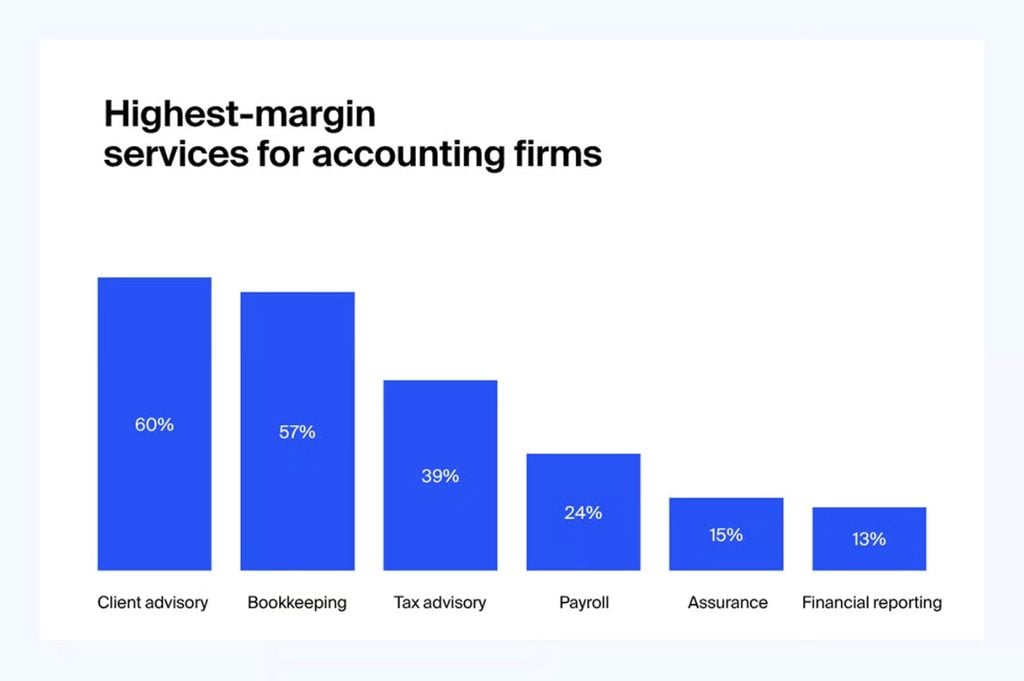
- Powering the shift towards client advisory: AI is freeing up resources to prioritize high-value work, with 60% of firms citing client advisory as the most profitable service
For a more in-depth look at how AI tools are reshaping the accounting industry, take a look at our breakdown of key trends and use cases of AI in accounting. Otherwise, let’s get into our top picks of AI tools for accounting in the following categories:
- Bookkeeping and data entry
- Expense management
- Financial analysis and forecasting
- Audit and fraud detection
- Practice management and workflow automation
- General AI assistance tools
Automated bookkeeping and data entry
Bookkeeping automation tools often use machine learning to automatically capture and categorize transactional data. Some also use optical character recognition (OCR) to scan receipts and invoices, and import information without any manual data entry.
Our favorite tools in this category include:
| Tool | Key features | Best for |
| Vic.ai | Autonomous invoice coding and routingPO matching and approval automationLearns from every correction | Mid-market to enterprise AP teams with high invoice volume |
| Docyt | AI copilot for transaction categorizationReal-time multi-entity reconciliationNatural language financial queries | Accounting companies managing multiple client entities |
| Zeni | AI bookkeeping with dedicated finance teamDaily books with real-time dashboardAutomated bill pay and reconciliation | Startups and growth-stage businesses wanting managed AI bookkeeping |
| Dext | Mobile and email receipt capture99.9% OCR accuracySyncs to 30+ accounting platforms | Accounting companies managing ongoing client document intake |
Expense management and spend control
Expense management tools offer real-time visibility into spending, with tools to help companies manage their expenses. The latest generation of AI systems increases companies’ abilities to track and manage expenses in greater detail without the excessive workload.
| Tool | Key features | Best for |
| Ramp | Corporate card with AI spend controlsAutomatic receipt matchingReal-time spend visibility | US-based growth companies wanting unified card and expense management |
| Brex | 99% of expense reports auto-processedGlobal FX supportIntegrated bill pay and reimbursements | VC-backed startups and scaling businesses with international spend |
| Expensify | SmartScan AI receipt captureWorks with any corporate cardSyncs to 30+ accounting systems | Companies that want expense automation without switching corporate cards |
| Stampli | AI learns invoice coding patterns70+ ERP integrationsFull procure-to-pay automation | Finance teams needing end-to-end AP automation across complex ERP environments |
Financial analysis and forecasting
AI financial analysis and forecasting systems give companies deeper insights into business performance and help inform smarter business decisions. These AI tools are integral for accounting firms and professionals that are moving further into client advisory services.
| Tool | Key features | Best for |
| Syft | Syft Assist AI commentary per graphMulti-entity consolidation and reportingDriver-based cash flow forecasting | Advisory-focused firms producing client management reports |
| Datarails | Excel-native FP&A platformAI agents for trend and anomaly detectionConnects to 400+ data sources | Finance teams and accountants who want AI analysis without leaving Excel |
| Clockwork.ai | Instant cash flow forecastingScenario modeling from live dataClient-ready advisory dashboards | Accounting companies building cash flow advisory services for SME clients |
| Fathom | AI Commentary Writer for reportsKPI tracking and cash flow forecastingIntegrates with QuickBooks, Xero, and MYOB | Accountants and advisory companies producing client management reports |
| Jirav | One-click Autoforecast from historical dataDriver-based financial modelingAdvisory-ready client dashboards | Accountants and CFO advisory companies delivering forecasts to growth clients |
Audit and fraud detection
AI auditing and fraud detection systems improve internal oversight and compliance, protecting companies from a wide range of financial risks. Here are the AI tools impressing us the most right now:
| Tool | Key features | Best for |
| MindBridge | 100% transaction coverageAI risk scoring per transactionTrained on 260B+ transactions | Enterprise audit and internal finance teams needing full-population transaction coverage |
| Blue Dot | AI tax compliance and VAT recoveryFlags taxable benefits in expense dataCovers cross-border employee transactions | Companies with complex employee expense or cross-border VAT compliance needs |
| DataSnipper | AI document extraction inside ExcelAuto cross-references workpapers and source docsGenAI audit document analysis | Audit teams working in Excel who need to accelerate evidence gathering and documentation |
| AppZen | Pre-payment expense auditingDetects FCPA violations and duplicatesReal-time policy breach detection | Finance teams catching fraud and policy violations before reimbursement |
Practice management and accounting workflow automation
Practice management software is the operational backbone of an accounting firm. It keeps client work moving, deadlines on track, and prevents organizational work from getting in the way of service delivery.
With AI and workflow automation handling routine tasks, such as document gathering and data capture, accounting teams can redistribute resources to priority work. Instead of handling every stage of workflows manually, they can focus on high-value tasks and client experiences.
| Tool | Key features | Best for |
| TaxDome | AI document renaming and organizationOCR physical document scanning for clientsTop-rated client mobile apps on iOS and AndroidEnd-to-end accounting workflow automationAI reporting for accounting firms | Hassle-free service delivery for accounting teams and clients |
| FloQast | AI-generated flux analysis and reconciliationsNo-code AI agent builder for custom workflowsClose management with audit-ready controls | AI accounting workflow automation |
| Basis | Agentic AI executes workflows end-to-endAdapts to firm-specific standards and processesDelivers review-ready outputs across practice areas | Firms setting up their first agentic AI accounting system |
At TaxDome, we made a conscious choice early on in the AI boom that we wouldn’t jump on the bandwagon and rush AI feature releases. We also decided against adding a generative AI layer to key features. Instead, we’re committed to identifying the real problems accounting teams and their clients face on a daily basis, and using AI’s core strengths to rethink solutions.
For example, our client app uses optical character recognition (OCR) to eliminate the need for clients to scan physical documents before sharing them with accountants. This means clients can share physical documents as easily as digital ones, but does this remove bottlenecks on both ends of file sharing?
Not quite. Effortless file sharing doesn’t equate to efficient document management if teams have to manually review and organize each file — especially when you end up with thousands of file names like 4353458223.pdf.
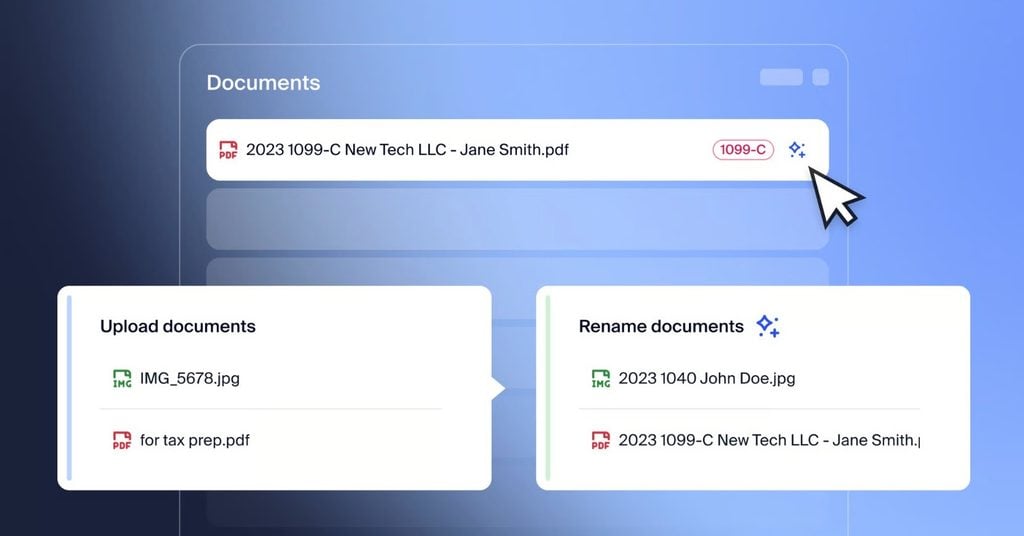
We couldn’t solve this problem by simply adding a generative AI layer to TaxDome, but we could by building a specialist AI-powered tool to tackle the issue head-on. Which is why we built the AI document naming and management system into TaxDome AI and rolled it out in time for peak season in 2025.
During the 2025 tax season, firms using TaxDome AI automatically renamed more than 2,000,000 documents, saving firms an estimated 16,000+ hours of tedious, manual work.
AI assistants for drafting, research, and analysis
Most professionals start their AI journey with general-purpose tools like ChatGPT, and accountants are no different. So, if you’re not ready to commit to specialist AI accounting tools, here are the best assistants for general tasks, such as research and drafting content.
| Tool | Key features | Best for |
| ChatGPT | Drafting, summarizing, and researchingBuilt-in web searchDeep Research mode with citations | Accountants trying their first generative AI tool |
| Claude | Low hallucination rate1M token context windowStrong long-document reasoning | Accountants who want a lower hallucination rate than ChatGPT |
| Microsoft Copilot | Embedded in Excel, Word, Outlook, TeamsDrafts emails and summarizes meetingsDraws on firm files via Microsoft Graph | Firms already using Microsoft 365 who want AI within their existing tools |
| Formula Bot | Plain-English to formula translationExplains and improves existing formulasReduces formula troubleshooting time | Accountants and bookkeepers who work heavily in Excel |
| Perplexity | Live, cited sources in every responseLow hallucination riskAcademic and writing research modes | Accountants who want an AI-powered research tool |
Key considerations for choosing AI accounting tools
The quality of AI tools is constantly improving, and the options available are growing every year. This is great from a capability standpoint, but it makes the software decision process increasingly difficult.
So, let’s run through the key considerations for choosing AI accounting tools:
1. Focus on problems, not features
Map your highest-friction workflows before evaluating specific tools. What does your team spend most of its time doing? Where do errors keep cropping up? What are the delays holding up progress and the bottlenecks limiting the number of clients you can manage at any one time? A tool that solves one real bottleneck delivers far more value than a platform with twenty features you’ll never use.
2. Calculate the integration burden
Integrations are important, but connecting multiple tools comes with a hidden cost. 58% of organizations say they’re dealing with an integration crisis from implementing multiple systems. Complex toolkits and integration gaps leave workflows only partially automated, forcing teams to switch between multiple tools and manually complete the missing steps.
3. Prioritize data security and governance
Confirm how potential AI tools and their providers use your data — and, more importantly, your clients’ data. Firstly, check whether any of the data these tools access will be used to train the system’s models, and scrutinize every provider’s security measures. Look for SOC 2 Type II certification, as a minimum, and check how vendors encrypt data. For example, TaxDome uses TLS 1.2 for encrypting data in transit and AES-256 encryption for data at rest.
4. Assess the full implementation cost
The initial subscription fee is only part of the full implementation cost. Account for any additional implementation fees, the onboarding process, staff training, and how long it will take to start seeing an ROI from the new system.
5. Plan for advocacy, not just adoption
Team adoption is important for any major software decisions, but AI brings new complexities to this consideration. Firstly, AI competency still varies greatly, and some team members may be skeptical or even afraid of the impact the technology will have on their work.
6. Target immediate impact
This is especially important when implementing comprehensive systems, such as practice management software. You can’t wait for teams to know the platform inside out before you get value from it. Speak to vendors about the immediate impact you can target in the first week or two of implementation, as well as a long-term roadmap for ongoing value.
7. Evaluate long-term scalability
While the immediate impact builds a faster path to ROI from your AI implementation, the scalability of products determines the ongoing value. You want systems that grow with your firm and its needs as they become more advanced.
2026: the year of AI-enhanced accounting firms
Instead of replacing accountants, AI is enabling them to do more with their time by automating routine tasks. Teams are spending less of their day doing admin tasks that anyone could do, and more of it on the core accounting tasks that genuinely require their expertise. More importantly, these are the tasks that deliver real value to accounting clients.
In 2026, AI-enhanced firms are handling more clients than previously possible, without relying on recruitment to manage the extra work. They’re delivering value to clients faster and maintaining consistent service quality, even as they handle higher workloads. And they’re gearing up for the best tax season they’ve ever had with AI-powered workflows that relieve the pressure for teams and clients.

Aaron produces practical content for TaxDome, drawing on 11 years in SaaS copywriting and marketing. He helps accounting and tax professionals get the most from TaxDome and other tools, making complex topics clear and actionable.
Get your free guide

Thank you!
The guide copy has been sent to your email. Please check your inbox!
Recommended articles

Buy Now, Pay Later: offer clients payment flexibility

Why accountants are quitting: inside the forces reshaping the profession

How to start a virtual bookkeeping business from scratch