 US – English
 UK – English
 Canada – English
 Australia – English
 Danmark – Dansk
 DACH - Deutsch
 France – Français
 España – Español
 Sverige – Svenska
 Italia – Italiano
 Nederland – Nederlands
 Portugal – Português
 Suomi – Suomi
 Norge – Norsk
 日本 – 日本語
 Romanian – Română












[Webinar recap] Security Smarts: Learn what to ask your software vendors (and why)

Run your entire firm on one platform
![[Webinar recap] Security Smarts: Learn what to ask your software vendors (and why)](https://static.taxdome.com/cdn-cgi/image/format=auto,quality=85,fit=contain,width=1024,height=607/blog/2025/10/Blog.jpg)
Table of сontents
- A no-jargon breakdown for firm leaders protecting client data in a digital world
- Why security conversations matter and what “good security” looks like in real life
- Panel insights: what firms still get wrong
- Questions to ask your vendors — red and green flags to watch for
- How to talk to your clients about security
- Download the tools: security checklist + audit worksheet
- Q&A key insights
Table of сontents
- A no-jargon breakdown for firm leaders protecting client data in a digital world
- Why security conversations matter and what “good security” looks like in real life
- Panel insights: what firms still get wrong
- Questions to ask your vendors — red and green flags to watch for
- How to talk to your clients about security
- Download the tools: security checklist + audit worksheet
- Q&A key insights
A no-jargon breakdown for firm leaders protecting client data in a digital world
Choosing the right software is already complex — but when security gets involved, many firm leaders find themselves in unfamiliar territory. You’re responsible for protecting sensitive client data, but you’re not a cybersecurity expert. And you shouldn’t have to be.
That’s what the Security Smarts webinar was all about: giving firm leaders the practical questions and plain-English explanations they need to evaluate tech confidently and protect their firm and clients.
In this recap, we’ll walk through the top insights — and share the downloadable vendor checklist and internal security audit worksheet from the session.
Why security conversations matter and what “good security” looks like in real life
Security isn’t just an IT problem. If you’re collecting, storing, or sharing client data, then protecting that data is part of your job. And yet, many firm leaders don’t feel equipped to evaluate whether the software they rely on is actually secure — or just claiming to be.
That’s especially true for U.S.-based firms: if you have a PTIN, the IRS requires you to maintain a Written Information Security Plan (WISP).
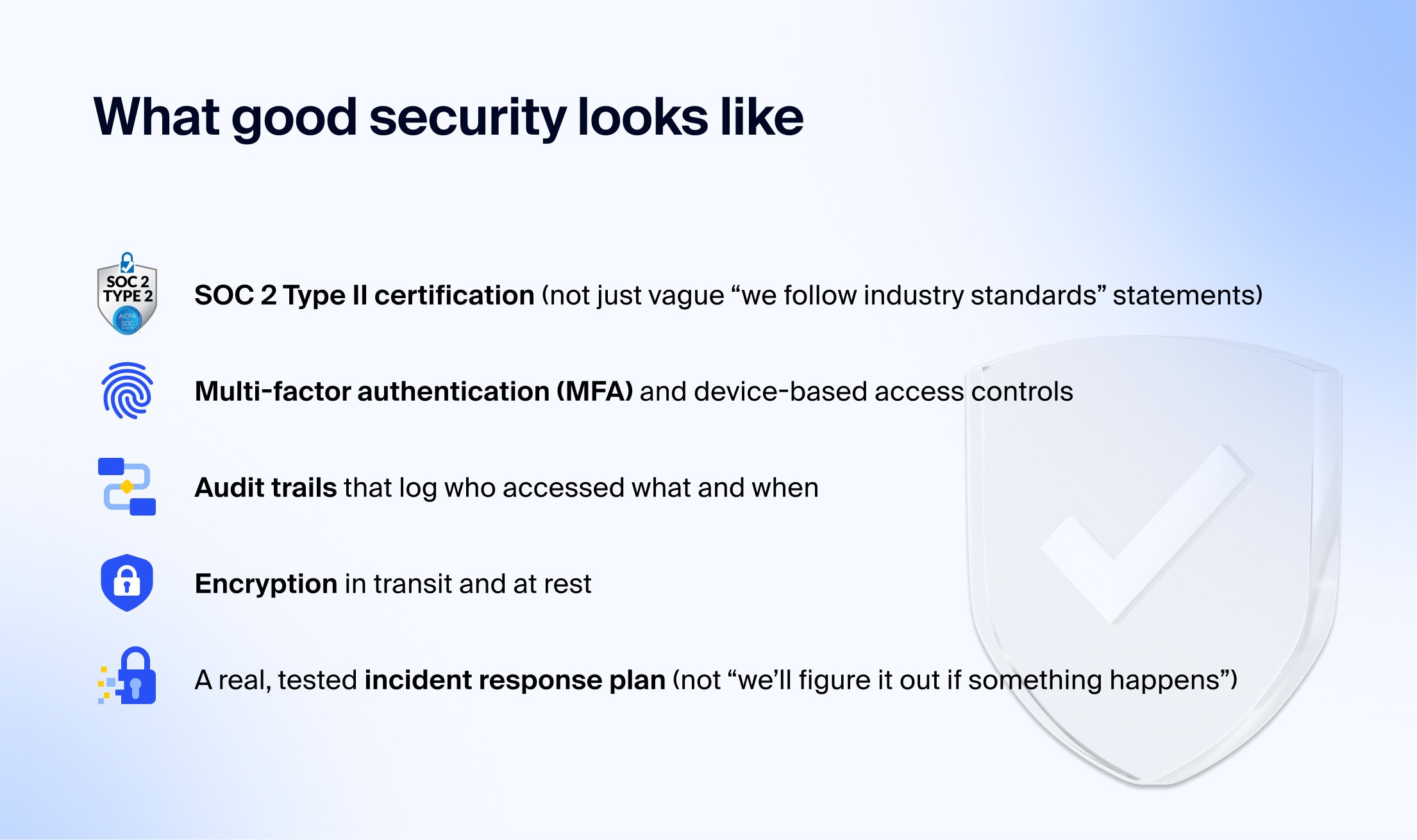
Fortunately, you don’t need to learn cybersecurity jargon to make smart decisions. What you do need is a clear understanding of what “good security” looks like in practice. That includes things like:
- SOC 2 Type II certification (not just vague “we follow industry standards” statements)
- Multi-factor authentication (MFA) and device-based access controls
- Audit trails that log who accessed what and when
- Encryption in transit and at rest
- A real, tested incident response plan (not “we’ll figure it out if something happens”)
These are the modern security foundations your tech stack should be built on — and you have every right to ask your vendors how they’re implementing them.
Panel insights: what firms still get wrong
Even well-meaning firms often make missteps when it comes to security. During the webinar, the panelists shared common mistakes they see regularly — and how to avoid them:
- Believing hosting = security. Many vendors say “we’re secure because we use AWS.” As the panel explained, AWS is just the infrastructure. It doesn’t guarantee the vendor is using it securely — just like storing files in OneDrive doesn’t mean your team is handling them properly.
- Settling for SOC 2 Type I. A Type I certification only proves a vendor wrote down policies. Type II shows those policies were enforced and tested over time — a critical difference.
- Skipping incident response planning. A surprising number of firms don’t test how their vendors would respond to an outage or breach. Without a predefined, tested plan, downtime during tax season can be devastating.
- Overlooking contractor access. It’s common for software companies (and firms themselves) to use contractors without limiting data access or logging it. That’s one of the easiest ways for security to break down.
- Thinking “98% secure” is good enough. 98% security = 0% security. All it takes is one weak point — whether it’s a missing MFA control or an employee working from an unsecured laptop — for client data to be exposed.
The message was clear: security isn’t about eliminating every risk. It’s about knowing the weak spots, asking the right questions, and working with vendors who can prove they’ve put safeguards in place.
Questions to ask your vendors — red and green flags to watch for
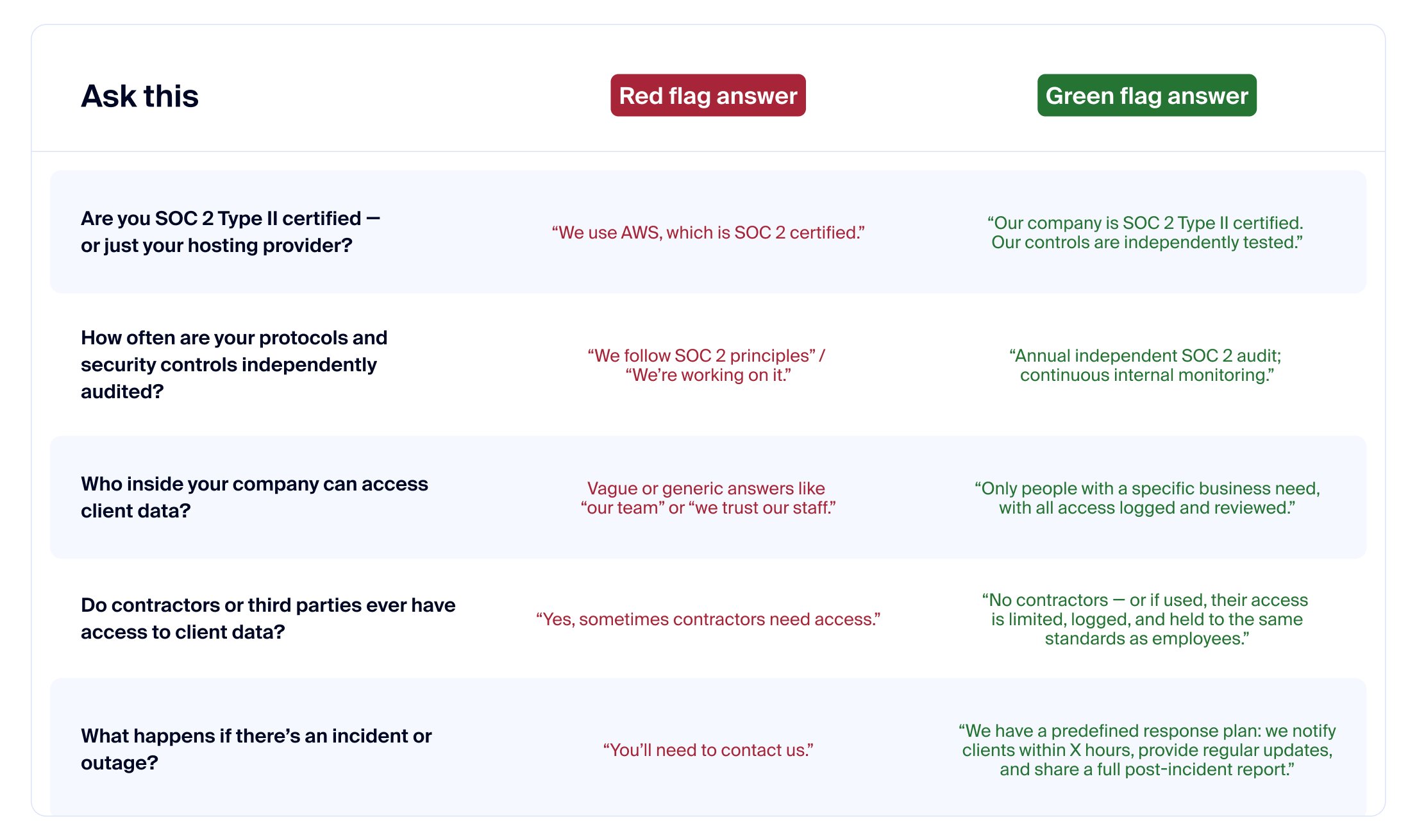
Most software vendors will tell you their platform is “secure.” But what matters isn’t the claim — it’s how they back it up. That’s why the Security Smarts panel focused on giving firm leaders the right questions to ask, along with examples of red-flag and green-flag answers.
Here are some of the key ones to keep in your back pocket when you’re evaluating tools:
How to talk to your clients about security
Your clients don’t expect you to be a cybersecurity expert — but they do expect you to protect their data. In fact, out of 1,000 tax payers surveyed, 87% of clients want technological reassurance from their accountant and 89% need assurance their information is securely stored. That’s why how you communicate about security matters just as much as the protections.
The panel shared a few ways to approach these conversations without overwhelming clients:
- Keep it plain English: instead of rattling off technical specs, explain the basics: “We use software that’s independently tested for security, and all client data is encrypted.”
- Focus on trust, not fear: position security as part of the professional experience you deliver, not as a scare tactic.
- Share your process: use tools like the client-facing security FAQ (provided in the webinar resources) to show that your firm has thought about risks and put controls in place.
- Be transparent about your vendors: if clients ask, be ready to explain how your practice management platform or accounting software protects their data.
And if you ever run into a security or IT-related question you’re not sure how to answer, you’re not alone. TaxDome and Verito have set up a free 24/7 IT & Security Hotline for all tax and accounting firms — even if you’re not a customer.
You can call anytime with a question or issues, and the first incident is handled completely free of charge. There’s no selling, no sign-up, and no trial required. Just crucial security help when you need it.
Download the tools: security checklist + audit worksheet
As promised, during the webinar our audience were given two practical resources to help firm leaders put what they learned into action right away:
- Vendor security checklist — a ready-to-use list of the key questions (and follow-ups) to ask any software provider, so you can separate red flags from real safeguards.
- Internal security audit worksheet — a firm-facing tool to evaluate your own processes, highlight vulnerabilities, and identify areas for improvement.
These two downloads give you a straightforward way to start strengthening security today.
We also shared access to the Client-facing security FAQ template within our recently-published eBook, Client trust in the age of cyber attacks. Inside, you’ll not only find a guide with specific information to reassure clients that their data is secure, you’ll also get data-backed insights on the most common cyber threats targeting accounting firms, a self-assessment quiz to benchmark your firm’s current security readiness, and best practices for authentication, secure client communication, and audit trails.
Q&A key insights
1. Where can I access the TaxDome WISP template mentioned?
TaxDome’s WISP template for firms can be accessed here or through our blog that goes into what WISP means and why firms need it.
2. What does SOC 2 mean?
SOC stands for System and Organization Controls, a security framework created by the AICPA to ensure companies protect client data across five trust principles: security, availability, processing integrity, confidentiality, and privacy. The difference between SOC 2 Type I and Type II is that Type I only verifies that controls exist at a single point in time, while Type II proves those controls are enforced and tested over a period of time.
You can read more about SOC 2 Type II in practice here: https://taxdome.com/policies/soc2
3. How can firms verify if a vendor’s SOC 2 certification is legitimate?
Ask for the SOC 2 Type II report itself or an attestation letter from the auditor. A legitimate vendor will be willing to provide documentation — at least a summary — showing that their controls were independently tested.
For example, we offer our dedicated TaxDome Trust Center where anyone can request our SOC 2 Type II compliance report and a multitude of other proof of our security measures: https://taxdome.com/security
4. What does device-level control actually mean, and how is it enforced?
Device-level control means vendors don’t just rely on logins — they control which devices can access client data. For example, employees may only log in from managed, secured devices with monitoring and encryption enabled. This ensures someone can’t just log in from an unsecured personal laptop or phone.

Jeff writes for TaxDome with experience in accounting, finance, and invoicing industries. He focuses on educating users about accounting trends and maximizing productivity through practical guidance on TaxDome’s features.

Get your free guide

Thank you!
The guide copy has been sent to your email. Please check your inbox!
Recommended articles
TaxDome AI: more than 2,000,000 documents organized for accountants this past tax season—and we’re just getting started

Webinar recap and Q&A: Summer Update 2026

Unpacking the differences between TaxDome Payments and Stripe