 US – English
 UK – English
 Canada – English
 Australia – English
 Danmark – Dansk
 DACH - Deutsch
 France – Français
 España – Español
 Sverige – Svenska
 Italia – Italiano
 Nederland – Nederlands
 Portugal – Português
 Suomi – Suomi
 Norge – Norsk
 日本 – 日本語
 Romanian – Română












7 best Jetpack Workflow alternatives for accounting workflow management

Run your entire firm on one platform

The best Jetpack Workflow alternatives for accounting firms in 2026 are TaxDome, Canopy, Karbon, Financial Cents, and QuickBooks Online Accountant. TaxDome is the top-rated replacement rated #1 on G2 with 4.7 stars from 680+ reviews and 7x winner of the CPA Practice Advisor Readers’ Choice Award offering complete practice management with workflow automation, client portal, mobile app, document management, and billing in one flat-rate plan from $58/month. Everything Jetpack Workflow lacks.
Key takeaways:
- Jetpack Workflow is best suited for sole accountants and small teams that want a simple workflow management tool
- For small teams that want a simple practice management tool, Financial Cents and Pixie are the most affordable alternatives
- QuickBooks Online Accountant and Xero Practice Manager can work for sole accountants with most clients using QuickBooks or Xero but they can’t match practice management software
- For collaborative accounting teams, Karbon streamlines internal processes but lacks client management features
- TaxDome is the complete practice management platform for growing accounting firms
These days, running an accounting firm without practice management software is a bit like driving a car without a GPS. You’ll get there eventually, but with all sorts of unnecessary detours and stress along the way.
Jetpack Workflow is a popular choice for accounting practices looking for a simple practice management solution.
Instead of complex software with endless features, you get a barebones toolkit for managing workflows:
- A jobs dashboard for tracking deadlines and job status
- Task lists for client work and internal processes
- Accounting checklist templates
- Basic workflow automation for recurring tasks
- Time tracking with budgeted time and cost monitoring
- Unlimited client contacts and document storage
- Native integrations for QuickBooks Online, Gmail, Outlook, and Zapier
However, Jetpack Workflow’s limited scope and stripped-back features don’t suit everyone.
In this article, we’ll explore some of Jetpack Workflow’s limitations. We’ll also look at seven of the best alternatives on the market — and why you should consider them for your accounting practice.
Table of сontents
Why consider alternatives to Jetpack Workflow?
In what is an increasingly competitive software category, Jetpack Workflow has claimed a not-insignificant piece of the market. More than 6,000 accountants and bookkeepers currently use Jetpack Workflow to systematize workflows, automate tasks, and track client work.
That said, Jetpack Workflow is far from the complete package. In this section, we’ll look at some key factors why you might want to look elsewhere for your practice management needs.
Jetpack Workflow lacks features beyond basic workflow management
Jetpack Workflow is a simple workflow management tool for accountants with limited automation features. You can automate recurring tasks, but you can’t create connected workflows with triggers and dependencies.
Where Jetpack Workflow really falls down, however, is the client experience. It’s not a bad tool for organizing internal workflows, but it’s sorely lacking when it comes to external, client-facing tools.
For example, there’s no client portal or secure chats. As a result, all interactions with clients take place via email — from updates to document requests and everything in between. Not only does this provide a clunky client experience, but it also increases the risk of your communications being lost in busy inboxes.
Jetpack Workflow relies on Zapier for most integrations
Jetpack Workflow comes with only a handful of native integrations — i.e. integrations built into the software that you can set up in just a few clicks. There’s a QuickBooks Online integration, as well as integrations with Microsoft Office and Gmail.
Beyond that, you’ll have to make use of Jetpack’s Zapier integration. Zapier is a third-party automation tool that connects different apps and services. While this gives you access to plenty of potential integrations, it involves more work on your side to build effective accounting workflows.
Jetpack Workflow is expensive for such a simple tool
On the face of it, Jetpack Workflow seems like one of the better value practice management tools on the market. There’s a single plan with two payment options:
- Starter Yearly: $120/year per user (equivalent to $40/month)
- Starter Monthly: $49/month per user
This price point only tells half the story, however. Because Jetpack Workflow is missing key features, you’ll have to pay for additional software and apps if you want those capabilities. For example, you’ll need separate tools for workflow automation, document management, e-signatures, and client interactions.
This can get very expensive. But more than that, it results in a bloated accounting tech stack. The more software you use, the more complex and disjointed your workflows become.
Jetpack Workflow looks and feels outdated
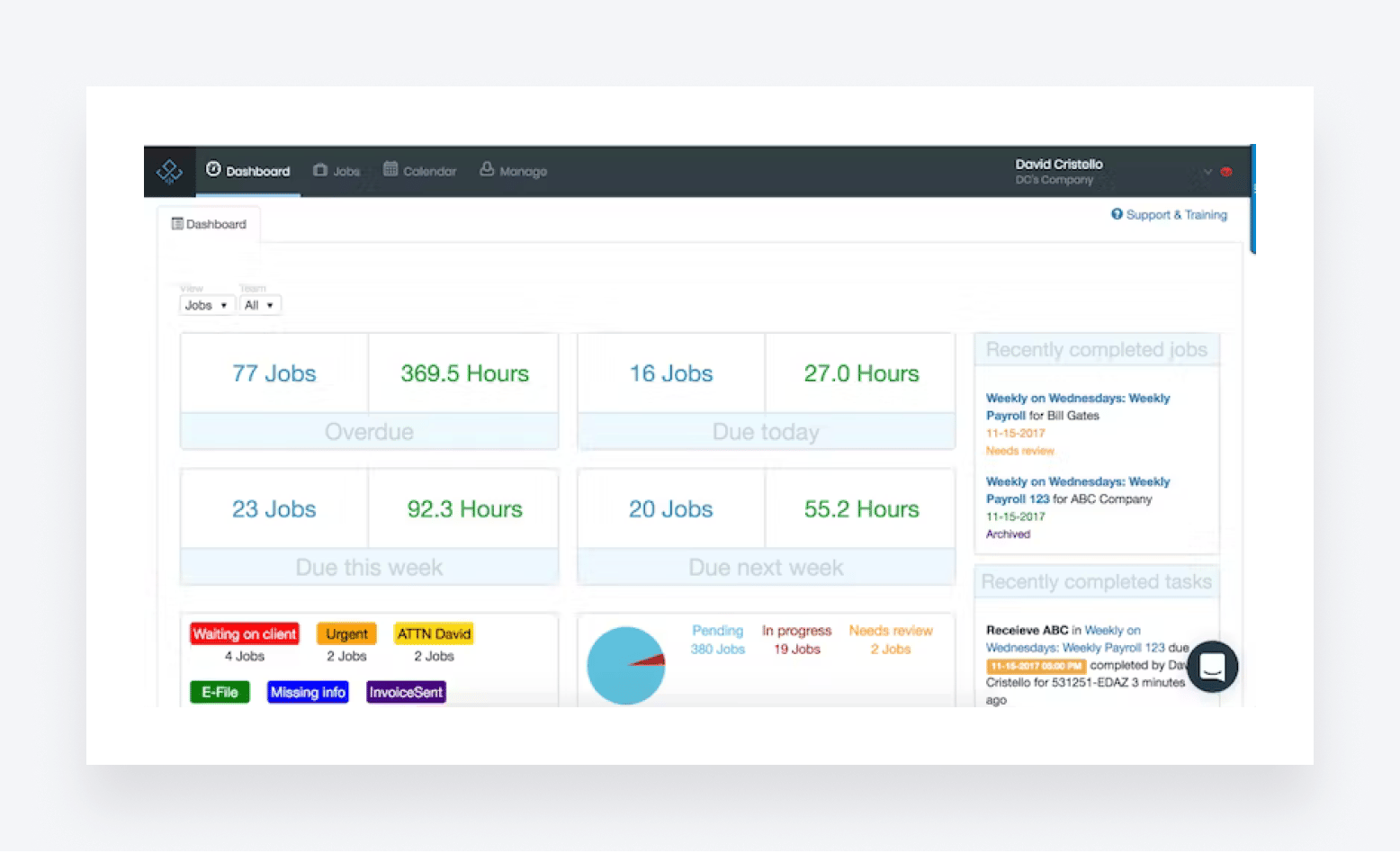
The user experience (UX) is one of the most important things to get right in software development. The best software balances powerful features with simple, intuitive user interfaces. Unfortunately, Jetpack Workflow misses the mark in this regard.
In a world where people expect slick digital experiences, Jetpack Workflow’s user interface looks relatively outdated and clunky. The attention to detail and focus on the best possible UX simply isn’t there — as you can see from the screenshot below:
Jetpack Workflow adds minimal growth potential for accounting teams
Jetpack Workflow is designed primarily for small accounting firms. But what happens if those firms have ambitions of becoming bigger?
Jetpack Workflow lacks the tools required to grow an accounting practice seamlessly. To scale a practice, you need to be able to automate not only standalone tasks but entire workflows. This allows you to take on more clients without needing to put in more hours. Jetpack Workflow’s basic task automation doesn’t have the necessary power or scope to do this.
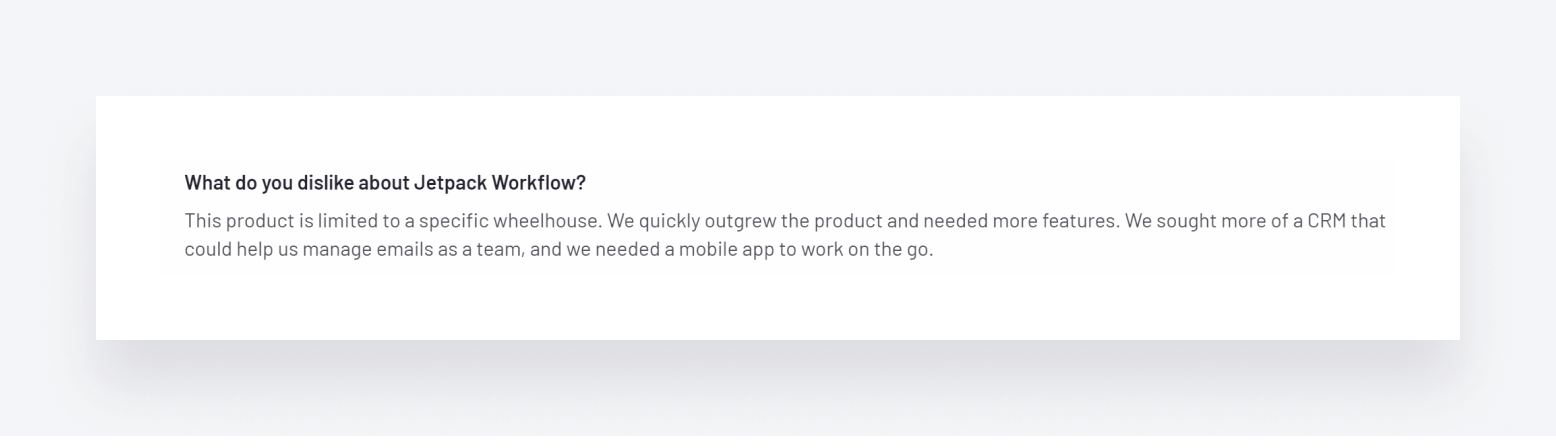
Likewise, Jetpack Workflow lacks more advanced features that larger firms expect — like advanced reporting or secure client portals. So if firms manage to scale while using Jetpack Workflow, they’ll eventually have to consider upgrading to a more complete platform as their needs become more complex. This recent review on G2 reflects Jetpack Workflow’s scalability issues perfectly:
Jetpack Workflow offers limited support for free
While Jetpack Workflow does offer same-day customer support and complimentary team training, there are limits to its free support package.
If you need help configuring the system, migrating your data, or setting up client workflows, you’ll have to pay extra. Jetpack Workflow offers a range of paid add-on services divided into three pricing tiers:
- Kickstarter at $299 — which helps you get the basics set up
- Fast Track at $748 — which offers more advanced configuration and hands-on support
- Done For You at $1,499 — a white-glove setup package that covers complete configuration
For less tech-savvy customers or those who simply don’t have the time, these packages might be the only way to get up and running in Jetpack Workflow. But with the most expensive package costing the equivalent of four annual subscriptions, it’s a huge outlay that will put many off.
7 best Jetpack Workflow alternatives
1. TaxDome
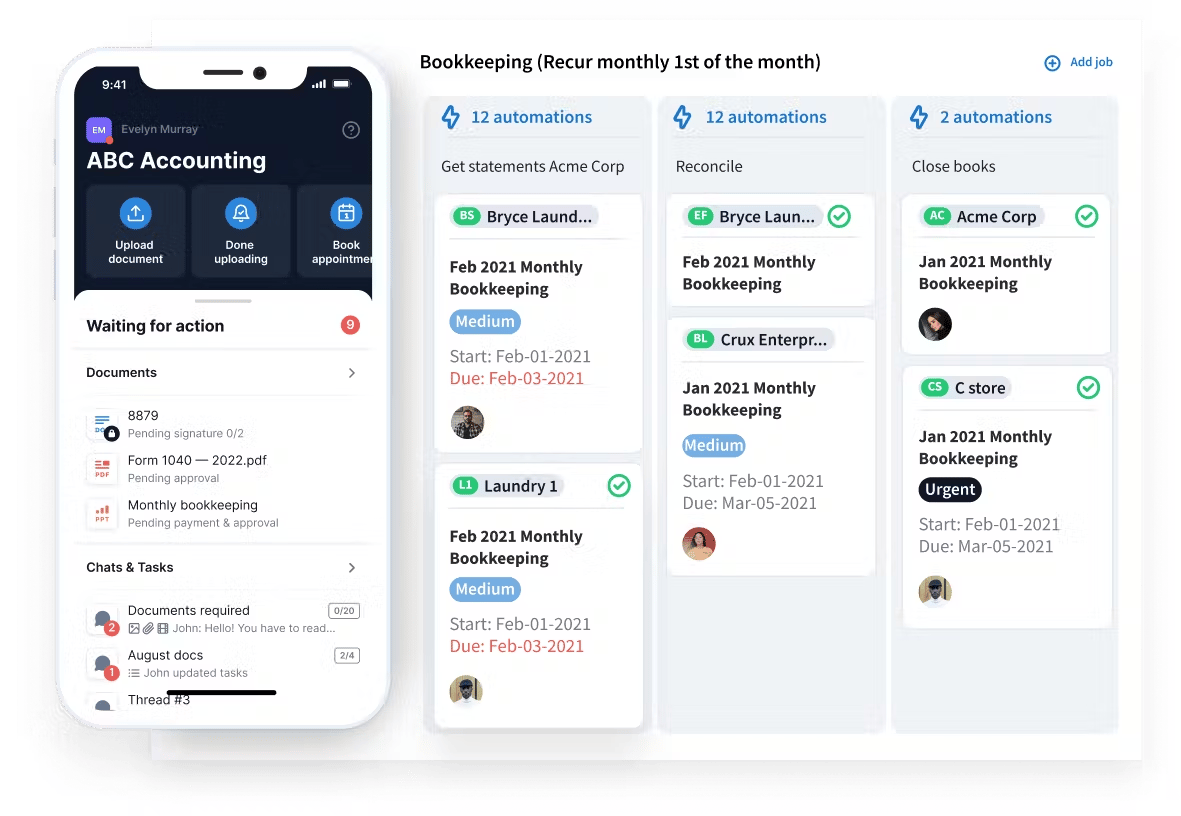
TaxDome is award-winning practice management software and one of the most complete offerings on the market. Launched in 2017, it has emerged as a market leader thanks to its powerful features and commitment to innovation. Today, TaxDome helps power more than 10,000 forward-thinking firms worldwide.
TaxDome key features
TaxDome offers a comprehensive feature set that leaves nothing out. In addition to all the standard practice management tools you’d expect from a leading platform, some standout features differentiate it from the crowd.
We’ll cover some of the most important features here, but for a full breakdown of what TaxDome offers, check out this article and explainer video: Accounting practice management software in action.
Efficiency and collaboration tools
TaxDome comes with powerful tools for organizing your team, projects, and workflows. These tools enable firms to create highly efficient and scalable processes that drive profitability.
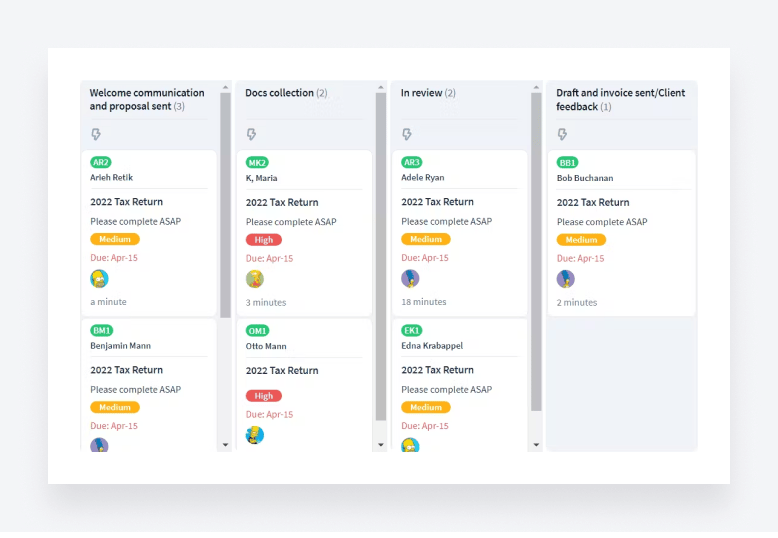
- Advanced workflow automation. Break complex workflows down into stages — and automate each stage. Each time an action is completed (e.g. signing an engagement letter) a new action is triggered (e.g. sending a welcome email).
- Team and project management tools. Provide complete visibility into tasks, progress, and deadlines. Improve team collaboration with @mentions and shared inboxes. Create standard operating procedures (SPOs) to standardize workflows.
- AI-powered analytics. Gain valuable insights into team performance, client profitability, and much more with flexible, real-time analytics and reporting. Search for specific data points, and our AI-powered helper quickly provides relevant insights and visualizations.
- TaxDome Marketplace. Streamline your practice with a library of templates created by TaxDome experts worldwide. Implement best practices rapidly with templates for emails, invoices, proposals, folders, and even entire workflows.
Firm, client, and revenue management tools
TaxDome provides a central hub for all your client and firm data, documents, and communications. You also get all the tools you need to manage clients — from onboarding and document gathering to getting paid.
- Accounting CRM. Manage and nurture client relationships. Keep records of all client data and accounting information. Filter contacts using custom tags, send bulk messages to different cohorts, and customize communications using shortcodes.
- Document management. TaxDome provides a central hub for storing, managing, and sharing documents. You get unlimited document storage, as well as legally compliant e-signatures (including KBA, AdES, and QES) and a built-in PDF editor.
- Time and billing. Track and record time, then automatically create custom-branded invoices using that data in just a few clicks. Set up recurring invoices and payments. Get paid seamlessly via integration with Stripe.
- Firm mobile app. Run your business from the palm of your hand with our firm mobile app. Chat with clients, manage documents and payments, and access client records on the go.
- Proposals & ELs (engagement letters). Market your firm, outline your services and pricing, formalize working relationships, and get paid all in one seamless workflow.
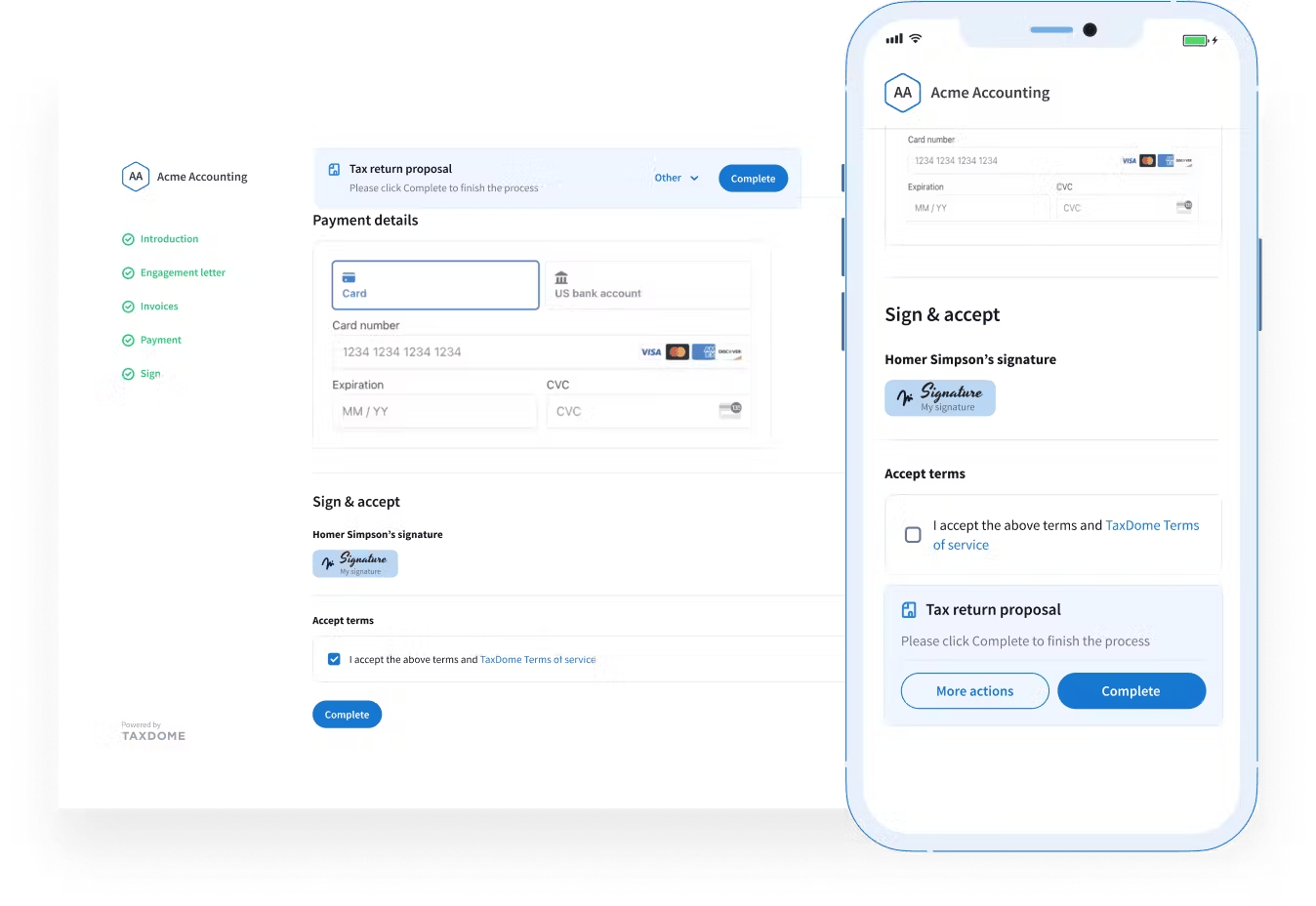
Client-facing tools
TaxDome isn’t just about improving internal efficiencies. You also get a suite of tools designed to create a slick and intuitive client experience on any device.
- Secure client portal. Provide a secure environment where clients can interact with your firm, upload and e-sign documents, complete tasks, pay bills, and more. Available on desktop or our top-rated client mobile app.
- Customizable organizers. Gather client information and documents seamlessly with customizable digital forms. Automate your onboarding process while providing a slick, digital user experience for clients.
- Secure chats. Chat with your clients in real time with secure integrated messaging. Request information, upload or scan documents, and send auto-reminders directly via the client portal.
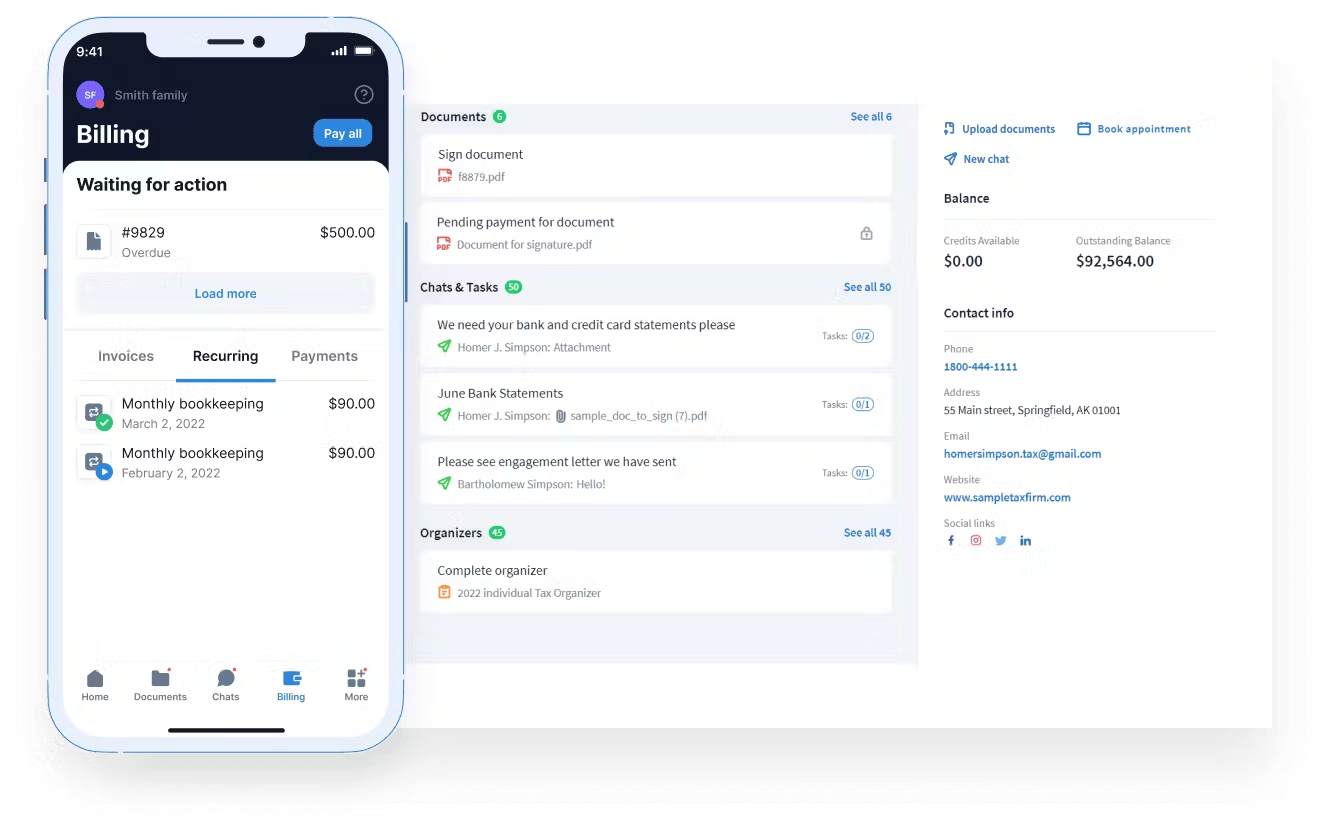
What kind of accounting firms use TaxDome?
TaxDome is used by accounting, tax, and bookkeeping firms of all sizes. Its powerful workflow automation and single pricing tier make it particularly popular with modern accounting firms looking to scale their business.
TaxDome pros and cons
| 👍 Pros | 👎 Cons |
| A complete practice management offering | Broad capabilities mean there’s a lot to learn |
| Powerful workflow automation | |
| Client portal and mobile app | |
| Industry-leading support and education | |
| Simple and transparent pricing |
TaxDome pricing
TaxDome has designed three plans tailored to meet your specific needs and goals:
- Essentials: from $58/month per user (billed annually)
- Pro: from $75/month per user (billed annually)
- Business: from $92/month per user (billed annually)
With TaxDome, there are no hidden costs or limitations. You won’t be charged extra to unlock advanced features, nor will you be forced to upgrade when you reach a certain number of users or clients. Every TaxDome user has access to all of TaxDome’s features, regardless of their size.
TaxDome average user ratings
- G2: 4.7 out of 5 from 680+ reviews
- Capterra: 4.7 out of 5 from 3,500+ reviews
TaxDome customer reviews
TaxDome users are generally delighted with the platform’s ability to streamline and automate their accounting practices. In the G2 “Pros and Cons” section, TaxDome ranks highly for ease of use and outstanding customer support.
The most frequently mentioned feature in positive reviews is TaxDome’s workflow automation, which enables accountants to create highly scalable processes that drive profitability. Here’s a recent example:
There’s also a lot of love for TaxDome’s client portal, which enables firms to provide a convenient and intuitive client experience — as this G2 review explains.
The most frequently mentioned issues with TaxDome relate to the platform’s broad feature set. Because TaxDome has the tools to run your entire firm, there’s a lot to learn. Setting up the platform can take time too. Thankfully, TaxDome’s top-quality customer support, training, and education resources make it simple to get up and running.
TaxDome or Jetpack Workflow?
For firms who want a relatively simple tool for organizing internal workflows and tasks, Jetpack Workflow isn’t a bad shout. But if you want a complete practice management platform, the only choice is TaxDome.
TaxDome has crucial features that are missing in Jetpack Workflow — including customizable workflow automation and a client portal and mobile app. So if you want to build scalable processes, consolidate your tech stack, and provide a top-level client experience, go with TaxDome.
Who should use TaxDome?
TaxDome is best for accounting firms that want to drive growth with a complete practice management platform that streamlines internal processes and client experiences.
2. Canopy
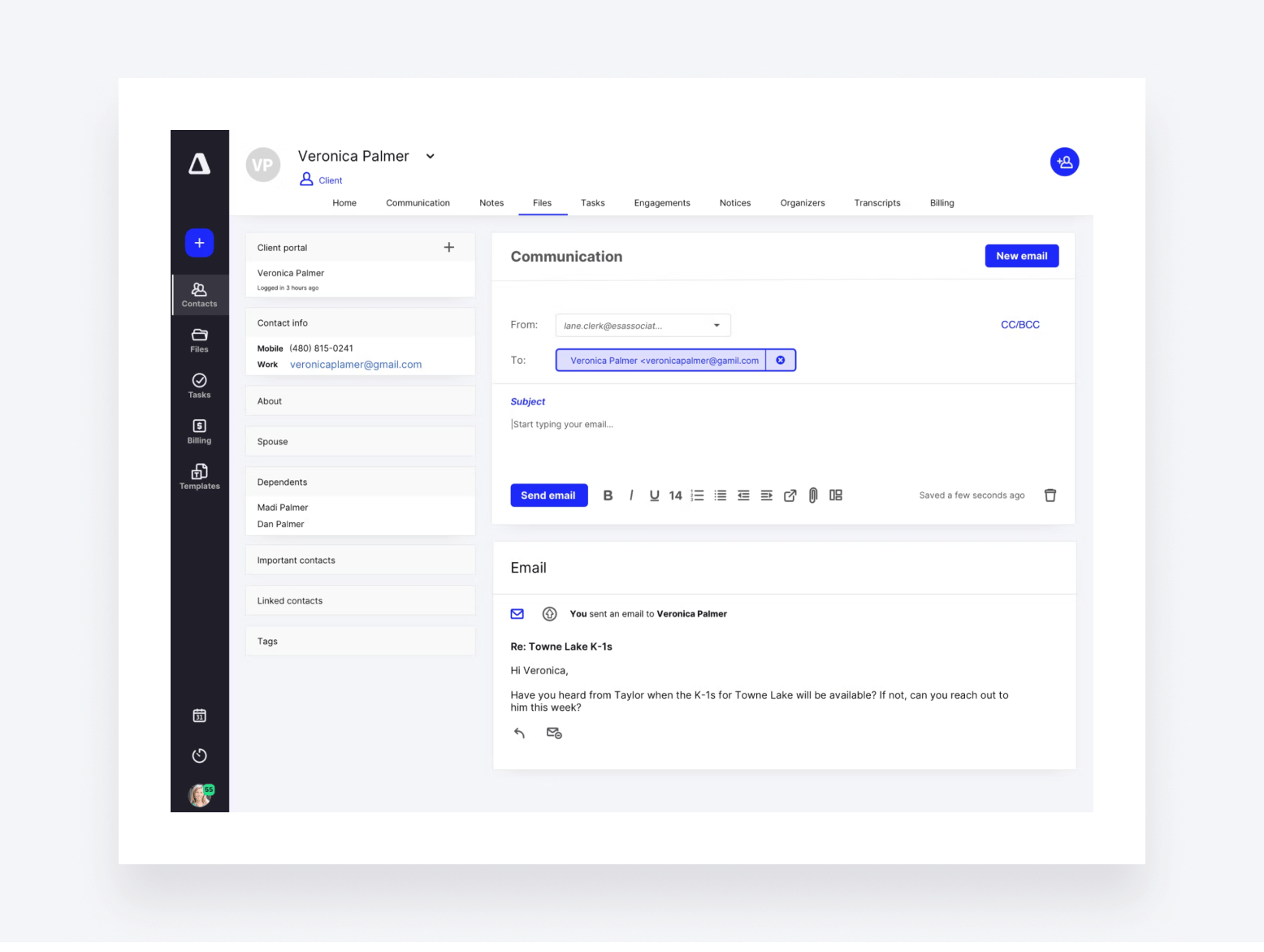
Canopy is another popular practice management platform. Launched back in 2014, it offers a range of features designed to get your accounting practice firing on all cylinders.
Canopy key features
Canopy is one of the more complete practice management platforms on the market. It divides its offering into four modules, all of which are priced differently — but more on that later! The Client Engagement module forms the foundation of Canopy’s offering and is included on all plans by default. It offers a range of tools for managing clients, including:
- A custom-branded client portal
- Client and firm mobile apps
- A CRM for accountants
- Engagements and proposals
You can then add additional modules on top of Client Engagement, all of which are optional. These include:
- Document Management. Unlimited storage, e-signatures, document editing, and more.
- Workflow. Automation, project and task management, recurring tasks, and more.
- Time & Billing. Invoicing, time tracking, and payment processing.
In addition to the above, Canopy offers some standout features. Canopy AI, for example, offers a ChatGPT-style AI assistant that drafts emails and summarizes communications. Canopy also offers robust data analytics and reporting via its Insights feature.
What kind of accounting firms use Canopy?
Canopy is used by small, medium-sized and large accounting firms looking for a flexible practice management package. That said, its minimum of five users means solo and very small teams aren’t catered for.
Canopy pros and cons
| 👍 Pros | 👎 Cons |
| Intuitive user interface | Complex pricing with lots of additional fees |
| Comprehensive feature set | Can get very expensive if you want the full package |
| Handy AI assistant | Frequent issues with email integration |
| Client portal and mobile app | A few bugs and performance issues |
| Robust data analytics | Not suited to very small teams |
Canopy pricing
Pricing is perhaps Canopy’s biggest drawback.
As we discussed earlier in this section, Canopy takes a modular approach to pricing. In other words, it divides its platform into separate offerings that can be added at an additional cost. Each module is priced separately based on the number of users.
- Client Engagement Platform: from $1,800/year (≈$150/month)
- Document Management: from $432/year per user (≈$36/month)
- Workflow: from $384/year per user (≈$32/month)
- Time & Billing: from $264/year per user (≈$22/month)
Although you get unlimited users on the Client Engagement Platform, the other products have a minimum 5+ user policy. So, you can multiply those starting fees x5. Sign up to all four products, and you’re looking at a starting price of $7,200/year.
On top of this, Canopy offers several add-on features that each cost extra, and there’s an unstated implementation fee for getting started.
Canopy user ratings
- G2: 4.6 out of 5 from 600+ reviews
- Capterra: 4.5 out of 5 from 250+ reviews
Canopy customer reviews
Overall, users are happy with Canopy’s broad capabilities. In particular, it receives a lot of praise for its ease of use and tools for managing documents and clients, as this recent review explains:
There are a few minor gripes about missing features and issues with existing ones. Several users had problems with Canopy’s email integration, for example. In this recent review, a Canopy customer explains the limitations of Canopy’s client portal:
Canopy or Jetpack Workflow?
Feature-wise, there isn’t much comparison between the two. Like TaxDome, Canopy offers a broad range of practice management tools. Jetpack Workflow does not. That said, Canopy’s pricing and five-user minimum mean it isn’t a viable solution for small firms or solopreneurs. If such businesses are looking for a basic platform for managing workflows and tasks, Jetpack Workflow fits the bill.
Who should use Canopy?
Accounting teams that only want the Client Engagement Platform benefit from the unlimited user pricing, but the fees get wild as soon as you add anything else.
3. Karbon
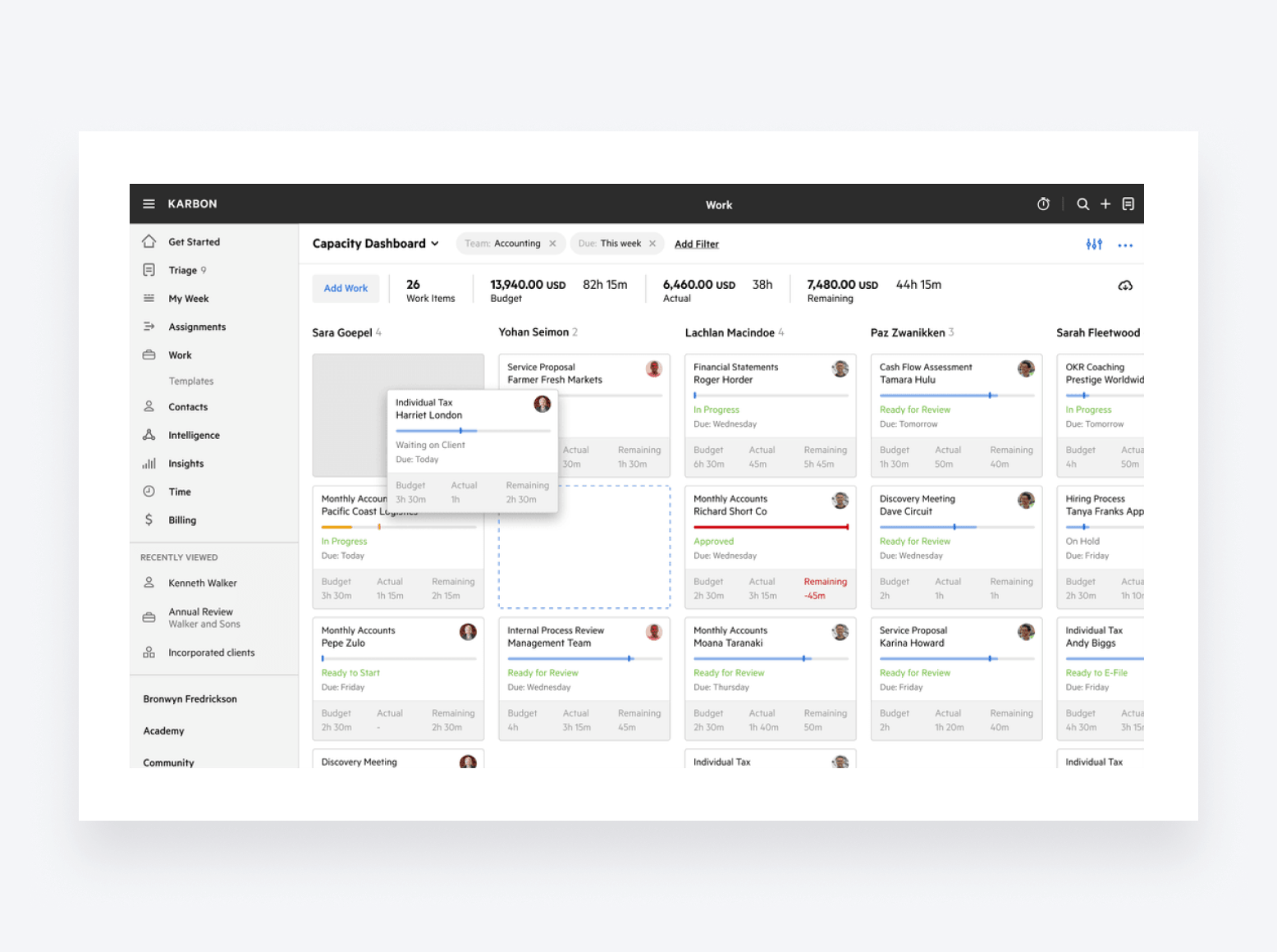
Alongside TaxDome and Canopy, Karbon is considered one of the big players in the practice management space. Founded in 2014, it has a broad set of features designed to help firms improve productivity, client relationships, and profitability.
Karbon key features
Karbon ticks most of the boxes when it comes to practice management features. In this section, we’ll run through the ones you should know about.
As you’d expect from a leading practice management platform, Karbon provides a central hub for managing documents, billing, and payments. There are a range of tools designed to streamline internal processes and boost efficiency, including:
- Team collaboration. Mentions, shared email inbox, and notes for internal discussions.
- Task management. Kanban board, checklists, and the ability to assign emails as tasks.
- Workflow management. Automated workflows, customizable templates, recurring tasks.
- Client management. CRM, client tasks with auto-reminders, onboarding checklists.
Karbon offers a decent client portal, but there’s currently no client mobile app — a major omission in today’s mobile-first world. You also get a decent AI tool — Karbon AI — that helps speed up client communication, as well as firm-wide analytics and reporting.
What kind of accounting firms use Karbon?
Karbon is used by accounting firms of all sizes, although its pricing structure may put off smaller, fast-growing firms. Karbon’s cheaper plans limit the usage of key features, as well as access to support and education. So as firms grow, they quickly hit a ceiling before needing to upgrade to a more expensive plan.
On top of that, Karbon’s lack of a client mobile app might put off firms looking to provide an outstanding client experience on the go. And because it lacks native proposals, Karbon users often combine it with a standalone proposals platform such as Ignition.
Karbon pros and cons
| 👍 Pros | 👎 Cons |
| Workflow automation | No client mobile app |
| Handy AI capabilities | Limited firm mobile app |
| Strong task management capabilities | No native proposals |
| User-friendly interface | Strict usage limits on key features |
| Support and education costs extra on cheaper plans |
Karbon pricing
Karbon has three pricing plans:
- Team: from $708/year per user (≈$59/month)
- Business: from $1,068/year per user (≈$89/month)
- Enterprise: custom pricing
As you’d expect, Team offers a stripped-back set of features compared to more expensive plans. Both Team and Business have strict limits on how much you can use key features — e.g. how many work templates you can use or how many teams or contacts you can have. Only Enterprise offers limitless usage.
At the same time, support during data import, implementation, and beyond is limited on cheaper plans. If you want hands-on support, you’ll need to pay an additional fee. The same goes for education and training.
Karbon user ratings
- G2: 4.8 out of 5 from 750+ reviews
- Capterra: 4.7 out of 5 from 200+ reviews
Karbon customer reviews
Karbon ranks highly for ease of use, thanks to its well-designed interface. Check out this recent G2 review, for example:
On the more negative side, however, Karbon users frequently point to a lack of core functionality. While Karbon offers a broader feature set than some alternatives, it’s missing important features such as native proposals and a client mobile app. Some users find the firm mobile app to be inadequate as well, leading to a poor user experience, as this review explains:
Karbon or Jetpack Workflow?
Jetpack Workflow is a smarter choice if you just want a simple yet powerful tool for managing internal workflows and tasks. If you need more than that, Karbon is the better option. That said, Karbon comes at a much higher price point — especially when you factor in the feature and usage limitations on cheaper plans. This might put smaller or fast-growing firms off.
Who should use Karbon?
Karbon is best for accounting team collaboration but it still trails behind TaxDome and Canopy when it comes to client management features.
4. Financial Cents
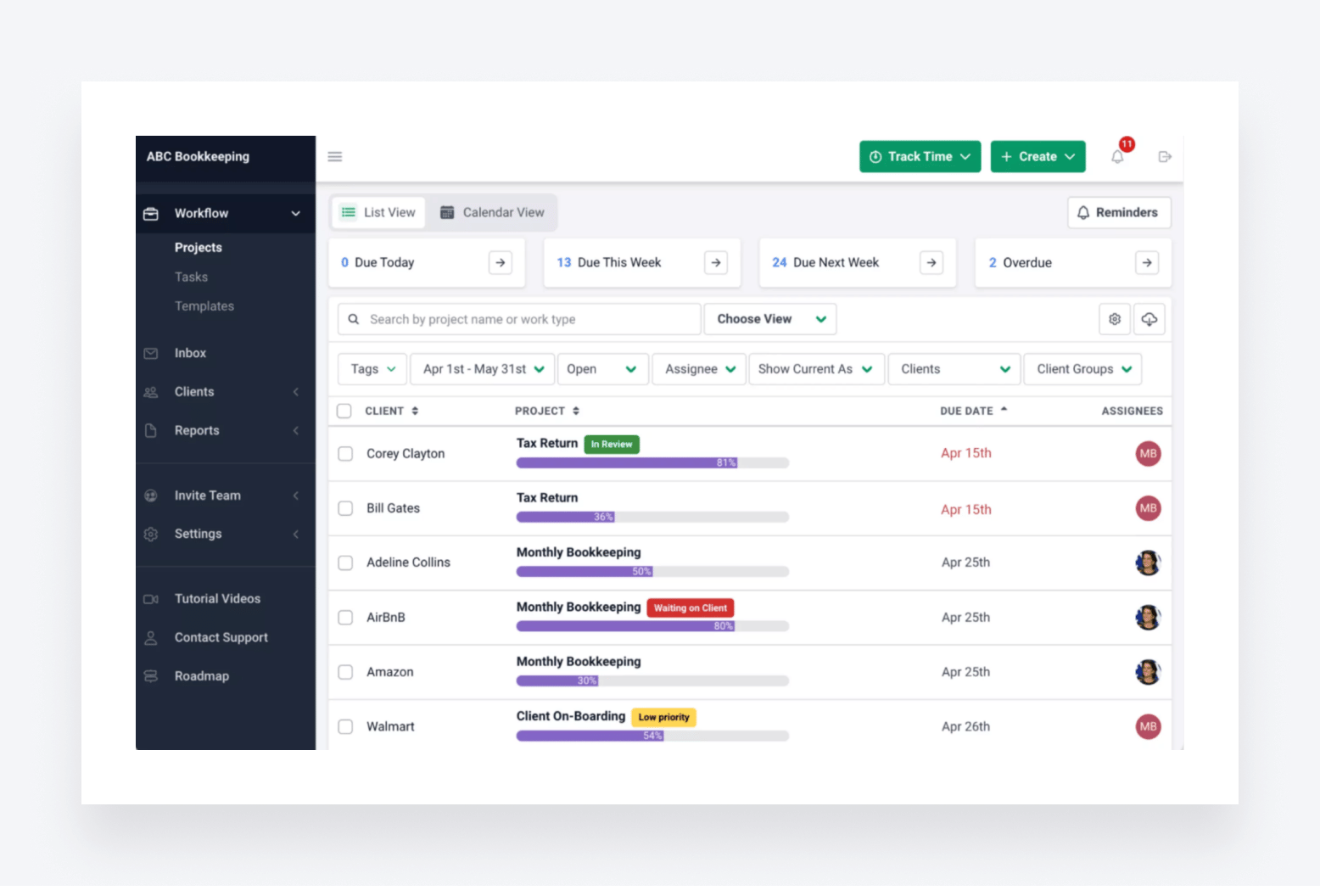
Financial Cents is a simple-to-use platform for streamlining accounting workflows. Launched in 2020, it’s one of the newer platforms on this list. Today, it helps more than 1,000 accounting, bookkeeping, and CPA firms scale their operations.
Financial Cents key features
Financial Cents offers a relatively basic feature set compared to some of the more advanced platforms on this list. That said, it provides some decent tools for getting accounting work done faster and more efficiently. Here are some of its key features:
- Workflow management. Create recurring tasks, delegate work, and gain top-down visibility into job progress.
- Client management. Request client docs automatically, send auto-reminders, and exchange files and data securely via a client portal.
- Accounting CRM. Store and organize all your client data, records, and communications in a centralized database.
- Time and billing. Track billable and non-billable hours, send professional invoices via QuickBooks Online, and access relevant reports and insights.
- Email integration. Improve collaboration and visibility by integrating directly with Gmail or Outlook.
- Capacity management. Get a global view of team capacity, reassign tasks, and manage workloads more effectively.
What kind of accounting firms use Financial Cents
Financial Cents is popular with smaller accounting and bookkeeping firms. It has a dedicated pricing plan for solo firms, offering a highly cost-effective — if somewhat limited — solution for accountants working alone. Because you can only send invoices via its QuickBooks Online (QBO) integration, it’s likely to be popular with firms who use QBO.
Financial Cents pros and cons
| 👍 Pros | 👎 Cons |
| Cost-effective for solo firms | Limited automation capabilities |
| Easy to set up and use | No ability to process payments |
| Decent workflow and task management tools | No mobile apps |
| Client portal | No proposals or engagement letters |
| Automated document collection | Invoices only available through QBO integration |
Financial Cents pricing
Financial Cents has three pricing plans:
- Solo: from $228/year per user (≈$19/month)
- Team: from $588/year per user (≈$49/month)
- Scale: from $828/year per user (≈$69/month)
- Enterprise: custom pricing
All plans are billed annually. As you’d expect, cheaper plans offer narrower feature sets.
Financial Cents user ratings
- G2: 4.7 out of 5 from 200+ reviews
- Capterra: 4.8 out of 5 from 250+ reviews
Financial Cents customer reviews
Financial Cents’ impressive average ratings show that it’s getting a lot right. Users particularly like its simple user interface, easy setup, and task management capabilities. Here’s a recent review highlighting the platform’s ability to streamline day-to-day workflows:
There are some issues with feature limitations, however. In addition to having no mobile apps, proposals, or native e-signatures, the platform’s lack of client communication tools is a concern — as this review explains:
Financial Cents or Jetpack Workflow?
Neither platform can be considered a complete practice management system. So whichever one you choose, you’ll either be missing core functionality or will need to invest in additional tools to complete your accounting tech stack.
That said, Financial Cents is a sensible and cost-effective choice for solo or small firms looking for a basic practice management platform — especially those that use QBO.
Who should use Financial Cents?
Financial Cents is the affordable upgrade from Jetpack Workflow for sole accountants and small teams that want a simple practice management tool.
5. QuickBooks Online Accountant
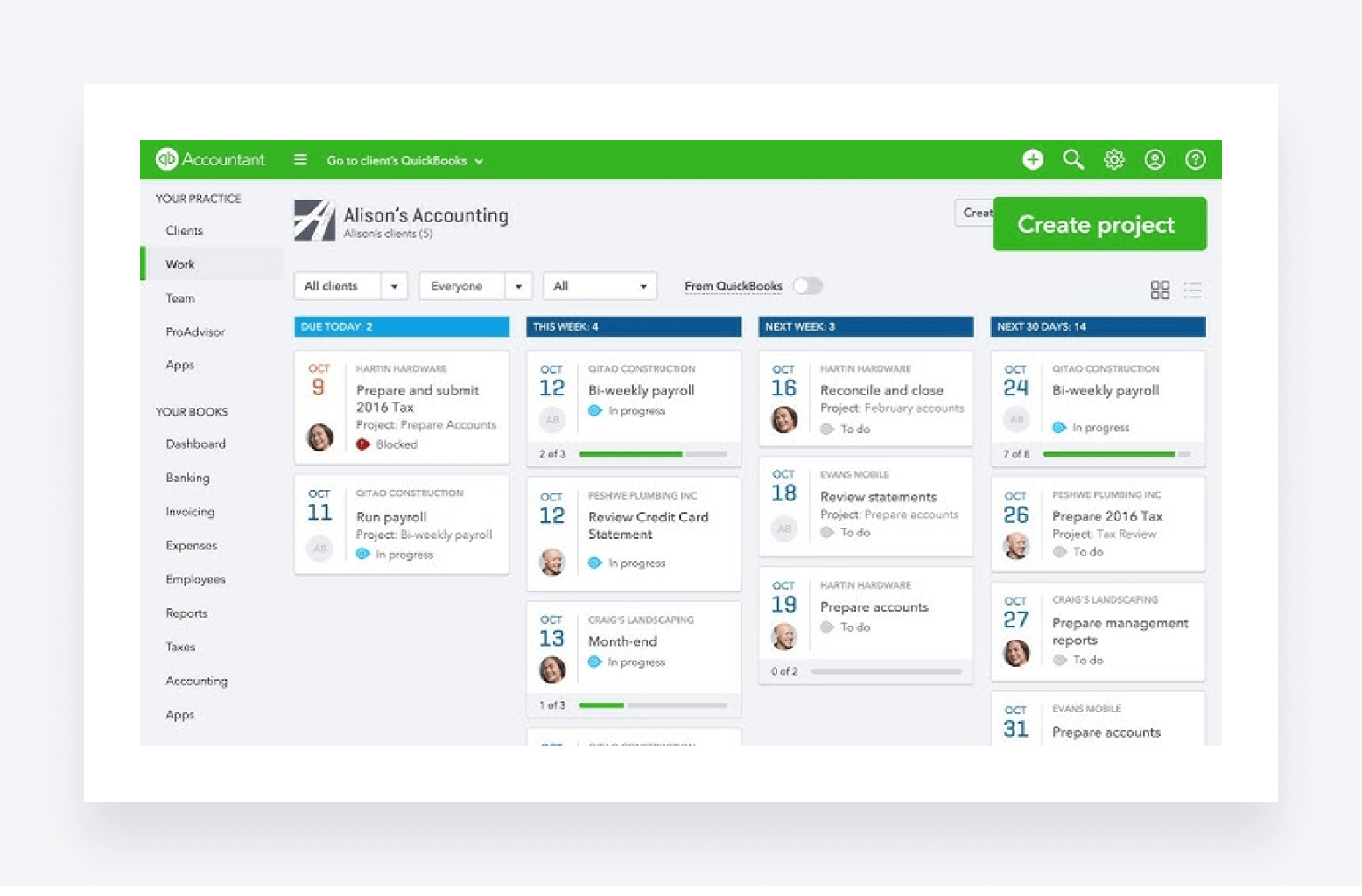
QuickBooks Online Accountant is the practice management offering from QuickBooks — the leading accounting software provider for small and medium-sized businesses. While Quickbooks has been a pioneer in the accounting tech industry since 2001, its practice management platform wasn’t launched globally until 2023.
QuickBooks Online Accountant key features
QuickBooks Online Accountant offers an interesting set of tools for running and growing an accounting firm.
You can manage your clients’ books using QuickBooks Online (the accounting software) while using QuickBooks Online Accountant (the practice management software) to manage client relationships, team collaboration, project management, and more. Here are its key features:
- Client management. Access a secure dashboard for sharing documents, messaging clients, and storing client data. Jump between your clients’ QBO accounts without having to log in and out.
- Project management. Create, assign, and track projects. Speed up project creation with templates. Auto-send notifications to keep staff on track.
- Accountant Toolbox. Access a suite of tools and reports inside QuickBooks Online, including bulk processes, charts of accounts, and bank feeds.
- Seamless QBO integration. As you’d expect, QuickBooks Online Accountant works seamlessly with its close relative, QBO — although it’s not compatible with the desktop version of QuickBooks.
In addition to these features, choosing QuickBooks Online Accountant enables you to unlock QuickBooks ProAdvisor resources. Once you are certified, you can list your firm for free and let clients find you.
What kind of accounting firms use QuickBooks Online Accountant?
QuickBooks Online Accountant is used by small and medium-sized accounting firms looking to expand their client base and market themselves as a QuickBooks ProAdvisor — i.e. a certified QBO expert. It’s essentially an extension of the popular QuickBooks Online accounting software, so its users tend to already be part of the QBO ecosystem.
QuickBooks Online Accountant pros and cons
| 👍 Pros | 👎 Cons |
| Seamless integration with QBO | Only a viable choice if your clients use QBO |
| The opportunity to get listed on the ProAdvisor directory | Limited CRM |
| Access to live training and education materials | Limited automation capabilities |
| Secure platform for client interactions | Some users have issues with support |
QuickBooks Online Accountant pricing
It’s free to sign up for QuickBooks Online Accountant. You only pay when you add clients. You can either bill your clients directly for the cost of the subscription, or you can purchase subscriptions wholesale at a significant discount and sell them to your clients.
QuickBooks Online Accountant user ratings
- G2: 4.4 out of 5 from 80+ reviews
- Capterra: 4.5 out of 5 from 40+ reviews
QuickBooks Online Accountant customer reviews
Because QuickBooks Online Accountant is a relatively new platform, there aren’t enough online reviews to get a real sense of what users love and what they struggle with. Overall, however, reviews are positive. As this user explains, the ability to switch between different clients’ QBO accounts without constantly logging in and out is a major perk:
On the flip side, some users claim that the platform isn’t the easiest to use. There are also some issues with customer support, as this reviewer explains:
QuickBooks Online Accountant or Jetpack Workflow?
These two platforms are quite different, making a direct comparison quite tricky. Jetpack Workflow is a somewhat limited but effective tool for workflow and task management. QuickBooks Online Accountant is almost an extension of QuickBooks Online accounting software. If you and your clients already use QBO, it’s likely the better option. That said, neither platform offers more advanced practice management features.
Who should use QuickBooks Online Accountant?
QuickBooks Online Accountant can work for accountants whose clients all use QuickBooks Online as their accounting software.
6. Pixie
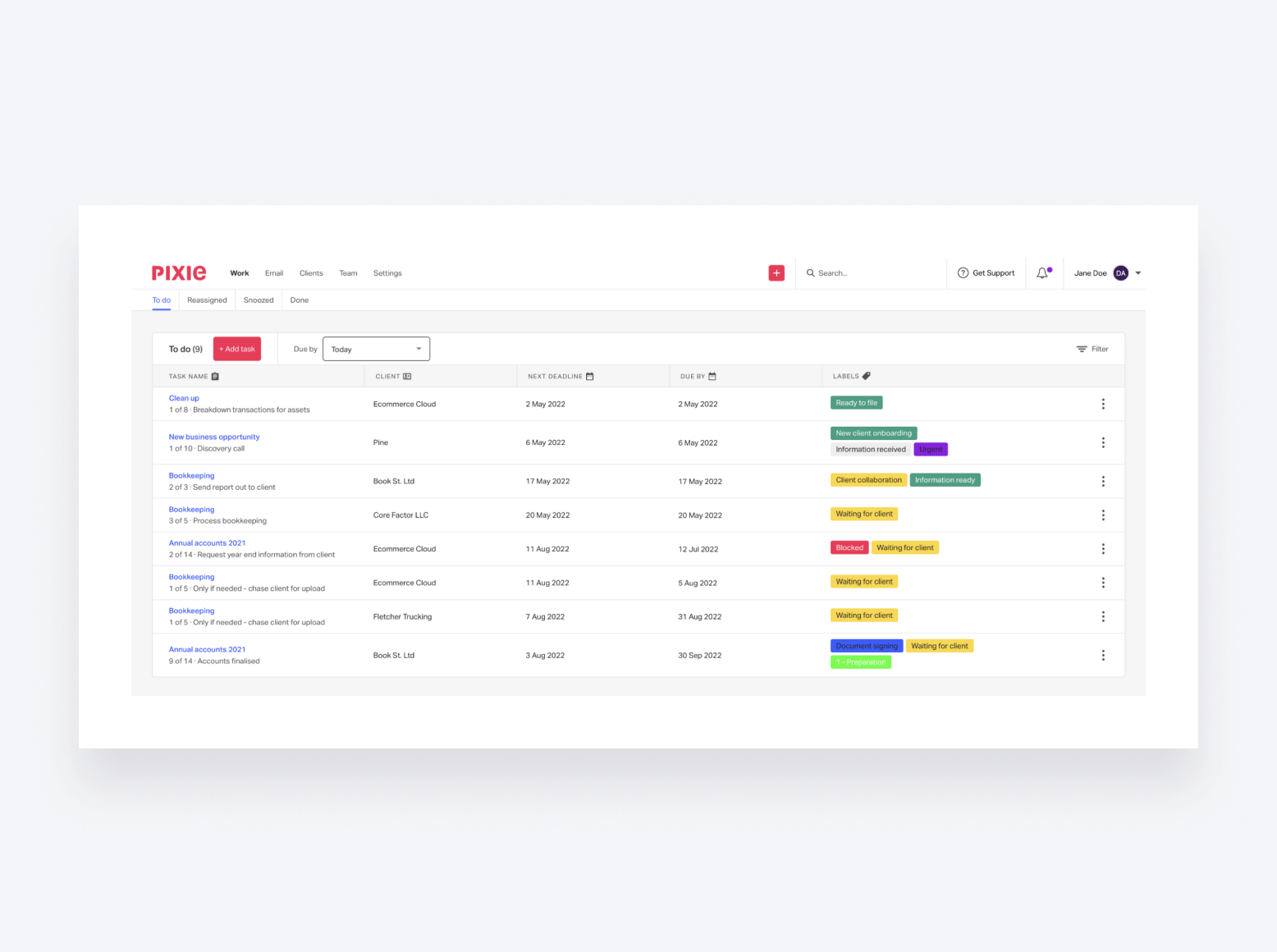
Pixie is a relative newcomer to the practice management scene. It takes a user-friendly approach, providing small accounting firms with the tools they need to build more efficient workflows.
Pixie key features
Pixie takes a lean approach to practice management. You get most of the essential features you need to run a modern accounting firm, but there are some major omissions when it comes to more advanced capabilities.
For example, Pixie doesn’t have the tools to track time, send invoices, or receive payments. Its automation capabilities are also rather basic.
Here’s what Pixie offers:
- Accounting CRM. A single source of truth for all your client data, files, and communications.
- Team and task management. Internal notifications, simple reporting, to-do lists, task templates, and email integration.
- Workflow management. Automate recurring tasks, build custom workflows, and add internal deadlines to stages.
- Client management. Automate client onboarding, send auto-reminders, and create and assign client tasks via a secure client portal.
- Document management. Securely manage, request, and store documents. Add e-signature requests to your workflows.
What kind of accounting firms use Pixie?
Pixie is well suited to smaller firms looking to scale. Its lean approach to practice management makes it well suited to firms looking for a relatively simple but effective solution, without the need for more advanced features.
Pixie pros and cons
| 👍 Pros | 👎 Cons |
| Client portal | Very limited automation capabilities |
| Simple, attractive user interface | No mobile apps |
| Intuitive and easy to use | No time tracking, invoicing, or payments |
| Easy to set up and decent support | Client-based pricing structure won’t suit new firms |
Pixie pricing
Pixie takes a different approach to pricing than the other platforms on this list. Instead of offering a range of plans with differing capabilities, Pixie users have access to all of its features no matter what. The amount that you pay depends on the number of clients you have, with the following rates:
- Under 250 clients: from $1,548/year (≈$129/month)
- 251-500 clients: from $2,388/year (≈$199/month)
- 501-1,000 clients: from $3,948/year (≈$329/month)
- Over 1,000 clients: custom pricing
So, what does this mean? First of all, you can add as many users as you want. Your team growing won’t impact costs. Instead, you’ll eventually pay more as your client base grows. This pricing structure might work for some but not others. For example, if you’re a new solo firm with a handful of clients, you’ll be paying over the odds for a relatively limited platform.
Pixie user ratings
- G2: 4.8 out of 5 from 11 reviews
- Capterra: 4.8 out of 5 from 32 reviews
Pixie customer reviews
Pixie only has a handful of reviews to choose from, but it’s clear from the limited information that it’s a highly user-friendly platform that simplifies basic accounting workflows. Here’s a recent review highlighting Pixie’s email integration, workflow management, and templates:
While most of the reviews are positive, it’s clear that Pixie’s greatest strength — i.e. its user-friendly simplicity — is also its main drawback, as this review explains:
Pixie or Jetpack Workflow?
Overall, Pixie is the more well-rounded platform — although both options lack key features. If you’re looking for a relatively simple solution for managing internal workflows and client interactions, Pixie is the better choice. Jetpack Workflow is a decent tool for managing tasks, but its lack of a client portal will be a dealbreaker for many firms.
You’ll also need to carefully consider Pixie’s pricing structure. Depending on the size of your team and client base, you might end up paying significantly more (or less) than for a competitor platform.
Who should use Pixie?
Pixie is best for small accounting teams that want a simple practice management system for managing relatively small client volumes — just make sure you run the numbers on its pricing.
7. Xero Practice Manager
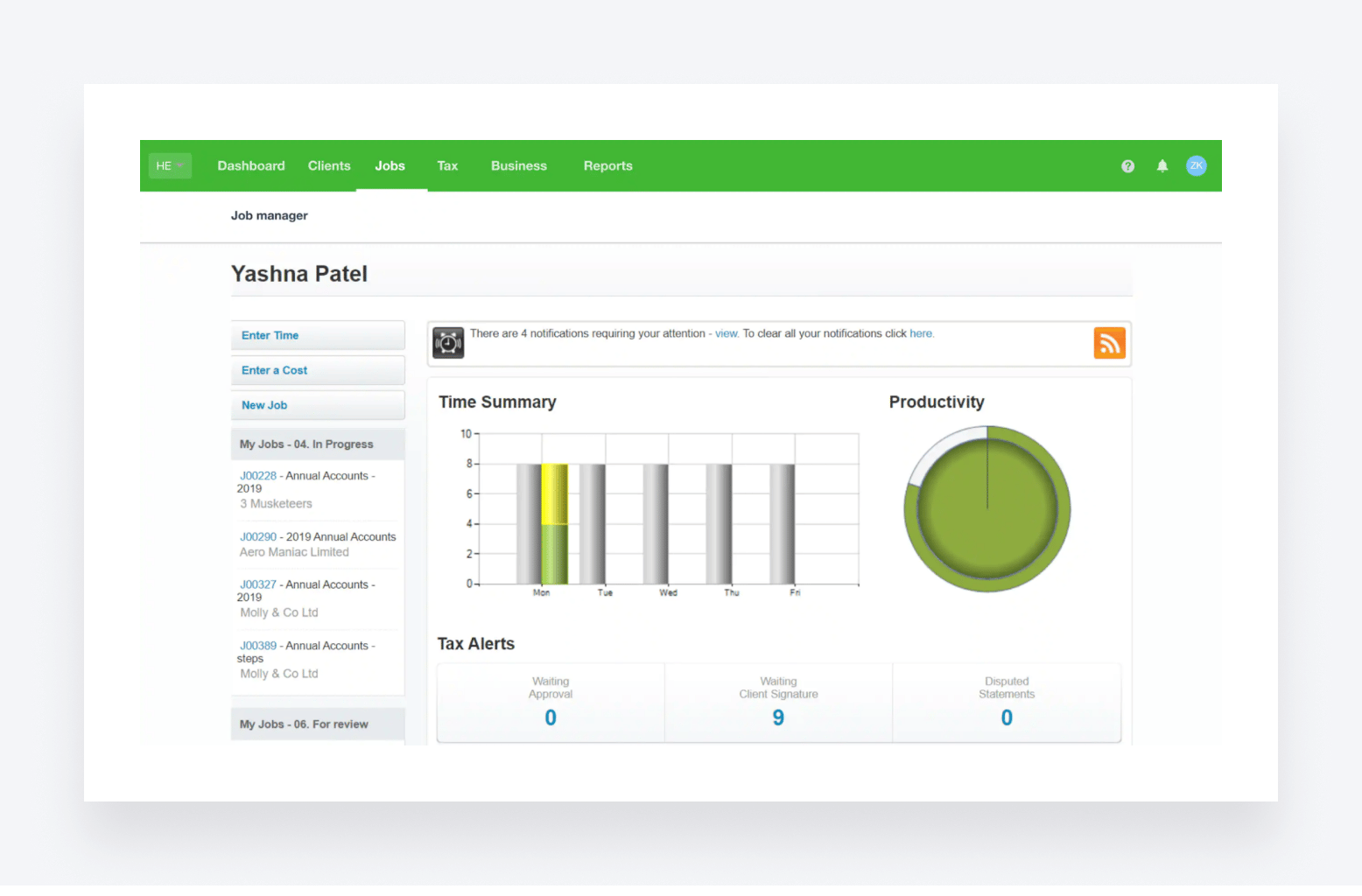
As the name suggests, Xero Practice Manager is the practice management offering from popular small-business accounting software provider Xero. Launched in 2014, it offers deep integration with Xero accounting software.
Xero Practice Manager key features
Xero Practice Manager offers a range of tools designed to streamline and simplify accounting practices. Here are some of its key features:
- Team and task management. Assign work, set deadlines, and track progress.
- Time and billing. Track time and convert the data into professional invoices.
- Custom reporting. Generate reports on clients, productivity, time and billing, and more.
- Xero integration. Connect with Xero accounting software to sync client data, invoices, payments, and more.
Like QuickBooks Online Accountant, Xero Practice Manager is almost like an extension of its related accounting software. As a result, its feature set tends to focus more on practical day-to-day functions such as tracking time and getting paid. There’s less focus on productivity and scalability, however, with limited workflow automation capabilities.
What kind of accounting firms use Xero Practice Manager?
As you’d expect, Xero Practice Manager tends to be used by firms that already use Xero’s accounting software. These tend to be smaller accounting and bookkeeping firms. That said, Xero users aren’t limited to a single choice, and in many cases, they may be better off with a third-party practice management platform that offers superior functionality.
Xero Practice Manager pros and cons
| 👍 Pros | 👎 Cons |
| Seamless integration with Xero accounting software | No real reason to use it if you don’t already use Xero |
| Like Xero — easy to use | Issues connecting with certain banks |
| Several performance issues and bugs | |
| Dashboard looks a bit dated |
Xero Practice Manager pricing
Unfortunately, we couldn’t find any information about Xero Practice Manager’s pricing. The Xero website provides pricing plans for its accounting software, but not its practice management software.
Xero Practice Manager user ratings
- G2: 4.5 out of 5 from 40+ reviews
- Capterra: no reviews for Xero Practice Manager
Xero Practice Manager customer reviews
Xero Practice Manager is widely considered easy to use and effective at managing accounting clients, as this review explains:
That said, users have reported several bugs and performance issues that let the platform down. This is from the same reviewer:
Xero Practice Manager or Jetpack Workflow?
If you already use Xero’s accounting software, Xero Practice Manager offers seamless integration. But it’s by no means a complete practice management platform. Small firms that are looking for a way to improve internal processes and task management may prefer Jetpack Workflow’s simplicity.
Who should use Xero Practice Manager?
Xero Practice Manager can work for accountants whose clients all use Xero as their accounting software, provided you can deal with its feature limitations.
Jetpack Workflow: the bottom line
Jetpack Workflow provides a simple workflow management tool for sole accountants and small accounting teams. If you don’t want a full practice management system, Jetpack Workflow offers a simpler alternative for organizing client work.
This comes with limitations, though. Workflow management mostly revolves around task lists and, aside from creating recurring tasks, you’re not getting any serious automation features.
In addition to a lack of advanced automation features, Jetpack Workflow offers very little in the way of client-facing tools. This makes it impossible to offer the sort of slick, digital experiences that modern clients expect. There are also concerns about its cost-effectiveness, outdated user interface, and lack of native integrations.
If you need more than basic workflow management, you’ll have to look at alternatives such as Karbon, Financial Cents, and TaxDome.
Each Jetpack Workflow alternative we’ve looked at today has its strengths, but TaxDome is the most complete practice management platform on the market. Rated #1 on G2 and trusted by 10,000+ firms across 25+ countries, TaxDome is the only platform that gives you everything Jetpack Workflow lacks and everything your firm needs to scale without stitching together multiple tools. If you want one solution for managing your firm, client experiences, and revenue operations, then TaxDome is the only realistic option.
To see how TaxDome can transform your internal workflows while providing an incredible client experience, request a demo today.
FAQ
Q: What is the best alternative to Jetpack Workflow for accounting firms?
A: TaxDome is the best Jetpack Workflow alternative for accounting firms in 2026. It is rated #1 on G2 and includes everything Jetpack Workflow lacks workflow automation with triggers and dependencies, a client portal with mobile app, document management, e-signatures, billing and payments, and CRM all in one flat-rate platform starting from $58/month per user.
Q: Why do accounting firms switch from Jetpack Workflow?
A: Accounting firms typically switch from Jetpack Workflow because it lacks a client portal, has no native e-signatures or document management, relies on Zapier for most integrations, has no invoicing or billing capabilities, and offers only basic workflow automation without triggers or dependencies. As firms grow, these gaps require purchasing multiple additional tools, making Jetpack Workflow more expensive than it first appears.
Q: Is TaxDome better than Jetpack Workflow?
A: Yes. TaxDome includes all the workflow management features Jetpack Workflow offers, plus a client portal with a top-rated mobile app, document management with unlimited storage, legally compliant e-signatures including KBA, billing and payments, CRM, and AI-powered reporting all in one platform. TaxDome starts at $58/month per user and replaces the multiple additional tools that Jetpack Workflow requires you to purchase separately.
Q: What does Jetpack Workflow lack compared to full practice management software?
A: Jetpack Workflow lacks a client portal, native e-signatures, document management, billing and invoicing, advanced workflow automation with triggers and dependencies, AI-powered reporting, and mobile apps for staff or clients. Firms needing any of these features must purchase separate tools alongside Jetpack Workflow, creating a fragmented and expensive tech stack.
Q: Is Karbon better than Jetpack Workflow?
A: Karbon is more capable than Jetpack Workflow for internal team collaboration and workflow management. However, Karbon lacks a client mobile app, has no native proposals on cheaper plans, and charges extra for hands-on support. TaxDome offers a more complete solution than both covering internal processes and client-facing features in one platform.

Nicholas produces TaxDome content focused on how technology improves accounting workflows and everyday firm operations.

Get your free guide

Thank you!
The guide copy has been sent to your email. Please check your inbox!
Recommended articles
9 best QuickBooks alternatives in 2026 for every business type

65+ key accounting statistics and insights for 2026

How to start an accounting firm: a step-by-step guide to running your own practice