 US – English
 UK – English
 Canada – English
 Australia – English
 Danmark – Dansk
 DACH - Deutsch
 France – Français
 España – Español
 Sverige – Svenska
 Italia – Italiano
 Nederland – Nederlands
 Portugal – Português
 Suomi – Suomi
 Norge – Norsk
 日本 – 日本語
 Romanian – Română












How to automate bookkeeping: a practical guide for small businesses and accountants

Run your entire firm on one platform
Key takeaways:
- Automated bookkeeping runs the most repetitive and time-consuming tasks on autopilot.
- Automated workflows save time, improve accuracy, and increase the quality of bookkeeping services.
- 1 in 5 clients say they’re willing to pay up to 50% more for a faster service.
- Firms and bookkeeping professionals should automate the client experience — not only internal processes.
Bookkeeping is an exercise in precision, but detail and accuracy take time to achieve. Every transaction must be recorded correctly, every receipt accounted for, and every balance verified before the month can close.
Doing all of this manually is both slow and prone to mistakes. Automated bookkeeping removes the manual workload from your most repetitive and time-consuming tasks. It speeds up turnarounds, reduces the risk of errors, and improves the quality of your bookkeeping services.
Table of сontents
What is automated bookkeeping?
Automated bookkeeping reduces the workload of time-consuming tasks such as data entry, transaction reviews, and account balancing. Instead of doing everything manually, bookkeepers use software to perform certain tasks automatically. This reduces turnaround times, improves accuracy, and frees up resources for bigger priorities.
Imagine a bookkeeping platform that automatically imports client transactions from their general ledger. You forget about manually transferring this data and start the review process right away. Many tools even flag missing or uncategorized transactions so you can resolve them faster.
Automation doesn’t remove the need for reviews, but it runs routine tasks in the background so bookkeepers can deliver value from day one.
The benefits of bookkeeping automation
Automated bookkeeping allows you to prioritize the activities that matter most, instead of the ones that take up most of your time. It performs routine tasks on autopilot, so you can focus on resolving issues and delivering consistent quality.
The more workflows you automate, the more impactful the benefits become:
- Reduce manual workloads: automate routine tasks that take up most of your time
- Increase accuracy: eliminate human error from repetitive workflows
- Resolve issues faster: identify issues in client books and resolve them faster
- Boost efficiency: manage more clients and higher workloads
- Improve client satisfaction: deliver faster, more convenient services
- Increase profitability: focus your time on activities that generate revenue
Ultimately, automation frees up time and attention to concentrate on the most impactful tasks. It helps you clean up financial information faster, improve accuracy, and meet tighter deadlines.
Internally, you complete a higher volume of work without putting in extra hours. Profit margins rise, client satisfaction soars, and the elevated quality of services attracts a more lucrative category of clientele.
According to TaxDome’s Client Satisfaction Report, 1 in 5 clients are willing to pay 50% more for a faster service and 77% of satisfied clients cite their accountant’s innovative use of technology.
Key tools and technologies for automated bookkeeping
Businesses and bookkeeping professionals use a mix of the following tools to automate workflows.
Cloud accounting software
For most businesses, accounting tools such as QuickBooks Online and Xero are the foundation of automated bookkeeping. They help internal finance teams manage company books and collaborate with external bookkeepers.
Bookkeeping workflow and pipeline automation
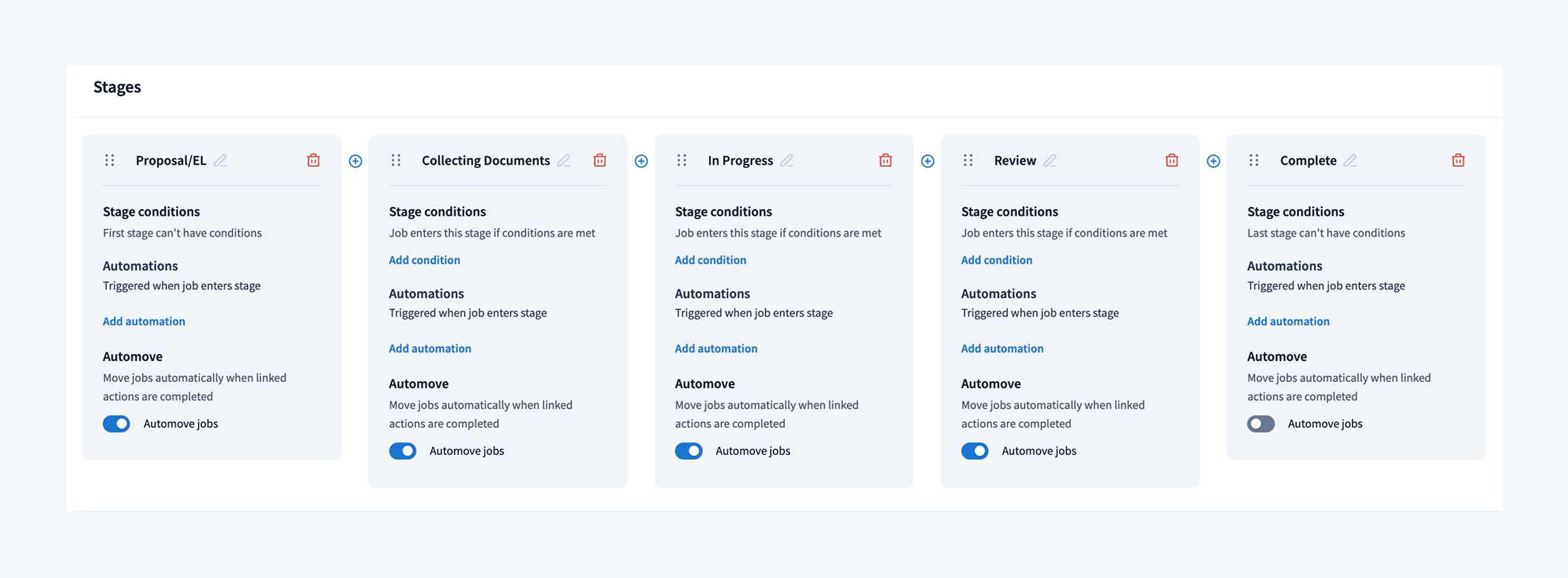
Bookkeeping involves a lot of repeatable processes: document collection, data reviews, client follow-ups, monthly closes, and more. These are ideal for automation, but you need a system capable of automating complete bookkeeping pipelines — from proposals and engagements to recurring services and payments.
Bank feeds and transaction synchronization
Direct connections to bank accounts and payment processors eliminate the need to download and upload statements manually. Transactions automatically flow into the books, speeding up the review process while improving accuracy.
Automatic categorization and transaction reviews
Many accounting tools automatically capture and categorize transactions from accounts and statements. We’ve taken this a step further with our new Bookkeeping Hub, which connects with your clients’ general ledger to give you complete visibility.
If you notice any missing or uncategorized transactions, you can send requests to clients through their portal and mobile app. We’re also introducing new quality control measures to further enhance automated bookkeeping without compromising accuracy.
Mobile receipt and document scanning
Optical character recognition (OCR) converts physical text documents into digital files. We’ve implemented this into the TaxDome client mobile app, allowing clients to securely scan and upload documents with their phone. This includes receipts, statements, and any other documents you need throughout the bookkeeping process.
Intelligent document management
Manually verifying, renaming, and organizing client documents is one of the biggest inefficiencies of digital bookkeeping. This is why we’ve launched a new AI-powered system that automatically analyzes, renames, and tags client docs.
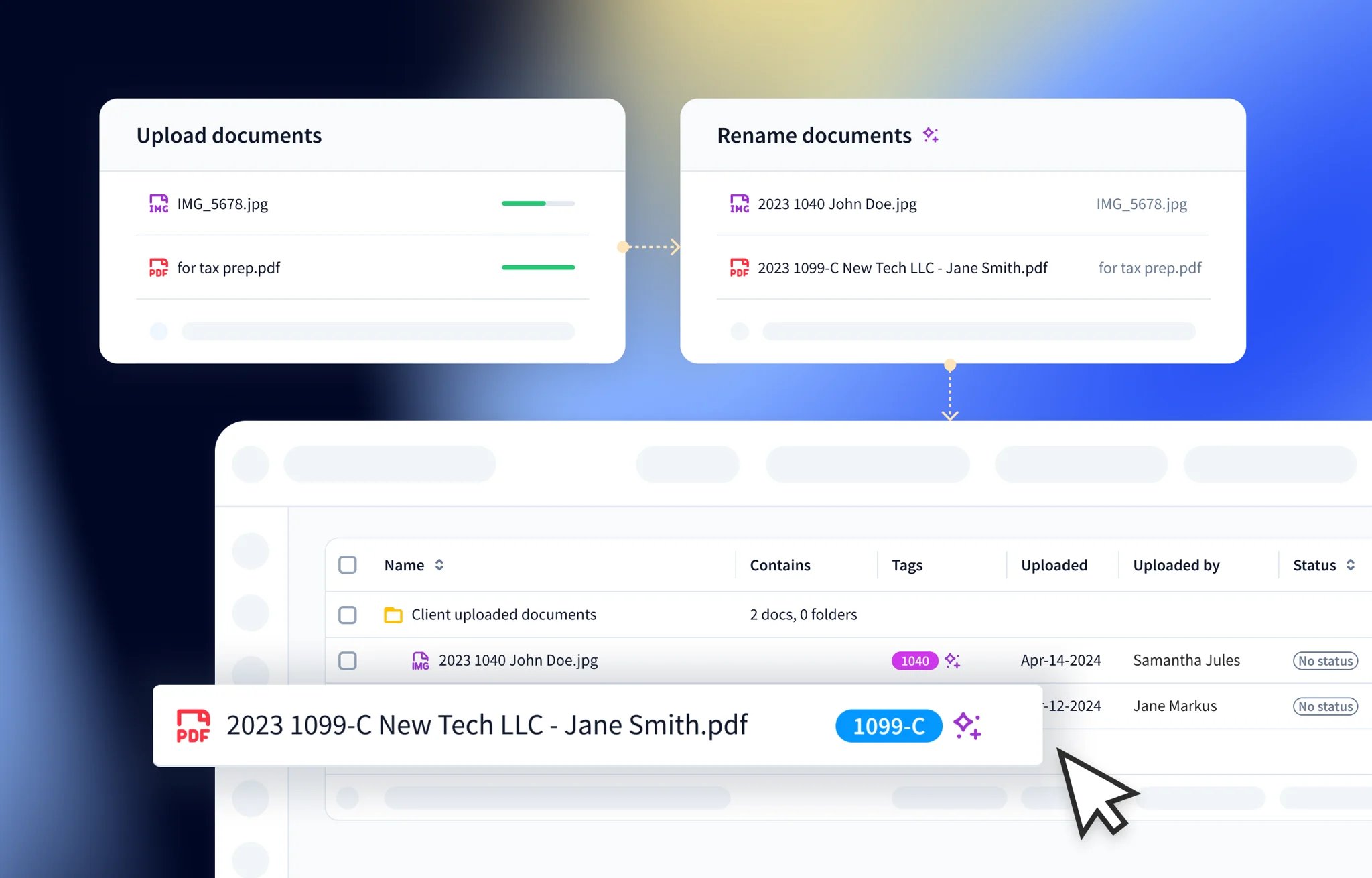
TaxDome AI has already organized over two million documents, saving accountants 16,000+ hours in the testing phase. We’re only just getting started, and you can join the waitlist to incorporate our most innovative AI features into the client experience.
Step-by-step guide to automating bookkeeping workflows
Wherever you’re currently at with automated bookkeeping, you can free up time and resources by scaling up your strategy in the following steps.
Analyze your current workflows
First, analyze your existing workflows to understand where time is spent and where bottlenecks appear.
- Analyze the amount of time you spend on every bookkeeping task
- Identify the repetitive, manual tasks you spend the most time doing
- Assess how information currently moves between systems and people
- Identify the most error-prone tasks in your workflows
- Flag all of the delays that hold up progress: document request, missing data, waiting for replies, etc.
- Separate tasks that require judgment from those that don’t
Now, determine which workflows impact quality and productivity the most. These are the top contenders for automation.
Automate data management
For most firms, manual data entry is the first bookkeeping process to automate. Not only are you saving time and reducing errors, but this is also one of the easiest processes to automate.
- Connect bank feeds, credit cards, and payment processors
- Sync accounting and bookkeeping tools with general ledgers
- Automate data imports and transaction matching
- Set up rules to detect duplicates or unusual activity
- Implement automatic statement fetching where possible
Finally, set up your workflows for manual data reviews. Use automated bookkeeping to reach the review stage faster, but don’t rely on it for 100% accuracy.
Automate recurring workflows
Bookkeeping is an ongoing process, filled with recurring workflows and services. So, it pays to automate as many of these as reasonably possible. This shortens turnaround times and allows you to manage a higher volume of work.
- Build templates for checklists, organizers, and routine tasks
- Automate recurring services, such as month-end close routines
- Set up categorization rules for common vendors and transactions
- Automate recurring invoices and payments
Automating recurring workflows and services drives the biggest time savings for most of our customers.
Automate client interactions
Inefficient communication can bring your bookkeeping services to a standstill. Luckily, you can eliminate most of these delays with automated bookkeeping tools.
- Centralize all communication into one platform
- Standardize request lists for documents and information
- Automate reminders for missing items or overdue tasks
- Set up approval workflows for bills or adjustments
- Support mobile document scanning and uploads
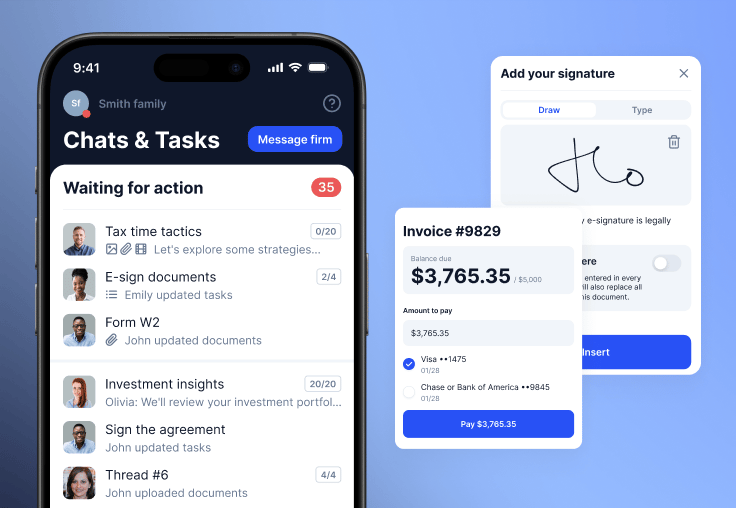
Client interactions should run as seamlessly as internal processes. This is why we built the top-rated client mobile app for accounting firms and bookkeeping professionals. Integrated with your branded client portal, all client communication happens in one connected platform.
Automate reporting and analysis
Automated reporting offers real-time insights on the financial health of a business. You can help clients make smarter business decisions and identify emerging trends.
- Set up automated cash flow tracking and forecasts
- Use dashboards to monitor financial trends in real time
- Automate the delivery of monthly reports
With demand for strategic advisory services rising , clients value insights from their accountants and bookkeepers.
Automate every stage of bookkeeping with TaxDome
Automation tools are everywhere now. Whatever bookkeeping workflow you want to automate, there are dozens of tools ready to do the job. The problem is, implementing separate tools for specific processes doesn’t simplify workflows. It complicates them.
You swap data entry for switching between apps and fixing broken workflows. In practice, you don’t save any time, and the spiralling software fees eat away at any profit gains.
Clients feel the impact of disjointed tools, too. 86% of clients tell us they want one platform for all interactions with their accounting firm .
The leading firms are reducing the size of their tech stacks. They want real productivity gains from using fewer, more powerful software tools. This is what brings them to TaxDome, the complete practice management system that provides everything you need for automated bookkeeping in one platform.

Aaron produces practical content for TaxDome, drawing on 11 years in SaaS copywriting and marketing. He helps accounting and tax professionals get the most from TaxDome and other tools, making complex topics clear and actionable.

Get your free guide

Thank you!
The guide copy has been sent to your email. Please check your inbox!
Recommended articles
Niche Business Accounting Report statistics: what business clients will pay for specialized expertise

Buy Now, Pay Later: offer clients payment flexibility
Top AI tools for accountants in 2026: key features and use cases compared