 US – English
 UK – English
 Canada – English
 Australia – English
 Danmark – Dansk
 DACH - Deutsch
 France – Français
 España – Español
 Sverige – Svenska
 Italia – Italiano
 Nederland – Nederlands
 Portugal – Português
 Suomi – Suomi
 Norge – Norsk
 日本 – 日本語
 Romanian – Română












Workflow Automation Update: Moving Jobs Between Pipelines

Run your entire firm on one platform

Robust TaxDome automations now allow you to keep context inside Jobs through different client lifecycles. We’re introducing the ability to move Jobs between pipelines that serve this exact purpose.
Jobs allow you to keep important information about a project together. It becomes even more important when different employees work on leads, new clients, returning clients, etc.
But before we dive into it, we recommend watching our webinar on how to set up a robust 1040 pipeline to set your work on autopilot this tax season.
Table of сontents
How to make use of moving Jobs between pipelines
Leads & clients
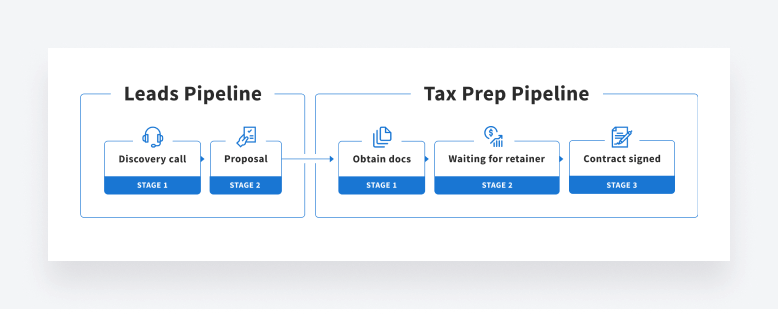
Imagine you have different processes to manage leads, clients and past clients. Your lead generation process includes discovery call and proposal. When leads become clients, you can move their job from one process (pipeline) to another with just one click keeping all the context in place — proposals, notes, messages, time entries, etc.
Extensions
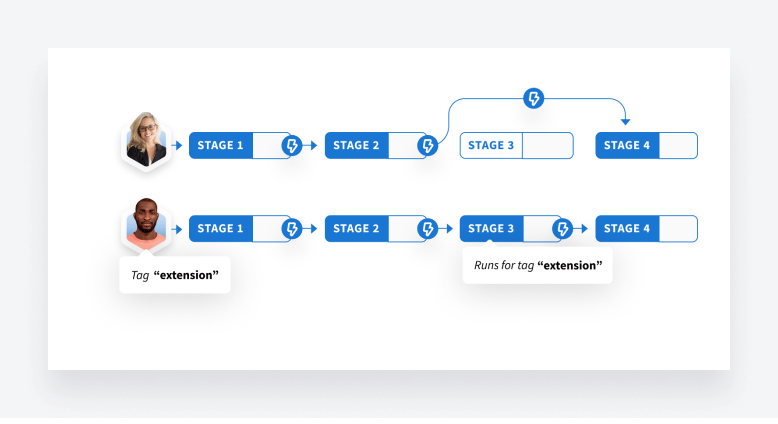
Recently, we released conditional stages allowing you to create specific stages in your pipeline that only certain Jobs will pass through. For example, to have a dedicated stage for clients who need extensions.
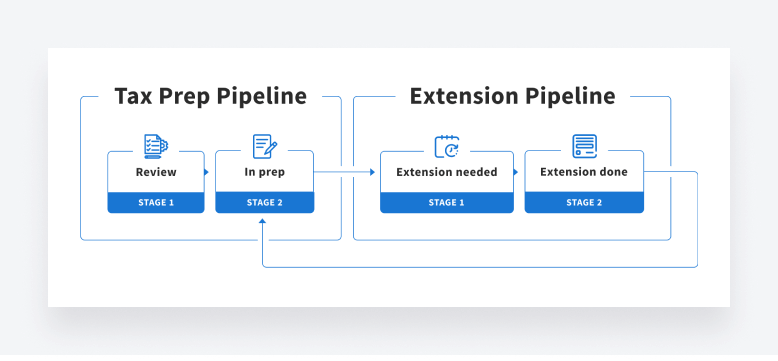
Alternatively, others may prefer to keep clients pending extension out of the general view of their workflow. In this scenario, you can move Jobs for those who need extensions from one pipeline to another and then back into your regular workflow when the extension is complete. Both methods serve different needs and provide each firm with the flexibility they desire.
Method 1: Conditional stage
Method 2: Move Job between pipelines
How to move Jobs between pipelines
With this release, you can move Jobs between pipelines manually. As with other items across TaxDome, you can do it in two ways: individually or in bulk. In future releases we plan to add automation to this operation, as well.
When you move a Job, you’ll be asked to which stage you want to move the Job and just like moving a job within the same pipeline, if there are any automations present in the new stage you will be able to review them.
More about moving Jobs between pipelines.
What’s next
Currently we’re working on interface improvements so that you can create and fine-tune your pipeline stages and automations more easily.
Additionally, we are analyzing client-specific workflows. We realize that tags work great for groups of clients, but many of you need automations and schedules set up for specific clients. In future releases, you will have the ability to create specific automations and job schedules just for one client. E.g. ability to set different job template, different recurrence schedule for each account in one pipeline.
As usual, fire off your ideas in our Feature Request Board!

Maria is a Marketer at TaxDome. Having been working in both custom software and product development, she knows what clients care about and how to help businesses succeed. Enjoys all sorts of writing. When not writing, she's looking for a new hypothesis to test.

Get your free guide

Thank you!
The guide copy has been sent to your email. Please check your inbox!
Recommended articles
TaxDome AI: more than 2,000,000 documents organized for accountants this past tax season—and we’re just getting started

Webinar recap and Q&A: Summer Update 2026

Unpacking the differences between TaxDome Payments and Stripe