 US – English
 UK – English
 Canada – English
 Australia – English
 Danmark – Dansk
 DACH - Deutsch
 France – Français
 España – Español
 Sverige – Svenska
 Italia – Italiano
 Nederland – Nederlands
 Portugal – Português
 Suomi – Suomi
 Norge – Norsk
 日本 – 日本語
 Romanian – Română












Tax workflow automation: the beginner’s guide for tax professionals

Run your entire firm on one platform

As a tax professional, one of the biggest challenges for your practice is trying to keep up with everything as you handle more clients and admin tasks. Trying to manage your accounting & tax practice manually can be overwhelming.
There’s a better way to do it!
Meet Brian Newman of Brian Newman CPA. He always had a small practice and was able to manage everything on his own. But as his practice was growing and things were getting busier and busier, Brian realized he needed a tool to better manage clients and administrative tasks.
Searching through Facebook groups where tax professionals share tips, Brian found out about TaxDome. His peers spoke highly of it, so Brian decided to give it a try.
Client portal, CRM, e-signatures, and other things that TaxDome provides seemed easy. But not tax workflow automation. Workflow is not something that many practitioners think about before they have to describe it either to onboard new team members or to set it done automatically.
Table of сontents
What’s a tax workflow and why do you need one?
The tax workflow is a written process of all actions you do: from the time that a client becomes a lead and then is onboarded into your practice, through the entire tax preparation service that you offer all the way through that last touchpoint with your client to off-board them.
Let’s have a look at it from a perspective of how a car is made. You have to create the mold and put the frame together before you can put on the tires and the doors and all that other stuff. The same is applicable to tax preparation process: you can’t prepare a return before the client signs a contract and sends you their documents.
Every service requires different steps to accomplish: individual tax return is different from business tax return or sales tax return. When you have these steps written down, you make it easier for your firm to scale. You can create tax preparation processes tailored to your firm’s needs by relying on TaxDome’s workflows.
When you use software like TaxDome, it helps to fully automate administrative tasks for you. So instead of you having to track whether a client signed a contract, TaxDome reminds them to sign and sends them a tax organizer once they’re done.
To make this magic happen, you need to thoroughly describe how the process must work. Every practice is unique, and you know your business better than anyone, so no one else can do this job for you.
If you find yourself in Brian’s shoes, not knowing where to start, we suggest starting with our simple beginner’s checklist.
Watch the full video of how tax professionals automate their work with workflow examples. We talked to TaxDome users: Brian Newman of Brian Newman CPA and Jessica Smith of Tax Savvy Jessica. Jessica had more experience with workflow systems, whereas Brian knew he needed to work on his workflow process but had not yet done so. Brian was skittish at first, but after talking to Jessica, it all started to make sense, and Brian was able to see the huge benefits TaxDome would bring to his practice.
Want to tinker with our workflow but not sure where to start? Our Workflow course will help you fine-tune internal processes to your liking.
How to automate the tax preparation workflow?
The pipelines may be a bit confusing at first, but once you get into breaking down your process on how you want to start automating your job from beginning to end, it all will make more sense for you to start.
Think of a broad picture of what your normal workflow looks like and note down every task that you do. Use an Excel spreadsheet and then organize it to indicate the tasks you need to do systematically.
Start at the very end result and work your way backward. Imagine you were going to prepare a workflow where the end result was that you sent a thank you message to a client, and they got their final tax documents. What did you have to do before that occurred in order for you to do that? This approach ensures you don’t miss a key task in your workflow.For example, when providing bookkeeping services, you go through several stages: collecting invoices, entering data into the accounting software, reconciling accounts and generating reports. When doing payroll, you’ll first need to get the employee timesheets, prepare the payroll, obtain confirmation, process the payroll and finally upload all the necessary documents.
A tax preparation workflow would be different yet again. Let’s take a look at the most common steps it would entail.
Basic steps of a tax preparation workflow
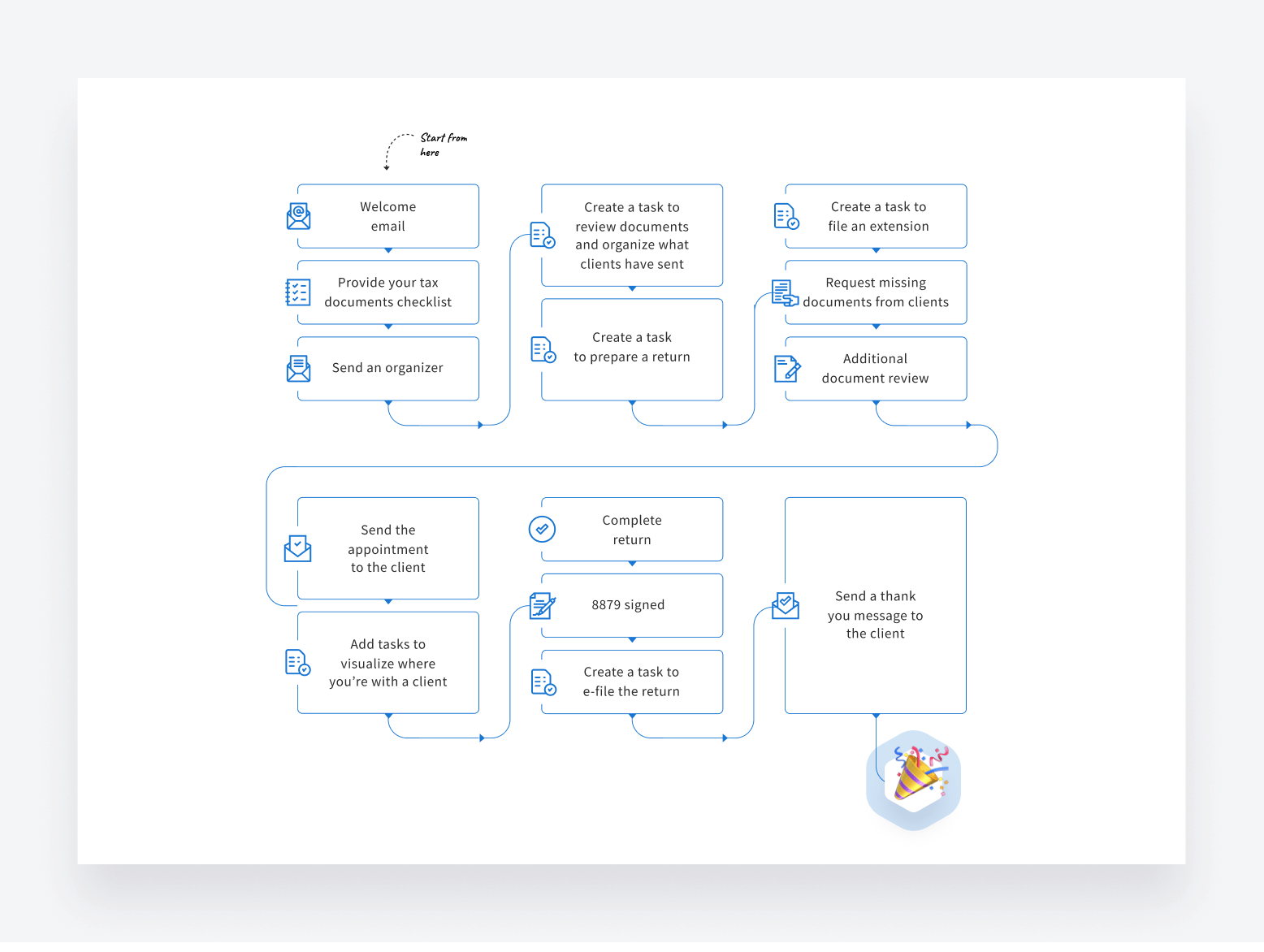
- Welcome email – When clients express interest in your services, they get a welcome email. We suggest you create a template for that.
- Provide your tax documents checklist – Ask clients to give you access to certain things. You can use message templates with tasks assigned to clients so that they can mark things off when everything is provided.
- Send an organizer – If you send organizers through TaxDome, your clients get a friendly push-notification saying, “Hey, I’ve sent this to you. Please do this.”
- Create a task to review documents and organize what clients have sent – You can assign it to yourself or any member of your team.
- Create a task to prepare a return – Again, it can be assigned to you if you’re a solopreneur, or to someone from your team.
- Create a task to file an extension
- Request missing documents from clients – You can skip this one if needed or contact clients via email or message.
- Additional document review – You need this step if the previous step is required.
- Send the appointment to the client – Include this step if you want to walk clients through the documents they have sent you. You can send them an email or message with the link to the scheduler you’re using (Calendly, Google Calendar, ScheduleOnce, etc)
- Add tasks to visualize where you’re with a client – If you opted for the previous step, you may want to add another one — waiting for the client to get back to us for the appointment. When they react, their project will automatically move to the next step.
- Complete return – At this step, you can now upload documents for the client into TaxDome and lock it to bill. Clients will be notified, but won’t be able to download it until they pay you.
- 8879 signed – You can have clients sign documents right in TaxDome including 8879 that requires KBA.
- Create a task to e-file the return
- Send a thank you message to the client
Getting rid of communication issues
We all have clients who feel you should have been in contact with them more. There’s so much that goes on behind the scenes. But the client just sends you information and is sitting in the dark.
With TaxDome, you can add different touch points as you’re working on a client. This allows you to add customized touchpoints to the client at each step of the way without you actually having to do anything. Your client is in the note, and you’re not getting these emails of: Hey, what’s going on? Where are we in the process? And you’re able to actually keep that personal touch.
Learn how to strategically incorporate touch points within your workflow, enhance client communication and resolve any misunderstandings with our Workflow course. To start off, send them a welcome email automatically. Or a bulk tax season kickoff email.
What to include into the client tax season kickoff email
- What changes in your practice/services this year
- What your office hours are
- How they can reach you (TaxDome allows them to send emails and messages securely)
- Will it be a deposit
- How you make sure their documents are secure (TaxDome covers all security aspects for you)
- How clients can access your client portal (If you don’t have any, check TaxDome’s mobile-friendly client portal)
Bottom line
Automation is not simply a trend — it's a necessity for modern tax practitioners — which becomes even clearer after taking our course. Tax professionals know how to prepare returns, but automation makes it very methodical and clear the steps that need to be taken to move it along. This also helps minimize your margin of error.
To get automation going, use our quick checklist:
- Prepare templates of messages, emails, contracts, and organizers — everything you send to clients repeatedly.
- Decide where to get your pipelines laid out. Write out every single bit of that for different scenarios. For instance, you might have a workflow that is unique to new and returning clients or create one for clients that you do representation work for and your tax preparation clients.
- Start to put all those pieces together.
Sign up for the TaxDome Academy and take our new workflow course to deepen your understanding of how tax workflow automations work. Our course equips you with actionable steps to seamlessly integrate workflow automation into your practice, to unlock unparalleled productivity.

Maria is a Marketer at TaxDome. Having been working in both custom software and product development, she knows what clients care about and how to help businesses succeed. Enjoys all sorts of writing. When not writing, she's looking for a new hypothesis to test.

Get your free guide

Thank you!
The guide copy has been sent to your email. Please check your inbox!
Recommended articles

9 best QuickBooks alternatives in 2026 for every business type
65+ key accounting statistics and insights for 2026

How to start an accounting firm: a step-by-step guide to running your own practice