 US – English
 UK – English
 Canada – English
 Australia – English
 Danmark – Dansk
 DACH - Deutsch
 France – Français
 España – Español
 Sverige – Svenska
 Italia – Italiano
 Nederland – Nederlands
 Portugal – Português
 Suomi – Suomi
 Norge – Norsk
 日本 – 日本語
 Romanian – Română












How to create a bookkeeping client intake form (with free template)

Run your entire firm on one platform

When you’re onboarding a new client, the first conversation sets the tone. But even the best kickoff call won’t capture everything your team needs to handle the work accurately from day one. That’s where a bookkeeping client intake form makes all the difference.
In this article, we’ll walk through what to include in your intake form, share best practices for building one, and provide a free template you can copy and customize for your firm.
Table of сontents
- What is a bookkeeping client intake form and when do you need it?
- Key benefits of using a client intake form
- What to include in bookkeeping client intake form
- Free bookkeeping client intake form template
- Simplify client intake with TaxDome organizers
- Best practices for designing your client intake form
- Final thoughts
Table of сontents
- What is a bookkeeping client intake form and when do you need it?
- Key benefits of using a client intake form
- What to include in bookkeeping client intake form
- Free bookkeeping client intake form template
- Simplify client intake with TaxDome organizers
- Best practices for designing your client intake form
- Final thoughts
What is a bookkeeping client intake form and when do you need it?
A client intake form for bookkeeping services is designed to collect key business and financial details from new clients. It helps your team set up the books correctly from the start, without chasing missing documents or clarifying basic information later.

When a new bookkeeping client comes on board, firms typically use intake forms during client onboarding, initial consultations, or when starting new service lines. Unlike an engagement letter, which covers legal terms and pricing, the intake form focuses on practical details: business structure, ownership, banking info, payroll, and current bookkeeping systems.
Key benefits of using a client intake form
A strong intake form does much more than collect information — it becomes a working system that improves every part of your client onboarding process and service delivery. Here’s where it brings the biggest gains:
1. Standardized data from every client: With the template in place, every new client submits the same core details in a consistent format, giving your team reliable information every time. This minimizes setup errors and gives you a clean foundation to build from, no matter who handles the account.
2. Faster onboarding, fewer delays: By collecting the full picture upfront, your team avoids the constant back-and-forth of follow-up emails and missing documents. Work starts sooner, and projects move forward without stalls caused by incomplete information.
3. Better client experience: Clients appreciate a single, organized process. Instead of answering the same questions across multiple emails or phone calls, they complete one clear intake, submit documents securely, and feel confident everything is covered.
4. Cleaner data that reduces downstream errors: Structured intake means you’re not working with fragmented or incomplete data. Accurate information from the start reduces corrections later and keeps your reports, filings, and reconciliations accurate as the work progresses.
5. Easier internal training and handoffs: As your firm grows, standardized templates simplify onboarding for your own staff too. New team members follow the same process, and nothing depends on one person’s memory or personal checklist.
What to include in bookkeeping client intake form
Every field you include here saves time later, reduces back-and-forth emails, and helps your team stay focused on the work that matters. Let’s break down the key sections every effective bookkeeping client intake form should include.
1. Client personal information
Bookkeeping client onboarding starts by confirming exactly who your main contact will be. This section gathers personal details like full name, job title, address, phone number, and email. Having clear contact information upfront ensures your team knows who to reach out to for questions, approvals, or document requests — helping you avoid delays and confusion once work begins.
2. Business information
The business section of your client onboarding questionnaire collects key company details that help your team properly set up the account and prepare for service delivery. These fields give your team a complete view of how the business operates:
- Legal business name and trade name
- Business address, phone number, email
- EIN or TIN
- Registered states
- Business entity type
- Industry or activity
- Employee and contractor count
- Annual revenue
- Reporting year type and fiscal year-end
3. Ownership information
For businesses with multiple owners or partners, capturing ownership details early is critical. You’ll want each owner’s full name, title, ownership percentage, and contact information. These details support accurate tax filings, equity tracking, and ensure that everyone involved in the business is properly documented from the start.
4. Banking and financial accounts
Accurate bank data is the foundation of clean books. This section collects each bank or financial institution’s name, account type, and the last four digits of account numbers. Building this into your client onboarding template helps ensure no critical data gets missed later.
5. Accounting system information
Every firm inherits clients using different software and processes. This section clarifies which bookkeeping software the client currently uses (QuickBooks Online, Xero, Sage, etc.), who handles payroll, how often payroll runs, and whether a chart of accounts is available. Gathering this information now helps avoid surprises when setting up your systems and workflows.
6. Business setup documents and financial records
Gather the documents that give you a clear financial history. Ask for prior-year financial statements, incorporation documents, tax returns, licenses, and recent reports like P&Ls or balance sheets. Reviewing these files upfront helps identify inconsistencies or cleanup needs before onboarding begins.
7. Financial health self-assessment
Use your template to ask a few yes/no questions about reconciliations, monthly reviews, budgeting, and KPIs. They can also flag any known issues or concerns that might affect the engagement. This quick assessment gives your team an early view of how much work may be involved.
8. Services requested
Make it easy for clients to clarify what they actually need. Are they hiring you for monthly bookkeeping? Payroll processing? Tax prep? Clean-up work? This section simplifies scoping the engagement and helps your team present clear service agreements from the start.
9. Collaboration preferences
Finally, ask how your client prefers to interact — whether that’s through email, portal, or video meetings. Include reporting frequency and billing preferences here too. Getting this information upfront helps prevent misaligned expectations down the road.
Free bookkeeping client intake form template
Building an intake form from scratch takes time. To make it easier, we’ve prepared a free, fully editable bookkeeping client intake form template you can start using right away. It includes all the fields we just covered, organized in a clear and easy-to-follow structure.
You can customize it to fit your firm’s processes, add your own branding, and adjust any fields to match your specific service offerings.
Simplify client intake with TaxDome organizers
The downloadable template is a great place to start. But once you’ve worked with a few clients, you’ll quickly see how much time can be saved by moving the entire process online.
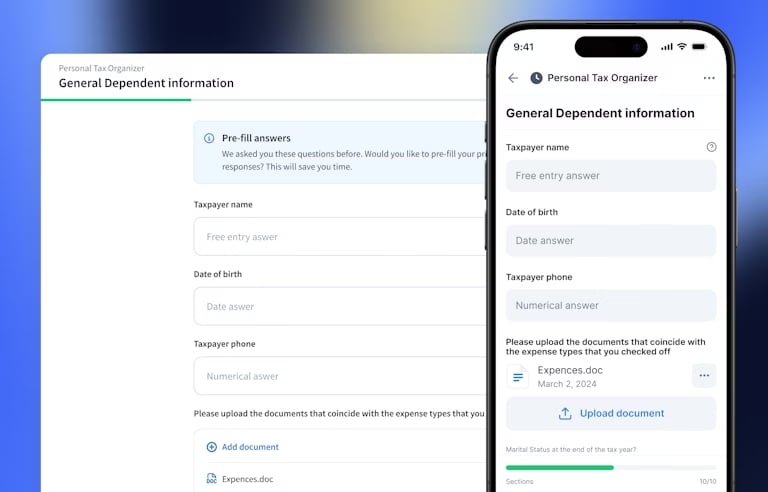
Instead of emailing PDFs and chasing clients, you can create secure, customizable forms that adjust to each client’s situation. This means you don’t have to build a new client intake form from scratch each time.
As a result, clients see only the questions that apply to them, which helps them complete the intake faster and with fewer errors. They can pause, save, and return at any time — even from a mobile app — without losing progress.
The real advantage is how organizers connect to your internal processes. Client responses can automatically trigger tasks, apply tags, and feed directly into your workflows. No more manual follow-up or extra data entry. Everything stays in one place, easy to track, so your team can focus on review and advisory work — not admin.
Best practices for designing your client intake form
Moving your intake form online opens the door to fine-tuning how you collect information. But even with the right tools, how you structure the form still matters. A few small choices can make a big difference in how fast clients complete it — and how useful the data is for your team.
- Begin by focusing on what’s essential. Don’t overload your form with every possible question. Instead, ask only for the information your team truly needs to set up accounts, run payroll, or handle filings. For more complex cases, you can always collect additional details later.
- Use conditional logic whenever possible. Not every question applies to every client, and showing irrelevant fields can slow clients down or cause confusion. In digital forms, you can automatically hide fields that don’t apply based on earlier answers. If you’re using a static form or PDF, customize it before sending so clients only see relevant sections.
- Keep instructions clear and simple. Clients may not know accounting jargon, so avoid technical terms or internal firm language. Use short, direct prompts that explain exactly what they need to enter.
- Break the form into logical sections. Group personal info, business details, financial data, and document uploads separately. Smaller sections feel easier to complete and give clients natural stopping points if they need to pause and come back later.
- Finally, always test your form before sending it out. Walk through it as if you were the client, step by step. This makes it easy to catch unclear questions, missing fields, or unnecessary friction points before real clients start using it.
Final thoughts
A good client intake form sets up your entire engagement for success. Clear, complete information helps you avoid delays, reduce questions, and start working with confidence. Clients know exactly what’s needed, and your team can move forward without chasing missing details.
And with the right software in place, you can simplify the process even further — from client onboarding to organizing files and keeping every step on track.

Mari develops TaxDome content by combining customer insights, industry research, and real-world trends. Her structured, automation-driven approach ensures messaging is clear, relevant, and supports more connected and efficient accounting firms.

Get your free guide

Thank you!
The guide copy has been sent to your email. Please check your inbox!
Recommended articles

Top 13 secure file-sharing tools for accountants

Best document management software for accountants in 2026: the ultimate guide

Top 15 Excel functions for accountants: take your Excel skills to the next level!