 US – English
 UK – English
 Canada – English
 Australia – English
 Danmark – Dansk
 DACH - Deutsch
 France – Français
 España – Español
 Sverige – Svenska
 Italia – Italiano
 Nederland – Nederlands
 Portugal – Português
 Suomi – Suomi
 Norge – Norsk
 日本 – 日本語
 Romanian – Română












February 2024 update

Run your entire firm on one platform

Tax season is underway and your clients are actively using our client mobile apps on iOS and Android. There have been over 1 million downloads and more than 250,000 documents scanned, and the client mobile app is in the top 80 of all Finance apps on the iOS store with a rating of 4.8/5! As a reminder, we have a ready-made PDF you can share with your clients about the client experience you are offering them, including all technology available to them — with direct links to the mobile apps.
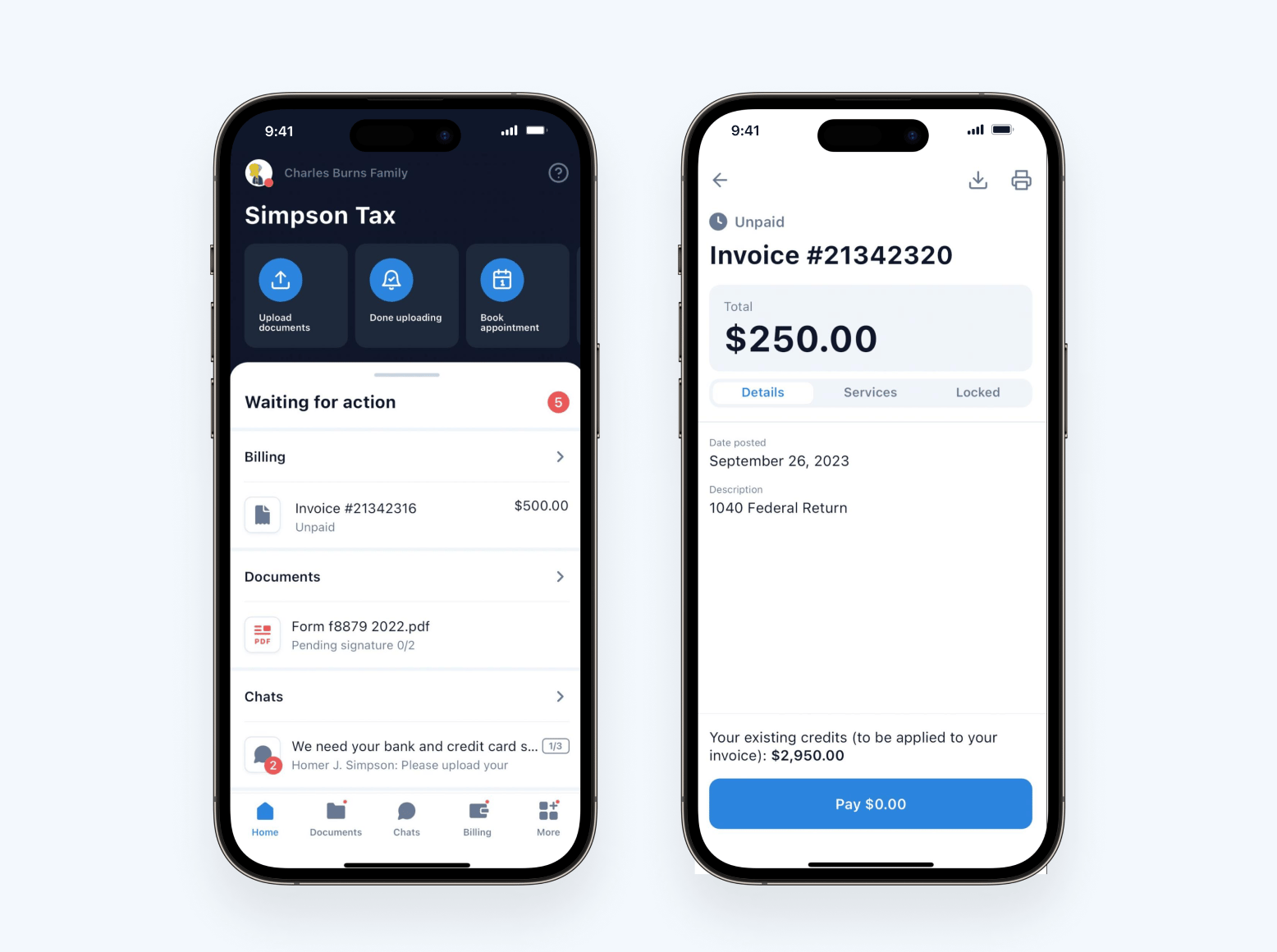
In addition to app improvements (a new scanner), we’ve released a number of important features in e-signatures (QES & AdES), we’ve made substantial improvements to our Quickbooks Online integration, and more.
Sneak peek:
- AI-powered reporting in TaxDome: discover untapped opportunities for boosting profitability and team productivity with insights that lead to concrete, data-driven actions and decisions — now available in beta testing! Apply for the TaxDome Beta Program
- SMS (now available in Early Access): send and receive SMS messages directly in TaxDome, allowing you to meet your clients where they are — their phones — and communicate in a way that’s highly familiar to them. We held a webinar on SMS communication; view the full recording and Q&A transcript in our blog
- Client-facing job statuses: provide your clients with useful information about job progress and what still needs to be done directly in their client portal
Watch a video overview of all our new features and improvements:
Table of сontents
📱 Client mobile app (iOS and Android)
Updated scanner for the client mobile app
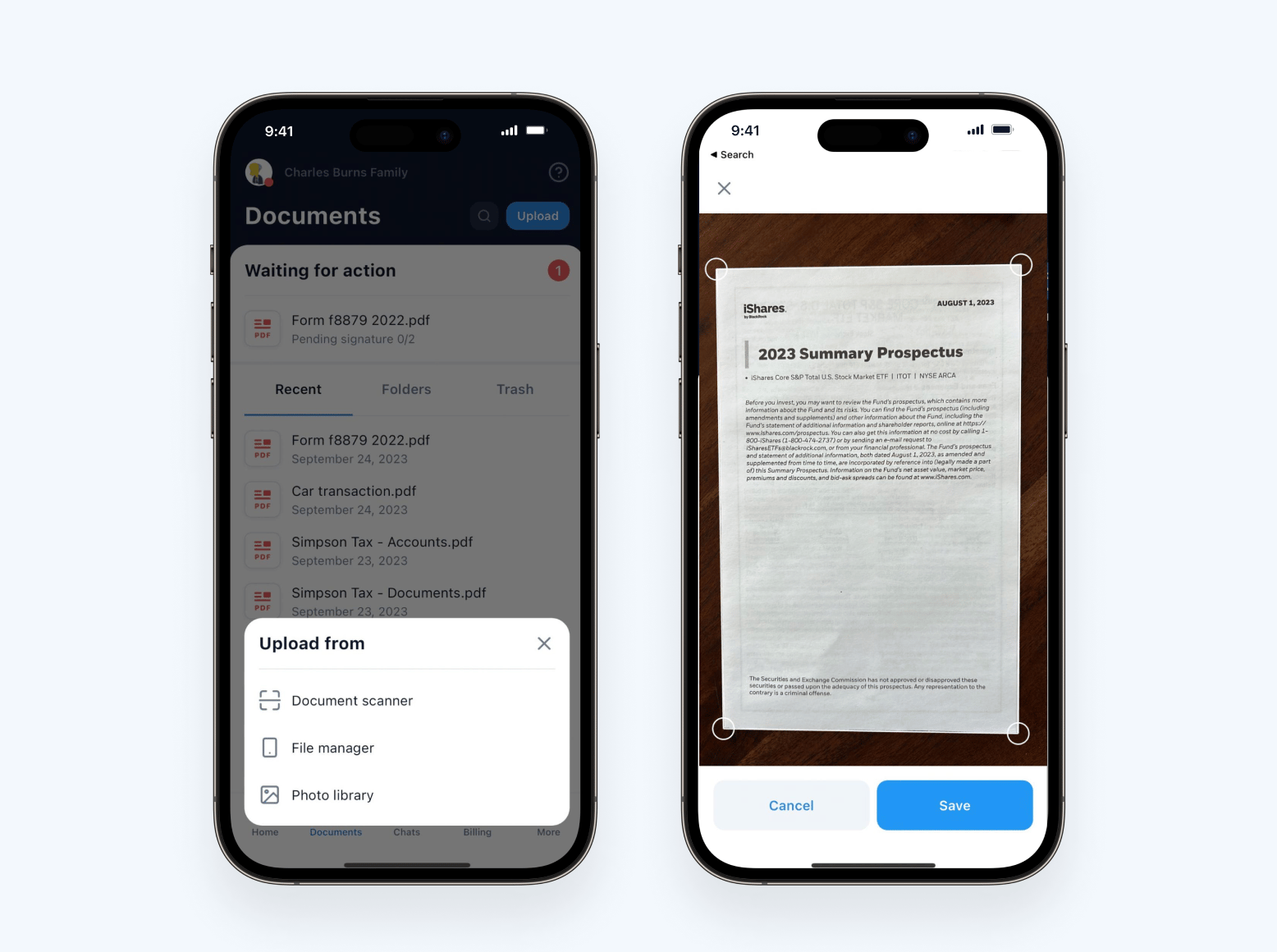
We’ve released an update to the scanner for both iOS and Android, which detects documents better to offer a more streamlined experience for your clients.
For your firm, this also means your clients will be sending you clearer, higher-quality PDF documents that are much easier to work with.
The updated scanner now offers:
- Real-time document detection in the camera view
- Distortion correction (perspective, curvature)
- Filters that clean up the background and edges of the paper, remove artifacts and ensure legibility
- Multi-page PDF creation — no need to merge photos to a single PDF
Read more about the TaxDome client mobile app in our blog >>
✍️ E-signatures
Advanced electronic signatures (AdES) and qualified electronic signatures (QES)
We’re excited to announce an update that will further enhance our e-signature capabilities for accounting firms in the European Union (EU): advanced electronic signatures (AdES) and qualified electronic signatures (QES).
Now, you can:
- Receive legally valid e-signatures within TaxDome, meeting EU standards
- Ensure compliance with eIDAS, the highest e-signature requirements set by European regulatory bodies
- Provide signatures to clients via the same platform you use for workflow, improving the client experience while eliminating the need for additional solutions
- Save on costs: most options start at 3€
If your firm operates in the EU, this update will allow you to get the most secure, trustworthy and legally compliant e-signatures possible.
Read more about qualified electronic signatures (QES) in our Help article >>
🛒 TaxDome Marketplace
Like the App Store, but for TaxDome templates
The TaxDome Marketplace enables you to implement ready-made templates for tax, bookkeeping and accounting across your organization quickly.
Through the TaxDome Marketplace, you can:
- Take advantage of best practices: adopt and implement new processes more easily
- Download with confidence: templates now support multimedia (video, images) and creators are encouraged to provide content that conveys the value and benefit of their offering
- Become a creator: share your templates with the community, for free or for a price
- View and download templates for everything in TaxDome: templates are available for jobs, tasks, emails, proposals & ELs, folders and entire workflows (pipelines)
As a creator, you can choose to share your templates for free or list them for a price. Each time a priced template is downloaded, you will be paid through your connected Stripe account — so, not only will you be able to build your brand in the industry, but you’ll get paid for your content.
To register as a creator, simply complete the creator application form. You can also access this form on TaxDome Marketplace by clicking “List your templates”.
Read more about the TaxDome Marketplace in our blog >>
➕ Integrations
Improved QuickBooks Online integration
Our improved QuickBooks Online (QBO) integration allows you to seamlessly send more data from TaxDome to QBO, easily keep tabs on sync status and ensure your synced data is always up to date.
While our blog provides all the details, the TL;DR is that the new improvements allow you to:
- Automatically sync line item descriptions to QBO when you create an invoice in TaxDome
- Route payments to income accounts in QBO by selecting your “Deposit To” account under Integrations settings
- Maintain accurate reporting: recurring invoices automatically sync to QBO only when they are due, and payments only sync when they have “Paid” status
- Keep tabs on your synced data: you can now conveniently monitor QBO sync status via TaxDome in Accounts, Invoices, Payments and Services
- View helpful hints by hovering over sync statuses; if “Not synced” or “Failed”, you can also restore “Synced” status by manually syncing to QBO via the three dots menu
Read more about QuickBooks integration in our Help article >>
🚀 Project Apollo
Redesigned menu structure for easier navigation
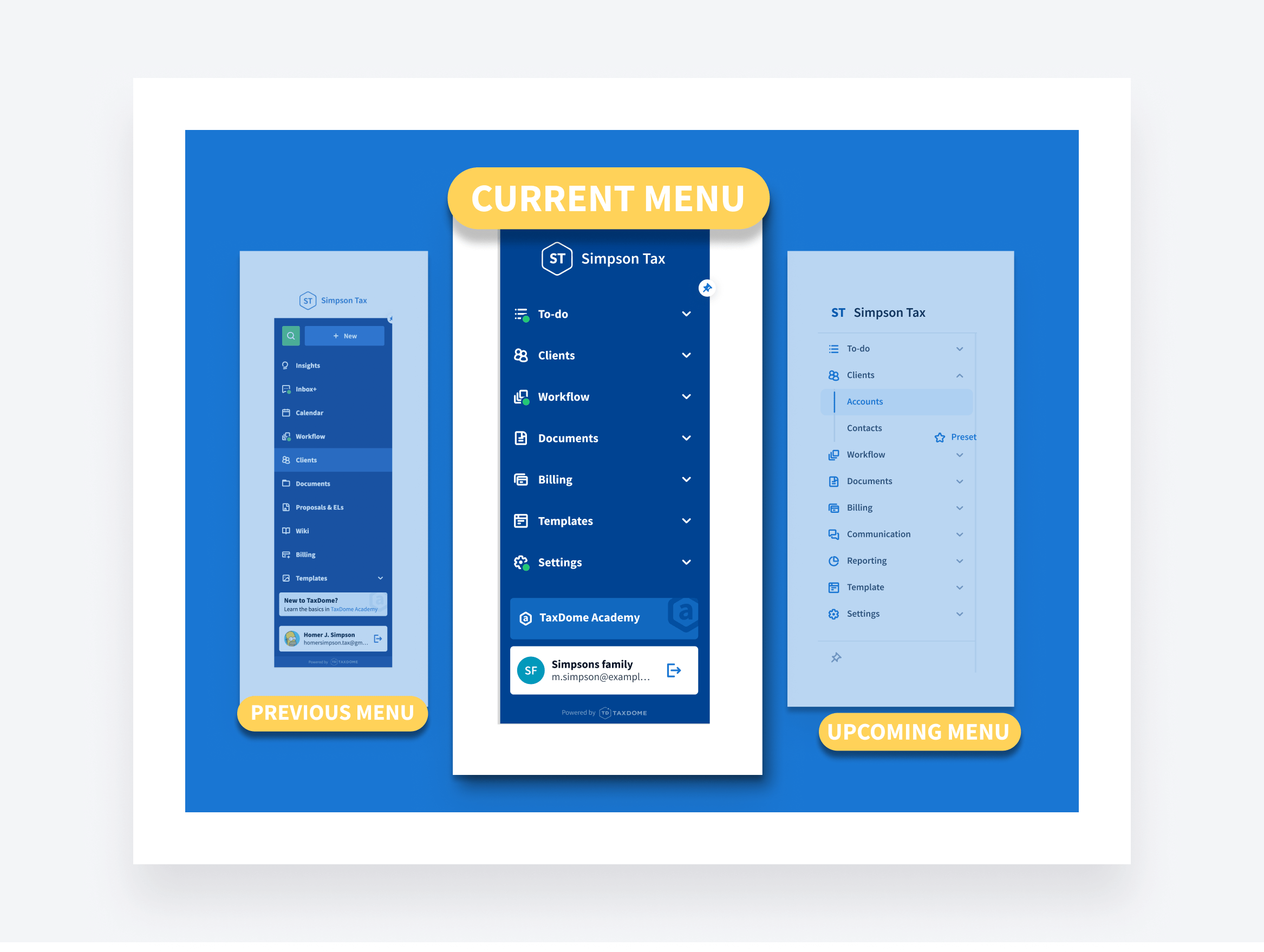
We’ve improved the left sidebar menu for faster, easier navigation. Here’s an overview of what the new menu offers:
- Save time: go straight to important tabs, such as Accounts and Tasks, in just two clicks with one less page to load
- Simplified navigation: easily find the page you’re looking for from each convenient drop-down menu
- Improved collapsed menu: when the menu is unpinned, hover over the icons to view the entire menu – then click where you need to go!
- New green informers: quickly see new firm activity whether the menu is pinned or unpinned
This is step one of a two-part menu redesign; expect a new color scheme in the next update.
New, more detailed filters for tasks and jobs
Searches in tasks and jobs will now be more efficient and accurate, thanks to the ability to create more detailed filters.
- Narrow down your search using multiple conditions (is, is not, task dates, and more)
- Save time by creating filter presets for any purpose you need
- ️Quickly access filter presets: view your saved filters at the top of the table with one click
As an example, you can filter tasks and jobs with two or more tags, and choose whether the results must have at least one, or all, of the tags applied.
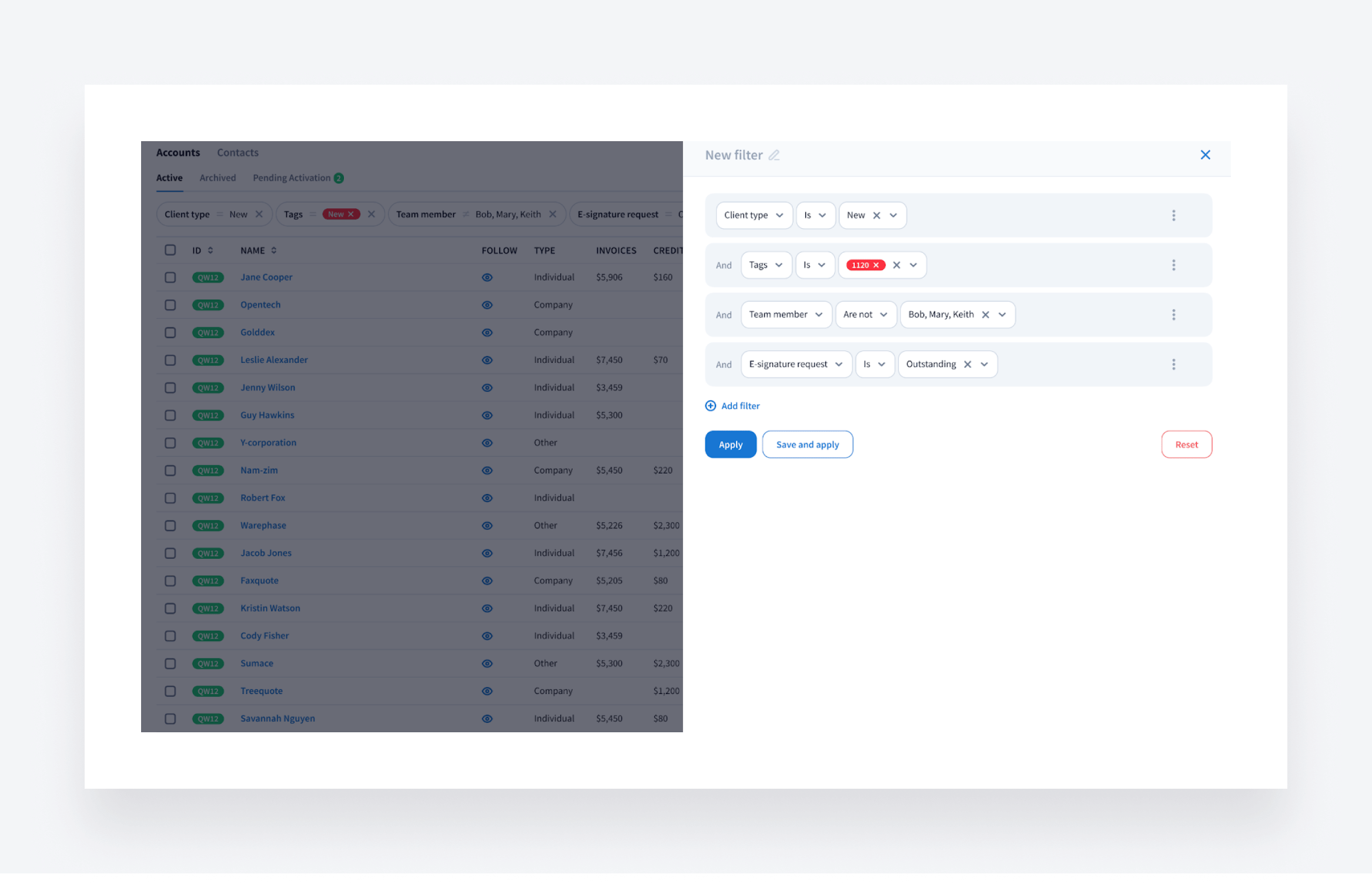
These updates are part of Project Apollo, our initiative to make every interaction fast, intuitive and effective. Read more about Project Apollo in our blog >>
🔥 Other updates
- TaxDome Academy: we’ve launched a brand new course, Documents Guide, on how to upload documents to TaxDome, request e-signatures from clients and work with documents like a pro
- Subscription: you can now pay for your subscription through ACH (US) and SEPA (Europe)
- Organizers: thanks to a new “Duplicate section” button in organizer templates, you can save time by duplicating any section, including all of its settings
- Security: exported data (accounts, contacts, invoices, organizers and more) is now sent to you via a secure link that requires authorization to access
- Recurring invoices: a new payment authorization column allows you to see whether recurring invoices are paid automatically or manually
In February, we’re bringing you all of the above — plus 68 more tweaks and fixes!
Expect more exciting new features next month. Until then, join our Facebook Community to ask questions, request features or chat with other TaxDome users.
And in case you missed it, here’s a neat summary of the major features we covered in our January 2024 update.

Josef creates clear, actionable content at TaxDome, highlighting features, updates, and key accounting topics. His focus is on making complex ideas accessible and engaging, helping users understand and apply insights effectively.

Get your free guide

Thank you!
The guide copy has been sent to your email. Please check your inbox!
Recommended articles
TaxDome AI: more than 2,000,000 documents organized for accountants this past tax season—and we’re just getting started

Webinar recap and Q&A: Summer Update 2026

Unpacking the differences between TaxDome Payments and Stripe