 US – English
 UK – English
 Canada – English
 Australia – English
 Danmark – Dansk
 DACH - Deutsch
 France – Français
 España – Español
 Sverige – Svenska
 Italia – Italiano
 Nederland – Nederlands
 Portugal – Português
 Suomi – Suomi
 Norge – Norsk
 日本 – 日本語
 Romanian – Română












#Accounting templates, #Client management
Bookkeeping client onboarding questionnaire: essential questions and free template for 2024

Run your entire firm on one platform

An outstanding onboarding process sets the stage for successful client relationships. With a slick and seamless onboarding journey, you present your firm as modern, organized, and highly professional.
But besides making a great first impression, the onboarding process is a golden opportunity to understand exactly who the client is, what they want, and how you can best serve them. This is where a bookkeeping client onboarding questionnaire can help.
Read on to explore what a bookkeeping client onboarding questionnaire is, why you need one, and what it should include. You’ll also find a free questionnaire template that you can download and customize to suit your needs.
Table of сontents
What is a bookkeeping client onboarding questionnaire?
A bookkeeping onboarding questionnaire is a structured set of questions designed to help you gather essential information from a client at the start of your working relationship. It’s a vital tool that provides you with key insights into the client’s business operations, financial situation, and specific bookkeeping needs.
Like a bookkeeping client onboarding checklist, a questionnaire is a great way to standardize your onboarding process, ensuring a high level of quality across all stages, regardless of who’s responsible for delivering them.
Ultimately, understanding your client’s needs at this early stage helps you serve them better, leading to happier client relationships, fewer issues or misunderstandings down the line, and a more successful business.
Key questions for your bookkeeping client onboarding questionnaire
So what exactly should a comprehensive bookkeeping client onboarding questionnaire include? While the specifics will depend on your business and how you operate, below you’ll see some examples that cover most bases.
Basic information
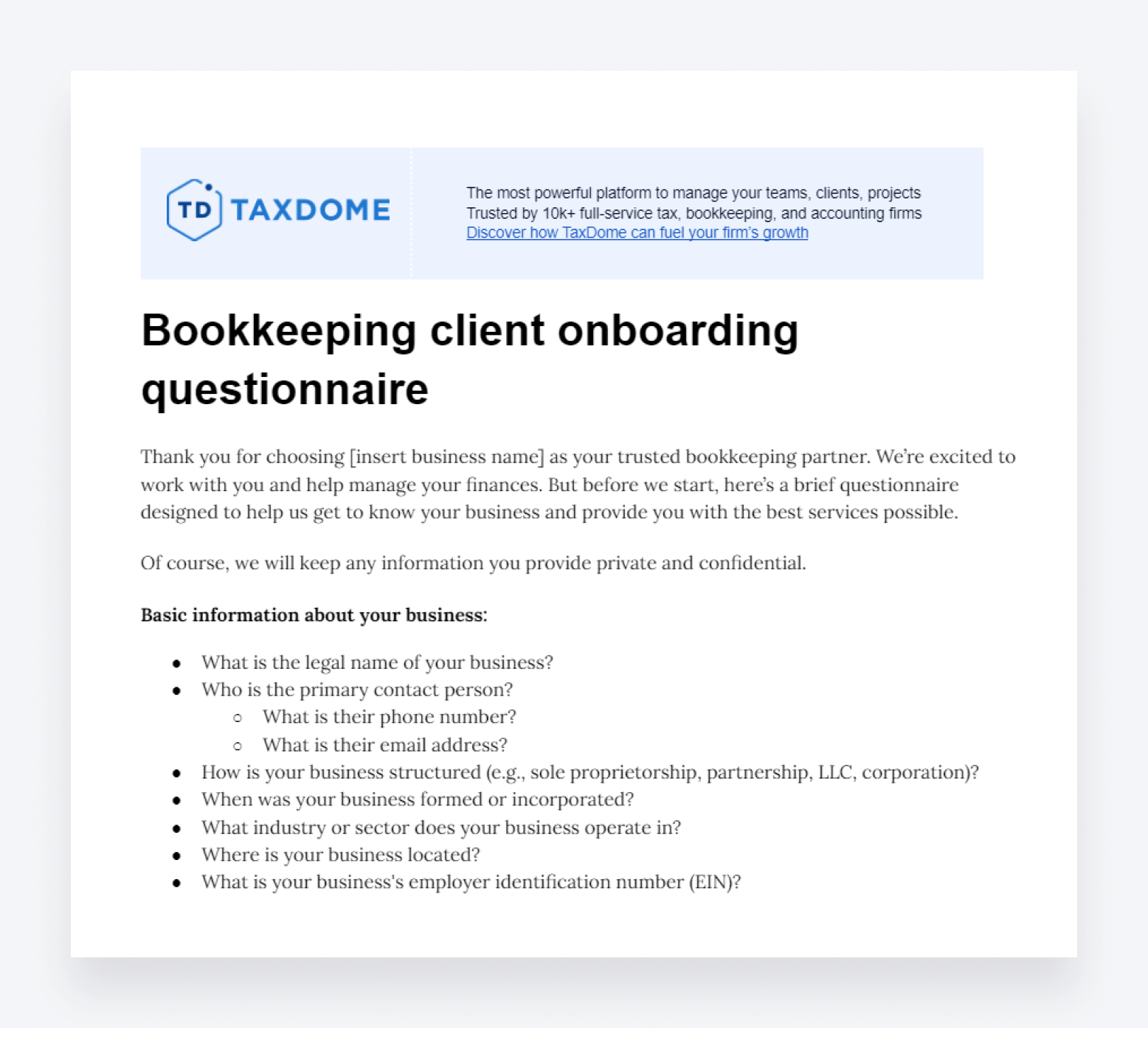
- Business name: what is the legal name of your business?
- Contact details: who is the primary contact person, and what are their contact details (phone number, email address, etc.)?
- Business structure: how is your business structured (e.g., sole proprietorship, partnership, LLC, corporation)?
- Business age: When was your business formed or incorporated?
- Industry: what industry or sector does your business operate in?
- Location: where is your business located?
Business operations
- Staff details: How many employees do you have, and what are their roles?
- Vendors and suppliers: who are your primary vendors and suppliers?
- Customer details: how many customers do you have? Who are your major customers?
- Inventory management: do you maintain physical inventory? If so, how is it managed and tracked?
- Sales volume: how much revenue do you generate per month, quarter, or year
- Key challenges: what are the main financial or operational challenges your business is currently facing?
- The competitive landscape: who are your main competitors? How do you compare to them in size, customer base, revenue, etc?
Financial information
- Fiscal year: what is your business’s fiscal year?
- Bank accounts: how many bank accounts does your business have, and what are their details?
- Credit cards: do you use business credit cards? If so, how many and for what purposes?
- Revenue streams: what are your primary sources of revenue?
- Expense categories: what are the main categories of expenses in your business?
Accounting and software information
- Accounting software: which accounting or bookkeeping software do you currently use, if any?
- Historical data: do you have historical financial data that needs to be integrated? If so, what format is it in?
- Payroll system: what payroll system do you use, and how often do you run payroll?
- Invoicing system: what system do you use for invoicing your clients?
- Point-of-sale system: do you use a point-of-sale system? If so, which one?
Compliance and regulatory information
- Tax IDs: what is your business’s employer identification number (EIN)?
- Filing requirements: do you have any specific tax filing requirements or deadlines?
- Licenses and permits: do you have any business licenses or permits? If so, which ones, and when do they expire?
- Regulatory compliance: are there any specific industry regulations or compliance standards that you need to adhere to?
Goals, needs, and expectations
- Financial goals: what are your short-term and long-term financial goals?
- Business growth: do you expect your business to grow in the coming years? If so, by how much?
- Service expectations: what specific services are you expecting from us (e.g., bookkeeping, tax preparation, financial advising)?
- Previous service experience: have you worked with another bookkeeping firm? If so, what was your experience like and why did you choose to switch firms?
- Communication preferences: how do you prefer to communicate (e.g., email, phone, in-person meetings)?
- Client portal: are you happy to use our secure client portal to manage all of your touchpoints with our firm?
- Reporting needs: what type of financial reports do you require and at what intervals?
- Additional support: are there any other areas where you need support or have specific requirements?
Free bookkeeping client onboarding questionnaire template
Below, you can find a link to a questionnaire template that you can use when onboarding new bookkeeping clients. Feel free to download the template or copy and paste it into a new document. You can then customize it to suit your specific needs.
Optimize your client onboarding process with TaxDome
Client onboarding is a relatively simple process, but it can vary wildly from business to business depending on one key factor: the technology used.
For firms stuck in the past, onboarding can be a needlessly inefficient process, requiring bookkeepers to handle repetitive manual tasks. From the client side, onboarding can become slow and tedious, making them second-guess their decision to work with the company. For firms that embrace software such as TaxDome, however, onboarding can be transformed into a smooth, hassle-free experience.
As a comprehensive practice management platform, TaxDome offers all the tools you need to transform your accounting, bookkeeping, and tax workflows — including client onboarding. Let’s explore some of the key features that will help you deliver a slick onboarding experience that sets the tone for productive and successful client relationships.
Workflow automation
Most practice management platforms offer some form of task automation. With TaxDome, you can automate entire workflows from start to finish, including client onboarding.
Each workflow — or pipeline, as we call them in TaxDome — is broken down into stages. Each stage contains automations that trigger when a job enters that stage. For example, the automation might be to send a proposal, welcome email, or organizer (a digital form for gathering client info and docs).
When a certain action is completed by the client or accountant — for example, the proposal is signed, or the organizer is submitted — the job automatically moves on to the next stage of the pipeline, triggering the next round of automations.
Here’s an example of what a pipeline looks like in TaxDome:
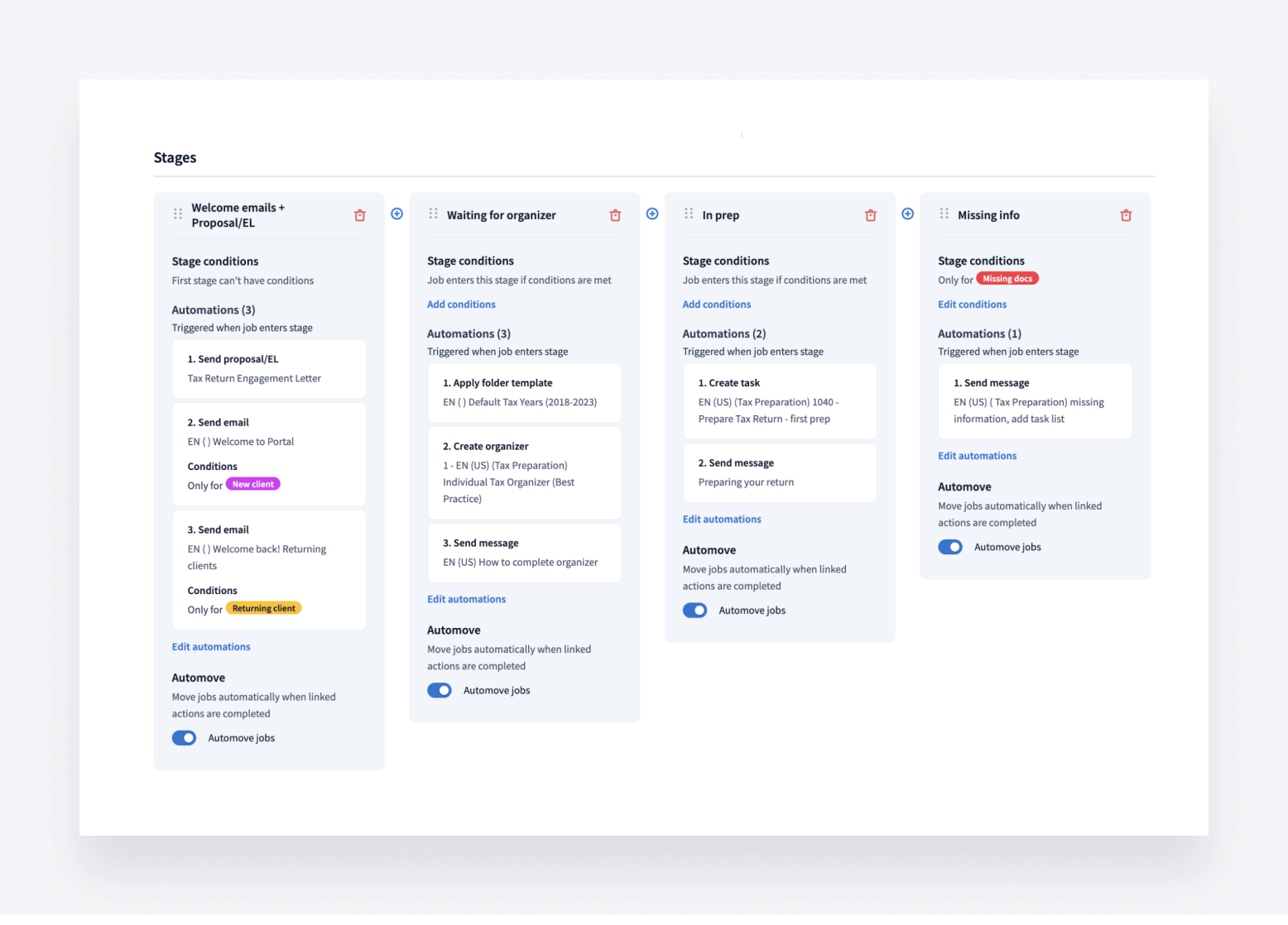
So what does this mean for your onboarding process? Instead of wasting time on manual processes, you can set your onboarding to autopilot, safe in the knowledge that your clients will be kept in the loop throughout the journey with automatic updates. When an accountant or bookkeeper is required to perform a manual task — such as approving documents — a task is created automatically and the right person is notified.
What’s more, using tags, you can set automations that will trigger for certain types of clients and not others. For example, you can send different proposals, welcome messages, and organizers depending on the size of the client and the services they require.
TaxDome Marketplace
With TaxDome, there’s no need to draft client emails from scratch or spend ages creating organizers to send. With TaxDome Marketplace, you have access to an entire library of templates created by industry experts from across the globe. Think of it like the App Store but for TaxDome templates.
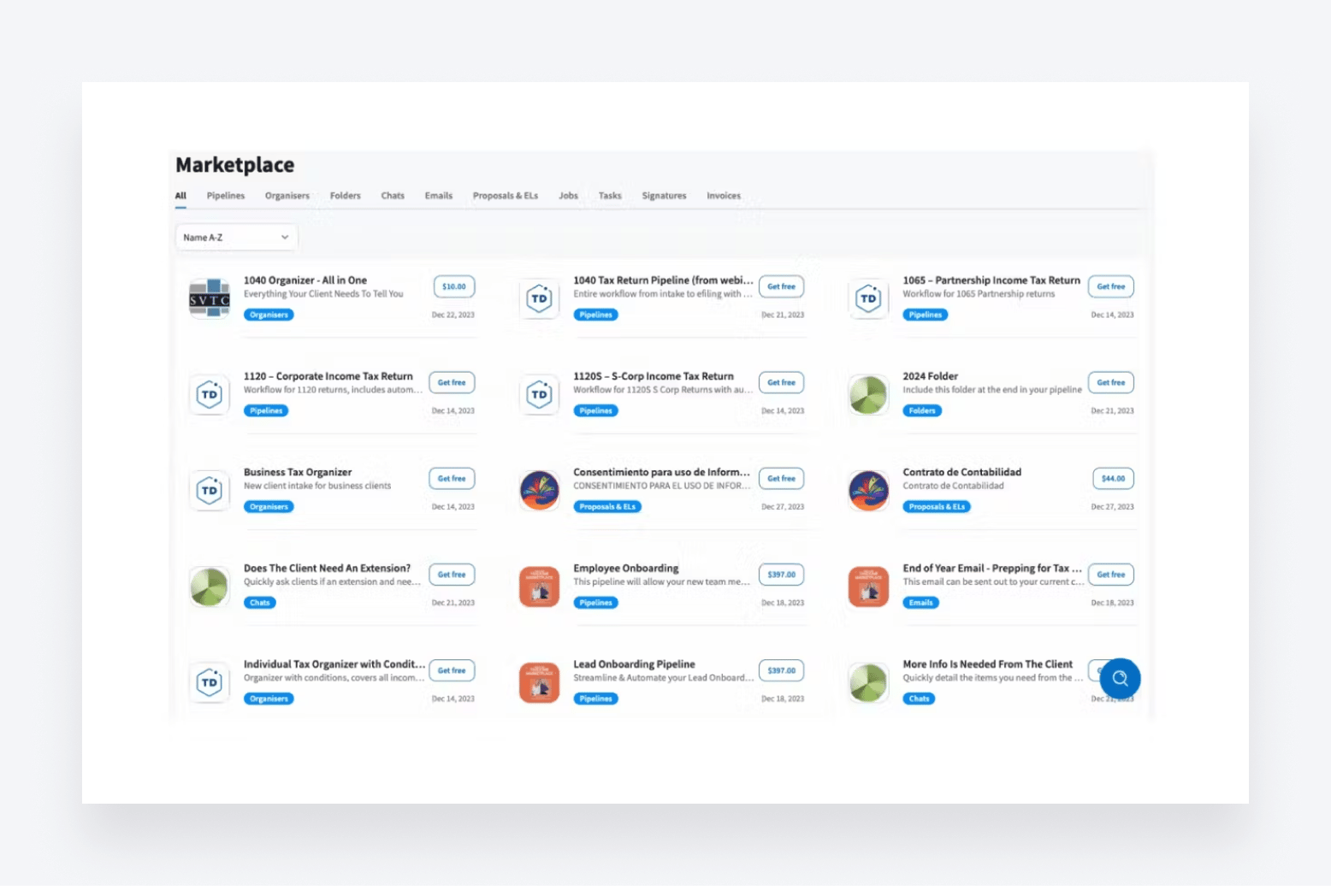
In TaxDome Marketplace, you’ll find templates for everything you need — including client communication, proposals, organizers, invoices, tasks, folders, and even entire workflows. You can add a client onboarding workflow template to your workspace, for example, which includes templates for all related dependencies.
This means you can implement best practices and create highly professional and scalable workflows in just a few clicks. And of course, all templates are fully customizable, so you can tweak them to your specific needs.
Secure client portal
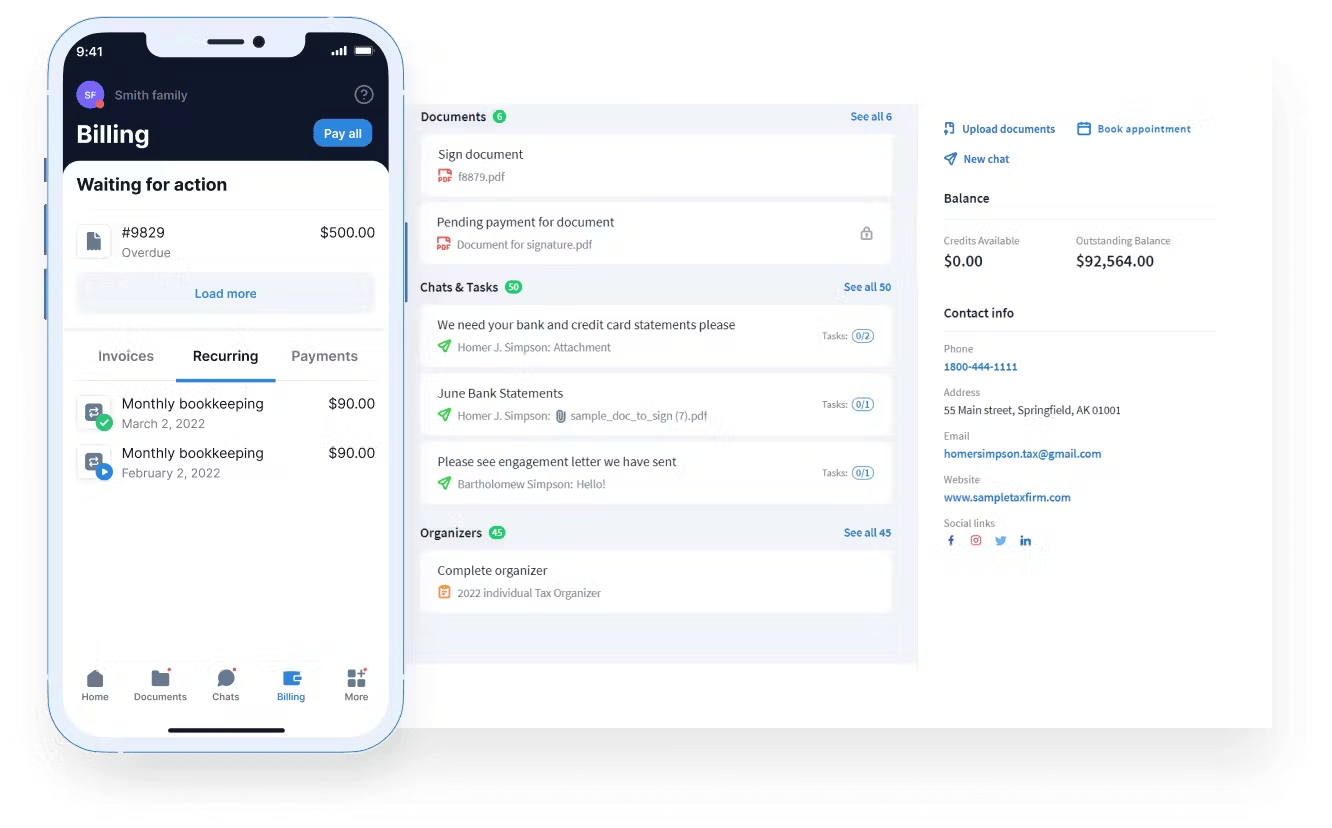
With TaxDome’s client portal, your clients get a secure space where they can manage all touchpoints with your firm during onboarding and beyond. For example, they can:
- Communicate with accountants via secure chats
- View, scan, and e-sign documents
- Tick off client tasks
- Complete and submit organizers
- Make payments
The client portal is available either on desktop or our top-rated client mobile app, providing an outstanding client experience from the moment you start working with a new business.
To sum up
As the first interaction with your firm, client onboarding sets the tone for a positive working relationship and demonstrates to new clients that you are a forward-thinking and efficient company. Client onboarding questionnaires can be a useful part of this process, ensuring that you have the information you need to best serve your new client.
To streamline your onboarding workflow and offer a truly exceptional onboarding experience, however, you need the right technology. This is where TaxDome can help. With automated workflows, a comprehensive library of templates, and a secure client portal, you have all the tools you need to deliver a slick and seamless onboarding journey.
But don’t just take our word for it. To see TaxDome in action, request a demo today!

Nicholas produces TaxDome content focused on how technology improves accounting workflows and everyday firm operations.

Get your free guide

Thank you!
The guide copy has been sent to your email. Please check your inbox!
Recommended articles
10 best client portals for accountants in 2026: features, pricing, and reviews

Client onboarding software for accountants: Streamlining the first step in client relationships

12 best CRMs for accountants, bookkeepers and tax professionals in 2026