 US – English
 UK – English
 Canada – English
 Australia – English
 Danmark – Dansk
 DACH - Deutsch
 France – Français
 España – Español
 Sverige – Svenska
 Italia – Italiano
 Nederland – Nederlands
 Portugal – Português
 Suomi – Suomi
 Norge – Norsk
 日本 – 日本語
 Romanian – Română












Best Aero Workflow alternatives to streamline your accounting practice

Run your entire firm on one platform

TL;DR:
- Why firms look for Aero Workflow alternatives: weak automation, lack of practice management features, and limited growth potential for accounting firms
- For growing tax and accounting firms, TaxDome is the most complete Aero Workflow alternative
- For solo practitioners and small teams, Jetpack Workflow and Financial Cents offer simple, affordable alternatives
Methodology: how do we choose?
We analyze Aero Workflow’s product offering and customer reviews vs the top alternatives. The percentages below indicate the weighting of each feature category in our recommendations:
- Workflow automation — 25%
- Client features — 20%
- Pricing — 20%
- Integrations — 15%
- Mobile apps — 10%
- Usability — 5%
- Reporting — 5%
Last Updated: Jan 2026
Aero Workflow was an early pioneer in cloud software for accounting teams. It built a name for itself by helping firms move away from spreadsheets to an integrated system for managing tasks, client data, and recurring workflows.
Modern practices need more than an upgrade from spreadsheets, though. In 2026, there are plenty of Aero Workflow alternatives offering stronger workflow management, deeper automation, and broader functionality.
Table of сontents
What is Aero Workflow?
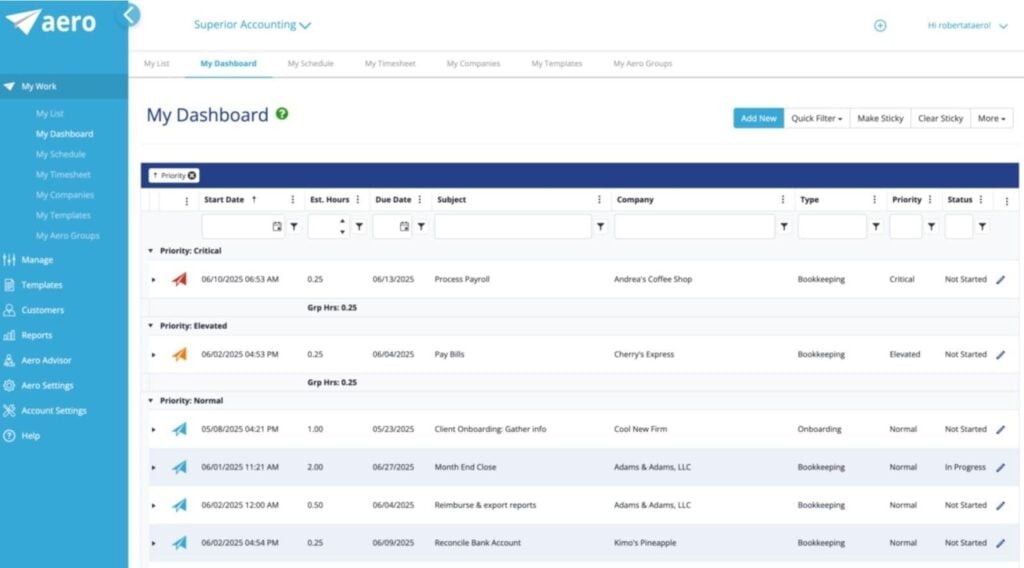
Aero Workflow is a workflow management platform designed for accounting teams and firms. Founded in 2008, this was one of the first solutions of its kind designed specifically for accounting teams.
The platform helps you manage team workloads and tasks while boosting productivity with built-in workflow templates (or by creating your own). You can also import client data, track the time spent on accounting tasks, and monitor team performance with built-in dashboards and reporting tools.
Aero Workflow key features:
- Task management
- Accounting workflow templates
- Client vault
- Client advisory system
- Integrated email
- Time tracking
- Reporting
- Accounting integrations
Aero Workflow pros and cons
| 👍 Pros | 👎 Cons |
| Simple workflow management | Weak automation features |
| Relatively easy to implement | Incomplete practice management |
| No user-based pricing | Lacking client management features |
| Minimal collaboration and communication | |
| Basic reporting tools | |
| Dated interface | |
| Complaints about customer support | |
| Expensive starting price |
How much does Aero Workflow cost?
As of early 2026, Aero Workflow offers the following plans and pricing:
- Startup (1-5 users): from $1,296/year (equivalent to $108/month)
- Growth (6-25 users): from $2,400/year (equivalent to $200/month)
- Scaling (26-50 users): from $3,540/year (equivalent to $295/month)
Why do accounting firms look for Aero Workflow alternatives?
- Lacking practice management features: no CRM, advanced workflow automation, billing and payments, or collaboration tools
- Basic workflow management: workflow management is essentially limited to checklists
- Weak automation: aside from creating recurring tasks, Aero Workflow doesn’t give you any real automation features
- No client portal or mobile app: Aero’s Client Vault doesn’t support messaging, uploads, tasks, or the other features of a client portal and mobile app
- Limited reporting: beyond time tracking, you don’t get much insight into team productivity or performance
- Dated interface and experience: Aero Workflow doesn’t look or operate like a modern SaaS product
- Customer support: complaints about customer support are relatively common, despite Aero Workflow not having many online reviews
- Limited growth potential: Aero Workflow can’t match practice management platforms in driving growth for accounting firms
Best Aero Workflow alternatives for accounting firms in 2026
Whether you’re an existing Aero Workflow customer — or it’s one of several options you’re looking at — we’ve carefully selected the best alternatives for accounting firms:
- TaxDome: the complete accounting practice management platform
- Jetpack Workflow: simple workflow automation for accountants
- Financial Cents: the entry-level practice management platform
- Karbon: the collaboration system for accounting teams
- Canopy: the accounting client management platform
Before we take a closer look at each of these tools, here’s a quick summary of how they compare with Aero Workflow:
| Aero Workflow vs top alternatives (2026) | |||||
|---|---|---|---|---|---|
| Best for | Strengths | Limitations | G2 review score | Pricing | |
| Aero Workflow | Managing workflows with checklists | Simplicity | Lacking featuresExpensive starting priceCustomer support | 3.8/5 | From $1,296/year |
| TaxDome | Complete accounting practice management software | Firm managementClient managementClient experienceRevOpsCustomer support | Longer onboarding process | 4.7/5 | From $700/year |
| Jetpack Workflow | Simple accounting workflow automation | SimplicityUnlimited ClientsAffordable for solos | Limited featuresWeak automationLimited supportNot scalable for growing firms | 4.2/5 | From $480/year |
| Financial Cents | Entry-level practice management | Starting priceSimplicityPractice management | Limited featuresWeak automationRestrictions on cheaper plansExpensive upgradesNot scalable for growing firms | 4.7/5 | From $228/year |
| Karbon | Collaboration for accounting teams | Team collaborationTask automationWorkload management | Feature depthClient managementNo CRMPaid add-onsExpensive upgrades | 4.8/5 | From $708/year |
| Canopy | Client management | Client management system | Limited featuresFirm managementComplex pricing modelPaid add-onsExpensive | 4.6/5 | From $1800/year |
1. TaxDome
TaxDome is the complete practice management platform for accounting firms. This is the biggest upgrade you’ll get from Aero Workflow with the most advanced accounting automation system currently available.
You can automate complete accounting workflows and recurring services using pipelines and conditional logic. The same system allows you to automate client management, billing and payments, and processes throughout your practice.
TaxDome key features:
- Advanced accounting automation: automate the most complex accounting processes and recurring services with conditional logic
- Team collaboration: simplify teamwork with secure chat, document sharing, comments, and @mentions
- Global communication: bring all team and client communications together with integrated email, secure chat, and two-way SMS in one system
- Unlimited CRM: manage all of your client data and customer relationships in one platform
- Client portal: give clients a secure, private space to upload and sign documents, complete tasks, and pay invoices
- Client mobile app: bring the top-rated client mobile experience on the App Store and Google Play to your firm
- Document management: securely store and manage unlimited client documents
- Proposals and engagements: simplify client onboarding with customized proposals and engagements
- Billing and payments: automate invoicing, recurring bills, and payment reminders
TaxDome pros and cons
| 👍 Pros | 👎 Cons |
| The complete practice management platform for accounting firms | Takes longer to set up than Aero Workflow |
| Ideal for firms operating in the UK and internationally | |
| Class-leading accounting automation | |
| Comprehensive client management features | |
| Top-rated client mobile app | |
| Universal communication: email, chat, comments, and two-way SMS | |
| Onboarding, training, and customer support |
How much does TaxDome cost?
As of early 2026, TaxDome offers the following plans and pricing:
- Essentials: from $700/year (equivalent to $58/month)
- Pro: from $900/year (equivalent to $75/month)
- Business: from $1,100/year (equivalent to $92/month)
Who should use TaxDome?
Firm owners who want to maximize growth by improving efficiency throughout their practice should start and end their search with TaxDome.
This is the most complete accounting practice management platform on the market, implementing the most comprehensive system for firm management, client management, revenue operations, and client experience.
Instead of trying to implement a tool like Aero Workflow with dozens of other products, you get everything you need from one system. Firms that switch to TaxDome save tens of thousands in annual software fees and get a more capable system for their money.
Try our savings calculator to find out how much you could save, or request a demo to see how TaxDome will transform your practice.
2. Jetpack Workflow
Jetpack Workflow is a project management and workflow automation tool designed for accountants and bookkeepers. It’s a newer, stronger automation tool than Aero Workflow in a simple product that’s easier to implement and learn.
Key Jetpack Workflow features:
- Workflow automation
- Project management
- Team management
- Task prioritization
- Unlimited clients and contacts
Jetpack Workflow pros and cons
| 👍 Pros | 👎 Cons |
| Easier to learn than Aero Workflow | Lacks practice management features |
| Stronger workflow automation | No client management tools |
| Simple onboarding process | Zapier-only integrations |
| Flat-rate pricing model | Dependence on third-party tools to fill feature gaps |
| Not suitable for larger teams or accounting firms |
How much does Jetpack Workflow cost?
As of early 2026, Jetpack Workflow offers the following plans and pricing:
- Starter Yearly: from $480/year (equivalent to $40/month)
- Starter Monthly: from $49/month
Who should use Jetpack Workflow?
Sole practitioners and small accounting teams want an automation upgrade from Aero Workflow without implementing a full practice management system.
3. Financial Cents
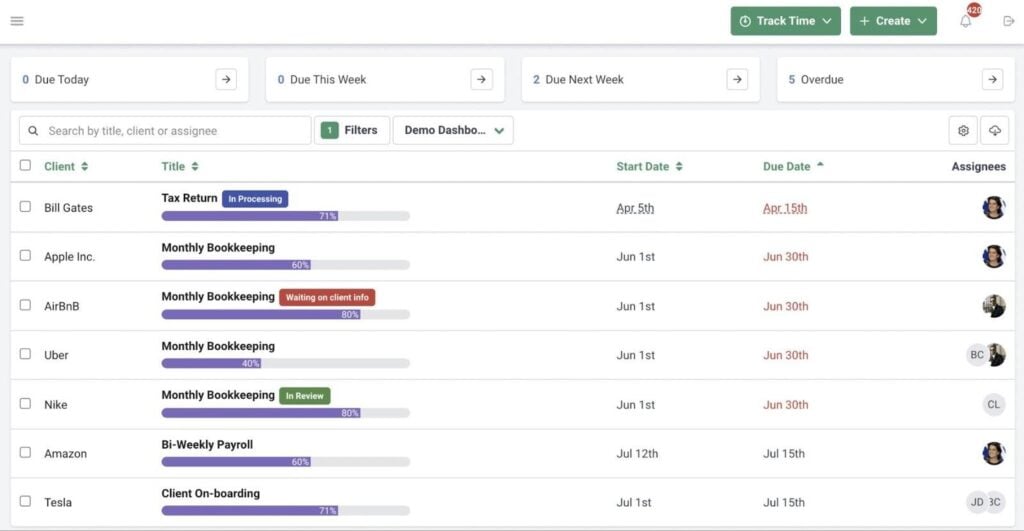
Financial Cents is a simple, affordable practice management system built for sole practitioners and small accounting teams. It sits somewhere between Aero Workflow and TaxDome in both capabilities and complexity. It’s a significant upgrade from Aero Workflow, but nowhere near as sophisticated as TaxDome.
Financial Cents key features
- Task management
- Workflow automation
- Client CRM
- Client portal
- Document management
- Time tracking
- Recurring tasks
Financial Cents pros and cons
| 👍 Pros | 👎 Cons |
| Superior automation to Aero Workflow | Weaker automation than TaxDome and Karbon |
| Stronger feature coverage for practice management | Many features lack depth |
| Affordable Solo plan | Expensive upgrades vs feature gains |
| Improved client-facing features | Limited features on Solo and Team plans |
| True client portal (basic) | No client mobile app, limited portal |
| Many features require paid integrations | |
| Live chat support only (except for Enterprise plan) |
How much does Financial Cents cost?
As of early 2026, Jetpack Workflow offers the following plans and pricing:
- Solo: from $228/year (equivalent to $19/month)
- Team: from $588/year (equivalent to $49/month)
- Scale: from $828/year (equivalent to $69/month)
- Enterprise: custom pricing
Who should use Financial Cents?
Sole practitioners and accounting teams looking for an affordable entry-level practice management platform. Just make sure you can get everything you need from the Team or Scale plan. Some important features are only available on the Scale plan or higher — and, at that price point, TaxDome is both more capable and better value for money.
4. Karbon
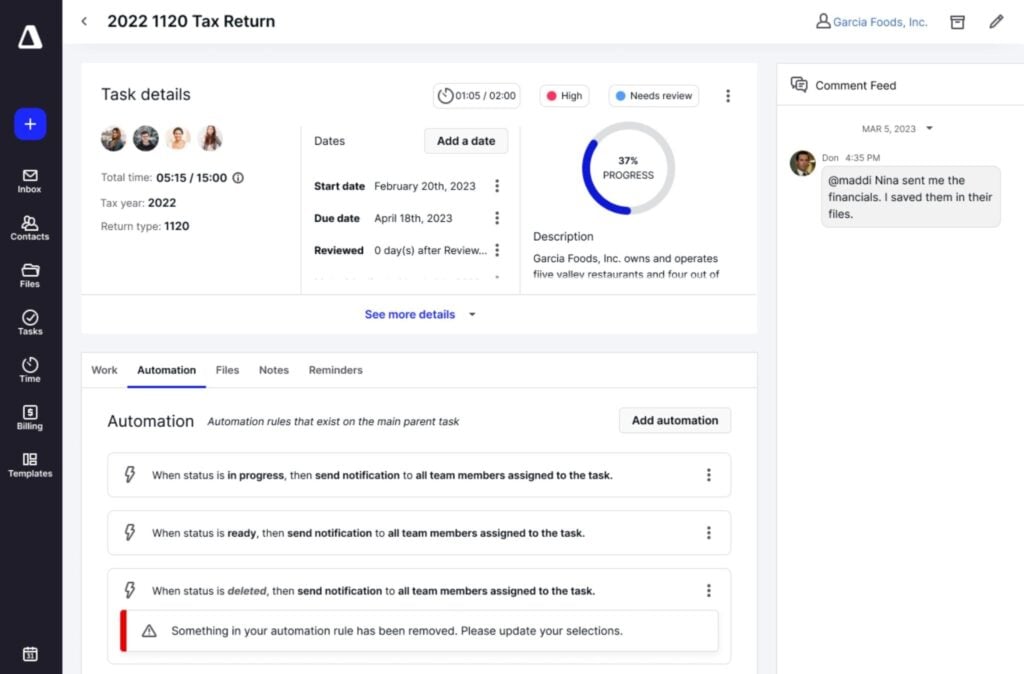
Karbon is a practice management platform that excels at team collaboration. It’s a far more powerful tool than Aero Workflow, especially when it comes to firm management and automation. It’s also more capable than Financial Cents but doesn’t match the feature depth of TaxDome, especially on client management and experience features.
For example, Karbon’s new client mobile app lacks most of the web app’s key features — a common complaint in customer reviews.
Karbon key features:
- Workflow automation
- Team collaboration
- Client management
- Client portal
- Time and budget tracking
- Billing and payments
Karbon pros and cons
| 👍 Pros | 👎 Cons |
| Team collaboration | Limited features on cheapest plan |
| Strong workflow automation (on its most expensive plans) | Shallow client management feature depth |
| Best features locked to higher plans or paid add-ons | |
| “CRM capabilities” no replacement for a true CRM | |
| No secure chat or SMS | |
| Expensive upgrade path |
How much does Karbon cost?
As of early 2026, Karbon offers the following plans and pricing:
- Team: from $708/year (equivalent to $59/month)
- Business: from $1,068/year (equivalent to $89/month)
- Enterprise: custom pricing
Who should use Karbon?
Karbon is a big improvement on Aero Workflow, but it’s also the most expensive tool we’ve looked at so far. Given the feature limitations on the Teams plan, you’re looking at the Business or Enterprise as a starting point. Then, you have to budget for paid add-ons for reporting, support, training, processing fees, and e-signatures.
5. Canopy
Canopy is an accounting client management system with three optional add-on products: document management, workflow automation, and time and billing. Each product is more capable than Aero Workflow, but the modular pricing model makes this the most expensive system we’re looking at today (by far).
Key Canopy features:
- Client management
- Client portal
- CRM
- Workflow management (add-on)
- Accounting automation (add-on)
- Document management (add-on)
- Time and billing (add-on)
- Tax resolution (add-on)
- E-signatures (add-on)
Canopy pros and cons
| 👍 Pros | 👎 Cons |
| Client engagement | Modular pricing model |
| Minimum-user pricing for add-ons | |
| Shallow firm management features | |
| Paid add-ons | |
| Expensive for teams |
How much does Canopy cost?
As of early 2026, Karbon offers the following products and pricing:
- Client Engagement Platform: from $1,800/year (equivalent to $150/month)
- Document Management: from $2,160/year (equivalent to $36/month x5)
- Workflow: from $1,920/year (equivalent to $32/month x5)
- Time & Billing: from $1,320/year (equivalent to $22/month x5)
Sign up for all four base products, and you’re looking at a starting price of $7,200/year.
Who should use Canopy?
Canopy is difficult to recommend unless you’re getting everything you need from its Client Engagement Platform. As soon as you start adding other products, your software fees multiply, and you’re instantly going to get better value from other options.
As an Aero Workflow alternative, there’s no questioning that Canopy is the superior product. But everything Aero does best is a paid add-on (workflows, document management, and time tracking), which makes Canopy an expensive upgrade by any standard.
How do you choose the right Aero Workflow alternative?
All five of the platforms we’ve looked at today offer a stronger toolkit than Aero Workflow for accounting firms. Choosing the right alternative for your team largely comes down to how much of an upgrade you’re looking for.
Here’s a quick shortlist of our top recommendations:
- Most complete features: TaxDome
- Best value for money: TaxDome
- Cheapest for solo accountants: Financial Cents
- Best for simplicity: Jetpack Workflow
- Best for growing firms: TaxDome
TaxDome is the most complete Aero Workflow alternative and the only accounting practice management software that improves performance across your whole firm.
Where the other tools prioritize either internal processes or client management, TaxDome doesn’t compromise. It delivers a comprehensive system for managing your firm, client relationships, and revenue operations — all powered by class-leading automation.
If you want a growth machine that drives revenue by enabling your firm to handle more clients with existing resources, TaxDome is the platform you need.

Aaron produces practical content for TaxDome, drawing on 11 years in SaaS copywriting and marketing. He helps accounting and tax professionals get the most from TaxDome and other tools, making complex topics clear and actionable.

Get your free guide

Thank you!
The guide copy has been sent to your email. Please check your inbox!
Recommended articles

9 best QuickBooks alternatives in 2026 for every business type
65+ key accounting statistics and insights for 2026

How to start an accounting firm: a step-by-step guide to running your own practice