 US – English
 UK – English
 Canada – English
 Australia – English
 Danmark – Dansk
 DACH - Deutsch
 France – Français
 España – Español
 Sverige – Svenska
 Italia – Italiano
 Nederland – Nederlands
 Portugal – Português
 Suomi – Suomi
 Norge – Norsk
 日本 – 日本語
 Romanian – Română












Webinar recap: Get Ready for Tax Season 2026 with TaxDome — Prebuilt Templates, One End-to-End Workflow

Run your entire firm on one platform

Table of сontents
Watch the webinar recording, explore the key takeaways, and download the complete tax return workflow template
Did you catch our live webinar earlier this week? Nearly 2,000 tax and accounting professionals tuned in from across the US and around the globe to see a complete, end-to-end tax workflow in TaxDome — powered by prebuilt templates and automated at every step — from both the client and firm perspective.
This event marked the fifth webinar in our annual Get Ready for Tax Season with TaxDome series, watched by more than 100,000 professionals to date.
In the session, Carlos M. Garcia (Founder, ExceedSales; Co-Founder, REFRAME; TaxDome Certified Consultant) and Ilya Radzinsky (President and Co-Founder, TaxDome) teamed up to walk through a complete, real-world tax return workflow in action. Together, they showed:
- How to download and use the prebuilt tax return workflow template
- New intake and tax return delivery features, such as document checklists and guided delivery packages
- The inner workings of the pipeline, including how it’s built, how automations are triggered, and how to customize it for your firm
Couldn’t make it live? Watch the full webinar recording — and see the complete Q&A transcript — via the link below.
What the webinar covered
This year’s Get Ready for Tax Season with TaxDome webinar walked through how a single, prebuilt tax workflow can power your entire tax season — from proposal to payment — using ready-made templates for proposals, organizers, messages, emails, tags, statuses, and delivery working together to keep your work moving forward.
During the session, Ilya Radzinsky and Carlos M. Garcia went back and forth between feature overviews and real-world advice, showing not just how the workflow works, but how you can roll it out with confidence.
You’ll see how jobs and pipelines structure the work, how automations trigger at each stage, what clients experience through their portal and mobile app, and how to customize every template — from proposals and organizers to document checklists and tax return delivery — to fit your firm’s needs.
Below is a stripped-down look at the end-to-end tax workflow shown in the webinar — from both the firm and client perspective — across the eight pipeline stages:
1. Proposal, package selection, and payment (client)
Clients receive a branded proposal and engagement letter, choose a service package, and submit a deposit or payment upfront.
2. Organizer and intake (client)
Once the proposal is signed, the organizer is sent automatically. Clients answer dynamic questions, upload docs using a checklist (the docs are auto-renamed and tagged) either on mobile or desktop, and are prompted to give a reason for missing items and set automated reminders to upload them later.
3. Document review and intake completion (client + firm)
This is the first step involving actual work from your team — everything else up to this point is automated. Document review can begin, with missing information visible in the job so the return can move forward without unnecessary follow-ups.
4. In prep (firm + client)
Returns move into prep once intake is complete. Internal job statuses show whether work is active or waiting on client information. Clients receive an automatic notification that work is in progress and they can check real-time status in their portal.
5. Manager review (firm)
When prep is finished, the job automatically moves to manager review after the job status is marked as complete.
6. Tax return delivery (firm)
After manager review, a guided tax return delivery package is created to include a letter and optional video, page highlights (e.g. what the client should focus on or needs to know), tax summary, required signatures, and invoice information.
7. Client review, signing, and payment (client)
Clients read the delivery letter, review the return, sign required forms, and complete any remaining payments all in one place.
8. E-filing and completion (firm + client)
Once signatures and payments are complete, the return is filed and marked complete, with automated reminders handling estimated payments after delivery.
5 key takeaways from the webinar
#1: One end-to-end workflow eliminates manual handoffs
Client actions automatically trigger the next step from proposal through e-file using jobs automove — helping teams manage higher volumes without manually pushing work forward.
#2: Smarter intake reduces follow-ups and prep delays
Dynamic organizers, document checklists, and conditional questions replace repetitive emails — clients see exactly what’s needed while your team receives better-organized information that moves returns into prep faster.
#3: Package-based proposals help increase revenue without added selling
Proposal packages let clients choose their service level upfront, standardizing pricing while creating natural upsell opportunities that can increase average revenue per client without sales conversations.
#4: AI-powered intake automates document organization
TaxDome AI has automatically renamed and tagged 3+ million documents since 2024 and can generate checklists from prior-year returns, eliminating hours of manual document sorting and follow-up.
#5: Unified tax return delivery elevates the final client experience
Tax return delivery brings documents, signatures, payments, tax summaries, and automated payment reminders into one guided experience — helping clients focus on what matters while reducing “what’s next?” questions for your team.
Tax season workflow template — free download
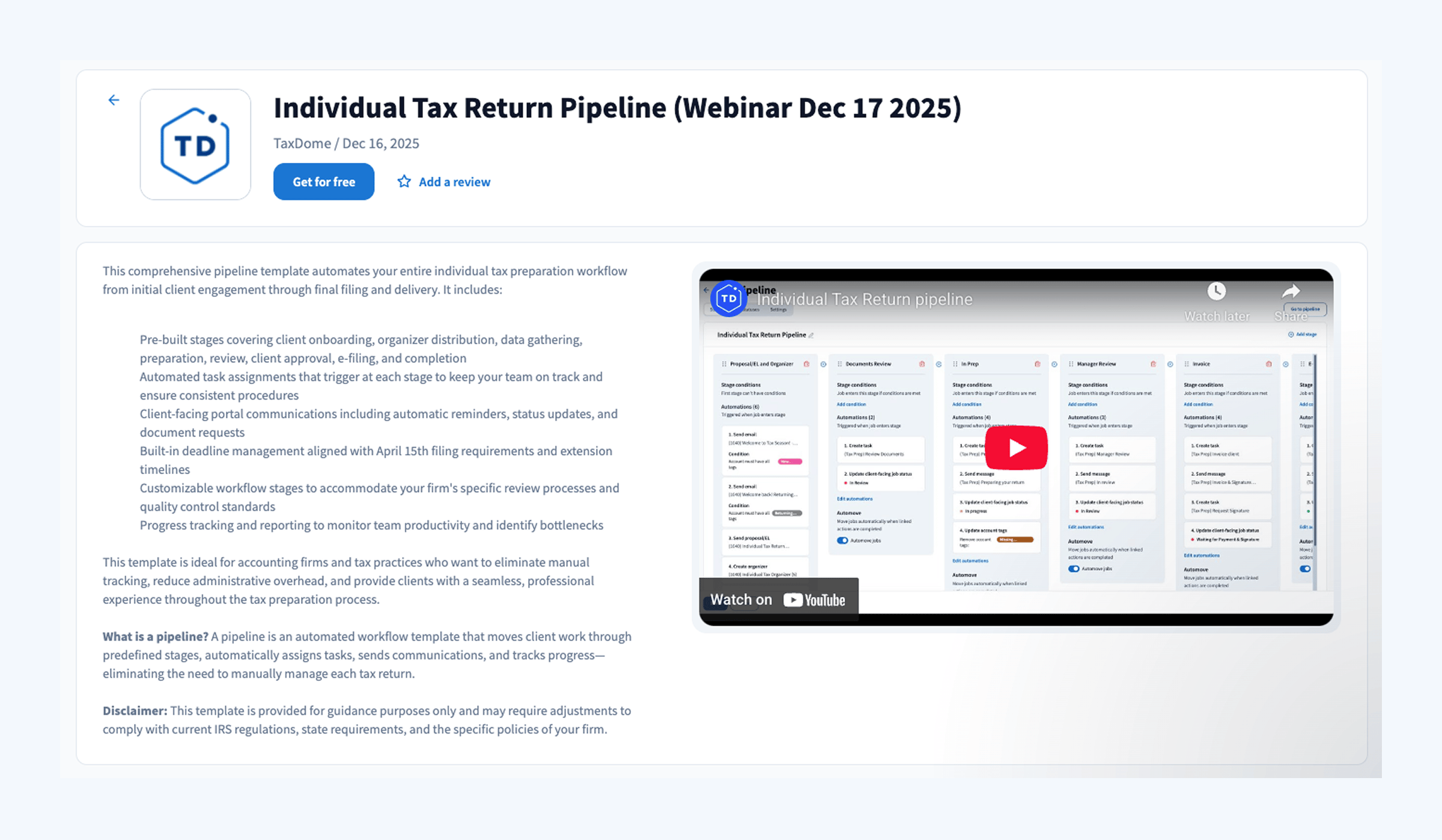
The Individual Tax Return Pipeline was built to give your firm a complete, end-to-end tax workflow in TaxDome — ready to launch with no setup.
To download the tax return workflow template from the webinar:
- In the left-hand sidebar menu in TaxDome, click Templates → Marketplace. Learn more about the TaxDome Marketplace
- Click on the Pipelines tab
- Sort by Newest
- Click on Individual Tax Return Pipeline (Webinar Dec 17 2025) → Get for free
- That’s it — the pipeline and all related sub-templates will be added to your workspace. You’ll find the pipeline under Workflow → Pipelines
Launch checklist: your first 4 steps
- Create jobs: select your client list and click ‘Add Job’ to enter them into your pipeline. Learn how to add jobs.
- Use a holding stage (optional): Carlos recommended editing your pipeline to add a “holding stage” at the beginning with no automations to prevent immediate automated emails and to piecemeal client rollout. Learn about client-facing tasks as an alternative.
- Test internal processes: run a test job with your team to understand how automations work and customize templates to your firm’s voice.
- Roll out: move clients from holding stage to active stages in manageable batches, or launch all at once if you’re comfortable with automation.
How to customize the pipeline template
From pipeline stages and automations to messages, emails, proposals, and organizers, everything is fully customizable after you download the template.
Carlos shared a pro tip during the webinar: test it using a client test account on the client mobile app or portal. By going through the workflow as a client — from proposal to organizer, document upload, and delivery — it’s easier to identify any necessary adjustments before rolling it out firm-wide.
For detailed guidance on how the workflow is built and how you can customize it, you can also watch Ilya’s template overview video, covering:
- how the pipeline stages are structured
- where automove is enabled and what actually triggers it
- how client actions (signing, submitting, paying) move jobs forward
- where the only manual firm actions exist
Signing off for 2025: our annual report and wishes for the New Year
We hope you find the webinar helpful as you prepare for the tax season ahead. Our goal at TaxDome is always the same: to help you feel organized, clear-headed, and confident — with tools and workflows that do the heavy lifting so your team can focus on what matters most.
As we wrap up the year, we’d also like to wish you all a restful holiday season. If you’re looking for something to read while you recharge, our 2025 annual letter is now out, offering a close-up look at our milestones, vision for the future of accounting, and the people behind the platform.
From everyone at TaxDome, we hope you enjoy a memorable end to 2025 and a strong, productive start to 2026!

Josef creates clear, actionable content at TaxDome, highlighting features, updates, and key accounting topics. His focus is on making complex ideas accessible and engaging, helping users understand and apply insights effectively.

Get your free guide

Thank you!
The guide copy has been sent to your email. Please check your inbox!
Recommended articles
TaxDome AI: more than 2,000,000 documents organized for accountants this past tax season—and we’re just getting started

Webinar recap and Q&A: Summer Update 2026

Unpacking the differences between TaxDome Payments and Stripe