 US – English
 UK – English
 Canada – English
 Australia – English
 Danmark – Dansk
 DACH - Deutsch
 France – Français
 España – Español
 Sverige – Svenska
 Italia – Italiano
 Nederland – Nederlands
 Portugal – Português
 Suomi – Suomi
 Norge – Norsk
 日本 – 日本語
 Romanian – Română












How to create a tax preparation checklist that keeps clients on track

Run your entire firm on one platform

Tax season is one of the busiest times of the year for accounting firms. Between collecting documents, answering client questions, and meeting filing deadlines, most teams feel the pressure. One way to stay on top of it is with a clear, client-ready tax checklist.
In this guide, we’ll cover what to include, share best practices for requesting and tracking documents, and give you access to a customizable template we’ve created to help your firm start strong.
Table of сontents
How to ask clients for the tax documents you need
Every tax preparer knows the preparation process moves only as fast as clients do. And they respond quickly only when the experience feels effortless. According to our Client Satisfaction Report, many would even pay up to 50% more for faster service.
Now think about the tools most firms still use: long PDF checklists, spreadsheets, or email threads with a dozen attachments. On the surface, they look simple, but in reality, they create more work on both sides. Clients have to download, fill, scan, and resend. You have to track replies, double-check that every field is filled, and chase missing items. That’s not simple. It’s slow, frustrating, and prone to errors.
Worse yet, it’s risky. Email was never built to protect sensitive tax information. Attachments can be intercepted, misrouted, or lost in an inbox. One mistake can undo years of trust. Cybersecurity is now one of the top concerns for clients — and it should be for firms as well.
The better alternative is a secure client portal that brings every interaction together. But not every portal works the same way. The right one should keep the process straightforward for both sides:
- For clients: one login for everything, user-friendly organizers, pre-filled data that carries over year to year, and auto-save across devices.
- For the firm: tailored questionnaires, conditional logic that hides irrelevant questions, reusable templates, CRM integration, and automated reminders.
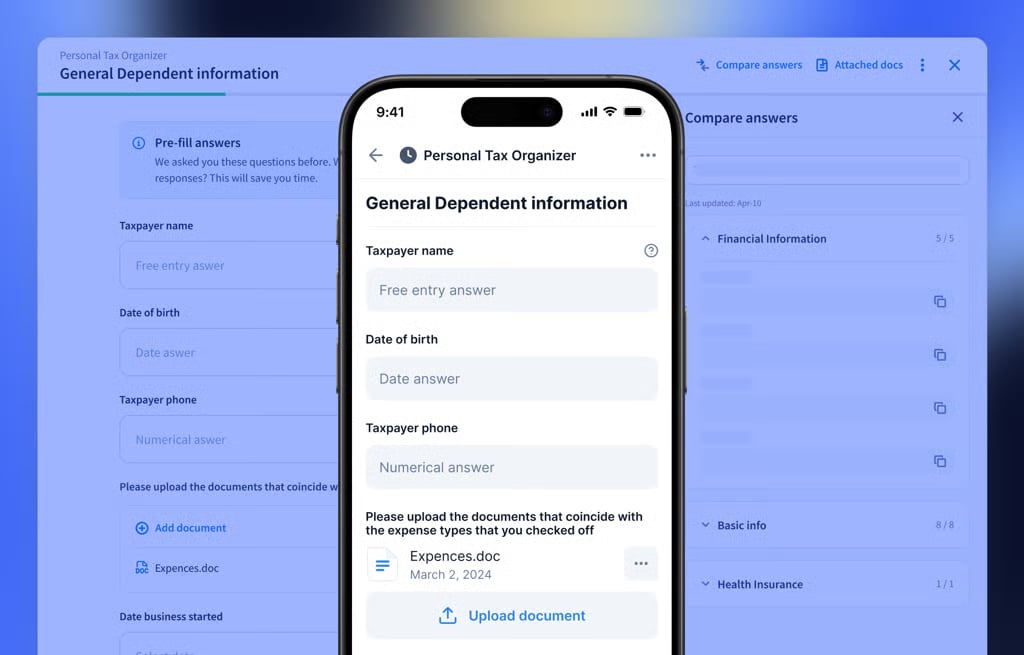
For example, TaxDome’s client portal combines all of these features and even lets clients do everything directly from their mobile device. That’s the kind of experience that keeps clients engaged, helps your team stay efficient, and keeps tax filing on schedule.
In short: make it easy, make it secure, and clients will do their part on time. That’s how you prevent tax season from turning into a bottleneck.
Why templates are non-negotiable at scale
Once you’ve decided how to request documents needed for tax preparation, the next step is making sure you don’t reinvent the wheel every time. Whether you’re handling the process manually or through a practice management solution, templates are the foundation of efficiency.
The power of reusable templates is simple: set them up once, and apply them endlessly. It’s also worth creating different versions for different types of clients. For example:
- For individuals: covering standard income tax and deductions
- For sole proprietors: including self-employed income and business expenses
- For partnerships or corporations: capturing entity-level financials and ownership details
Templates give your team a consistent starting point while leaving room for customization when needed. If you’re looking for inspiration, explore our library of accounting templates designed to cover a wide range of common scenarios.
What every tax preparation checklist should cover
A well-designed preparation guide does more than list documents. It organizes everything into logical categories, making it easier for clients to know what’s needed (and harder for them to forget something important or misplace paperwork). Every firm may adapt it differently, but the categories below form a reliable starting point.
Personal information
Start with identity details that allow you to complete returns accurately. Clients should provide their full legal name, date of birth, Social Security number, and current address. If they have a spouse or dependents, the same details apply. In some cases, you’ll also need additional information — for example, a spouse’s employment details for joint returns or records of childcare and medical support for dependents.
Income documents
Income reporting often makes up the largest share of the preparation process. Which documents are needed varies by client, and that’s exactly where conditional questions are extremely useful.
Common categories include:
- Employment records: W-2s or other wage statements
- Self-employed and business income: 1099 forms, business summaries, or expense records
- Retirement and investment details: distributions, dividends, interest, or sale transactions
- Property and real estate documents: rental income, expenses, depreciation, or settlement statements
- Other income sources: K-1s, gambling winnings, unemployment, or scholarships
Deduction and credit records
Deductions and credits can come from many different areas of a client’s life, and the mix will look different for everyone. But here’s a list of the most common records to choose from:
- Home and property expenses: mortgage interest, property taxes, or major improvements
- Education and family costs: tuition, student loan interest, childcare, or adoption expenses
- Medical and insurance: out-of-pocket health costs, premiums, or HSA contributions
- Charitable giving: receipts for cash and non-cash donations
- Retirement and energy incentives: IRA contributions, clean vehicle purchases, or energy-efficient upgrades
Tax payments made during the year
Many clients forget about estimated payments or extension payments until late in the process. Your checklist should prompt them to include proof of federal and state estimated tax payments, any portion of last year’s refund applied forward, and payments made with an extension.
Additional information
Finally, round out your checklist with documents that provide context or confirm prior filings. This includes last year’s tax return, IRS or state correspondence, and an Identity Protection PIN if issued. Clients should also share records of major life events (marriage, divorce, or new dependents) or any foreign assets or bank accounts that may require disclosure.
Download your customizable tax preparation checklist
We’ve assembled the list of documents most firms rely on during tax season. This printable tax checklist is broad enough to cover common situations while flexible enough for you to adapt to specific client needs. Use it as a starting point and make it your own.
What if clients don’t submit on time? Best practices to stay ahead
Even when you make the process simple, some clients still miss deadlines. That can put filings — and client trust — at risk. These practices can help keep everything on track:
1. Educate clients during onboarding
Set expectations from the start. Make sure clients understand why timely submissions matter for them: late documents can mean delayed filings, reduced refunds, or even penalties. When clients see the personal impact, they’re more likely to cooperate.
2. Plan ahead to stay on track
Don’t wait until the deadline to find out you’re in trouble. Set your own internal due dates that give you some cushion before the IRS deadline. You probably already know which clients tend to submit everything at the last possible moment — keep a closer watch on those accounts from day one. That way, when a few clients inevitably run late, you won’t be scrambling to save your entire tax season.
3. Keep everything connected
Checklists and reminders are helpful, but they only work if they’re part of a bigger picture. A centralized platform like TaxDome ties together all the moving pieces, from client onboarding and document collection to signatures, payments, and communication.
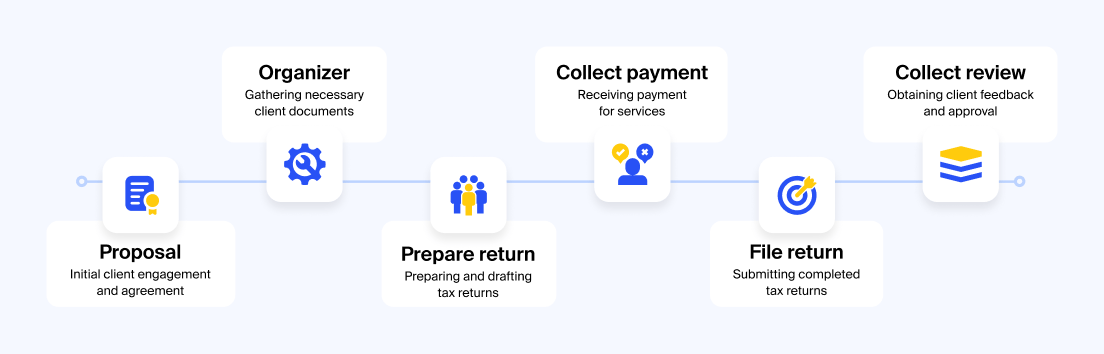
Instead of switching between tools, firms manage the full lifecycle in one place. With everything connected, your team gains visibility, your clients get a better experience, and deadlines stop slipping through the cracks.
Final thoughts
Tax season doesn’t have to mean chasing documents, missed deadlines, and client frustration. With a clear tax preparation checklist, client-friendly tools, and the power of centralization, firms can turn a stressful process into a structured, predictable workflow. Simplify requests, use templates, and keep everything connected — and both your team and your clients will feel the difference.

Mari develops TaxDome content by combining customer insights, industry research, and real-world trends. Her structured, automation-driven approach ensures messaging is clear, relevant, and supports more connected and efficient accounting firms.

Get your free guide

Thank you!
The guide copy has been sent to your email. Please check your inbox!
Recommended articles

Niche Business Accounting Report statistics: what business clients will pay for specialized expertise

Buy Now, Pay Later: offer clients payment flexibility

Top AI tools for accountants in 2026: key features and use cases compared