 US – English
 UK – English
 Canada – English
 Australia – English
 Danmark – Dansk
 DACH - Deutsch
 France – Français
 España – Español
 Sverige – Svenska
 Italia – Italiano
 Nederland – Nederlands
 Portugal – Português
 Suomi – Suomi
 Norge – Norsk
 日本 – 日本語
 Romanian – Română












How to make a profit and loss statement: free template, examples, and step-by-step instructions

Run your entire firm on one platform
Profit and loss statements provide fundamental insights into your clients’ financial health. By breaking down revenue and expenses, clear reporting can inform key business decisions and flag potential issues early.
Consistency becomes increasingly challenging as you handle more clients, though.
Your team is growing, and so is your workload, so how do you retain control at scale? You implement profit and loss statement (P&L) templates into your workflow to speed up reporting and deliver a consistent format for clearer comparison.
Table of сontents
Why should you use a profit and loss statement template?
A profit and loss statement template gives your team a reusable format for producing reports. Instead of creating P&L statements from scratch, everyone has access to a shared template ready to fill out and send.
The key benefits of using a template for profit and loss statements apply to most of the financial reports you produce for clients.
Create profit and loss statements faster
Starting from a template reduces the repetition in producing P&L sheets. Team members simply fill in the data, verify the calculations, and save the statement. Their time is spent only on tasks that require manual input, instead of repeating unnecessary steps.
Ideally, templates should include formulas to automatically calculate totals and other sums. Aside from producing statements faster, this reduces the risk of human error.
Customize statements with control
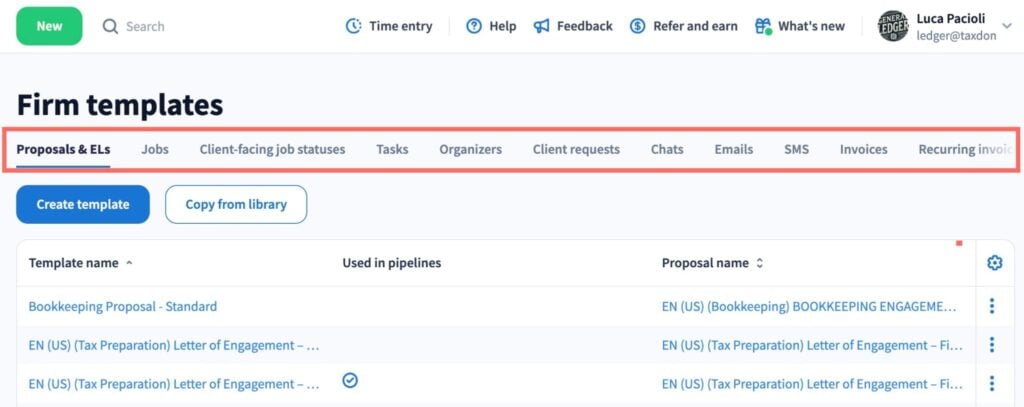
You can create and customize templates for as many purposes as you need. For example, you can create templates for quarterly and annual P&L statements and customize templates for individual clients.
When you need to update a template, you only have to make changes in one place, and they apply to every statement.
With TaxDome’s integration template and document management system, you can save customized, ready-to-go documents for every client.
Improve internal collaboration
When everyone works from the same set of templates, you remove potential inconsistencies from collaborative processes. Team members complete tasks faster and deliver consistent results, which reduces issues during handovers and reviews.
You can even automate these workflows so that each stage starts when the previous one is finished, and all tasks are assigned to the relevant team members.
Reduce the risk of errors in P&L statements
Removing manual work and automating calculations drastically reduces the risk of errors in financial statements. You still need to implement manual reviews to check everything is in order, of course. But fewer mistakes mean your team will complete reviews faster, and they’ll spend far less time correcting issues.
Simplify the analysis of financial statements
A consistent profit and loss statement format makes financial statements easier to compare and analyze for everyone. Anomalies stand out, trends are clearer, and you can respond to issues sooner. This improves the quality of reporting on clients’ financial health and the value of the services you provide them.
Flag financial and tax prep issues earlier
Simplifying analysis helps you flag issues as quickly as possible, giving your team and client more time to resolve them. This could range from fixing relatively simple anomalies for tax preparation to raising profitability concerns with clients before they become serious problems.
Make results easy for clients to understand
A familiar format in P&L statements also helps clients understand the information in them. This makes it easier for them to keep track of their financial performance. It also demonstrates the value of your accounting services in numbers that make sense.
What should a profit and loss statement include?
A profit and loss statement (or income statement) should clearly report on three core elements of a company’s financial health:
- Revenues
- Expenses
- Net profit (or loss)
Now, let’s look at the key sections of a P&L statement that convey this information in the clearest way possible.
Revenue
Revenue includes all income earned during the reporting period. Depending on revenue sources, some companies break down income into several categories:
- Sales (product) revenue
- Service revenue
- Other revenue
For product sales, the P&L statement should also subtract any sales returns, and discounts and allowances, from total sales revenue. Net Sales shows the remaining income, accounting for these subtractions.

Cost of goods sold (COGS) or cost of sales
Cost of goods sold (COGS) lists all expenses involved in the production or acquisition of physical products. This is typically used by manufacturers, detailing the cost of raw materials, labor, and other expenses.
For retailers, COGS includes the costs of acquiring and selling inventory over the reporting period.
Cost of sales is the equivalent metric for service businesses, detailing the expenses of delivering services to their customers. Depending on the business, this can include equipment, travel costs, sales commissions, software fees, and a range of other expenses.
Expenses
Expenses track all of the operational costs of running the business — everything not attributed to the cost of sales or COGS. This includes staff salaries, property rental fees, maintenance, marketing, and all other expenses not directly related to sales.
Companies may also have non-operating expenses to account for, such as interest payments or losses from investments. These require clear labeling in the Expenses table or a separate table should be added for clients with a high volume of non-operating expenses.
Other income
Other income details any revenue earned outside of core business operations. For example, interests and dividends, gains and losses on foreign currency, or income from the sale of assets.

Net profit (loss)
Net profit shows the profit (or loss) after all costs are accounted for, including tax deductions, for the reporting period. Your P&L statements should automatically calculate net profit (loss) using the figures previously entered.
Free profit and loss statement template
Download and edit our free profit and loss statement template to simplify your reporting system for clients. This template provides a clear, consistent format for tracking income and expenses, complete with built-in formulas to automatically calculate net profit and other totals.
Download template
How to create P&L statements: step-by-step
Now that we’ve covered the core elements of a profit and loss sheet, let’s run through the steps of implementing this template into your workflow.
Download our P&L statement template — or create your own
First, you want to get your templates in order. Download our profit and loss statement template and customize it or create your own from scratch. You’re not stopping at one template, either. You need templates for every P&L statement variation your team creates on a regular basis:
- Reporting periods: monthly, quarterly, and annual statements
- Comparative P&L reports: a year-on-year comparison of profit and loss performance
- Client P&L templates: customized statement templates for each client
With customized templates for each client, you can save client details and predefine key values — such as common expense types — to minimize manual entry on every statement.
Gather financial information for the reporting period
With your templates in place, the next step is to make sure you have all the necessary financial information from clients. Ideally, you want to capture clients’ financial data automatically from their general ledger or accounting software, so you don’t have to collect everything manually.
This means your team can simply review the relevant information and check for missing transactions, anomalies, and any other issues.
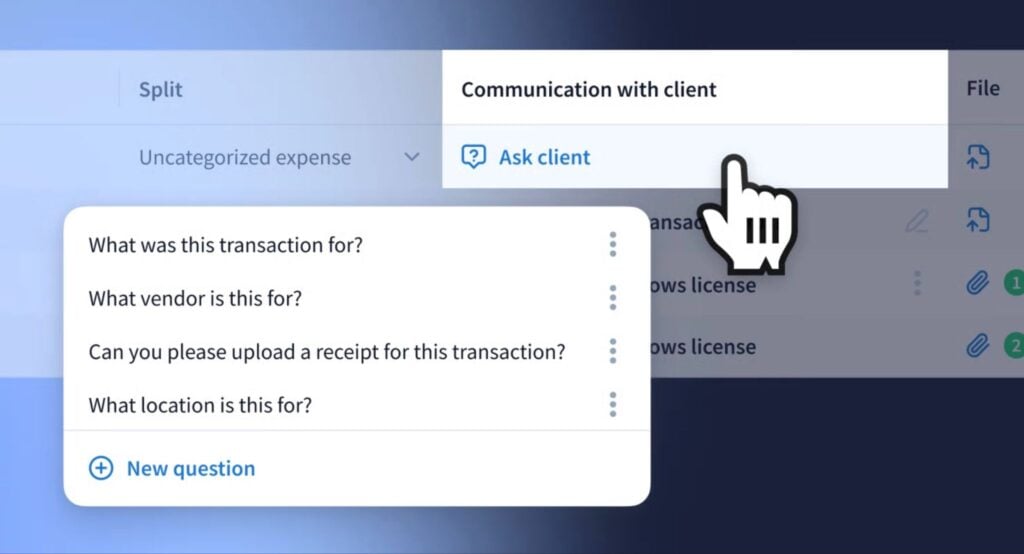
You need an efficient system for following up with clients to address any issues. You don’t want reporting tasks stuck “on hold” because you’re waiting for clients to provide documents or categorize transactions.
To resolve this issue, we’ve implemented a new follow-up system in TaxDome for sending queries to clients with a couple of clicks.
Enter the data into your P&L statement template
Once you have all the required financial information, you can add the latest figures to your P&L statement template. If your template includes the right formulas, it will automatically calculate subtotals, net income, and other values based on your input.
Before sending the P&L statement for review, take the chance to check the figures and calculations all look correct. It’s often faster to resolve issues at this stage of the workflow.
Review the final P&L statement for accuracy
Although you want to automate as much of this process as possible, manual reviews are integral to ensuring quality standards. Faster workflows allow your team to jump to the review stage faster, but don’t rush this phase of the process.
Verify all of the data and calculations in your income statements before approving them. Also, regularly check that the formulas in your templates are operating correctly and keep copies of original backups. It only takes one accidental change to throw your calculations off.
Deliver your P&L statement to the client
Email is not a secure system for exchanging sensitive financial information. Clients shouldn’t have to send financial records to you by email or receive P&L statements along with the rest of their emails.
In fact, you don’t need to send clients financial statements at all. With a secure client portal, you can upload them to a private vault where every document you add is stored, organized, and protected.
According to TaxDome insights, 75% of clients want a single platform for all document sharing and communication with their accountants. We know how important this is to your clients, which is why we’ve built the most complete collaboration system for accounting firms with our integrated client portal and top-rated client mobile apps for iOS and Android.
Automate recurring P&L reporting from start to finish with TaxDome
This profit and loss statement template is the starting point for more efficient P&L reporting, but it doesn’t end here. We’ve built TaxDome to automate every repeatable stage of profit and loss reporting so that your team can focus its time on the tasks that require manual oversight.
You can set recurring P&L workflows to start automatically, with all tasks assigned to the relevant team member. Data is pulled in automatically, documents are created on schedule, and reports are securely sent and stored everywhere they need to be.
15,000+ firms across 25+ countries around the world are already using TaxDome to manage workflows on autopilot — and the list is growing. The leading names in tax and accounting services are replacing disjointed tools with one, complete practice management system.
In 2025, TaxDome was named the #1 tax practice management software by G2 and won Comprehensive Firm Workflow Solutions at the CPA Practice Advisor Readers’ Choice Awards for the second year in a row.

Aaron produces practical content for TaxDome, drawing on 11 years in SaaS copywriting and marketing. He helps accounting and tax professionals get the most from TaxDome and other tools, making complex topics clear and actionable.

Get your free guide

Thank you!
The guide copy has been sent to your email. Please check your inbox!
Recommended articles
Niche Business Accounting Report statistics: what business clients will pay for specialized expertise

Buy Now, Pay Later: offer clients payment flexibility

Top AI tools for accountants in 2026: key features and use cases compared