 US – English
 UK – English
 Canada – English
 Australia – English
 Danmark – Dansk
 DACH - Deutsch
 France – Français
 España – Español
 Sverige – Svenska
 Italia – Italiano
 Nederland – Nederlands
 Portugal – Português
 Suomi – Suomi
 Norge – Norsk
 日本 – 日本語
 Romanian – Română












Free bank reconciliation template + guide to automating account reconciliation

Run your entire firm on one platform
A bank reconciliation template brings speed and consistency to ongoing reconciliation work. This is one of the most time-intensive tasks for accounting teams, and the heavy emphasis on manual data entry means it’s also prone to errors.
Every discrepancy requires investigation and each client query puts the workflow on pause. Some delays are unavoidable, but you can mitigate or prevent most of them with the right processes in place — starting with this free template.
Table of сontents
Why should you use a bank reconciliation template?
Instead of creating every bank reconciliation statement from scratch, templates allow your team to focus its attention on tasks that drive the most value for your firm and its clients.
Implement a consistent bank reconciliation workflow
Templates are the first step in building efficient workflows for recurring accounting tasks. They give your team a defined starting point, preventing unwanted variations from causing errors or confusion.
You still have room to tailor your statements for individual clients, though. Instead of customizing every statement, you can save pre-customized templates for client types and individual clients. This eliminates unnecessary repetition and reduces the risk of errors.
Minimize manual input without compromising quality
By removing the most repetitive aspects of bank reconciliation, templates let your team focus on tasks that require human oversight. A good template includes formulas to automatically calculate totals and reflect changes in closing balances.
If you add a transaction, the relevant totals update automatically, and the changes are reflected in the adjusted balances. So, instead of running the numbers manually, your team can simply review and verify them.
Make reviews and approvals easier across your team
Manual reviews are integral to ensuring accuracy in bank reconciliation. You can’t rely on automation for reviews themselves, but you can improve the speed and efficiency of the review process.
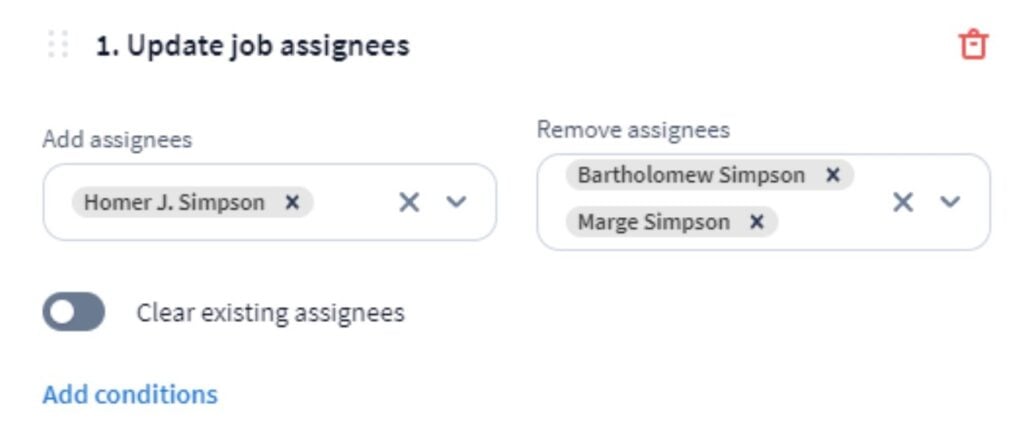
Templates maintain a clear, consistent structure in your reconciliation statements, making it easier to review and identify any remaining issues. Beyond this, you can automate each step of the review cycle so every task is assigned to the right person and each stage starts as soon as the previous one ends.
Reconcile accounts more often for clients (without working harder)
With a more efficient reconciliation process in place, you unlock capacity to run them more often without working harder or compromising quality. Firstly, this allows you to handle a higher volume of clients without reconciliation becoming a bottleneck.
Crucially, it also equips you to reconcile accounts for clients with higher transaction volumes — the companies willing to pay more for streamlined accounting services.
Simplify reporting for clients
A bank reconciliation template helps you present findings to clients in a layout that makes sense to them. You can clearly show the adjustments your team has made and their impact on the client’s final balances.
Above all, these statements show the value of your reconciliation services in clear numbers. They also support wider financial reporting, any advisory services you provide, and crucial reinforcement in the event of an audit.
What should a bank reconciliation statement include?
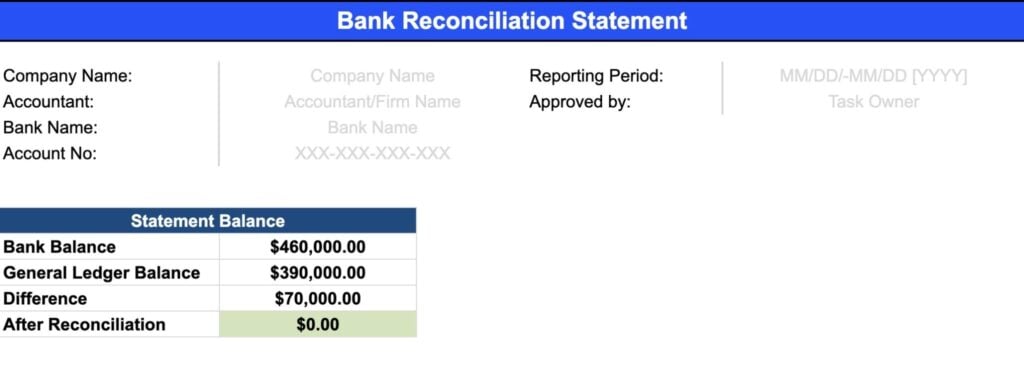
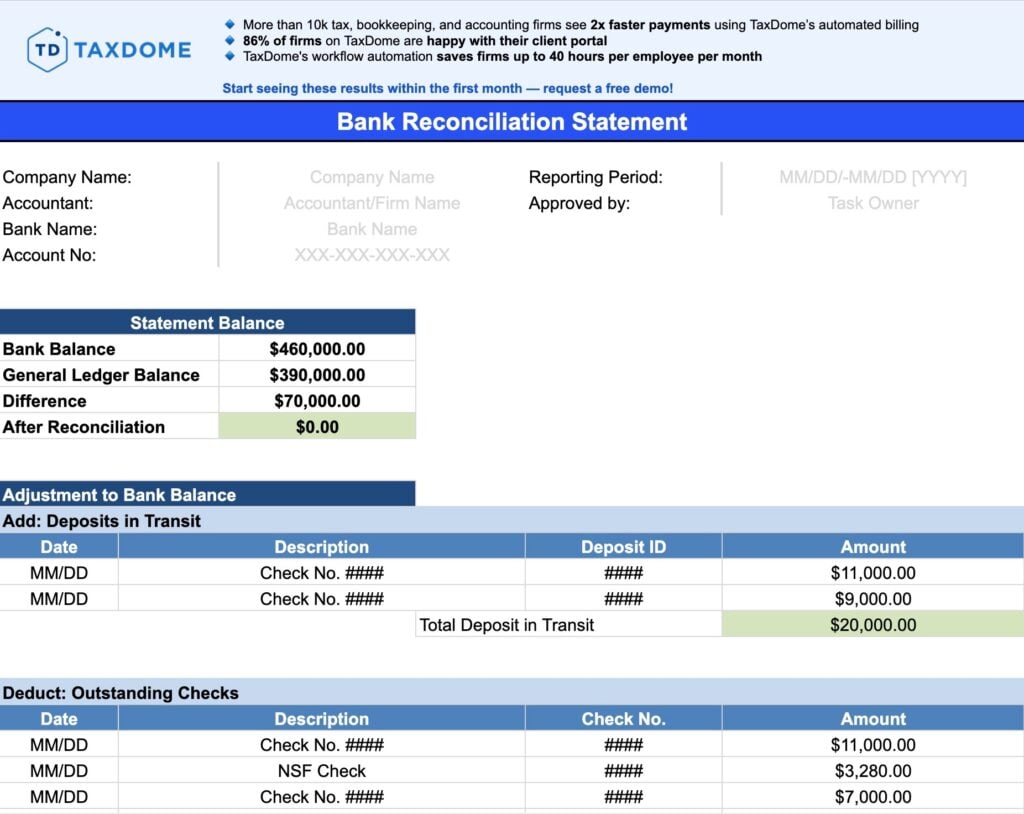
A reconciliation statement should give clients a clear view of the period covered: the starting balances, adjustments made, and the final results. To present this information clearly, you want to group everything into three distinct sections:
1. Reconciliation period and summary
The reconciliation summary in your statement provides a quick overview of all the information clients need to know. This includes the basic admin details for the reconciliation itself and a summary of both balances over the period.
The admin section includes:
- Client details
- The reconciliation period (start date and end date)
- Bank account details
- Reconciled by (optional)
- Approval (name)
The reconciliation summary clearly specifies the following:
- Opening bank balance
- Opening GL balance
- Difference
- Difference after reconciliation
This summary helps clients quickly see that everything adds up after the reconciliation. It also makes it easier to review reconciliation records and narrow down the timeline of where discrepancies could have started.
2. Adjustment to bank balance
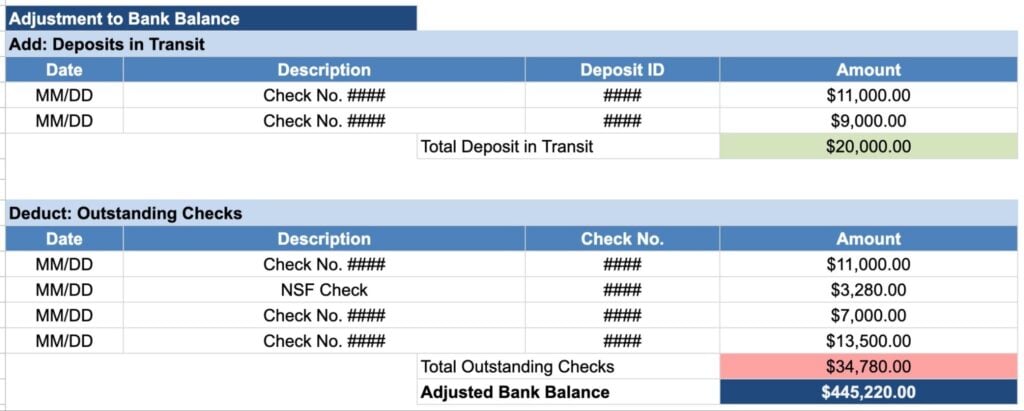
In this section, you document all changes made to the opening bank balance for the reconciliation period. This breaks down all of the additions and deductions that result in the adjusted balance value.
3. Adjustment to ledger balance
This section serves the same purpose as the Adjustment to bank balance section, except for the general ledger balance. Again, you want to specify the opening balance and list all of the additions and deductions that result in the adjusted balance for the general ledger.
Free bank reconciliation template
Download and edit our free bank reconciliation statement template to simplify the monthly reporting cycle for clients. This template gives your team a consistent format for reconciling accounts and documenting the work your team does to bring balances in line.
How to use this template in your bank reconciliation workflow
With 50% of finance teams spending 6+ days on month-end closes, it’s clear that companies need a more efficient system. Your firm can be the answer to their problems if you deliver an efficient reconciliation cycle that demands minimal input from clients every month.
So, let’s break down the other key components of implementing this template into a streamlined reconciliation workflow.
Download our bank reconciliation template — or create your own
First, download our bank reconciliation statement template (Excel or Google Sheets) and customize it to suit your needs. Alternatively, use our template as a guide and create your own. Just keep in mind that you’ll need to check that your formulas work properly if you make any changes to our template or replicate it in one of your own.
Save template variations for different client types
You’re going to need more than one bank reconciliation template to eliminate unnecessary repetitive work. If you have different client types, create and save templates that meet their needs. For example, if you have clients that operate in multiple markets or currencies, save reconciliation templates that support them.
Once you’ve got all of the template types you need, save versions for each client with their details and any special requirements. You don’t need to repeat any of these customizations or allow any space for avoidable errors with a complete library of templates.
Assign clear roles throughout the reconciliation process
Bank reconciliation requires clearly defined roles and responsibilities with clean handovers at every stage. Decide who prepares the statement, who reconciles accounts, and who reviews the results. Keep these roles as consistent as possible and use a workload management system that gives everyone 100% visibility as reconciliation tasks progress.
Streamline your approach to gathering clients’ financial information
Gathering financial information from clients is one of the biggest drags on reconciliation workflows. This includes getting the initial transaction data from bank statements and general ledgers, but also any discrepancies you have to follow up on with clients.
To resolve this problem, we’ve implemented a new system in TaxDome that automatically imports data from your clients’ general ledgers. This removes the burden of manually collecting information from clients, allowing your team to progress directly to the reconciliation stage of the process.
Implement an intuitive system for investigating discrepancies
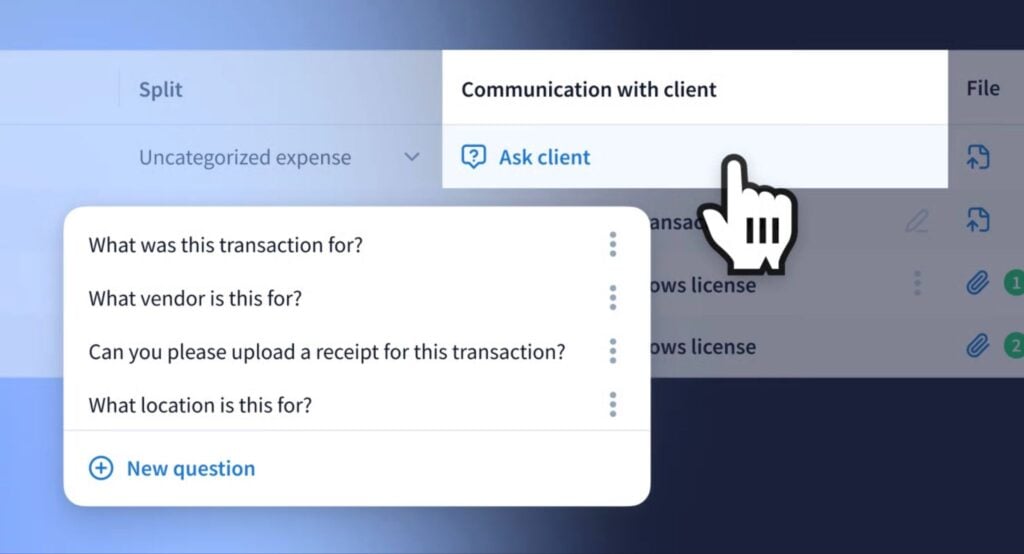
Hopefully, your team can resolve most discrepancies by comparing bank statements with the general ledger. Sometimes, you’ll have to dig deeper to investigate issues, and you may need further documentation from clients, such as specific invoices or receipts.
To minimize any delays, we’ve also incorporated a new communication system into TaxDome that allows you to follow up with clients on all discrepancies within a few clicks.
Run manual reviews to verify reconciliation statements
The smartest automation strategies know when to preserve manual processes, and the review stage is one of them. Every reconciliation statement should be reviewed by a dedicated team member to confirm accuracy. This is integral to scaling up your reconciliation services without compromising quality.
Deliver your bank reconciliation statement to clients
As soon as a reconciliation statement is approved, you want this approval to trigger its delivery to clients without any manual input from your team.
Let’s be clear about one thing here: email is not a secure channel for sending sensitive financial documents to clients. You need a secure system for storing and sharing all client files.
With TaxDome’s secure document management and file sharing system, you don’t even need to send reconciliation statements to clients. You can automatically link them to client profiles in the built-in CRM, and they’ll show under the Docs tab for clients in their client portal and client mobile app.
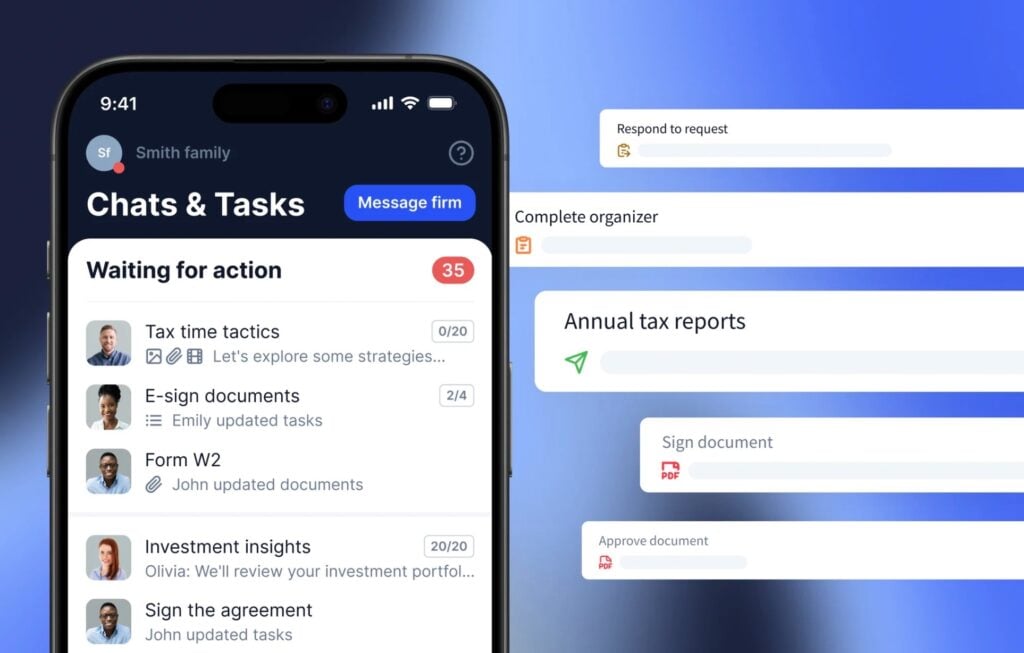
According to TaxDome research, 3 in 4 clients want one secure platform for all communication and document sharing with their accountants. You can tell we take these insights seriously from our integrated client portal and client mobile app, the complete collaboration system for accounting firms and clients.
Automate end-to-end reconciliation workflows with TaxDome
This bank reconciliation template kickstarts your workflows for recurring reconciliation cycles, but this is only the beginning. With TaxDome, you can automate every step with recurring pipelines and conditional logic.
Reconciliations start automatically on schedule with all tasks assigned to the relevant team members. Data is imported automatically and documents are created and assigned to tasks — all without any manual input. Your team only needs to get involved in the tasks that truly require their attention.
When the reconciliation is complete, statements are stored securely and accessible both to your team and the client. Files are stored as editable spreadsheets on the firm’s end and PDF documents on the client side.
15,000+ firms across 25+ countries around the world use TaxDome to automate workflows like this every day. High-growth firms are realizing the power of an end-to-end practice management system that improves outcomes at every level of their firm.
The same platform named the #1 tax practice management software by G2 in 2025 and winner of Comprehensive Firm Workflow Solutions at the CPA Practice Advisor Readers’ Choice Awards for the second year in a row.

Aaron produces practical content for TaxDome, drawing on 11 years in SaaS copywriting and marketing. He helps accounting and tax professionals get the most from TaxDome and other tools, making complex topics clear and actionable.

Get your free guide

Thank you!
The guide copy has been sent to your email. Please check your inbox!
Recommended articles

Niche Business Accounting Report statistics: what business clients will pay for specialized expertise

Buy Now, Pay Later: offer clients payment flexibility

Top AI tools for accountants in 2026: key features and use cases compared