 US – English
 UK – English
 Canada – English
 Australia – English
 Danmark – Dansk
 DACH - Deutsch
 France – Français
 España – Español
 Sverige – Svenska
 Italia – Italiano
 Nederland – Nederlands
 Portugal – Português
 Suomi – Suomi
 Norge – Norsk
 日本 – 日本語
 Romanian – Română












The best BrightManager alternatives for accounting firms

Run your entire firm on one platform

TL;DR:
- Why firms look for BrightManager alternatives: price concerns, limited automation, missing client features, and a complex software suite
- For growing tax and accounting firms, TaxDome is the most complete BrightManager alternative for practice and client management
- For solo practitioners and small teams, Financial Cents and Pixie offer simple, affordable alternatives
Methodology: how do we choose?
We analyze BrightManager’s product offering and customer reviews vs the top alternatives. The percentages below indicate the weighting of each feature category in our recommendations:
- Workflow automation — 25%
- Client features — 20%
- Pricing — 20%
- Integrations — 15%
- Mobile apps — 10%
- Usability — 5%
- Reporting — 5%
Last Updated: October 2025
BrightManager (formerly AccountancyManager) is a familiar name in the UK accounting space. It promises to automate client management and internal processes while simplifying compliance with local regulations.
The platform has earned a reputation for helping smaller firms step up and handle higher workloads. However, many practices find the product can only take them so far — at which point, they start looking for BrightManager alternatives.
What is BrightManager and why do accounting firms choose it?
Best for: small firms in the UK and Ireland prioritizing local compliance
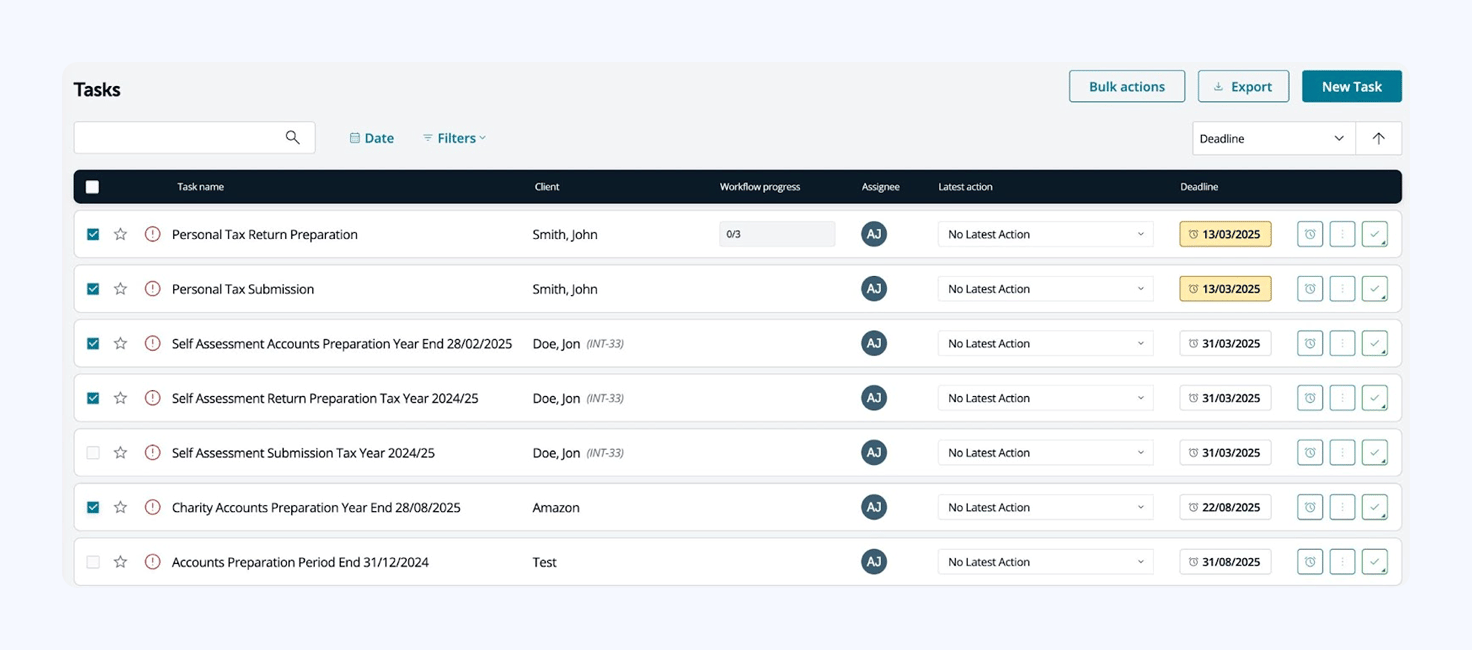
BrightManager claims to be the UK’s favorite practice management software. Rebranding from AccountancyManager in 2023, BrightManager now integrates tax, payroll, bookkeeping, and HR software into a connected ecosystem.
BrightManager key features:
- Task management
- Workflow automation
- Onboarding automation
- Client CRM
- Client portal
- Email integration and SMS
- Time tracking
- AML risk assessments and client risk profiling
- Reporting
BrightManager pros and cons
| 👍 Pros | 👎 Cons |
| ✅ Simple automation for workflows, client comms, and onboarding | ❌ Limited collaboration features (no team chat, @mentions, client chat) |
| ✅ Centralized CRM, client portal, and document management | ❌ Rigid automation workflows; lack of conditional logic and customization |
| ✅ Good balance of firm and client management features for small teams | ❌ Client portal limitations: confusing navigation, no secure chat |
| ✅ AML checks and risk assessments | ❌ No client mobile apps |
| ✅ UK‑focused compliance and integration advantages | ❌ Limited reporting insights and customization |
| ❌ Bright’s suite of products can multiply software fees and make navigation challenging | |
| ❌ Relatively expensive for all team sizes |
How much does BrightManager cost?
BrightManager starts from £33.60+VAT/month, per user, billed annually at £403.20. That price covers you for up to 12 team members before you’re bumped up to the Enterprise plan.
You can also choose to pay monthly at a higher rate:
- Standard: £33.60+VAT/month per user (billed annually)
- Standard: £42+VAT/month per user (billed monthly)
- Enterprise: custom pricing
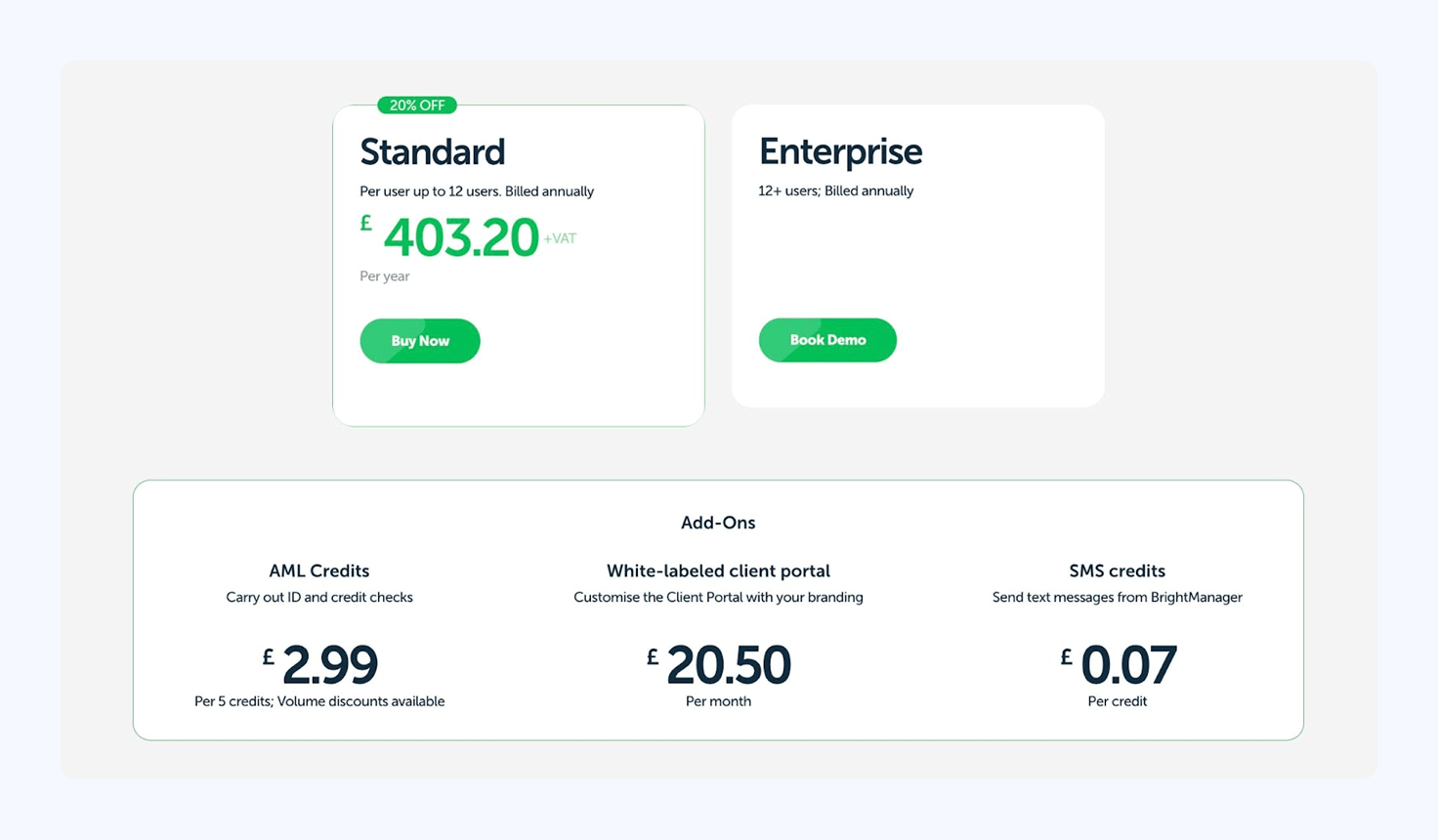
You’ve also got some paid add-ons to consider if you’re interested in signing up for BrightManager. AML credit checks, SMS messages, and the white-labeled client portal are all priced separately:
- AML Credits: £2.99 per five credits
- White-labeled client portal: £20.50/month
- SMS credits: £0.07/credit
By the time you add in the VAT and additional costs, pricing is comparable to TaxDome — a complete practice management platform that delivers a lot more for your money.
Why do accounting firms look for BrightManager alternatives?
- Limited task management features: mostly task lists and calendar views — no Kanban or advanced workload management tools
- Basic workflow automation: Setting up recurring tasks is awkward, and you can’t automate complex workflows or full pipelines
- Missing team collaboration features: no built-in chat system, no support for @mentions, and you can’t quickly tag someone for quick task updates or requests
- Shallow client-facing features: no client mobile apps, secure client messaging system, or mobile document uploads
- Value for money concerns: you can get more for a similar starting price from other tools
- BrightManager gets expensive: if you have 11+ team members or need to implement other Bright products, things get expensive.
- Potential price increases: customers have raised concerns about recent price increases on other Bright products, and whether BrightManager increases are coming
Table of сontents
What are the best BrightManager alternatives for growing accounting firms?
Whichever reasons you’re looking for a BrightManager alternative, we’ve selected five of the best options for each use case:
- TaxDome: the complete, end-to-end practice management platform
- Karbon: internal collaboration and workflow automation
- Pixie: the simple, affordable BrightManager alternative for small teams
- Engager.app: the best for focusing on client management
- Financial Cents: the entry-level practice management platform
We’ve done the testing and deep research on these products to pinpoint their strengths and weaknesses, so you don’t have to.
Here’s a quick summary of how these tools compare with BrightManager:
BrightManager vs top alternatives (2025)
| BrightManager | TaxDome | Karbon | Pixie | Engager.app | Financial Cents | |
| Best for | Basic automation and UK compliance | The complete practice management platform for growing firms | Internal team collaboration | The simpler, affordable BrightManager alternatives | Client management for small teams | Entry-level practice management toolkit |
| Workflow depth | Basic | Complete | Moderate | Basic | Basic | Basic-moderate |
| Client comms | Limited | Built-in chat, secure portal, mobile messaging | Email integration | Limited | Basic | Basic |
| Mobile apps | No | Yes – the top-rated client mobile app | Yes – limited | No | Yes (basic client access) | No |
| Reporting | Basic | Advanced | Moderate | Minimal | Basic | Moderate |
| Price model | Per user, tiered | Per user | Per user, tiered + add-ons | Client-based | Client-based | Per user, tiered |
| Starting price | £33.60+VAT/month
(billed annually at £403.20+VAT) | $58/month
(billed annually at $700) | $59/month
(billed annually at $708) | $129/month | £9+VAT/month | $19/month
(billed annually at $228) |
| G2 Review score | N/A | 4.7/5 | 4.8/5 | 4.8 | N/A | 4.7 |
| Notable caveat | Limited scalability & collaboration | Learning curve (mostly solved by onboarding team) | High cost for key features | Not suited for fast-growing firms | Still maturing features & integrations | Cost scales quickly with team size |
1. TaxDome
Best for: growing accounting firms serving companies worldwide
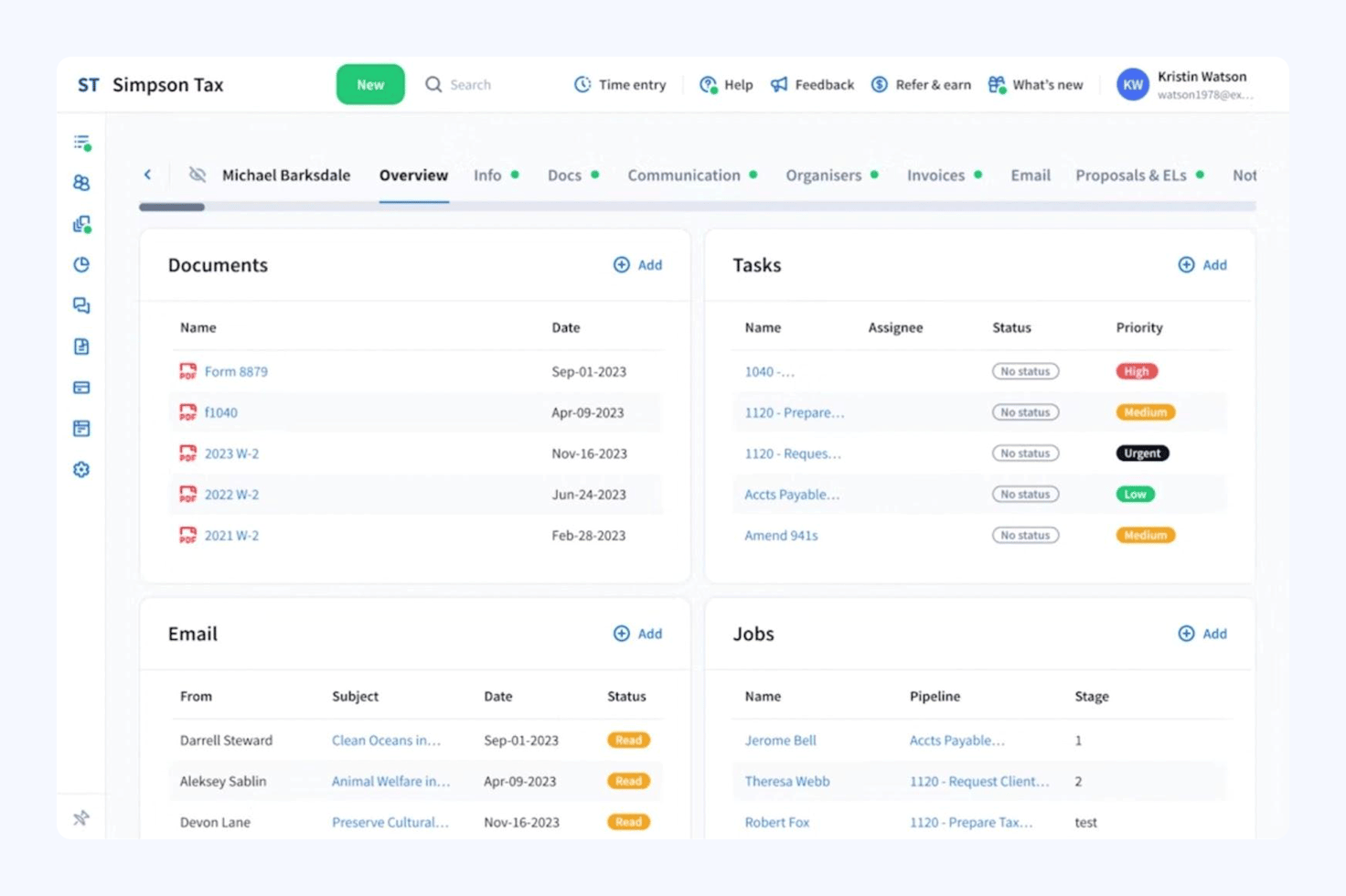
TaxDome is the most comprehensive upgrade you’ll get from BrightManager. At a similar price point, you get the complete practice management platform with no compromises between firm and client management.
This includes the industry’s top-rated client mobile app and the most advanced accounting workflow automation system currently available. You still get a platform built for UK firms, complete with Companies House integration, but one that’s also designed for managing clients around the world.
TaxDome key features:
- End-to-end automation: run complex accounting processes, pipelines, and recurring services on autopilot
- Unlimited CRM: manage client data in one place and automate relationships with unlimited contacts
- Proposals and engagements: automatically send customized proposals and engagements without the manual workload
- Document management: store unlimited files, organize client docs, and automate document management
- Billing and payments: send invoices, recurring bills, and payment reminders automatically
- Team collaboration: take the hassle out of team tasks with internal messaging, chat, comments, and @mentions
- Unified communication: centralize all communications with integrated email, secure chat, and two-way SMS
- Branded client portal: make it effortless for clients to upload docs, add signatures, and complete other tasks
- Client mobile app: give your clients the top-rated mobile experience on the App Store and Google Play
TaxDome pros and cons
| 👍 Pros | 👎 Cons |
| ✅ Everything growing firms need in one practice management platform | ❌ Slightly longer learning curve than BrightManager |
| ✅ Supports UK firms operating nationally and internationally | |
| ✅ Advanced automation features | |
| ✅ The most complete set of client-facing features | |
| ✅ Top-rated client mobile app | |
| ✅ Fully integrated communication: email, chat, comments, and two-way SMS | |
| ✅ Clear, simple pricing with no hidden fees or paid add-ons |
How much does TaxDome cost?
TaxDome runs a simple pricing structure with no hidden fees or sudden price hikes:
- Essentials: from $58/month (billed at $700/year per user)
- Pro: from $75/month (billed at $900/year per user)
- Business: from $92/month (billed at $1,100/year per user)
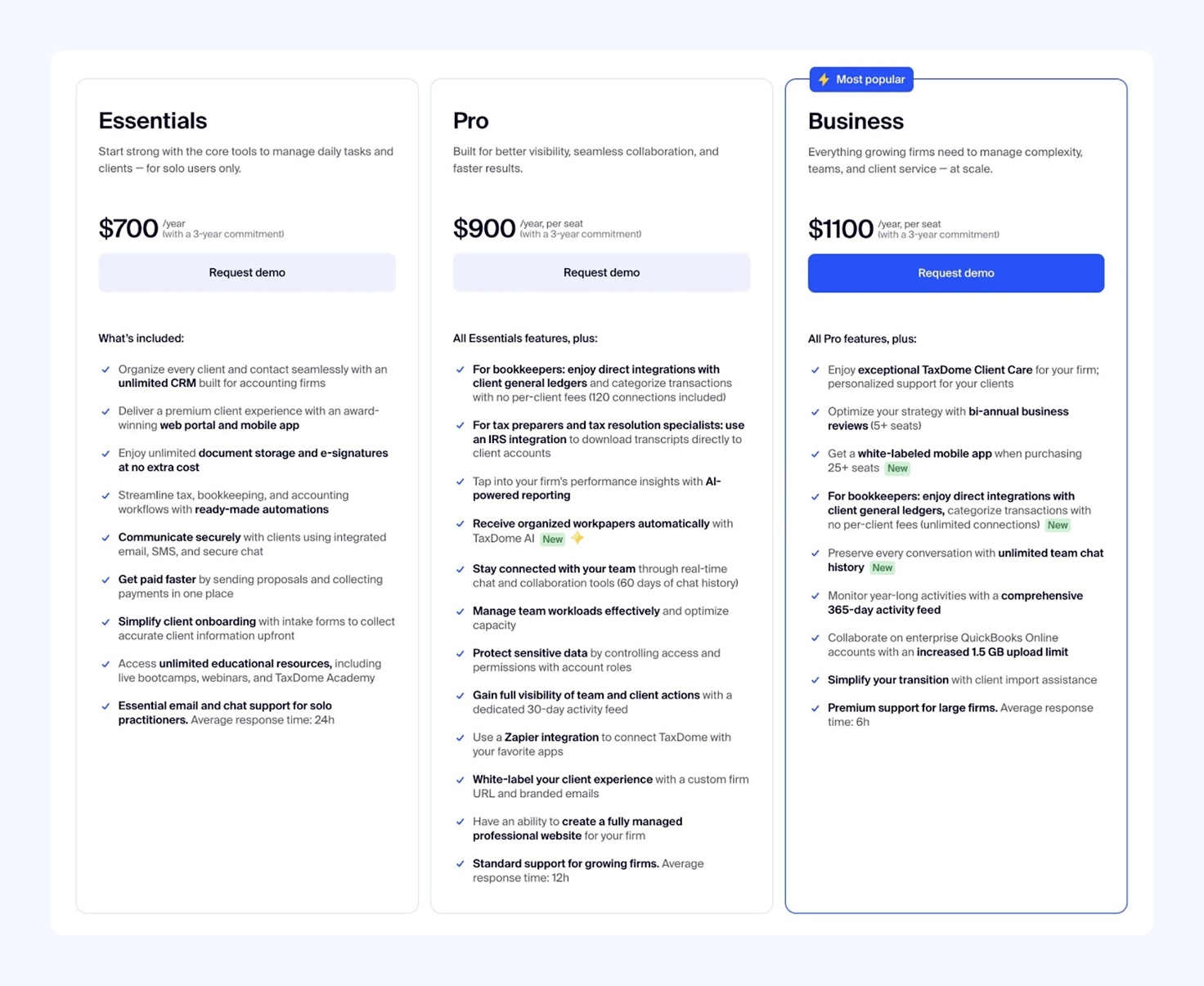
At a glance, BrightManager appears to offer a lower starting price than TaxDome, but this disappears once you add the VAT and other additional charges. Ultimately, you’re getting a far more capable platform with TaxDome for a comparable starting price.
You’re also not dealing with the price hikes if your team grows beyond 11+ members.
TaxDome integrations
TaxDome brings all of the features you need to manage and build your firm, so you’re not reliant on integration to fill feature gaps. However, the platform does include native integrations with essential services to help you operate both in the UK and overseas:
- Juno: automate the entire intake and delivery experience in one place with TaxDome’s Juno integration
- Companies House: import client data directly from Companies House
- International tax integrations: connect TaxDome to international services, including the IRS, DATEV, and Japan’s tax system
- QuickBooks Online: integrate with the most popular accounting software for businesses
- Payment processors: set up automatic payment with Stripe
- Cloud hosting providers: run TaxDome on a managed cloud service with RightWorks or Verito
- Zapier: connect TaxDome to thousands of apps, sync data, and automate tasks
TaxDome reviews

TaxDome scores 4.7/5 from customer reviews on G2 and Capterra. Customers say the platform transforms internal operations and client relationships, allowing them to handle higher client volumes with existing resources.
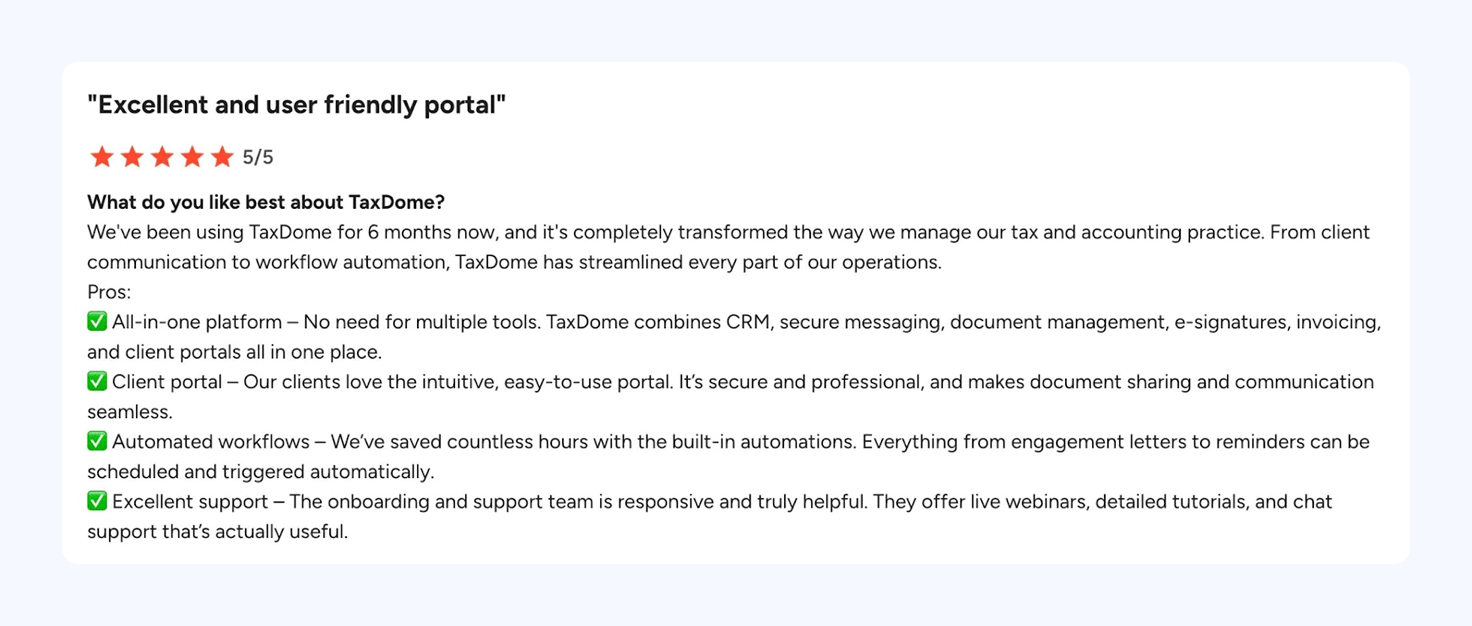
In 2025, TaxDome ranked as the #1 tax practice management software on G2. It was also named as #1 in Capterra’s 2025 Shortlist for Accounting Practice Management — for the second year running.
Who should use TaxDome?
TaxDome is the most complete practice management platform on the market. The other alternatives we’re looking at today improve on BrightManager in some ways, but not in others. Sooner or later, you’re going to be looking for another upgrade.
If you’re ready to make the change, why not switch to the last practice management platform you’ll ever need? Upgrading to TaxDome isn’t going to cost you any more than BrightManager — in fact, it saves most firms tens of thousands every year in unnecessary integrations.
Reasons to choose TaxDome:
✅ You want a complete practice management platform
✅ You want to build a bigger, more profitable accounting firm
✅ You don’t want to compromise between firm and client management
2. Karbon
Best for: internal collaboration and automation
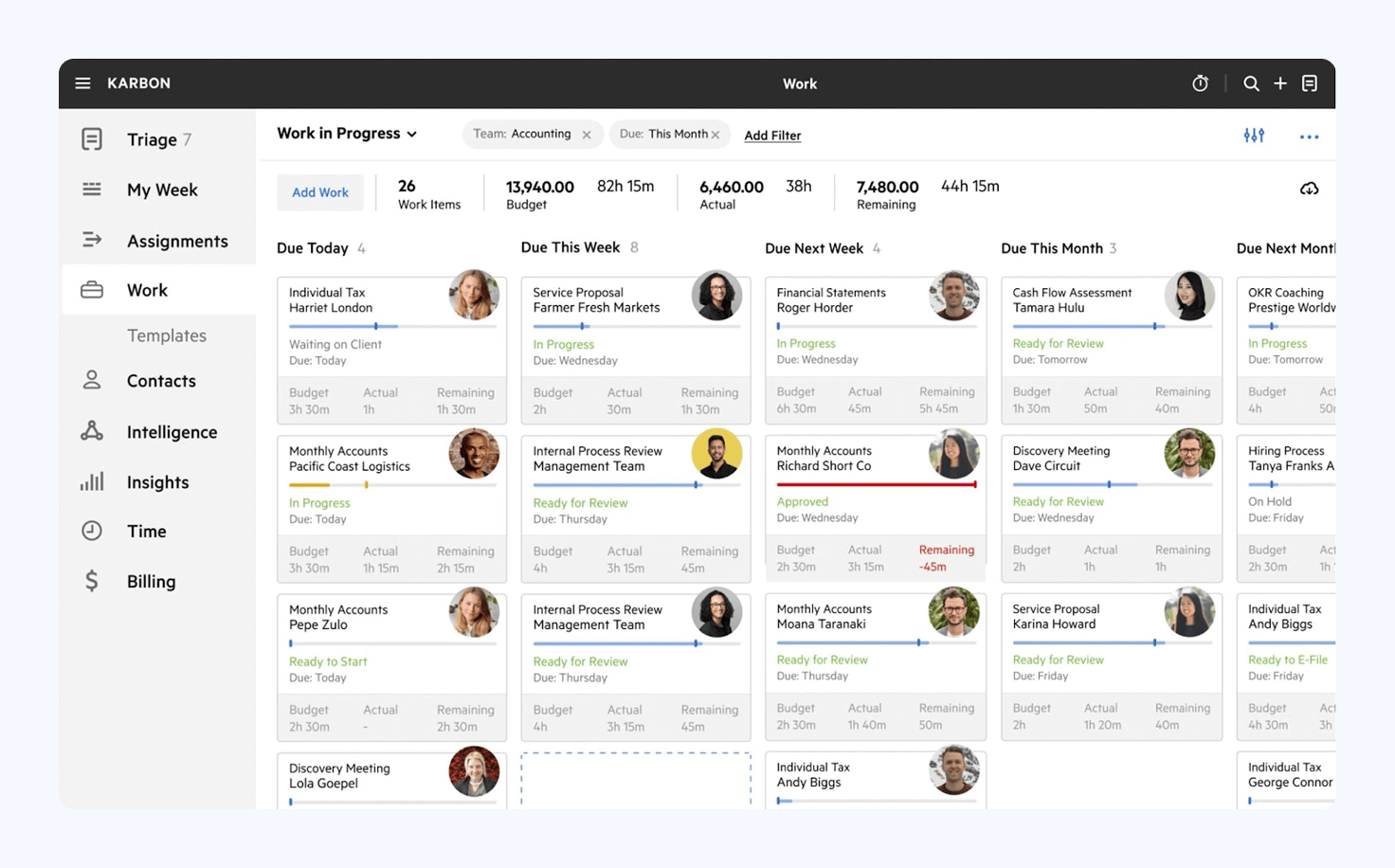
Karbon is a more capable platform for teams than BrightManager. You get stronger automation features, team collaboration tools, and a more complete communication system. The problem is, you have to sign up for its most expensive plans to access most of these improvements.
So, although Karbon is a step up from BrightManager, you have to question how it compares with the other alternatives available.
Karbon key features:
- Workflow automation
- Team collaboration
- Client management
- Client portal
- Time and budget tracking
- Billing and payments
Karbon pros and cons
| 👍 Pros | 👎 Cons |
| ✅ Stronger team collaboration features than BrightManager | ❌ Steeper learning curve than Bright Manager |
| ✅ More advanced workflow automation (but only on its priciest plans) | ❌ Client-facing tools are better than BrightManager, but still weaker than other alternatives |
| ✅ Native email integration brings all comms into one place | ❌ Most advanced features are locked behind higher plans or add-ons |
| ✅ Reporting is a step up from BrightManager — but still limited in flexibility | ❌ No secure chat system for client communication |
| ❌ Still expensive for larger teams |
How much does Karbon cost?
Karbon costs from $59/month per user (billed annually) with three core plans available:
- Team: $59/month per user (billed annually)
- Business: $89/month per user (billed annually)
- Enterprise: custom pricing
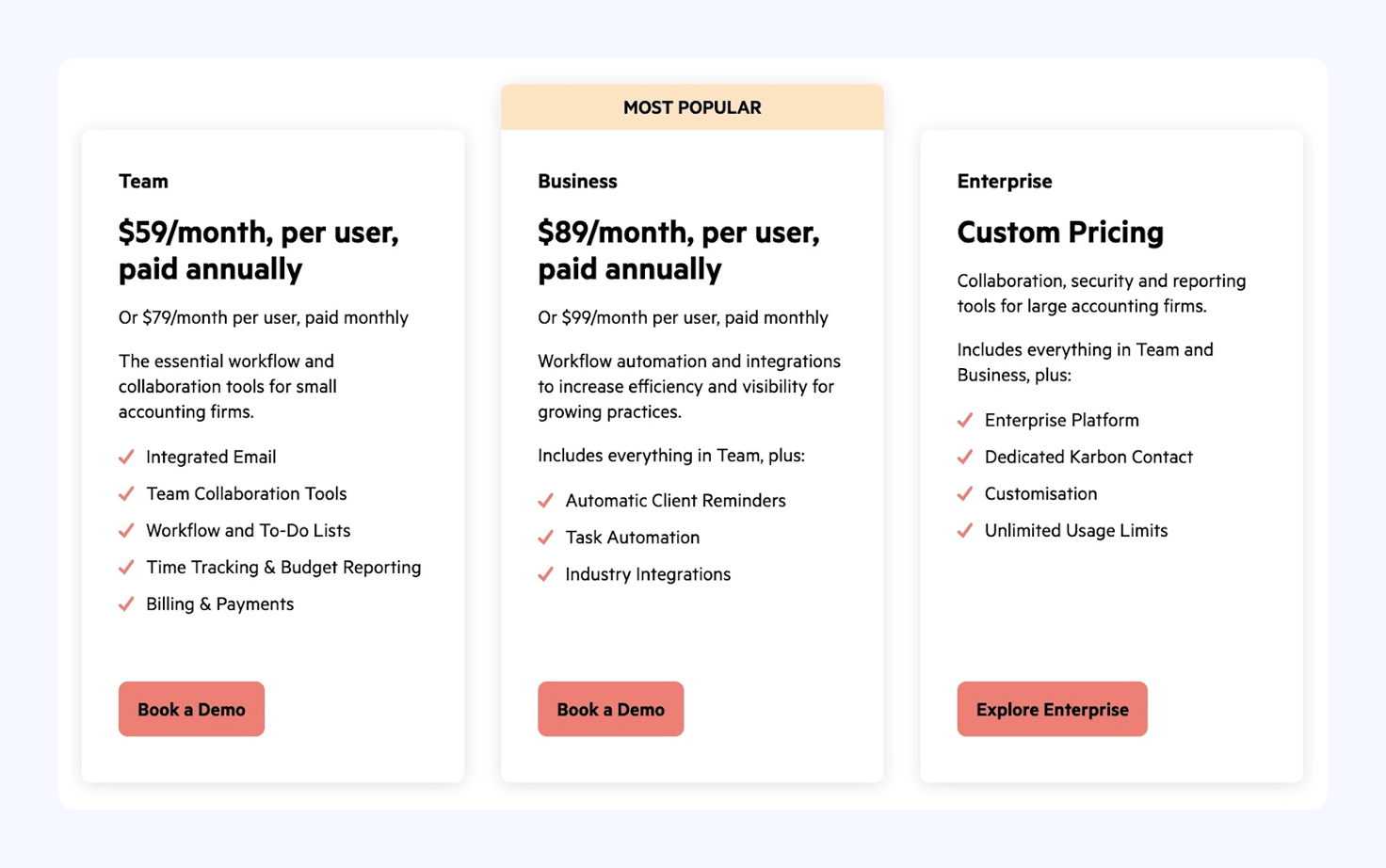
Karbon’s most advanced features are only available on the Business plan or higher. This includes the client portal, mobile apps, its full set of collaboration features, and most of its integration options.
You also have to sign up for the Enterprise plan to remove limits on client contacts and workflow automations. Then you’ve got the paid add-ons for reporting, e-signatures, payment processing, and other expenses.
Be prepared to pay $100+/month per team member to start getting the best out of Karbon.
Karbon integrations
Karbon offers a strong set of integrations for UK accounting firms, but only if you’re on the Business or Enterprise plans:
- Gmail and Office 365
- Microsoft Exchange
- QuickBooks Online
- Zapier
- Companies House (UK)
- Karbon API
Karbon reviews

Karbon has an average rating of 4.8/5 on G2 from 685 reviews. Users are generally happy with the task management and team collaboration features, but many complain about missing features and performance issues.
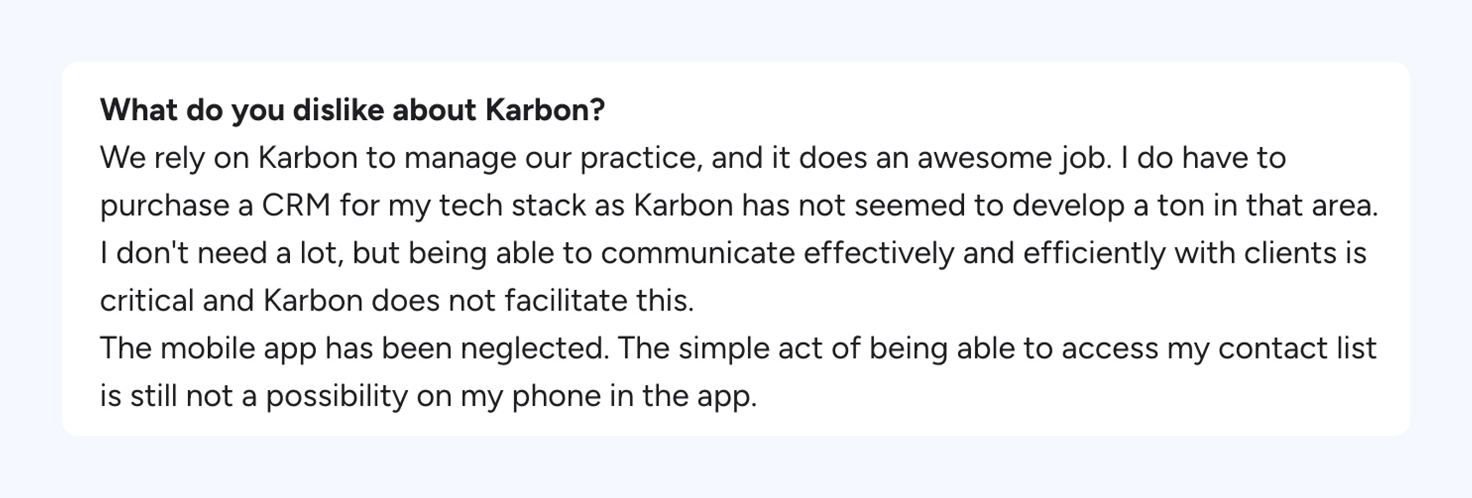
For example, Karbon’s CRM limitations force some customers to pay for a separate CRM platform.
Many customers also realize, after signing up, that key tools like the client portal and client mobile apps lack important features. This is particularly disappointing if you’ve upgraded to the Business or Enterprise plans to access these features.
What do customers like/dislike about Karbon?
| 👍 Likes | ✅ Ease of use | ✅ Task management | ✅ Team collaboration | ✅ Efficiency improvement | |
| 👎 Dislikes | ❌ Missing features | ❌ Email issues | ❌ Learning curve | ❌ Email integration | ❌ Poor usability |
Who should use Karbon?
Karbon offers a genuine upgrade from BrightManager, but its pricing model makes it an expensive option for all firm sizes. You have to sign up for its most expensive plans to justify the switch, but Karbon still lacks enough features to justify the enterprise price tag.
Reasons to choose Karbon:
✅ Internal collaboration is your priority
✅ The Teams plan is good enough for your needs
✅ You can deal with the CRM contact limits
3. Pixie
Best for: simple practice management for small teams
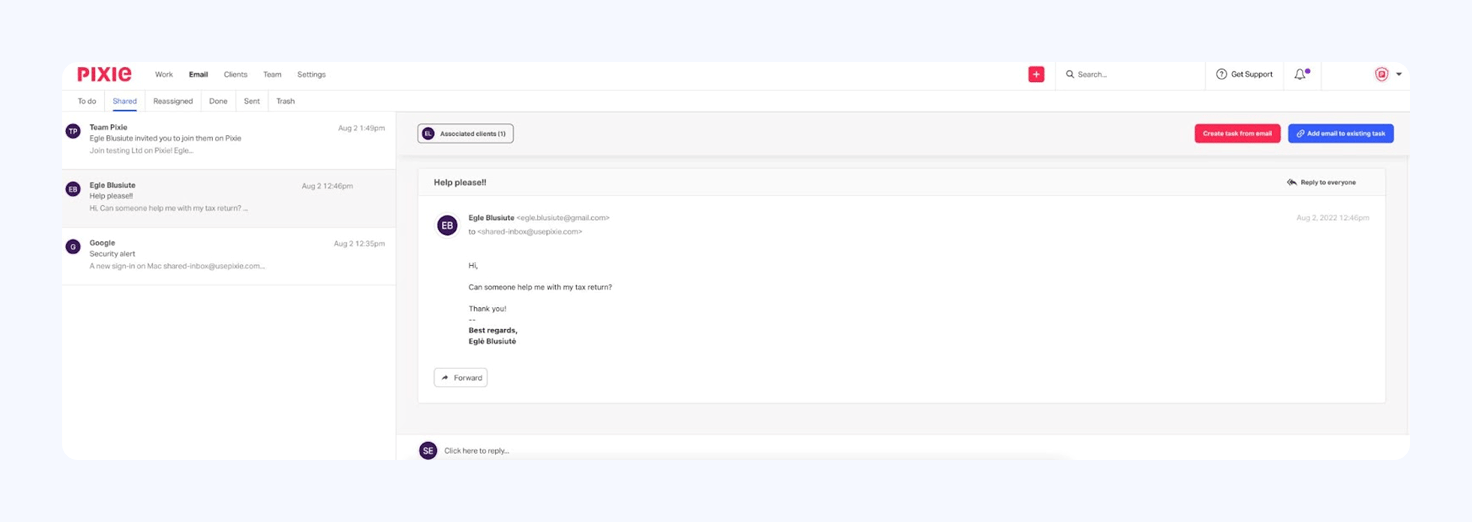
Pixie is a simpler alternative to BrightManager without the complex software architecture or cost concerns.
It’s not much of an upgrade in terms of features. Pixie does some things better, such as email integration and recurring tasks, but it falls short in other areas. It doesn’t have a native time tracking and billing system, invoicing tools, or other features available elsewhere.
As a BrightManager alternative, Pixie’s biggest selling point is its affordable pricing model for small teams.
Pixie key features:
- Task management
- Client CRM
- Workflow automation
- Recurring jobs
- Integrated email
- Document storage and e-signatures
- Client portal
Pixie pros and cons
| 👍 Pros | 👎 Cons |
| ✅ Predictable pricing—pricing based on client count, not number of users | ❌ Automation still limited vs other alternatives |
| ✅ Easier onboarding and a cleaner UI compared to BrightManager | ❌ Basic collaboration features (still no @mentions or notes) |
| ✅ More flexibility with recurring task automation | ❌ Reporting and dashboards lack depth and flexibility |
| ✅ Better email management features than BrightManager | ❌ Document/email management can get messy without stricter rules |
| ✅ Affordable for small teams | ❌ No time tracking or billing |
| ❌ Lacking integrations | |
| ❌ Limited growth potential |
How much does Pixie cost?
Pixie runs a flat‑fee pricing model, based on the number of clients you manage. Prices start from $129/month, giving you access to all of its features with no additional charges for user seats:
- Less than 250 clients: $129/month
- 251-500 clients: $199/month
- 501-1,000 clients: $329/month
- 1,000+ clients: custom pricing
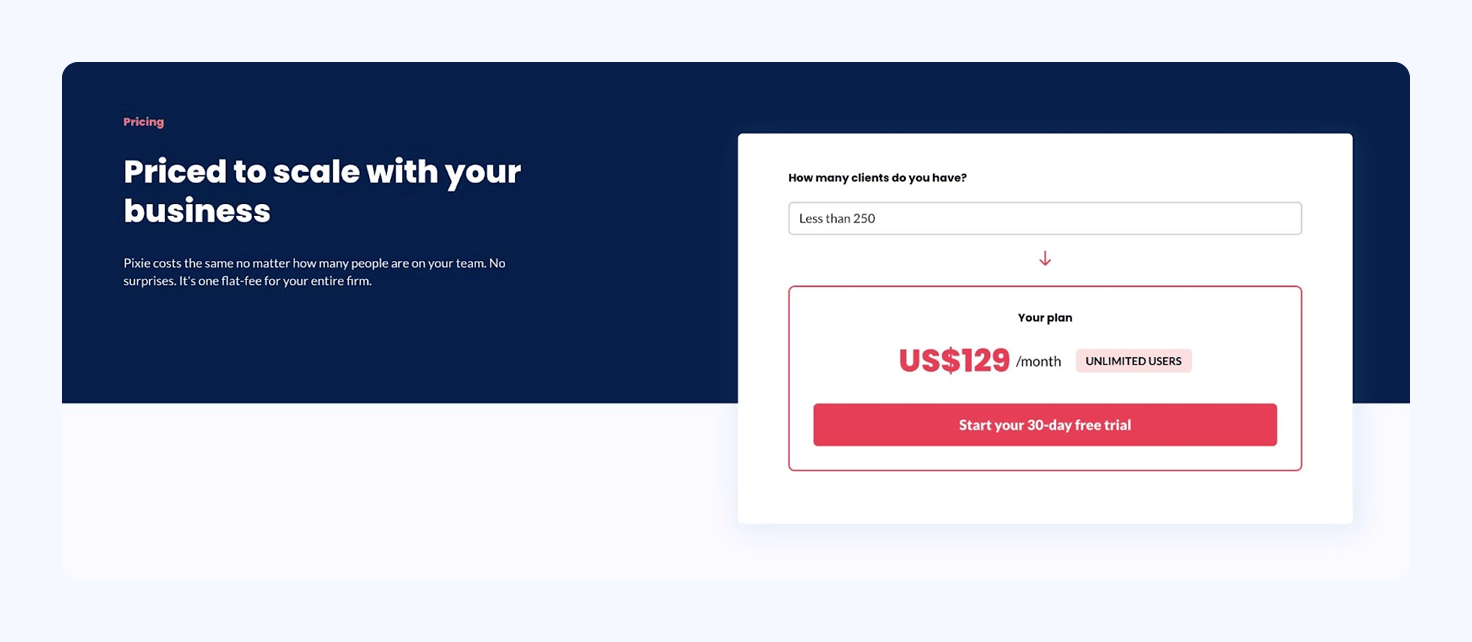
This makes Pixie a more affordable alternative to BrightManager for small teams. However, it doesn’t resolve the feature limitations for larger or growing firms.
Pixie integrations
Pixie runs a limited range of integrations, mostly geared towards small accounting firms in the UK:
- Email integration
- Companies House
- Xama
- Zapier
There’s a heavy reliance on Zapier for integrating with third-party tools and you also have to use a browser extension to “implement” Clockify for time tracking.
Pixie reviews

Pixie has an average rating of 4.8/5 on Capterra from 32 customer reviews. Users generally consider the platform easy to use and praise the company’s pricing model, onboarding process, and support team.
Complaints mostly comment on missing features, such as the lack of a client chat system. Others run into limitations with automation, collaborations, email integration, and document storage.
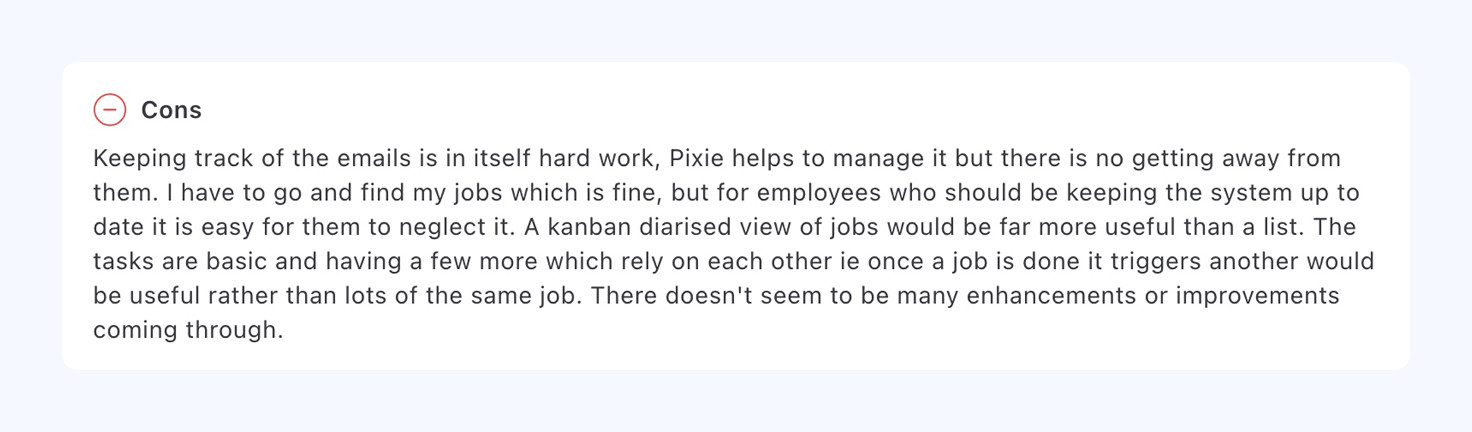
For example, the email integration doesn’t filter out images or email signatures, which end up in the Files tab.
What do customers like/dislike about Pixie?
| 👍 Likes | ✅ Ease of use | ✅ Workflow automation | ✅ Simple pricing | ✅ Customer support | |
| 👎 Dislikes | ❌ Missing features | ❌ No chat system | ❌ Team collaboration | ❌ Document storage | ❌ Reporting |
Who should use Pixie?
Pixie is a worthy alternative to BrightManager for small teams that need similar capabilities in a cheaper package. However, it doesn’t address the feature limitations or reliance on integrations to fill feature gaps.
The flat-rate pricing model is great for adding team members, but it doesn’t help you automate higher workloads. Pixie can make the day-to-day easier for small teams, but its client-based pricing and limited features show it’s not built for growth.
Reasons to choose Pixie:
✅ You have fewer than 500 clients
✅ You don’t need to automate complex services
✅ You’re more interested in making work easier than growth
4. Engager.app (Client Engager)
Best for: an affordable client management system for UK accountants
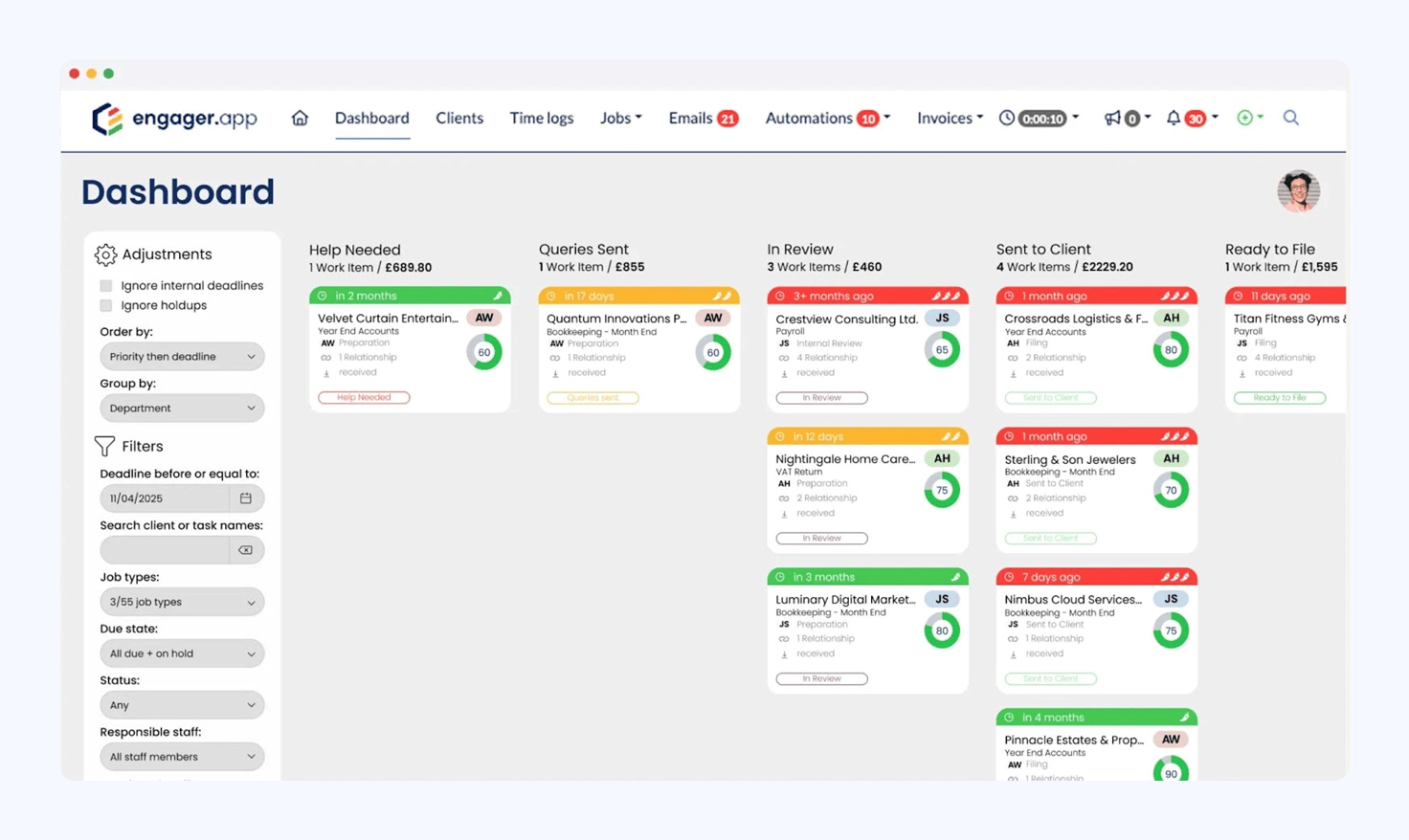
Engager.app is a client management platform for accountants and bookkeepers in the UK. Originally founded as Client Engager by the Managing Director at Wainwrights Accountants, Andy Wainwright, the company rebranded as Engager.app in 2024.
As both names suggest, the product’s main focus is managing client relationships. So, practice management takes a back seat with Engager.app, and we’re talking about a very different product compared to BrightManager.
Engager.app key features:
- Client CRM
- Task management
- Workflow automation
- Email integration
- E-signatures
- Engagement letters
- Time tracking
Engager.app pros and cons
| 👍 Pros | 👎 Cons |
| ✅ More client management features than BrightManager | ❌ Limited firm management features |
| ✅ Stronger CRM and email automation features | ❌ Workflow and reporting features lack depth |
| ✅ Transparent client-based pricing model (no user limits) | ❌ Some features and integrations are underdeveloped |
| ✅ Built-in client messaging, @mentions, and notifications | ❌ Not yet built for firms with complex needs or large teams |
| ✅ More customizable than BrightManager | ❌ Expensive for small teams with high client volumes |
How much does Engager.app cost?
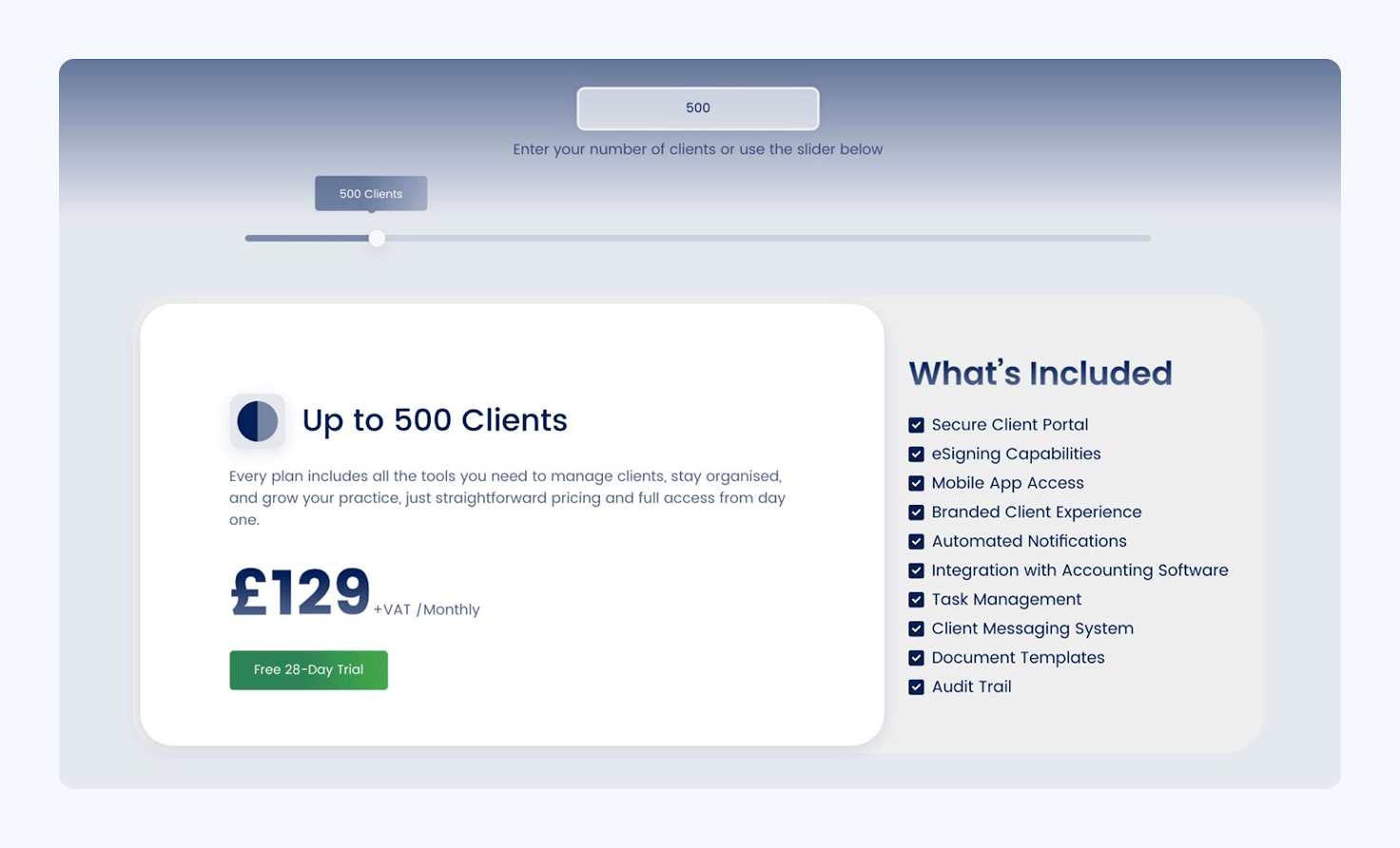
Engager.app runs a client-based pricing mode. Pricing starts from £9/month for up to five clients and increases incrementally as your client base grows. We can’t fit every price increase into a table, but here’s a shorter summary of how Engager.app’s pricing works:
| Client count | Monthly fee |
| Up to 5 | £9+VAT/month |
| Up to 25 | £19+VAT/month |
| Up to 50 | £29+VAT/month |
| Up to 100 | £49+VAT/month |
| Up to 150 | £59+VAT/month |
| Up to 200 | £69+VAT/month |
| Up to 500 | £129+VAT/month |
| Up to 1,000 | £229+VAT/month |
| Up to 2,000 | £409+VAT/month |
| Up to 5,000 | £999+VAT/month |
| Up to 10,000 | £1,999+VAT/month |
| Up to 15,000 | £2,999+VAT/month |
| 15,000+ | Custom pricing |
Either way, if you’re using Engager.app to manage client relationships, you’re going to face a lot of price increases as your list grows. They’re moderate, but frequent.
On a more positive note, you’re not charged for user seats. Although SMS fees (unlisted) and an optional Xero integration are both paid extras.
Engager.app integrations
Engager.app supports a unique mix of native integrations for UK accounting firms:
- Adfin
- Armalytix
- Companies House
- Crezco
- FreeAgent
- HMRC
- QuickBooks
- RQ
- TaxCalc
- Xama
- Xero
That covers you for Companies House, HMRC, QuickBooks, and some other crucial integrations. Just keep in mind that the Xero integration is a paid add-on.
Engager.app reviews

Engager.app has an average score of 4.9/5 on Trustpilot UK, but the company’s online review profile is limited. It doesn’t have profiles on G2, Capterra, or Software Advice.
Overall, Engager.app customers appreciate the client management features and the quality of the CRM. Many also praise the pricing model and usability of the platform, although some say the learning curve is steep.
Missing features top the list of complaints, while some customers report a lack of product maturity and development.
What do customers like/dislike about Engager.app?
| 👍 Likes | ✅ Client management | ✅ CRM system | ✅ Email automation | ✅ Usability | ✅ Pricing model |
| 👎 Dislikes | ❌ Missing features | ❌ Product maturity | ❌ Complex setup | ❌ Learning curve | ❌ Missing integrations |
Who should use Engager.app?
Engager.app beats BrightManager as a client management system, but it’s seriously lacking in firm management features.
Although it solves some of the problems you get with BrightManager, Engager.app creates several of its own. Above all, it’s another example of practice management tools failing to deliver on firm and client management equally.
Reasons to choose Engager.app:
✅ Client management is your priority
✅ You’re a solo practitioner or part of a very small team
✅ You don’t need advanced automation
5. Financial Cents
Best for: affordable entry to practice management software
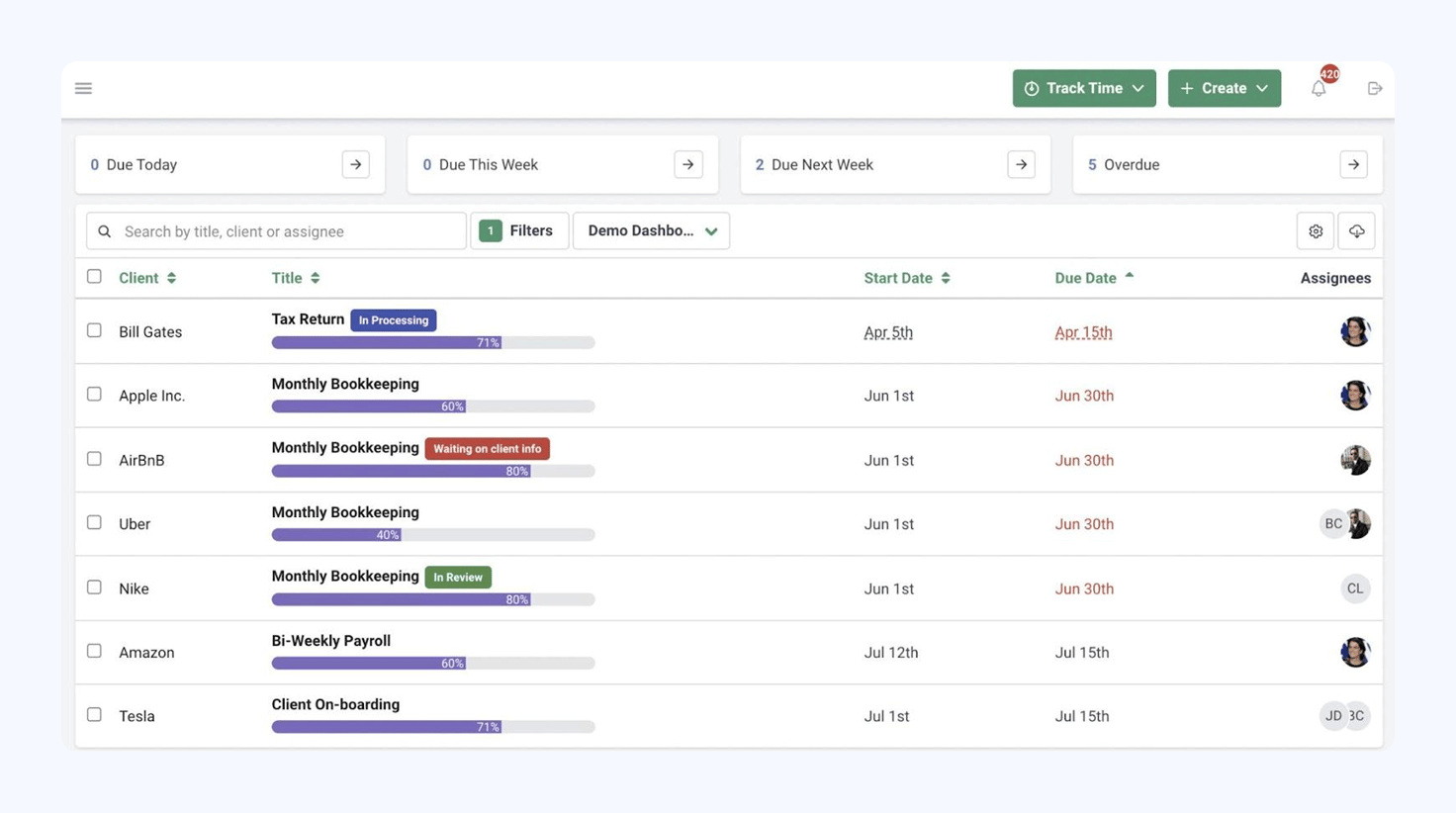
Financial Cents is a more complete practice management platform than BrightManager. It also offers a more affordable starting price and upgrade path for solo practitioners and smaller teams. However, the platform gets expensive as you upgrade, competing with the likes of TaxDome on pricing, but not in features.
Financial Cents key features
- Task management
- Workflow automation
- Client CRM
- Client portal
- Document management
- Time tracking
- Recurring tasks
Financial Cents pros and cons
| 👍 Pros | 👎 Cons |
| ✅ Better automation features than BrightManager | ❌ Weaker automation than TaxDome and Karbon |
| ✅ Stronger internal team communication | ❌ Limited features on Solo and Team plans |
| ✅ Improved client-facing features | ❌ Limited portal and no client mobile apps |
| ✅ Simple pricing model | ❌ Many features require third-party integrations (eg: Adobe Sign) |
| ❌ Live chat support only (except for Enterprise users) |
How much does Financial Cents cost?
Financial Cents offers four plans, starting from $19/month for solo practitioners:
- Solo: $19/month (billed annually)
- Team: $49/month per user (billed annually)
- Scale: $69/month per user (billed annually)
- Enterprise: custom pricing
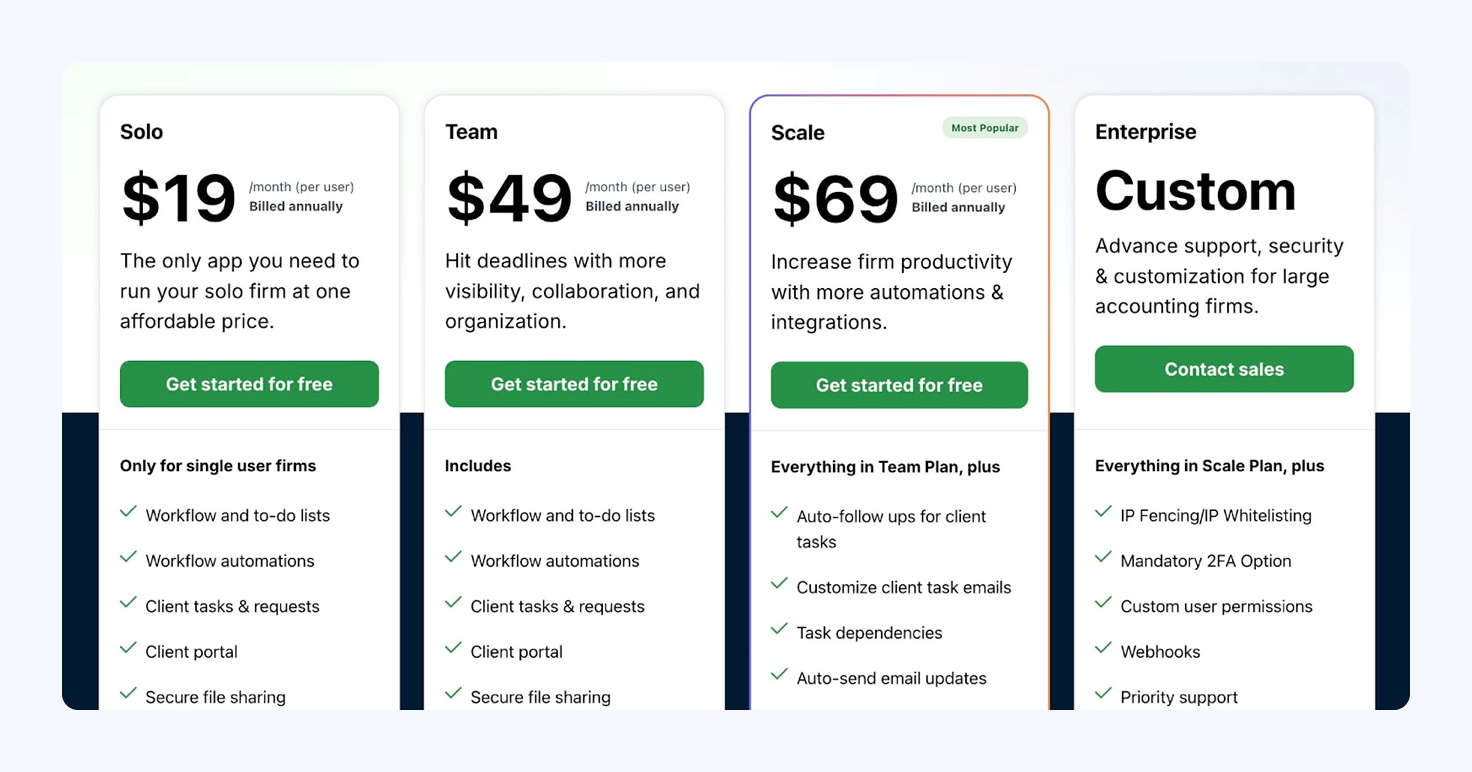
Keep in mind that you have to sign up for the Team plan or higher to get many of the platform’s best features. This includes most integrations, automation, and collaboration features.
By the time you reach the Scale plan, Financial Cents is hard to recommend ahead of other alternatives. Considering TaxDome offers more with a starting price of $59/month, you’re getting much better value elsewhere at this point.
Financial Cents integrations
Financial Cents offers a solid set of integration options, but most of them are only available on the Team plan and higher:
- QuickBooks Online
- Gmail and Outlook
- Google Drive and OneDrive
- Adobe Sign
- Anchor
- Zapier
Financial Cents reviews

Financial Cents has an average score of 4.7/5 on G2. Customers typically praise the platform’s usability and low entry price to practice management software. Firm owners and members growing teams aren’t always so positive.
While some appreciate the simplicity of its workflow automation, others find it limiting. This isn’t helped by the limitations on its cheaper plans or the need for integrations to compensate for missing features.
What do customers like/dislike about Financial Cents?
| 👍 Likes | ✅ Affordable entry price | ✅ Workflow automation | ✅ Usability | ✅ Integrations | |
| 👎 Dislikes | ❌ Missing features | ❌ Limited automation | ❌ Email functionality | ❌ Onboarding fees | ❌ Scalability concerns |
Who should use Financial Cents?
Financial Cents is an improvement on BrightManager in most areas for solo practitioners and small teams. It’s a more complete product, but many of the improvements are marginal. When you bring other tools into the comparison, Financial Cents looks more like a stepping stone to a complete practice management platform than a long-term BrightManager alternative.
Reasons to choose Financial Cents:
✅ Entry into practice management software
✅ An affordable improvement on BrightManager
✅ The Solo or Team plans offer everything you need
How do you choose the right BrightManager alternative?
Every practice management platform looks great when you browse its website. They all promise big things and, at a glance, offer a similar set of features. No wonder it’s so difficult to choose the right platform for your needs.
The first thing you want to know is which features each platform delivers and which ones they don’t. So, here’s how BrightManager compares to the alternatives we’re recommending today:
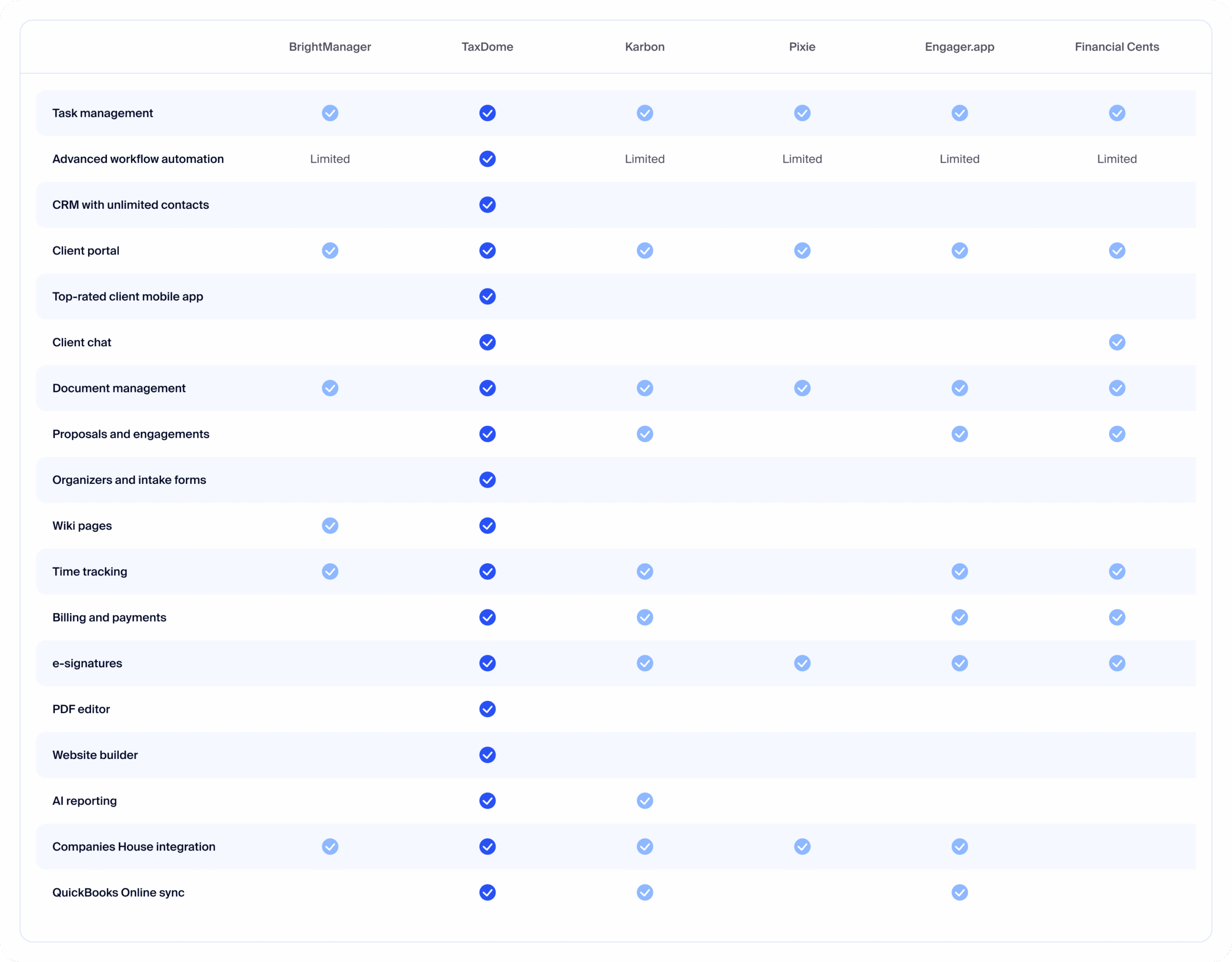
Once you know exactly what each platform has to offer, you can figure out which one best meets the needs of your firm. This starts with understanding your priorities — as they stand now — but also how they might change over time.
Are you a solo practitioner looking to improve your own efficiency? A team trying to take the stress out of tax season? Or a growing firm that wants to increase client volumes through efficiency, instead of hiring more staff?
Answer these questions, and you can start to rank practice management platforms in order of suitability for your needs:
Best for solo practitioners and small teams (1-5)
| First place 🥇 | Second place 🥈 | Third place 🥉 |
| TaxDome | Financial Cents | Pixie |
Best for growing firms and teams (10-50)
| First place 🥇 | Second place 🥈 | Third place 🥉 |
| TaxDome | Karbon | – |
Best for workflow automation
| First place 🥇 | Second place 🥈 | Third place 🥉 |
| TaxDome | Karbon | Financial Cents |
Best for client management
| First place 🥇 | Second place 🥈 | Third place 🥉 |
| TaxDome | Engager.app | BrightManager |
Best for internal collaboration
| First place 🥇 | Second place 🥈 | Third place 🥉 |
| TaxDome | Karbon | Financial Cents |
Best for scaling firm growth
| First place 🥇 | Second place 🥈 | Third place 🥉 |
| TaxDome | Karbon | Financial Cents |
All of the BrightManager alternatives we’ve looked at today can help smaller teams improve efficiency. But how many of them will grow with your firm and resolve the ongoing challenges of higher workloads and client volumes?
These challenges don’t disappear because you automate a few workarounds. They become harder to deal with as you add more clients, tasks, and complex workflows into the mix. You need a practice management platform that grows with your firm and resolves the challenges of scaling further.
Frequently asked questions
What are the best BrightManager alternatives for accounting firms?
TaxDome, Karbon, Pixie, Engager.app, and Financial Cents are the best BrightManager alternatives for accounting firms.
Why do accounting firms switch from BrightManager?
Former BrightManager customers typically say they outgrow the platform and need something more capable of scaling with their firm. Others realize it’s more expensive than expected, and look for a system that offers better value.
Is it difficult to migrate to another tool from BrightManager?
Difficulty depends on how much data you’re moving and how many templates and workflows you’ve built. Ask each vendor for a migration plan — including a timeline and any fees involved.
Which pricing model is right for our firm?
If growth is your priority, be wary of client-based pricing models that charge you to add more client contacts. Look for user-based pricing and plans that don’t force you to upgrade or pay extra fees for the features you need.
Which BrightManager alternative has the best automation features?
TaxDome offers the deepest automation features to improve processes throughout your firm: team management, workflow automation, client relationships, billing and payments, and more. Where most platforms prioritize firm or client management, TaxDome brings everything you need into one platform.

Aaron produces practical content for TaxDome, drawing on 11 years in SaaS copywriting and marketing. He helps accounting and tax professionals get the most from TaxDome and other tools, making complex topics clear and actionable.

Get your free guide

Thank you!
The guide copy has been sent to your email. Please check your inbox!
Recommended articles

Niche Business Accounting Report statistics: what business clients will pay for specialized expertise

Buy Now, Pay Later: offer clients payment flexibility

Top AI tools for accountants in 2026: key features and use cases compared