 US – English
 UK – English
 Canada – English
 Australia – English
 Danmark – Dansk
 DACH - Deutsch
 France – Français
 España – Español
 Sverige – Svenska
 Italia – Italiano
 Nederland – Nederlands
 Portugal – Português
 Suomi – Suomi
 Norge – Norsk
 日本 – 日本語
 Romanian – Română












#Accounting templates, #Accounting workflow
Take control of cash flow: download our free accounts receivable template in Excel format

Run your entire firm on one platform
Managing accounts receivable (AR) is critical for healthy cash flow. With visibility into unpaid customer invoices and when payments are expected, businesses can forecaste finances more effectively.
But how do you manage accounts receivable? A good place to start is with our free downloadable Excel template, which streamlines tracking to take the guesswork out of cash flow.
Read on to discover:
- What accounts receivable is
- How to utilize the accounts receivable format within our free Excel template
- The key components of an effective accounts receivable template
- How to transition from templates to software
Table of сontents
Understanding accounts receivable
Accounts receivable represents the money owed to a business by other businesses for goods or services. It is listed on a company’s balance sheet as a current asset.
Specifically, accounts receivable is comprised of:
- Outstanding invoices: goods or services that have been billed to a customer but not yet paid for
- Accrued revenue: revenue that has been earned but not yet billed via invoices, such as services or contract work still in progress
As an asset, accounts receivable impacts several key financial metrics and operational factors. Most importantly, it impacts cash flow — AR directly ties to cash flow schedules, as turning outstanding invoices and accruals into cash is vital for funding payroll, vendor payments, and other obligations.
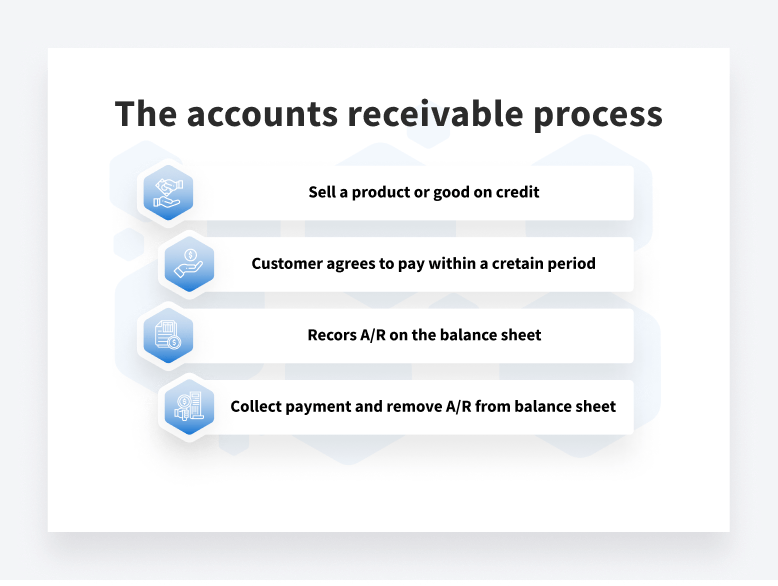
Any delays or non-payment immediately slow cash flow.This is why properly managing accounts receivable is so important. An AR ledger tracks all outstanding customer invoices and due dates in one place to inform collection efforts.
Most accountants track AR using Excel templates — this is an easy and convenient way to manage AR and ensure healthy cash flow. Accountants also use Excel templates to track accounts payable.
Essential features of an accounts receivable template
First of all, let’s see what accountants use AR templates for:
- Logging invoice details like dates, numbers, customers, items, etc
- Recording payment due dates and actual payment dates and amounts
- Calculating open AR balances for customers
- Identifying unpaid and overdue invoices
- Summarizing total outstanding AR amounts
- Forecasting future cash flow based on payment history
To ensure that accountants make the most out of their AR templates, the templates should include the following essential components:
- Customer details, including name, number, address, and contact information
- Invoice numbers and dates
- Invoice payment due dates
- Line items with descriptions, quantities, and dollar amounts
- Summed invoice totals
- Actual payment dates and amounts when received
- Current open or unpaid invoice balances
- Columns for any adjustments or write-offs
Using these as a foundation, experienced accountants can add columns for credit limits, past due statuses, days past due, and more.
Further customizations include linking customer names to another sheet with address details, adding conditional formatting to highlight past-due invoices, and integrating the template with other financial statements. The result is templates that are powerful and customizable yet simple and accessible.
Our free downloadable template includes all of these fields and calculates outstanding customer balances automatically based on payments received against invoiced amounts.
Free download: accounts receivable Excel template
Here is a link to download our free, customizable Excel template for tracking accounts receivable. Feel free to customize the template and link it with other financial statements to suit your unique business needs.
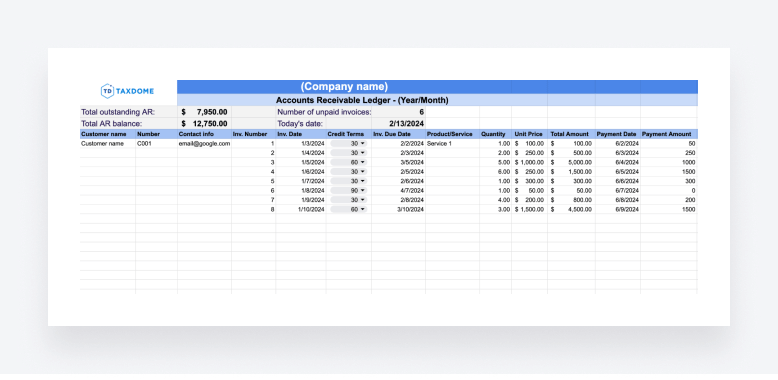
This AR template offers a user-friendly solution for managing accounts receivable effectively. With its help, you can centralize invoice and payment data and automate calculations, which in turn will help streamline AR processes and improve cash flow management.
How to use the template:
- Download it to open with Excel or copy to open with Google Sheets
- Edit the template to your liking
- Add your company information
- Add your clients’ information
- Fill in the desired invoice information
- Watch the template do all the calculations for you!
Advanced accounts receivable tracking
For large accounts receivable ledgers, basic tracking may not cut it. More complex analysis uncovers trends that inform future decisions regarding credit limits, collection approaches, payment terms, and more.
Our template builds the foundation for advanced accounts receivable analysis. Here are some of the features you may want to add:
- Aging reports: categorize AR balances by age ranges (e.g. 0-30 days, 30-60 days, 60+ days past due) to prioritize collection efforts. This will help illustrate emerging patterns.
- Cash flow forecasting: forecast future cash inflows based on historical payment patterns. For example, a customer may pay their smaller invoices immediately, but they take 45 days on average to pay larger balances. Understanding these trends leads to tighter cash flow projections.
- Roll-forward analysis: review period-over-period changes in AR instead of static totals to identify issues like increasing delinquency rates. Tracking changes in aging bucket balances uncovers more nuanced trends.
While our base template establishes the structure for advanced AR analysis, large ledgers often warrant upgrading to accounting software. Read on to learn more about this exciting topic!
Transitioning from templates to accounting software
Excel templates efficiently manage accounts receivable for early-stage businesses. However, scaling introduces limitations:
- Tracking hundreds or thousands of invoice line items in a spreadsheet is impossible
- Manual data entry and calculations increase the risk of human error
- Custom reporting and analysis features are non-existent
Here are some warning signs that your business has outgrown Excel-based AR tracking:
- It’s becoming increasingly difficult to generate aging reports
- You’re unable to view AR roll-forward analysis
- You have revenue recognition errors from mismatched or duplicated customer payments
- There are inaccurate financial statements due to untraceable adjustments
- You are receiving customer complaints about incorrect balances and delinquency notices
Cloud-based accounting systems eliminate these pain points with automated accounts receivable functionality, including:
- Multi-user access with centralized, real-time data
- Custom invoices
- Customizable aging reports and revenue recognition reporting
- Automated matching of customer payments to open invoices
- Robust analytics on AR patterns and trends
Leading platforms to consider as your business scales include:
When transitioning away from Excel templates, make sure you evaluate capabilities for generating invoices and revenue recognition reports and aging AR automatically.
While freelancers and solopreneurs thrive on Excel, established businesses depend on scalable accounts receivable software with mobile access and financial analytics. The time comes for all growing businesses to graduate from makeshift templates to integrated accounting systems.
Conclusion
Smooth accounts receivable operations are important to financial health and managing cash flow in particular. Our free Excel template organizes customer invoices, payments, aging reports, and more to inform projections and business decisions.
Download the template and customize it to the needs of your business as a stepping stone toward more advanced AR management and accounting software capabilities down the road.
Want more templates? We have free downloadable ones for writing memos, transforming your month-end close, writing bookkeeping proposals, or building accounting workflows.
With reliable tracking via templates, you can focus on scaling volume while monitoring KPIs, such as delinquency rates or payment trends.
Take control of accounts receivable with a structured approach, whether through our free downloadable template or accounting platforms.

Nora creates TaxDome content that translates complex tax and accounting topics into clear, practical guidance for professionals.

Get your free guide

Thank you!
The guide copy has been sent to your email. Please check your inbox!
Recommended articles

What is accounting workflow management? The complete guide with real-world examples

ChatGPT for accountants: 12 strategies to automate your workflows

12 best free online accounting courses with certifications for 2026