 US – English
 UK – English
 Canada – English
 Australia – English
 Danmark – Dansk
 DACH - Deutsch
 France – Français
 España – Español
 Sverige – Svenska
 Italia – Italiano
 Nederland – Nederlands
 Portugal – Português
 Suomi – Suomi
 Norge – Norsk
 日本 – 日本語
 Romanian – Română












#Accounting templates, #Accounting workflow
Free Excel accounts payable template for easily tracking your payables

Run your entire firm on one platform
The ability to pay for goods and services at a later date comes as a huge benefit when managing the cash flow of your business. But as invoices start to accumulate, it becomes increasingly important to keep track of what you need to pay and when.
Keeping an accounts payable ledger is one of the best ways to do this — and you can start right away by using a template. This will allow you to keep tabs on all your supplier invoices and, as a result, reduce the possibility of missing a payment.
Below, we’ll cover all the benefits of using an accounts payable template and the key components it should include. We’ve also provided an Excel accounts payable template that you can download right now for free.
Table of сontents
The benefits of using an accounts payable template
The key benefit of using an accounts payable template is that it will set you up with all the most important data fields for tracking your accounts payable transactions efficiently.
Once you input all the necessary information, you’ll gain a bird’s-eye view of invoice dates, payment amounts, due dates and more, with the ability to monitor what’s been paid and what’s due.
This will put you on the right track to:
- Monitor cash flow and budget expenses effectively
- Improve operational efficiency and free up time for other tasks
- Keep an organized record for regulatory compliance and audits
- Avoid missing payment dates — including late fees and penalties
These are all crucial for managing the financial health of your business, along with its overall reputation and any relationships you build with suppliers.
The key components of an accounts payable template
A great way to manage payables is by using spreadsheet software, such as Excel or Google Sheets.
An accounts payable spreadsheet must include several data fields for organizing the invoices you receive, presented in a way that gives you a clear view of the most important information.
The key components of an accounts payable template include:
- Invoice date: a section for the date the invoice was issued, allowing you to search by date or order invoices chronologically
- Invoice number: a section for the invoice number, which will make it easier to track payments
- Supplier name: a section for the name of the supplier — useful if you do business with multiple suppliers or vendors
- Invoice amount: a section for the payment amount that’s detailed on the invoice, so you can quickly see how much you owe each supplier
- Terms: a section to indicate whether the payment terms are PIA, Net 15/30/60, COD, etc.
- Payment due date: a section for the date an invoice payment is due, so you quickly see when all supplier invoices need to be paid
- Balance due: a section displaying the remaining balance of an invoice — useful if you’re spreading the payment
- Status: a section for quickly seeing whether an invoice is unpaid, pending, paid, due or overdue
- Payment date(s): a section for recording when you made an invoice payment
- Payment amount(s): a section for recording the amount you paid
- Total accounts payable: a section for viewing the total outstanding amount owed to suppliers
To provide you with more information at a glance, an accounts payable template can also include sections for:
- Descriptions: a section for naming the goods or services provided to help you easily differentiate between invoices
- Notes and comments: a section for noting the payment method, late fees, contact details, discounts and credits — or anything you need to make a note of
Try this free, downloadable Excel accounts payable template
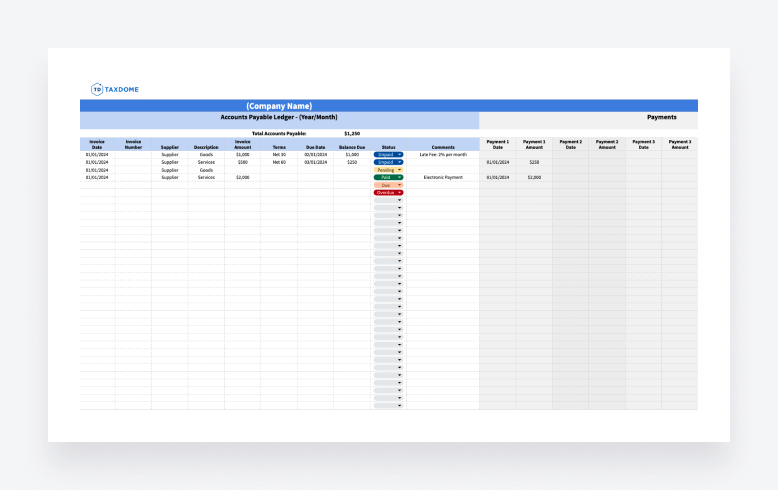
To help you get started, here’s a free Excel accounts payable template that you can download or copy and then edit to your liking, which we created to include all the key components listed above.
This template is quick and easy to use, providing you with a systemized layout for organizing your invoice data, monitoring the status of your invoices and tracking any payments you have made.
After downloading the template, simply open it in Microsoft Excel or Google Sheets — whichever you prefer. You can then add your company name, fill in the desired invoice information, select the status from the convenient drop-down options and more, setting you up to easily track payments for all of your invoices.
Alternatives to manual templates: accounting software
Using templates is a great way to start managing your business’s finances.
That said, manually entering information into templates can become difficult to maintain during busy season or as your business starts to grow. This can also introduce several risks, such as inaccurate data or missing information — which can then lead to your business missing a payment date.
Accounting software offers a far more efficient way to stay on top of your business’s finances.
With powerful features that include automatic data syncing and accounting process automation, accounting software can eliminate the hard work and increase your workflow efficiency, even as your business expands.
With that in mind, why not take a look at a few accounting software examples?
QuickBooks
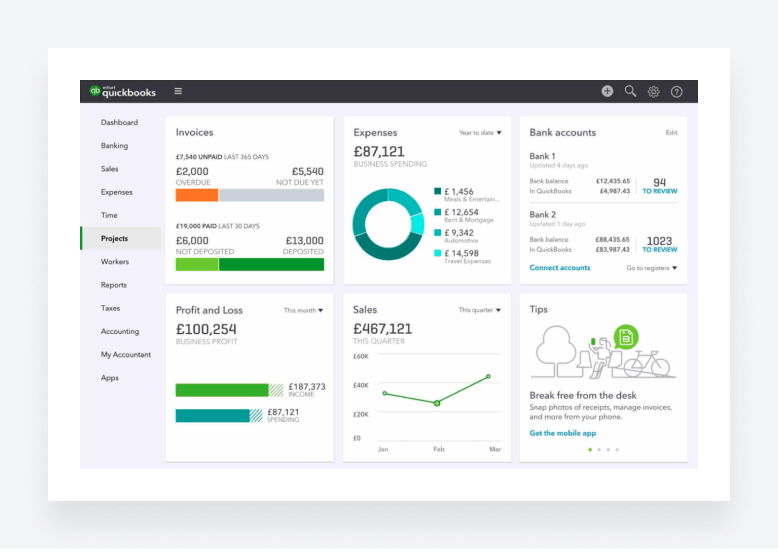
QuickBooks is a popular software choice for online accounting, serving freelancers to large businesses. Top features of QuickBooks allow its users to track cash flow, send customized invoices, sync transactional data from their bank accounts and more, all tied to a user-friendly interface.
Zoho Books
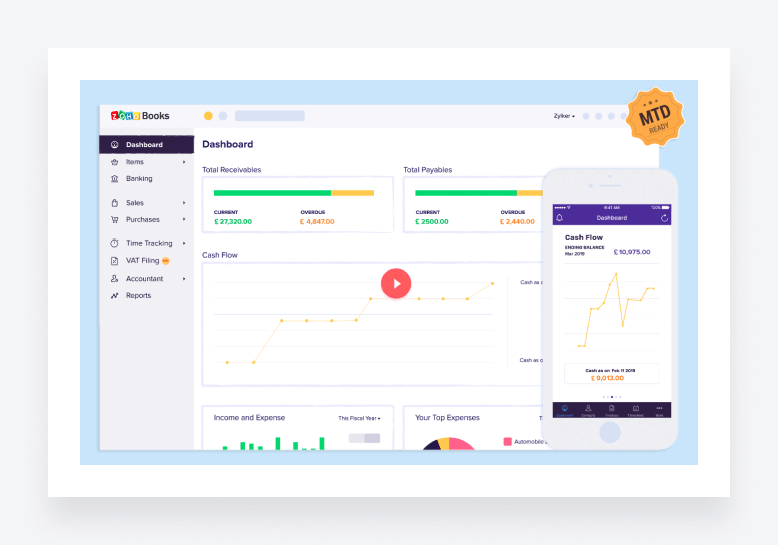
Zoho Books is another online accounting software designed to make managing finances easier. It offers client and inventory management, bank statement imports, timesheets and other useful features, with dedicated areas for sales and purchases to help monitor both receivable and payable transactions.
Wrapping up — the best software is one that suits your needs
Managing an accounts payable ledger is vital for keeping tabs on invoice payments, due dates, transactions and more. And using templates, like the free accounts payable template we provided above, is a great way to get started.
But while templates can get you up and running quickly, manually filling in information can become a chore once the invoices start to accumulate — the big reason most businesses have turned to accounting software.
Still, the most important factor is choosing accounting software that suits your needs.
QuickBooks and Zoho Books are great for managing business finances. If you manage clients as an accountant, bookkeeper or tax preparer, on the other hand, another option is TaxDome: a powerful practice management platform that integrates with traditional accounting software, streamlines accounting workflows and automates routine tasks, making it easy to manage thousands of clients — even if you run a small firm.

Josef creates clear, actionable content at TaxDome, highlighting features, updates, and key accounting topics. His focus is on making complex ideas accessible and engaging, helping users understand and apply insights effectively.

Get your free guide

Thank you!
The guide copy has been sent to your email. Please check your inbox!
Recommended articles

What is accounting workflow management? The complete guide with real-world examples
ChatGPT for accountants: 12 strategies to automate your workflows

12 best free online accounting courses with certifications for 2026