 US – English
 UK – English
 Canada – English
 Australia – English
 Danmark – Dansk
 DACH - Deutsch
 France – Français
 España – Español
 Sverige – Svenska
 Italia – Italiano
 Nederland – Nederlands
 Portugal – Português
 Suomi – Suomi
 Norge – Norsk
 日本 – 日本語
 Romanian – Română












Switching accounting software made simple: a step-by-step guide

Run your entire firm on one platform
Most firms need to change accounting software at some point — usually, for one of two reasons. Hopefully, it’s a sign that your firm is growing, and you need to upgrade to a more capable system. Otherwise, it probably means you chose the wrong platform for your needs last time around.
Whatever your reasons, switching accounting software is a major commitment. The larger your firm is, the more disruptive the change becomes, but you can minimize interference with careful planning and smart software choices.
Table of сontents
- Signs it’s time to switch accounting software
- Types of accounting software for accounting firms and professionals
- What to look for in a new accounting software solution
- Step-by-step: how to switch accounting software
- Common mistakes when switching systems and how to avoid them
- How TaxDome removes the hassle of switching accounting software
Table of сontents
- Signs it’s time to switch accounting software
- Types of accounting software for accounting firms and professionals
- What to look for in a new accounting software solution
- Step-by-step: how to switch accounting software
- Common mistakes when switching systems and how to avoid them
- How TaxDome removes the hassle of switching accounting software
Signs it’s time to switch accounting software
The need to switch accounting software can creep up on you over time. Many firms spend months or years trying to make poor software choices fit. You don’t want to play this game — it’s expensive, and it can cause irreparable damage to your growth potential.
Know the signs telling you it’s time to make the switch and be ready to take action:
- Your existing system holds you back more than it drives growth
- Your current provider can’t support your growing client base
- Pricing or usage limitations mean your existing system is no longer viable
- A lack of automation causes repetitive manual steps
- Your team is constantly switching between multiple tools
- Workflows between different tools are breaking
- You’ve lost visibility by implementing too many tools
- Your software fees are spiraling out of control
- Clients complain about having to use too many tools
- Staff complain about inefficient tools or convoluted processes
Recognizing these issues early helps you time your switch to minimize disruption. More importantly, it saves you from wasting time (and money) on systems that no longer meet your needs.
Types of accounting software for accounting firms and professionals
1. Accounting software
This is the software accountants use to perform accounting and bookkeeping tasks on behalf of clients. You can manage client books, track their expenses, and monitor their business health.
Key functions:
- Review financial records
- Automate accounting and bookkeeping tasks
- Monitor cash flow
- Assist with tax preparation
- Analyze clients’ financial health
- Offer strategic advisory services
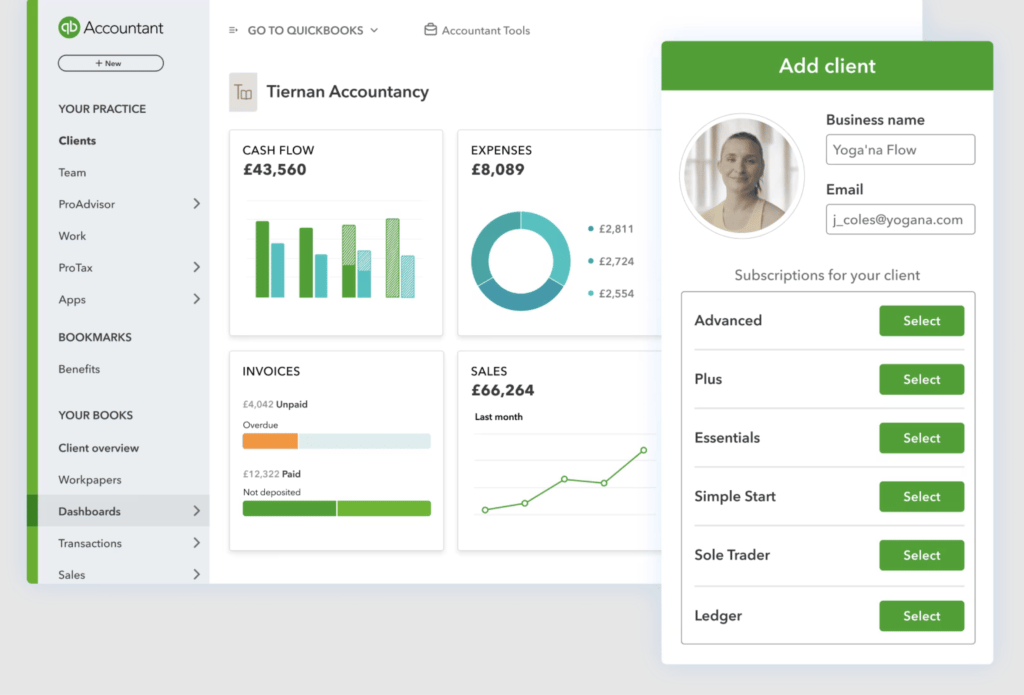
Most of the key names in accounting software offer dedicated solutions for accountants. For example, QuickBooks Online Accountant is Intuit’s system for handling accounting and bookkeeping for clients.
2. Tax preparation software
Tax preparation software helps accountants and tax professionals submit returns on behalf of their clients and ensure they pay the correct amount of tax. Although many accounting tools offer tax prep features, they’re typically designed for business owners rather than accounting or tax professionals.
Key functions:
- Prepare client documents for tax filings
- Calculate tax obligations and payments
- Check documents and returns for errors
- Complete and file tax returns
- Generate tax reports
- Offer strategic advisory services
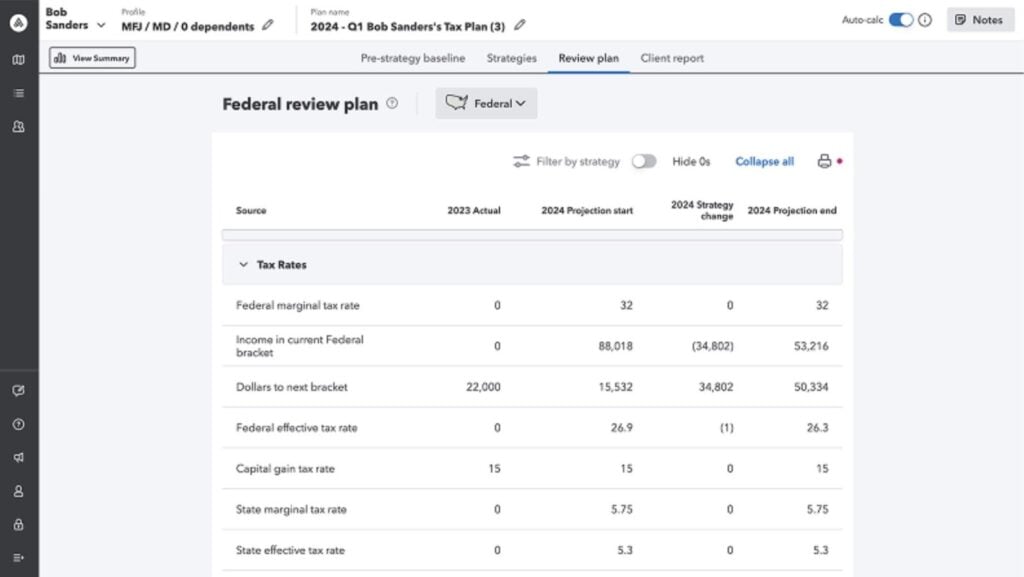
Popular tax preparation tools for accountants include ProConnect Tax (above), Drake, and TaxSlayer Pro.
3. Practice management software
Practice management software helps accounting and tax firm owners manage their business. It simplifies
Key functions:
- Increase accounting firm efficiency
- Improve accounting team collaboration
- Manage client jobs and team workloads
- Automate accounting workflows and recurring services
- Improve client onboarding, experiences, and relationships
- Drive growth for your accounting firm
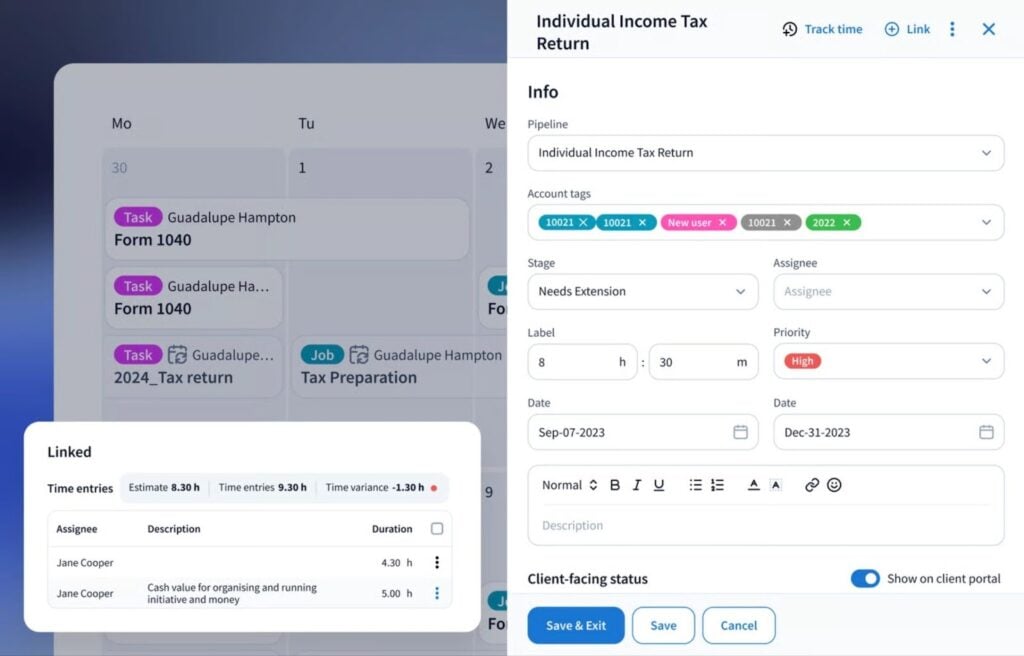
TaxDome is the most complete practice management platform for accounting firms. Where most providers focus on either firm management or client management, TaxDome implements everything you need into one growth machine:
- Project and team collaboration
- Accountant portal and mobile app
- Integrated email, chat, and two-way SMS
- Accounting CRM
- Client collaboration
- Client portal and mobile app
- Document management system
- E-signatures
- PDF editor
- Billing and payments
- Website builder
- Accounting software integrations
- Class-leading security
- TaxDome AI
Firm owners shouldn’t have to pay for dozens of tools to manage their accounting business. Aside from being unreasonably expensive, the constant integrating and switching between tools is a productivity killer.
The top accounting firms are realizing that using fewer, more powerful software tools is the key to maximizing growth.
According to TaxDome research, 53% of accounting teams are using 6+ tools to manage their workloads. At the same time, 57% of firms want to reduce this to 1-5 tools. And no wonder when 37% of software spend is wasted.
What to look for in a new accounting software solution
Features — know what you need now (and later)
Changing accounting systems is a big commitment, and your needs are going to change as you manage more clients. You don’t want to have to change platforms every time your firm reaches the next growth stage.
You want an accounting platform that scales with your firm and continues to meet your needs as your firm grows. So, don’t simply consider what you need from accounting software today; think about what you’ll need over the next 3-5 years or more.
Prioritize features that improve efficiency and drive growth: accounting automation, client management, and team collaboration.
Make your next accounting software platform the last one you’ll ever need.
Plans, pricing, and upgrade paths
There’s nothing worse than implementing a new accounting system, only to get hit by unexpected fees or upgrade costs. Pricing models for software products can get complicated, and the more feature-rich a product is, the more complex pricing often is.
So, make sure you know exactly what you’re buying into before you sign up for anything.
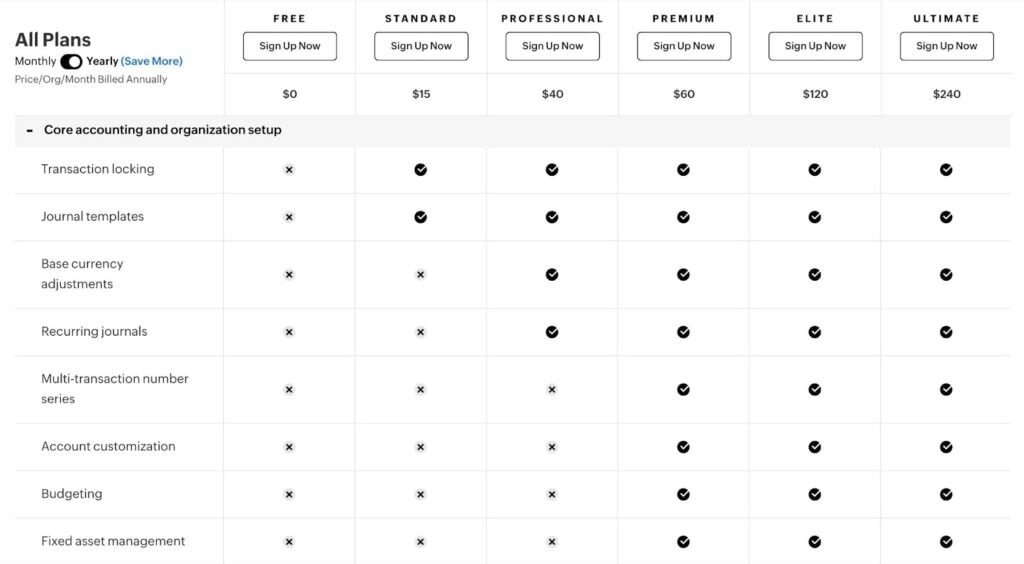
For example, Zoho Books (above) offers six different plans, including a free version with limited features.
Again, consider your needs now and the upgrade path you’re looking at as your business grows. Pay attention to feature restrictions, usage limits, hidden fees, and upgrade costs to know what committing to your next accounting software really means.
Onboarding and customer support
Onboarding and customer support are essential for any significant software switch. Your team needs to hit the ground running with the new system to keep your firm on track during the switch.
A comprehensive onboarding and support program should include:
- A dedicated support manager
- Clear guidance for setting up the new platform
- Support for importing client data
- Support for setting up workflows
- Support for customizing the system
- Structured training for team roles — eg: firm owners, admins, accountants
- Ongoing support after going live
- A responsive support team throughout
- Extensive training resources and documentation
By the time onboarding is complete, you should know the system well enough to train clients for all client-facing features. For example, how to access their client portal, upload documents, and pay invoices.
Step-by-step: how to switch accounting software
1. Plan your migration
Time the switch to minimize disruption
Unless you have a critical software failure that requires an immediate switch, time the move to minimize disruption. Changing your accounting software mid-year will require a different approach to making the switch at the end of year.
- Switch mid-year for minimal disruption
- Switch at year-end for the cleanest data transition
- Assess team workloads and staff availability
- Consider the timing and impact on clients
Involve your team from the beginning
Your team will be the ones using your new accounting system every day, and a successful switch largely depends on them.
- Involve key team members in the software selection process
- Be open about the key goals and objectives of the switch
- Address the challenges of changing accounting systems
- Start training as early as possible
- Get feedback on the implementation roadmap
- Agree on the right time to make the change
Prepare your data and workflows
Data loss is always a risk when you migrate from one accounting software to another. Before making the switch, prepare your data to protect client information and records.
- Map your workflows to see what needs to carry over
- Clean up inconsistent categorizations and outdated accounts
- Consolidate your chart of accounts
- Close outstanding reconciliations
- Identify open items such as invoices, bills, and unreconciled transactions
- Back up core reports for reference
2. Decide what data to migrate
Before changing accounting systems, decide exactly what needs to move. Once you’ve selected the data for migration, clean it to remove any duplicates or discrepancies that could cause errors.
Focus on essential items, such as:
- Chart of accounts
- Open balances
- Active clients and vendors
- Recent transaction history
- Client CRM data
- Client documents
- Communication history
- Recurring services
- Schedules and deadlines
Archive anything outdated or unnecessary. Confirm how documents and attachments will transfer so nothing important gets left behind.
3. Move your data and validate accuracy
The data migration process is different for every software switch, so discuss this in detail with providers. Ideally, you want to set up a testing environment to manage the following three key steps:
- Export your data: make sure you export the data from your existing system in the correct format for the new one
- Import data to the new system: run the appropriate import process for your new accounting software
- Data verification: run side-by-side comparisons to validate imports (contact data, general ledger, trial balance, bank reconciliations, AP and AR aging, etc.)
For comprehensive migrations, it helps to move data sets in batches so you can resolve any issues as you go. For example, you might start by importing client CRM data to make sure everything carries over correctly. Once this data is validated, you can import client documents or use a transaction data enrichment API to process transaction data, ensuring that everything is connected to the relevant account and properly categorized.
4. Configure your new accounting system
Configure the essential settings, workflows, and customizations in your new accounting software. You can refine your implementation over time, but you want the system to be ready for day-to-day operations before going live.
- Assign user permissions and access levels
- Build templates for recurring work
- Set up workflows to match how your team operates
- Add automations to reduce manual tasks
- Configure client-facing elements such as portals, messaging, and billing
- Ensure integrations work as intended
5. Train your team and roll out in phases
Your team needs to be comfortable with your new accounting system by the time it goes live. This is crucial for getting the adoption you need and reducing friction during the switch.
- Define processes for using the new accounting system
- Set out processes in SOPs
- Define clear roles and responsibilities for everyone on your team
- Schedule structured training sessions
- Set up clear support channels for team members
- Collect feedback throughout training and migration
To help your team get used to the new system, you can roll out in phases and run both platforms in parallel for a short period of time.
6. Train your clients
Clients need clear guidance when you introduce a new system, especially if it changes how they share documents or communicate with your team. Give them plenty of notice about what’s changing and explain how it will improve their experience.
Walk them through any client-facing features they’ll use, such as portals or mobile apps, and show them how to complete key actions. Provide ongoing support for clients, and let them know who to contact with questions, so they feel supported from the start.
7. Review the switch
Once the new system is live, take time to confirm everything is working as expected. Start by verifying reports and reconciliations to ensure the imported data is complete and accurate.
Monitor workflows to see how they perform during the first few weeks and resolve any issues quickly. Encourage your team to flag issues as they come up so nothing gets overlooked. Refine automations, templates, and processes to improve efficiency and match how your team actually works.
Common mistakes when switching systems and how to avoid them
Careful planning is key to successfully changing accounting systems, but mistakes can still happen. The most common issues include:
- Choosing the wrong software: switching systems is doomed to fail if you choose the wrong accounting software to begin with
- Going in without a clear vision: making a switch without clear goals and objectives
- Rushing the rollout: going live before the team understands new workflows or tools
- Skipping data cleanup: transferring inconsistencies or inaccuracies that follow you into the new software
- Not validating reports: failing to compare trial balances, reconciliations, and aging reports between systems
- Scrimping on product training: expecting your team and clients to navigate the switch without sufficient training
- Lack of ownership: lacking defined roles for migration tasks, which leads to missed steps and inconsistent setup
- Switching during peak periods: creating avoidable stress and increasing the risk of mistakes
Poor planning is the biggest mistake you can make when switching to a new accounting system. Aside from preventing these issues from happening in the first place, you want processes and contingency plans in place to deal with anything that does.
How TaxDome removes the hassle of switching accounting software
TaxDome is the most complete practice management platform on the market. We’ve built the growth machine for accounting firms, and the last software ecosystem your practice will ever need.
Switching systems is disruptive, but you’ll never need to do it again with TaxDome.
This is why TaxDome was named the #1 practice management system and the most comprehensive firm workflow solution (for the second year running) at the 2025 CPA Practice Advisor Readers’ Choice Awards.
Instead of constantly switching between different tools, your team runs everything from one system. This saves time, reduces complexity, and slashes your software expenses. Firms using TaxDome save $18,600 per employee every year, on average.
Try our savings calculator to see how much your firm could save by replacing your existing tools with TaxDome.

Aaron produces practical content for TaxDome, drawing on 11 years in SaaS copywriting and marketing. He helps accounting and tax professionals get the most from TaxDome and other tools, making complex topics clear and actionable.

Get your free guide

Thank you!
The guide copy has been sent to your email. Please check your inbox!
Recommended articles
What is accounting workflow management? The complete guide with real-world examples
ChatGPT for accountants: 12 strategies to automate your workflows

12 best free online accounting courses with certifications for 2026