 US – English
 UK – English
 Canada – English
 Australia – English
 Danmark – Dansk
 DACH - Deutsch
 France – Français
 España – Español
 Sverige – Svenska
 Italia – Italiano
 Nederland – Nederlands
 Portugal – Português
 Suomi – Suomi
 Norge – Norsk
 日本 – 日本語
 Romanian – Română












LinkedIn for accountants: how to optimize your profile and write a stronger summary

Run your entire firm on one platform

LinkedIn is more than a networking tool for accountants. Aside from making connections, it’s an open space for building your brand, both as an individual and the firm you represent.
The strongest LinkedIn accountant profiles are thoroughly optimized for their target audience: clients, recruiters, or otherwise. But an optimized profile counts for nothing if your audience never sees it. Which is why you have to build your LinkedIn network strategically to connect with the right people and bring them to your profile.
Table of сontents
- Why is LinkedIn important for accountants?
- How to create a strong accountant LinkedIn profile
- LinkedIn headline examples for accountants
- How to write an accountant summary for LinkedIn (with examples)
- How to grow your network on LinkedIn
- Demonstrate expertise in your LinkedIn content
- Common mistakes accountants should avoid on LinkedIn
- LinkedIn’s top accountants deserve the best practice management platform
Table of сontents
- Why is LinkedIn important for accountants?
- How to create a strong accountant LinkedIn profile
- LinkedIn headline examples for accountants
- How to write an accountant summary for LinkedIn (with examples)
- How to grow your network on LinkedIn
- Demonstrate expertise in your LinkedIn content
- Common mistakes accountants should avoid on LinkedIn
- LinkedIn’s top accountants deserve the best practice management platform
Why is LinkedIn important for accountants?
An effective LinkedIn strategy turns the network into a key marketing asset for accounting firms and professionals. Whether you’re looking to find clients or career opportunities, no other platform covers as much ground as LinkedIn for accountants:
- Networking: connect with industry peers, potential clients, referral partners, and more
- Brand building: shape your identity as an accounting professional
- Thought leadership: share insights that highlight your knowledge and perspective
- Lead generation: use your LinkedIn profile to win new clients from the social network
- Recruitment: attract the top accounting talent and other professionals to your firm
- Career development: find the perfect role at your dream accounting firm
Studies consistently show that LinkedIn is the most valuable social platform for accountants.
Despite the rise of AI systems, professional buyers say their personal network is their most trusted (81%) source of recommendations. And, with 84.7% using the platform, LinkedIn is the largest online network influencing their decisions, compared to 23.0% on Facebook and 19.5% X (Twitter).
The same study finds that accounting and financial service providers have the highest reputation scores on LinkedIn, with 64% scoring 9/10 or higher. This highlights LinkedIn’s potential for accountants, but also the competition you’re up against.
How to create a strong accountant LinkedIn profile
Building momentum on the world’s #1 professional network starts with creating a strong LinkedIn profile.
Make the right impression with your profile picture and cover photo
Your profile picture shows the person behind the LinkedIn account. Then, you’ve got the cover photo, which gives you space to put forward a brand message or supporting visuals.
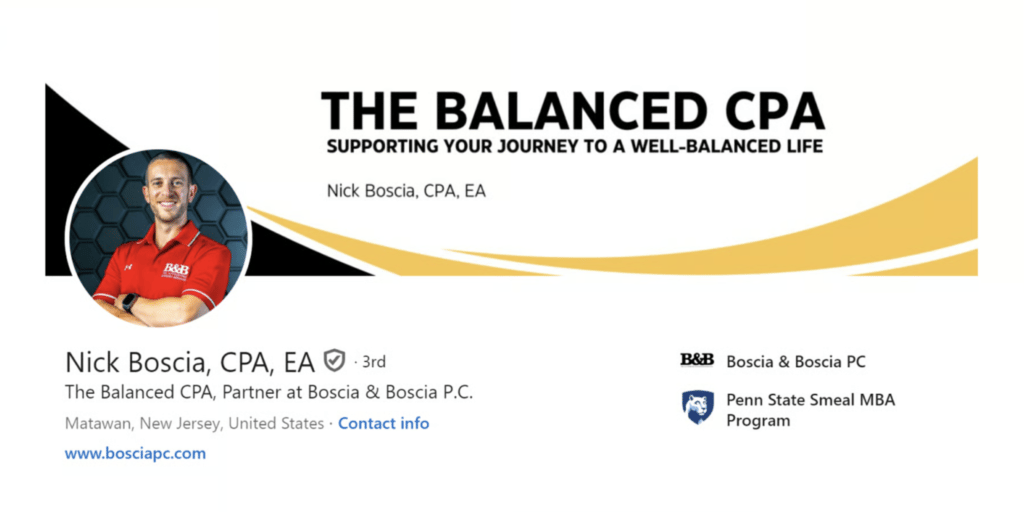
Consider how you want to come across on the platform and the impression you want to make. Are you representing your firm, looking to attract clients, inspire industry peers, or impress hiring firms?
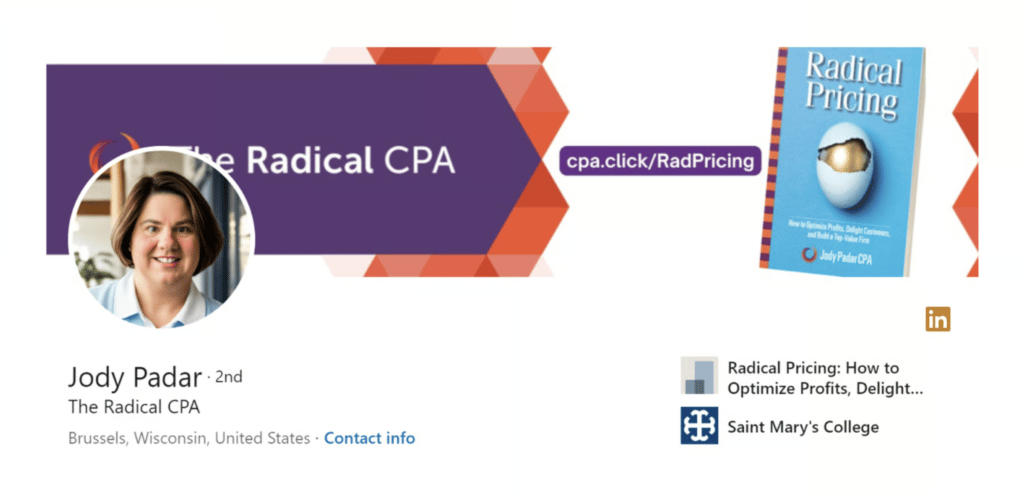
Analyze the LinkedIn profiles of accountants you admire and see how they use their profile pictures and cover photos.
Grab attention with your LinkedIn headline
The LinkedIn headline shows directly after your name, and this is the first contextual information people see on your profile. You get up to 200 characters to capture attention by explaining what you do — so make it count.

Later, we’ll look at examples of LinkedIn headlines used by some of the leading accountants on the platform.
Craft a compelling LinkedIn summary
As an accountant, your LinkedIn summary (or “About” section) is essentially your profile’s elevator pitch. It gives you ~2,600 characters to explain what you do and how you’re different from the other accounting firms or professionals on LinkedIn. Above all, your summary should make the most compelling case for why people will hire, follow, or interact with you on the platform.
Here’s a great example from Jason Andrew:
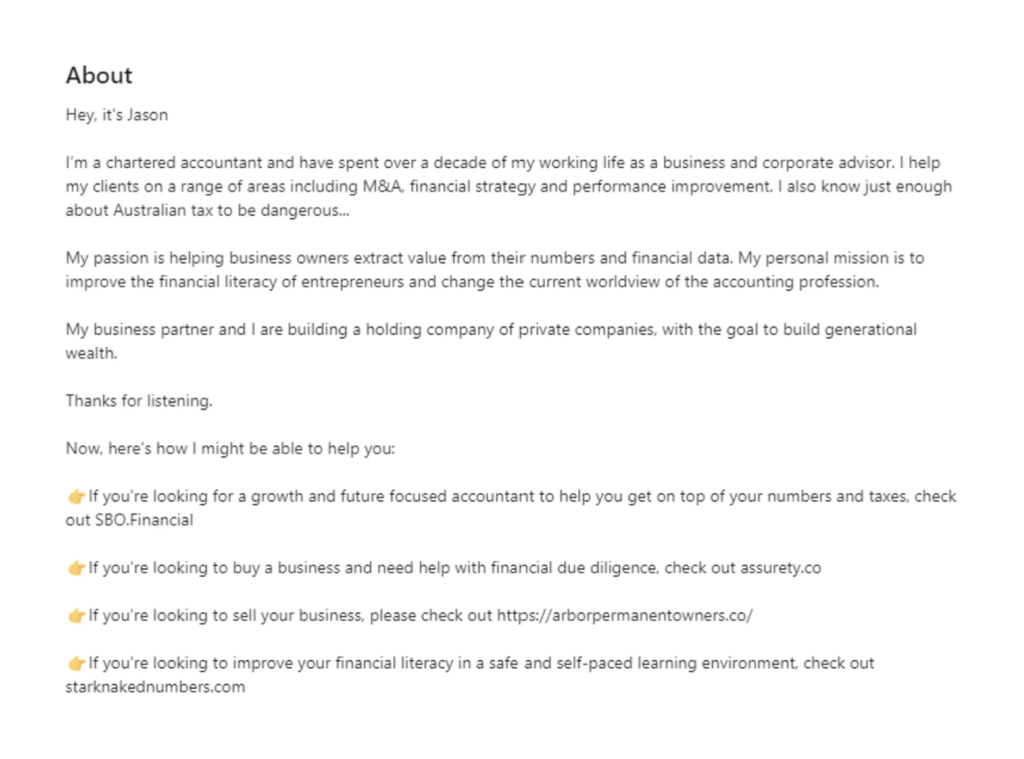
We’ve got more guidance on how to create an accountant’s summary for LinkedIn coming up, with more examples for inspiration.
Showcase your experience, skills, and certifications
LinkedIn gives you plenty of space to showcase your experience, skills, and certifications as an accountant. This starts with the Experience section, where you can list your current and previous positions.
For each position, use the Description field to explain the value you added to the role and your key achievements. Then, use the Skills section to add up to five of the most valuable skills you used for the position.
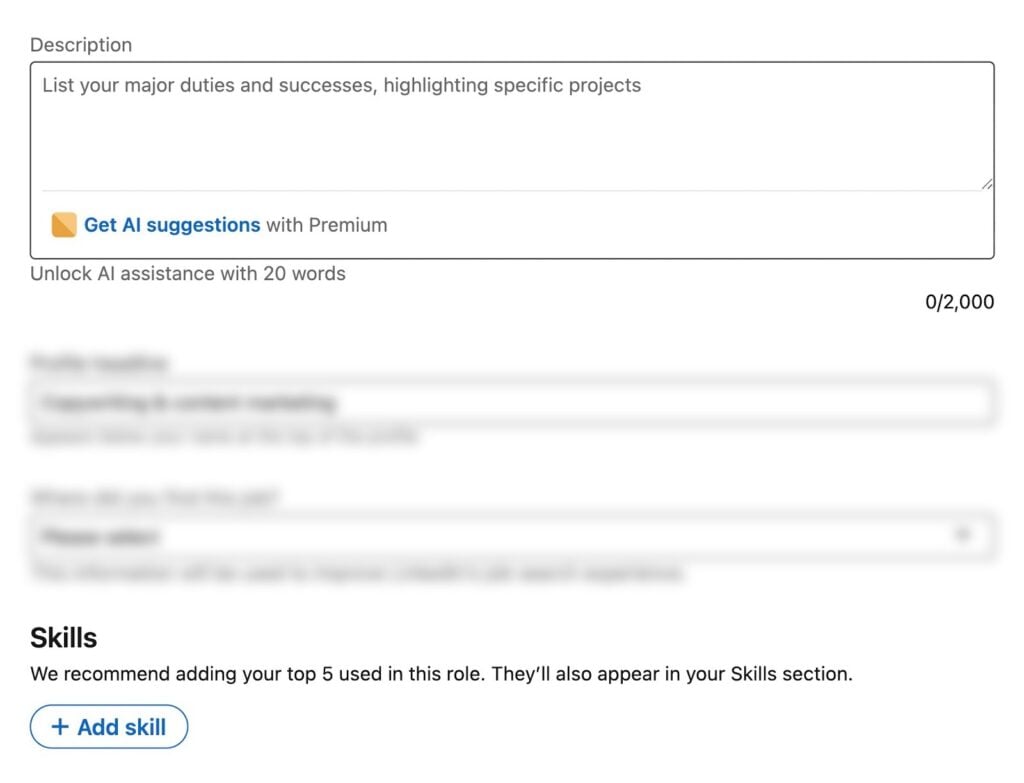
You can also add a more complete list of skills to your LinkedIn profile in the Skills section.
Add certifications by clicking Add profile section > Recommended > Add licences and certifications.
Build social proof with endorsements and recommendations
Endorsements and recommendations on LinkedIn help verify your expertise as an accountant.
- Endorsements: a quick thumbs-up verification of specific skills listed on your profile
- Recommendations: a detailed testimonial of what it’s like working with you and why you’re worth recommending to others
Reach out to people you’ve worked with in the past and ask them to give you endorsements and recommendations. You can also take the first step and give people in your network endorsements or recommendations, incentivising them to return the favor.
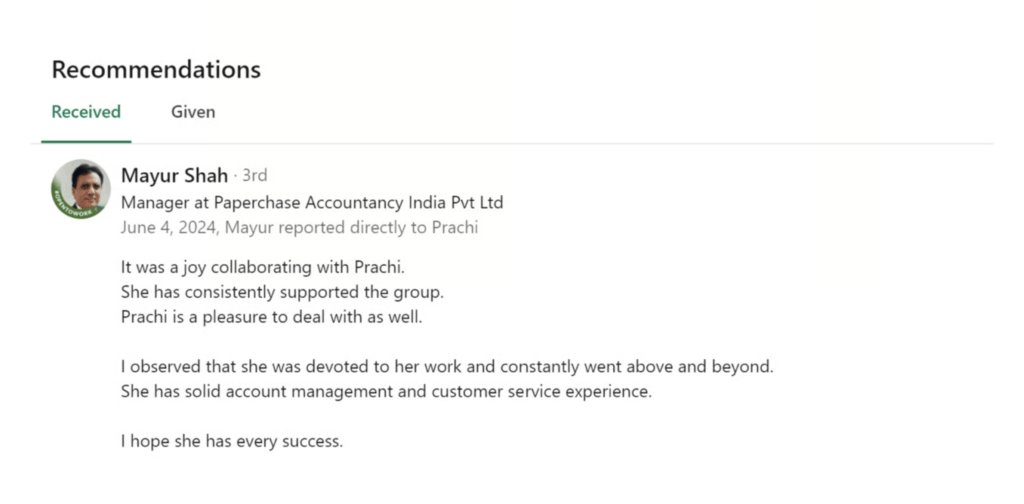
Only request endorsements and recommendations from people you’ve genuinely worked with in the past.
Use keywords naturally
Use keywords naturally throughout your LinkedIn profile, but don’t force them anywhere. Some of the most effective places to add keywords include:
- LinkedIn URL
- LinkedIn headline
- LinkedIn summary
- Experience (positions)
- Skills
- Education and certifications
- Posts and articles
If you’re looking to get hired on LinkedIn, find the keywords recruiters are most likely searching for to find accountants like you. Otherwise, concentrate on topical relevance, and you’ll naturally include all the keywords you need to.
Customize your LinkedIn URL
The default LinkedIn profile URLs are a mess, but it’s easy to clean them up. Simply follow the instructions on this LinkedIn documentation page:
- Open LinkedIn and click the Me icon at the top of the homepage
- Click View Profile
- Click the Edit icon next to Public profile & URL
- Under Edit your custom URL, click the Edit icon next to your public profile URL
- Enter your customized URL
- Click Save
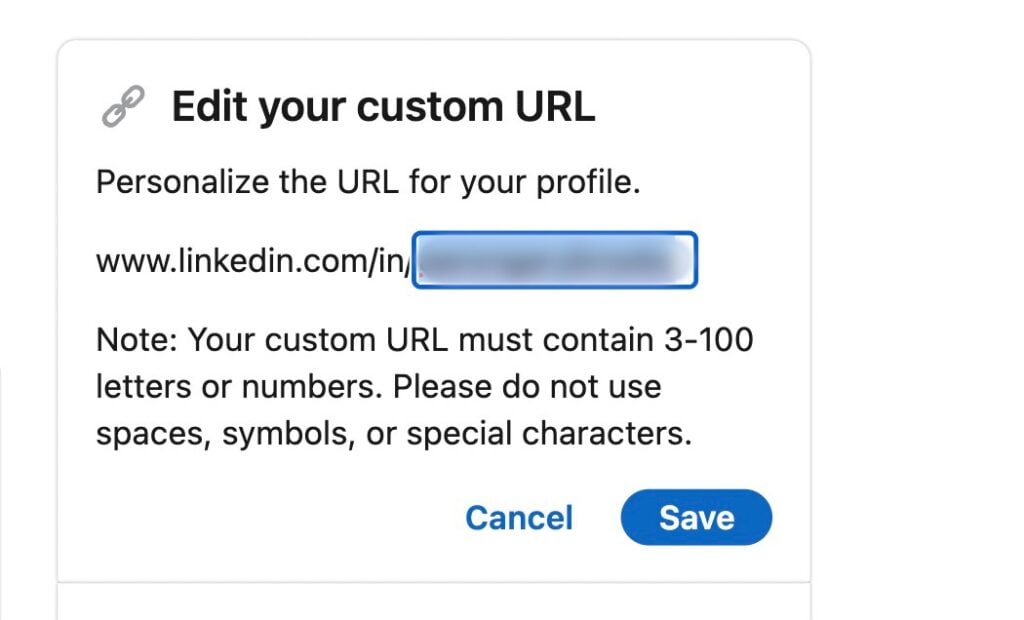
A customized URL makes your LinkedIn profile look more professional, but it’s also valuable for building your brand on the network. Try to include your name and a keyword like “CPA,” depending on who you’re trying to reach.
Verify your LinkedIn profile
Verifying your information on LinkedIn proves you’re the real deal. Currently, you can verify your identity, workplace, and educational institution. Once you complete the verification process, a badge will appear next to your name on your LinkedIn profile.

According to LinkedIn, verified users see 60% more profile views and 50% more engagement than average.
LinkedIn headline examples for accountants
Your LinkedIn headline is one of the most prominent features of your profile. Along with your photo and name, it shows across your profile page, search results, connection requests, comments, and recommendations to other users.
Here’s a common formula many accountants use for their headlines:
[Current Profession] | [Main Skills/Expertise] | [USP] | [Notable Achievement] | [Notable Former Role]
In this case, the complete headline would look something like:
CEO of Accounting Firm | Corporate Tax, Auditing, and Advisory | SAP & Oracle Certified | Former Senior Accountant at Accounting Firm
You can see Nicole McClintock takes a similar approach in her headline:
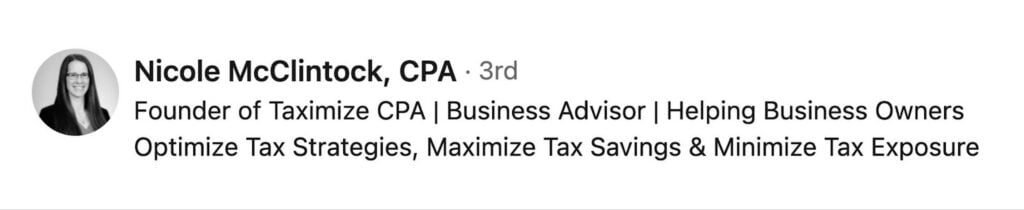
You don’t need to include all of these elements. In fact, a shorter headline often has more impact. You can simply include the first two elements [Current Profession] | [Main Skills/Expertise] as Blake Carroll does:
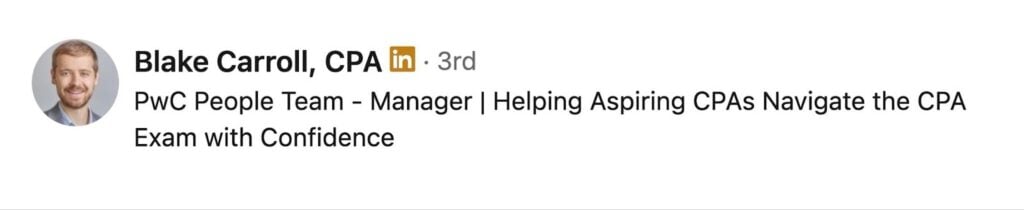
You can always add other elements from the formula and test different combinations.
Some accountants take a completely different approach and avoid headline formulas altogether. You’ll mostly see this from sole practitioners and accounting influencers who focus on standing out as a personal brand.
Jason Staats is a great example:

He drops the corporate lingo and gives a more personal description of what he has to offer his target audience on the platform.
How to write an accountant summary for LinkedIn (with examples)
The About section is one of the few spaces on your profile where you can truly differentiate yourself. So, don’t just use ChatGPT to create a generic description. Take inspiration from these LinkedIn summary examples for accountants.
Hook readers with a compelling opener
Try to hook people with a compelling opener in your summary. Think about your ideal reader and what will grab their attention. Business owners interested in hiring a CPA are looking for very different things than recruiters headhunting for accounting firms.
This opener from Angel Zhen is an excellent example of how to capture your audience’s attention.
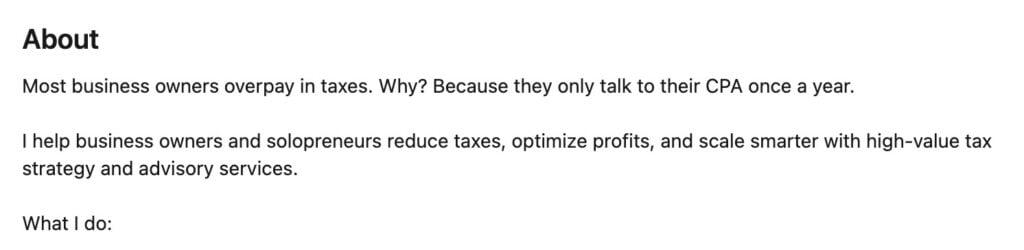
Angel is clearly writing for business owners here, and this introduction instantly sets his summary apart.
Demonstrate your key skills and experience
Your LinkedIn summary allows you to differentiate your skills and expertise from other accountants and firms on the platform. In the example below, Nick Boscia gives insights into his credentials and the work he does for both Boscia & Boscia and TheBalancedCPA.
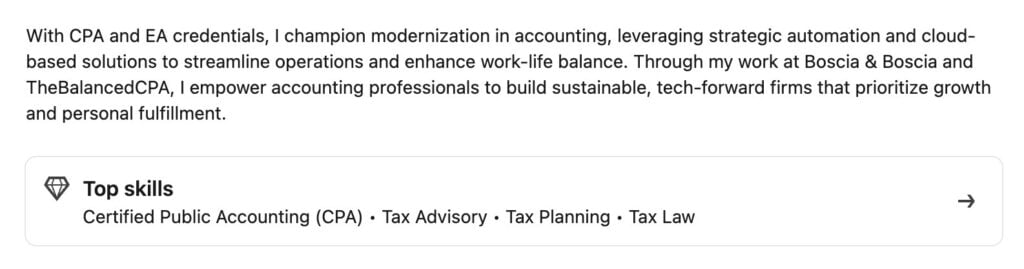
You can also add Top skills to your summary to highlight the core skills your audience is most interested in.
Showcase outcomes and achievements
If possible, once you’ve explained your experience and key skills, include your most important outcomes and achievements. Think of this as validating what you have to offer to your ideal profile viewer.
Take notes from Karen Yu and her LinkedIn summary:
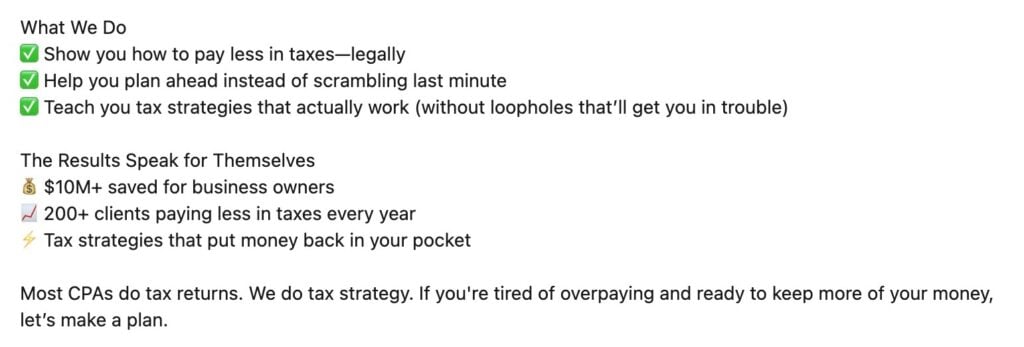
Karen antagonizes the pain point of overpaying tax in her summary and positions her firm as the answer.
End with a call to action
Close with a call to action (CTA) that speaks to your ideal audience. Follows are great, but what do you really want potential clients or recruiters to do when they finish reading your summary?
Angel Zhen wraps up his summary with several actionable steps: website visits, calls, appointments, and a downloadable playbook.
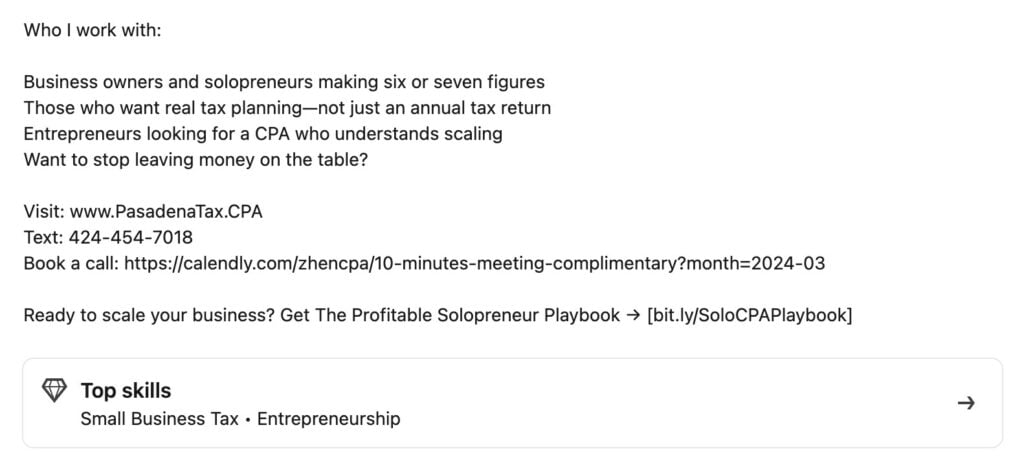
The problem with CTAs in LinkedIn summaries is that you can only add them in plain text, so they blend in with everything else. However, the Top skills tab draws the eye to the bottom of your LinkedIn summary. Combine this with line spaces above and below your CTAs to increase their visibility.
Remember — these are guidelines, not rules
If you can implement all of these best practices, you’ll have one of the most compelling accountant LinkedIn profiles on the network. This isn’t the only approach you can take, though.
In fact, sometimes, breaking “the rules” is the best way to stand out. Take Erica Goode and her summary as an example:
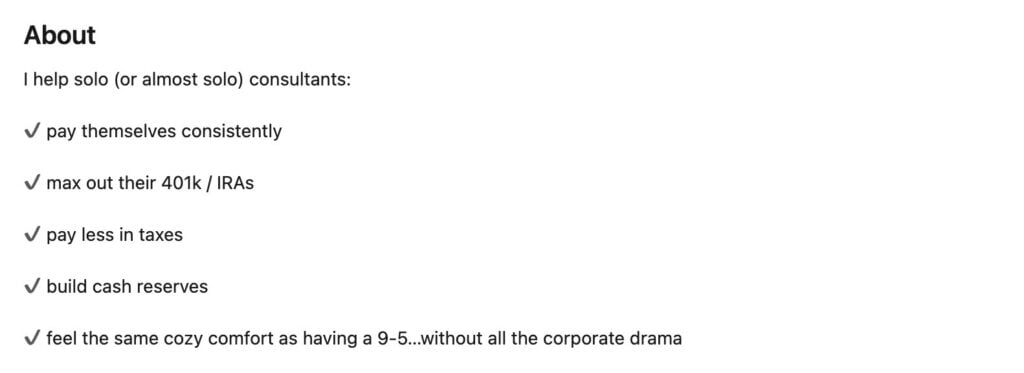
It’s concise, straight to the point, and visually clear for people who simply want to scan the key information.
Once you’ve tested the best practices for writing an accountant summary for LinkedIn, feel free to experiment.
How to grow your network on LinkedIn
A strong LinkedIn network makes it easier for the right people to find you. The goal isn’t to build as many connections as possible, though. Yes, volume increases your reach, but it’s the relevance of your connections that brings your target audience to your profile.
Build your network strategically
You want to build connections with accounts that bring you a step closer to your ideal audience. Start with the people who already know what you have to offer, then expand to those who should.
- Add the people you already know: the professional connections who build your initial network
- Review mutual connections: monitor “People you may know” and “Suggestions for you” to find valuable additions to your network
- Follow industry leaders: build your initial list of industry leaders and experts to follow
- Send regular requests: set a weekly target (max. 100-200) for manual connection requests
- Personalize connection requests: take the time to personalize requests and make sure they don’t scream “AI” if you use ChatGPT
- Review connection requests: prioritize connections that add value to your network
- Add new IRL connections: send/accept requests as you meet new clients, industry peers, and other valuable connections
Every LinkedIn connection is a potential intro to their network, so be selective about the accounts you target and accept requests from.
Join relevant LinkedIn groups
LinkedIn groups are a great way to network, grow your following, and expand your professional expertise.
To find a group, simply write a relevant keyword into the search bar. You can then filter the search results by clicking on Groups near the top of the page. Here’s an example of search groups for the keyword “audit professionals”.
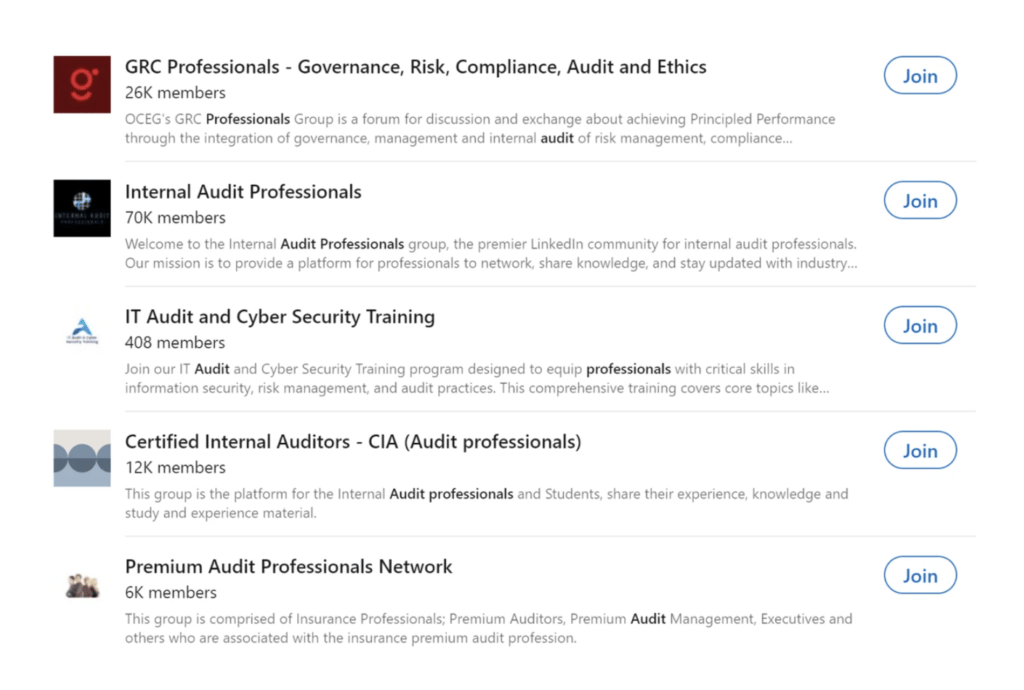
For private groups, you’ll have to wait for your request to be approved by the group administrator. Once your request to join is approved, we recommend introducing yourself early on to build connections.
Examples of groups for accountants to join:
- AICPA Tax Practitioners: keeps members updated on tax legislative and regulatory developments (25,513 members)
- CPA Trendlines Community: an active group for accounting, tax, and finance professionals around the world (53,295 members)
- Next Big Thing Club: engage with leaders across startups, real estate, and private equity (1.7 million members)
- Tax Professionals: one of the largest LinkedIn groups dedicated to tax professionals (126,997 members)
Engage before and/or after connecting
Genuine engagement is the key to growing your LinkedIn network. People are more likely to accept a request from you if you’ve already interacted with each other in a positive way. Just keep in mind that forced engagement can have the opposite effect.
- Engage with the content target accounts post
- Repost or quote the best content from valuable accounts
- Join LinkedIn groups that your target audiences are active on
- Add value to conversations to drive further engagement
- Congratulate people on milestones once you’ve established engagement
- Spark conversations that appeal to your target audience
Engagement works both ways, so acknowledge people who interact with your posts and keep an eye out for valuable connection requests.
Demonstrate expertise in your LinkedIn content
On a platform as bloated as LinkedIn, showcasing your expertise without sounding self-promotional is a difficult balancing act.
Provide real value
Your target audience engages with content that helps them achieve their own goals. If you’re trying to get hired, give recruiters a flavor of what you can bring to potential positions. If you’re looking to attract clients, offer snippets of expertise that help them run their business more effectively.
When you get involved in conversations, bring real value to the discussion. Be an asset to the groups you join, drive engagement for the posts you comment on, and share practical tips or insights in everything you post.
Engage with your network
Engagement is great for building your network, but don’t forget about people once they accept your request. The accounts that gain real traction on LinkedIn are the ones that build an engaged network around them, and this requires ongoing interaction:
- Comment on your connections’ posts
- Reply to comments on your own posts
- Quote interesting posts from your network
- Reply to people who quote your posts
- Tag connections where appropriate
- Message people in your network (when you have good reason)
There’s a popular theory that engaging with accounts and content for 10-30 minutes before you post improves performance. We’ll leave this for you to test and decide for yourself, but 10+ minutes of meaningful engagement will only help your LinkedIn network grow.
Types of content to share
Consistent posting keeps you visible and gives people more opportunities to learn from your expertise. You don’t need to use every format, but it helps to find a mix of quick and in-depth posts that works for you.
- LinkedIn posts: quick updates, insights, or observations that spark discussions in your network
- LinkedIn articles: long-form content offering deeper insights and thought leadership
- Newsletters: recurring content series that help build a loyal, engaged audience
- Documents: resources packed with insights in presentations, Word docs, PDFs, etc.
- Polls: ask questions, spark conversations, and gather insights directly from your network
- Video posts: short videos that offer quick insights, tips, expertise, or humor
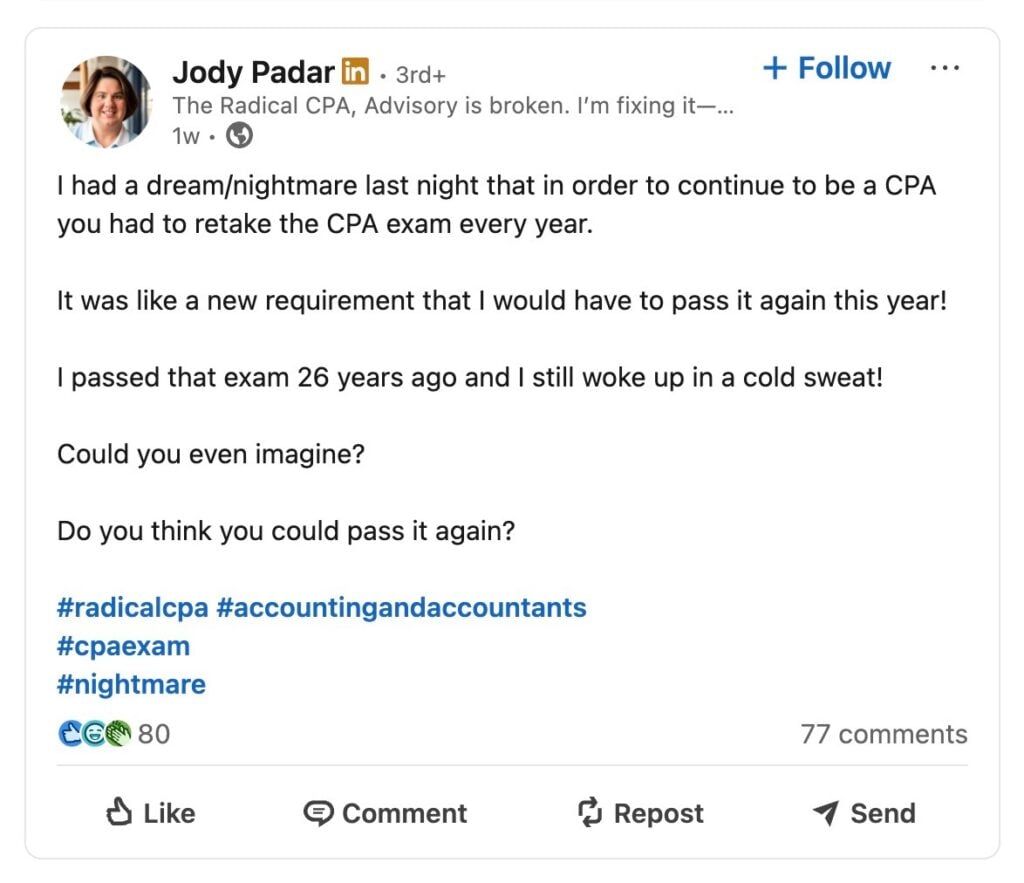
You’ll find some content formats drive more engagement than others, while some are also harder to produce. Unfortunately, the most engaging post types are often the most time-consuming, but look at the top accounts and evaluate how they drive engagement, even from simple text posts.
Best practices for creating engaging content
Ultimately, the content you post on LinkedIn determines how much you grow your network. The biggest accounting influencers on LinkedIn have built their audiences on the back of consistently publishing content that drives engagement.
- Always add value: everything you post on LinkedIn should add value to your network
- Post frequency: aim to publish 2-3 posts that drive engagement every week
- Expertise: show your expertise in every way possible, even indirectly
- Conversation: spark conversations with your posts and get involved in ones already taking place
- Take a stand: have an opinion on the hottest topics and make it known
- Credibility: use insights from trusted sources to reinforce your messages
- Mix formats: blend text posts with images, videos, polls, and other post types
- Readability: break posts and articles into scannable chunks of text with bullet point lists where appropriate
- Visuals: create image posts, charts, and other visuals — you can add these to articles and post them as image posts
- Hashtags: use 1-3 relevant hashtags for each post and mix up different combinations
- Experiment: test different post types and approaches to using them
- Consistency: find a publishing cycle that you can maintain without overloading yourself
Look at the accounts that are building traction right now and see how they balance content quality, consistency, and engagement. What topics offer the most value, which ones drive the most engagement, and how often are they posting?
Common mistakes accountants should avoid on LinkedIn
Building your LinkedIn network requires a lot of time and effort, so the last thing you want to do is slow progress (or worse) by making avoidable mistakes.
LinkedIn profile optimization mistakes
Issues with your LinkedIn profile limit your visibility with the people who matter most, or could give them the wrong impression.
The most common mistakes here include:
- Incomplete or outdated information on your profile
- No profile photo or a low-quality/unprofessional photo
- Weak or confusing headlines that don’t communicate value
- Weak LinkedIn summaries
- Missing skills, credentials, or certifications
- Unexplained gaps in your experience
- Overly generic descriptions throughout your profile
You want a complete and accurate LinkedIn profile that speaks to your target audience on the platform.
Networking mistakes
Building a valuable network on LinkedIn takes time, patience, and consistency. Trying to do too much at once can do more harm than good, so try to avoid these common mistakes:
- Sending mass connection requests
- Sending generic requests with no personalization
- Accepting every connection request that comes your way
- Ignoring connection requests from valuable accounts
- Not engaging with contacts after they accept requests
- Missing opportunities to connect with people after events and meetings
- Treating LinkedIn as a cold outreach platform
Connections aren’t the end goal in your LinkedIn strategy; you want to build an engaged network of mutual value that helps you reach more of the right people.
LinkedIn content mistakes
We’ve already looked at best practices, but what are the biggest LinkedIn content mistakes to avoid?
- Not posting often enough
- Posting generic tips or takes that don’t offer real value
- Posting irrelevant content or getting involved in the wrong conversations
- Trying to win every conversation (instead of simply adding value to them)
- Sharing overly promotional content
- Talking about yourself, instead of your audience’s interests
- Using long, dense paragraphs in text content
- Not using visual post formats or adding visuals to articles
- Adding too many hashtags
- Posting inconsistently or disappearing for stretches of time
Although you want to post regularly on LinkedIn, quality is always more important than quantity.
Credibility mistakes on LinkedIn
Your reputation is everything on LinkedIn, and it takes years to carefully craft one on the platform. You don’t want to build the wrong kind of reputation or ruin a perfectly good one with silly mistakes:
- Spreading misinformation
- Making false claims on your profile
- Sharing unverified information
- Posting AI-generated content
- Stealing post content from other accountants
- Being confrontational
- Being overly promotional
- Reacting to criticism in an unprofessional manner
- Posting offensive material
Try to avoid posting or commenting in the heat of the moment. Give yourself the chance to think things over, and question whether you’ll be proud of your next post the following day.
LinkedIn’s top accountants deserve the best practice management platform
LinkedIn success can take many forms for accountants: industry authority, an influx of clients, or a position at your dream accounting firm. Whatever success on LinkedIn looks like for you, TaxDome is the practice management platform that drives growth for your accounting business.
Beyond the social posts and marketing messages, TaxDome provides the complete toolkit for handling the day-to-day accounting work. It enhances every stage of client management and accounting workflows, enabling you to multiply client intake through greater efficiency, instead of putting in extra hours.
As LinkedIn helps you attract the right attention, TaxDome helps you manage everything else.

Aaron produces practical content for TaxDome, drawing on 11 years in SaaS copywriting and marketing. He helps accounting and tax professionals get the most from TaxDome and other tools, making complex topics clear and actionable.

Get your free guide

Thank you!
The guide copy has been sent to your email. Please check your inbox!
Recommended articles

How to start an accounting firm: a step-by-step guide to running your own practice

Accounting process improvement: Practical strategies, tools, and real-world examples

Accounting practice management software: complete guide and comparison