How does TaxDome compare to Karbon?

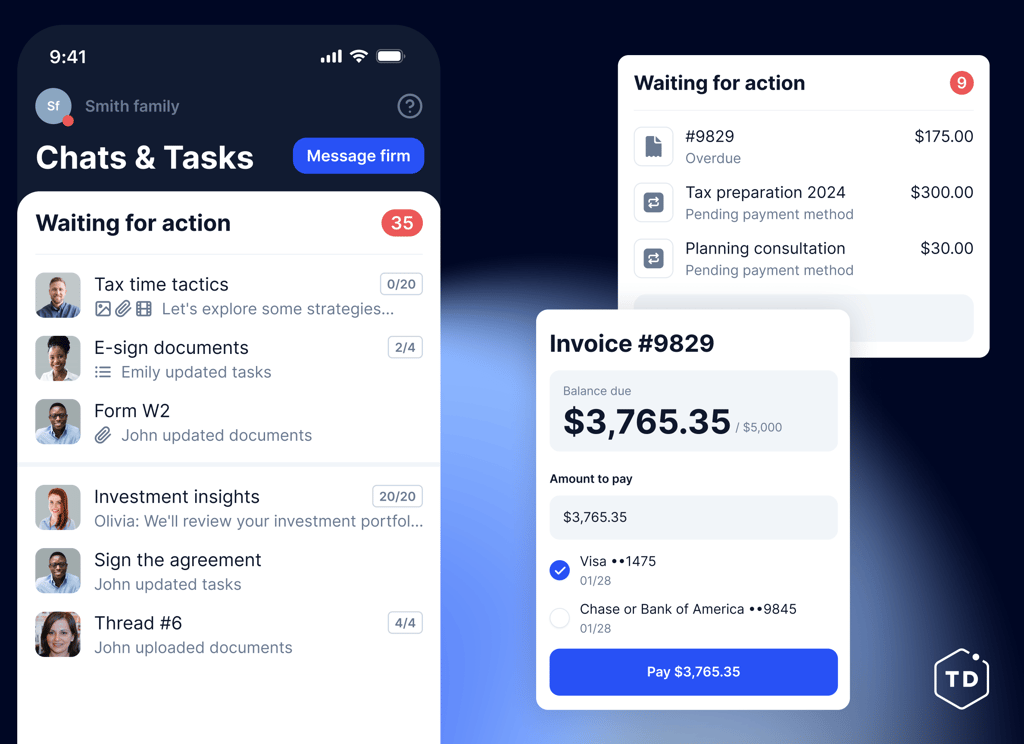
Your team and your clients will use TaxDome in week one, while Karbon’s clients often don’t. 15,000 firms run on TaxDome, and their clients gave the TaxDome app 4.9 stars on iOS. That gap matters when you need client adoption on day one.
4.7/5 across 7,600+ reviews

Real reviews from the clients of accounting firms, not accountants

The people everyone says are impossible to onboard. They left five-star reviews.

“We are not computer experts but this app was so easy to use. We were able to send our information to John and he completed our taxes and called us to explain how to sign and submit payments and fees. It was simple.”
<strong>East Coast Ginger,</strong> <br>TaxDome iOS user

East Coast Ginger,
TaxDome iOS user

“Initially, I thought this would be a huge learning curve, but this app experience was surprisingly easy to use, and communication was fast. Doing taxes has never been easier.”

“I can’t believe how easy and quick it was to provide all the information needed to process my taxes. I’m a very senior citizen and technology-challenged but the app is so simple with guided steps. It was a very positive experience.”

“The platform is SO smooth and I adore using it. It actually makes me love working with taxes and my accountant, which is something I never thought of saying!”

Comparing TaxDome and Karbon features

Client portal

Offer clients a secure, user-friendly portal for document sharing and communication.

Top-rated client mobile app

TaxDome’s client application is top-100 in iOS and Android, providing excellent client experience.

Client experience AI

Automatically organize and label incoming client documents with TaxDome AI.

Bookkeeping hub

Connect client GL and manage uncategorized transactions.

Client requests

Streamline client communication with organized, trackable requests for information.

Website and branding

Customize your firm’s client-facing portal with branded design and personalized web pages.

Limited

Global communication

Let your clients easily connect with your firm and centralize all communications with an all-in-one inbox for SMS, chats, and emails.

Client Care

Firms can delegate platform-related client support to TaxDome’s support team.

White-labeled client app

A fully branded white-labeled mobile app, developed and maintained by TaxDome.

IRS compliant e-signatures and KBA, QES, AdES

Collect legally binding electronic signatures, including advanced and qualified e-signatures (AdES and QES), without limits.

Limited

CRM with unlimited contacts

Store and manage unlimited client records in one secure, organized CRM.

Limited

Organizers and intake forms

Create customizable questionnaires to gather all necessary information from clients.

Limited

Client chats

Secure, real-time messaging with your clients – fully integrated into your workflow.

Limited

Two-way SMS

Send and receive text messages directly from your TaxDome account.

Synced email

Automatically sync your email with TaxDome to track all client communications in one place.

Document approvals

Ensure client satisfaction and accuracy by requesting document approvals before finalization.

Intake and delivery

End-to-end intake, preparation, and delivery tax process, powered by Juno integration.

Limited

Advanced workflow automation

Automate repetitive tasks with powerful, customizable workflows.

Limited

Team chats

Keep discussions and project updates organized with TaxDome’s built-in Slack-like chat.

Built-in PDF editor

Edit, annotate, and manage PDFs directly within TaxDome — no external software needed.

AI-powered reporting

Use AI-powered search to uncover insights, generate reports on your firm’s performance, and visualize data with templates or custom reports.

Wiki pages (SOPs)

Create an internal knowledge base to document processes and best practices.

Desktop app

Access your TaxDome account with a dedicated desktop application and interact with client documents directly from your computer.

Firm mobile app

Manage your firm on the go with a dedicated mobile app for practitioners.

TaxDome Payments

$1B+ processed for accounting firms. Unify proposals, document delivery, and payments in one platform.

Lock deliverables to invoices

Reduce accounts receivable by locking documents to invoices, releasing them only after payment.

Proposals and engagement letters

Send customizable proposals and engagement letters for faster client approvals.

Time and billing

Track billable hours and generate invoices automatically for accurate client billing.

Packages in proposals

Add tiered service lists to proposals for the client to choose from.

IRS

Get transcripts directly from the IRS in your client portal. Request, view, and manage transcripts for each client, whether individuals or business.

QuickBooks Online

Automatically sync all payments and invoices created in your client portal with your QuickBooks Online account.

Zapier

Connect your client portal to 2,000+ tools with Zapier.

Tax programs

Upload docs to your client portal directly from Drake, ATX, AccountingSuite, CCHAxcess, CrossLink, Intuit ProConnect, TaxSlayer, ProSeries, and many more.

Limited

Payment providers

Stripe, PayPal, Venmo, GooglePay, ApplePay.

Limited

Schedulers

Calendly, Schedulista, Squarespace, Youcanbook.me.

Limited

SMS

TaxDome has an integration with Twilio to provide two-way SMS messaging features.

DATEV

Send documents to DATEV Unternehmen Online from your client portal.

Companies House

Link your account and watch as all information about your UK-based clients is filled in automatically in your client portal.

Juno

Smart intake, automated data entry into tax software, and delivery.

SOC 2 Type II Compliance

Built to meet the highest industry standards for data security, availability, and confidentiality.

Firm-wide activity feed and security audit trails

Track every action across your firm in one place for complete visibility and peace of mind.

Limited

2FA security policies for staff and clients

Enforce two-factor authentication across your team to keep sensitive client data secure.

Which tools does your firm currently use?

SmartVault, $480 per user/year

Ignition, $828 mixed (base per firm + limits per client/user + add-ons)

Keeper, $96–120 per client/year

SafeSend, $13–17 per return ($15/delivery), approx. $1,500 for 100 returns

Liscio, $720 per user/year

Karbon, $1,068 per user/per year

Practice CS, $600 per user/year

Canopy, $1,704 per user/per year

Atom, $1999 per firm/year, unlimited users

ShareFile, $300 per user/year

Jetpack Workflow, $360 per user/year

DocuSign, $300 per user/year

Adobe Sign, $239 per user/year

GetNetSet, $1188 per firm/year

Asana, $299.88 per user/year

Dropbox, $180 per user/year

Slack, $150 per user/year

Typeform, $996 per user/year

ClickUp, $144 per user/year

Monday, $258 per user/year

Financial Cents, $828 per user/year

Cognito Forms, $94 per user/year

UnCat, $108 per client/year, $10,800 for 100 clients

Mango, $660 per user/year

Soraban, $3,000 ($20/return, min. 150)

Stanford Tax, approx. $10 per return, $1,000 for 100 returns

SecureFile Pro, $299.95 per firm/year

Excel, $180 per user/year, $1,800 for 100 users

How many team members do you have?
How many individual clients do you have?
How many business clients do you have?
Save
$
0 9 8 7 6 5 4 3 2 1 –
0 9 8 7 6 5 4 3 2 1 –
0 9 8 7 6 5 4 3 2 1 –
0 9 8 7 6 5 4 3 2 1 –
0 9 8 7 6 5 4 3 2 1 –
/year by switching to TaxDome — we’ll show you how
Request a demo to see how TaxDome will replace X apps with one robust solution and reduce costs.
If the form doesn’t load, please call us at +1-833-TAX-DOME or email [email protected] — we’ll help you schedule a meeting.
<strong>Chris Farris</strong>,
<br> COO of Foundation Group (50+ staff)

Chris Farris,

COO of Foundation Group (50+ staff)

“TaxDome has been a huge success for us, meeting both client and employee expectations.”

One of the easiest platforms to implement – discover the TaxDome onboarding experience

When choosing a practice-management platform, onboarding matters just as much as features. In this video, our onboarding lead explains how TaxDome helps firms get up and running quickly — with a structured process and hands-on support.

Clear onboarding path that gets most firms live in 6–8 weeks

Dedicated onboarding manager — not just documentation

Multiple training formats: 1:1, group, self-guided courses, and ready-made templates

Continuous post–go-live support from our award-winning team

TaxDome and Karbon pricing

Most popular

TaxDome

From

$

700

/per year, per user

TaxDome offers three pricing plans, starting at $700 per user annually (with a 3-year plan).

Each plan provides firms of all sizes with a comprehensive platform for running a practice — without hidden costs or necessary add-ons.

Request demo

Karbon

From

$

1,068

/per year, per user

Karbon offers three pricing plans, and the most popular one is $1,068 per user annually, with multiple feature limits and paid add-ons.

For example, you will have to pay an additional $299 for contact migration, $6,000 for custom reporting, and so on.

Discover our easy migration process

Bring your firm from Karbon to TaxDome

Kick-off meeting

Align on your goals, timelines, and migration plan so your move to TaxDome is stress-free.

Client communication

Keep clients informed and confident with clear messaging about the transition.

Documents migration

Securely transfer all your files from Karbon to TaxDome.

Workflow basics, customization, testing

Set up and tailor workflows to your processes, then test to ensure everything runs seamlessly.

Invoicing and payments

Configure your billing system in TaxDome for faster payments and a better client experience.

Transition to Customer Success

Move your team fully onto TaxDome with training and support for long-term success.

Switch to TaxDome from Karbon today

Feel the TaxDome effect – streamline your practice management, improve your client experience, and foolproof your growth.

Request migration

1 Fill in the form
2 Get a setup plan
3 Migrate with ease
By requesting migration, you agree to TaxDome’s terms of service and privacy policy
If the form doesn’t load, please call us at +1-833-TAX-DOME or email [email protected] — we’ll help you schedule a meeting.

Thank you!

Your submission was successful. We’ll reach out to you to build a comprehensive migration plan for your firm.

Move to TaxDome now, and we’ll help cover the remaining cost of your contract — with a credit of up to 6 months free of TaxDome.

Which is the right tool for you? TaxDome vs Karbon

According to Capterra reviews, users prefer TaxDome over Karbon for the following reasons:

Superior client experience that 35k of accounting firms’ clients rate 4.9

Comprehensive functionality without costly add-ons

Simple, all-in-one platform that eliminates the need for multiple software programs

Continuous improvements driven by customer feedback and platform evolution

Why TaxDome is the best choice for you

TaxDome is built to help tax and accounting firms grow efficiently — without complexity or added costs.

$18,600

saved by firms that use TaxDome per employee yearly

4.9/5

in App Store and Google Play

40 hours

saved by firms that use TaxDome per employee monthly

10,000+

firms trust TaxDome

Our client experience speaks for itself

"All in one features. It was like both Karbon and Canopy all in one. The cost is great too."

Our client experience speaks for itself

"TaxDome does everything that Karbon/IPM does and then some!"

Our client experience speaks for itself

"We loved TaxDome so much that we switched from Karbon Workflow after 5 years of use."

Our client experience speaks for itself

"What made TaxDome stand out for me was being able to keep all client communication in one place with their built-in chat feature."

Our client experience speaks for itself

I chose TaxDome over the other four products because it met every one of my needs and was cost-effective.

Readers Choice

Winner Comprehensive Firm Workflow Solution

Frequently asked questions

What are the key differences between TaxDome and Karbon?

TaxDome is a full-fledged practice management platform offering comprehensive features, including client communication, document management, workflow automation, billing, and more. 

Karbon focuses primarily on internal collaboration and task management. To match TaxDome’s client-facing features, firms often need to integrate third-party tools, which increases complexity and cost. 

While Karbon offers a mobile app and client portal, it lacks built-in e-signatures with KBA, proposals and engagement letters, and bookkeeper features.

How do TaxDome and Karbon compare in terms of client management features?

TaxDome provides robust client management tools, including a CRM, secure client portal, top-rated mobile apps, and integrated e-signatures with Knowledge-Based Authentication (KBA). 

Karbon offers limited client management features and does not include a client portal or mobile applications, which may hinder seamless client interactions. ​

How does pricing compare between TaxDome and Karbon?

TaxDome starts at $700/user/year (3-year plan) and includes all features with no hidden fees or paid add-ons.

Karbon’s most popular plan is $1,068/user/year, and many features require paid add-ons — for instance, contact migration ($299), custom reporting ($6,000), and some integrations.

Do TaxDome or Karbon offer tools specific for bookkeepers?

TaxDome provides a comprehensive Bookkeeping Hub, integrating directly with clients’ general ledgers without per-client fees. This feature streamlines bookkeeping tasks and is included in the standard subscription. 

In contrast, Karbon focuses on workflow and collaboration tools but lacks dedicated bookkeeping functionalities.

Do TaxDome or Karbon offer tools specific for tax preparers?

TaxDome offers an end-to-end tax workflow, including client intake forms, document requests, e-signatures with KBA compliance, and secure delivery of completed returns. 

Karbon provides customizable workflows and task management, but does not offer specialized tax preparation tools like e-signatures or client portals tailored for tax services.

Which platform offers more automation and workflow tools?

TaxDome provides robust automation with conditional task triggers, automatic email and signature requests, pipeline templates, and client-facing workflow steps — all built-in.

Karbon offers internal workflow tools and task templates, but requires integrations for client-facing steps like document requests or communication automations, adding friction and cost.

How do client experience features compare between TaxDome and Karbon?

TaxDome includes a branded client portal and top-rated mobile apps (4.9+ stars on iOS), centralized communication (email, chat, SMS), client-facing automation, and more.

Karbon also provides a client portal and mobile app, but lacks tools like SMS, client chat, and IRS-compliant signature options.

What types of support do TaxDome and Karbon offer?

Both companies offer online and phone support as well as account managers who will help you make the most of each product.

TaxDome offers free, unlimited white-glove support, including screen-sharing onboarding sessions. In addition to this, TaxDome has paid support plans to ensure firms get the right assistance at the right time.

Can I bring my firm from Karbon to TaxDome?

Of course! If you have an existing account with Karbon, we have multiple import tools that allow you to bring your firm over to TaxDome quickly and easily. To support your transition, we offer a discount of up to 6 months’ worth of TaxDome free.

See TaxDome in action with a free demo
If the form doesn’t load, please call us at +1-833-TAX-DOME or email [email protected] — we’ll help you schedule a meeting.
Voted #1 across all 9 practice management categories
Read more
Benchmark your firm against data from 15,000+ accounting firms in the Accounting Industry Index.
Get your copy
Explore the trends shaping the future of accounting and why its best years are ahead.
Download the 2025 TaxDome Annual Report
350+ companies surveyed: How business clients choose accountants and what they're willing to pay.
Download the report
Download the security guide to learn how to protect client data and build lasting trust.
Get the quide
Discover how a team of 10 with 1,000+ clients achieved 5-star loyalty.
Read the story