 US – English
 UK – English
 Canada – English
 Australia – English
 Danmark – Dansk
 DACH - Deutsch
 France – Français
 España – Español
 Sverige – Svenska
 Italia – Italiano
 Nederland – Nederlands
 Portugal – Português
 Suomi – Suomi
 Norge – Norsk
 日本 – 日本語
 Romanian – Română












Trello for accounting firms: is it the right project management tool for your practice?

Run your entire firm on one platform
Summary:
- Trello is a simple, intuitive project management tool, but it lacks depth for accounting purposes
- Jetpack Workflow offers better automation for accountants, but it’s limited in client management features
- Uku is the best free Trello alternative, but its paid plans are relatively expensive for the features it delivers
- TaxDome is the complete practice management system and growth platform for accounting firms
Methodology: how do we choose?
We analyze each product and customer reviews vs the top alternatives. The percentages below indicate the weighting of each feature category in our recommendations:
- Workflow automation — 25%
- Client features — 20%
- Pricing — 20%
- Integrations — 15%
- Mobile apps — 10%
- Usability — 5%
- Reporting — 5%
Last Updated: October 2025
Trello is one of the first names that crops up in any search for project management software. Renowned for its simplicity, it’s the first productivity tool many teams try, and an easy starting point for people with limited software experience.
Unfortunately, this simplicity limits Trello’s ability to handle any serious accounting workflows. It isn’t designed to manage client relationships, reduce manual data entry, or automate bookkeeping services. So, what are the best alternatives to Trello for accounting firms and professionals?
Table of сontents
What is Trello?
Trello is a visual project management tool based on the Kanban system. Work is organized through Trello boards, lists, and cards that represent individual tasks. It’s an intuitive app for single users and small teams managing tasks, but it struggles with complex projects and workflows.
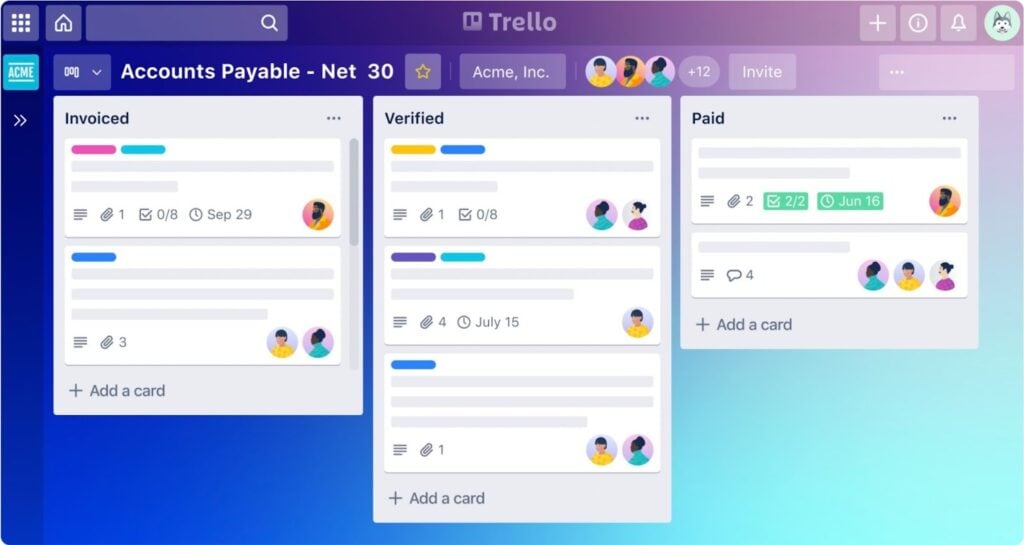
In fairness, the platform was never designed to deal with the day-to-day challenges of accounting. This is one of the simplest project and task management tools on the market, and it fits this purpose excellently.
This is precisely why Trello tops so many recommendation lists, but many accountants only discover its limitations once they start using it.
How can accounting firms use Trello?
Although Trello isn’t designed for accounting, sole practitioners and small teams may find it helpful for certain tasks:
- Project management: create, view, and manage tasks for simple projects
- Workflow automation: automate basic actions like reminders, status updates, and moving cards to the next stage
- Recurring tasks: set up basic recurring tasks in with free Power-Ups (add-ons)
- Team collaboration: bring your team together to collaborate on projects and tasks in one place
- Knowledge management: build resource boards for team members to access process guides, checklists, and updates
Trello is an upgrade from spreadsheets and email threads in every way for small accounting teams. It’s also one of the easiest project management tools for teams that don’t want to make the jump to a more advanced system designed for accounting workflows.
What are the main limitations of Trello for accounting firms?
As a project management tool designed for ultimate simplicity, Trello’s limitations for accounting firms shouldn’t come as a surprise.
We see similar drawbacks with most project management platforms, including ClickUp, Monday.com, and Asana. Trello’s simplicity only adds to the list of limitations:
- Project management: the Kanban system offers visual clarity for simple projects, but isn’t ideal for complex or overlapping projects
- Workload management: you have to manually create and update dashboards to track team and individual workloads
- Accounting automation: Trello’s automation capabilities are about as simple as it gets — forget about automating complex accounting or bookkeeping workflows
- Client management features: you can invite clients to Trello, but you’re not getting any serious client management or collaboration features
- Client CRM: Trello says you can customize its product into “a powerful CRM,” but it’s not a true customer relationship management tool
- Secure document storage: although Trello supports basic document storage, it doesn’t provide a secure system for exchanging documents with clients
- Time tracking: you have to integrate time tracking apps to bring this feature to Trello — a common theme with the product
- Billing or payments: you’ll have to use separate tools for billing clients and managing payments
- Accounting integrations: Trello doesn’t include any integrations for accounting tools like QuickBooks
- Accounting templates: this requires a lot of customization to adapt Trello for accounting teams, but the payoff is also limited
Trello wants to be the easiest, most affordable project management system on the market — and it largely succeeds.
Unfortunately, this means it has limited value for accounting teams beyond the most basic projects. So, it’s only natural for accounting teams to start looking for Trello alternatives, and your clients will thank you for doing so.
According to TaxDome’s Client Satisfaction Report, 77% of satisfied accounting clients say their firm’s technology choices are crucial to the quality of their services.
Best Trello alternatives for accounting firms
We’ve chosen the best Trello alternatives for accounting teams, with each one offering a more advanced system than the last:
- Jetpack Workflow: the simplest workflow automation tool for sole practitioners and accounting teams
- Financial Cents: the entry-level practice management platform for smaller accounting teams
- Uku: the best free plan as a Trello alternative for accounting firms
- Karbon: advanced collaboration and project management for accountants
- TaxDome: the complete practice management platform for growing accounting firms
Before we take a closer look at each Trello alternative, here’s a comparison table to give you a side-by-side preview of what they have to offer:
| Jetpack Workflow | Financial Cents | Uku | Karbon | TaxDome | Trello | |
|---|---|---|---|---|---|---|
| Project management | ✔ | ✔ | ✔ | ✔ | ✔ | ✔ |
| Advanced workflow automation | Limited | Limited | Limited | Limited | ✔ | Limited |
| CRM with unlimited contacts | ✔ | ✔ | ✔ | |||
| Client portal | ✔ | ✔ | ✔ | ✔ | ||
| Top-rated client mobile app | ✔ | |||||
| Client chat | ✔ | ✔ | ||||
| Document management | ✔ | ✔ | ✔ | ✔ | ✔ | |
| Bookkeeping Hub | ✔ | |||||
| Proposals and engagements | ✔ | ✔ | ✔ | |||
| Organizers and intake forms | ✔ | |||||
| Wiki pages | ✔ | Basic | ||||
| Time tracking | ✔ | ✔ | ✔ | ✔ | ||
| Billing and payments | ✔ | ✔ | ✔ | ✔ | ||
| e-signatures | ✔ | ✔ | ✔ | ✔ | ||
| PDF editor | ✔ | |||||
| Website builder | ✔ | |||||
| AI reporting | ✔ | |||||
| IRS integrations | ✔ | |||||
| QuickBooks Online sync | ✔ | ✔ | ✔ |
As you can see, each product we’re looking at today has more to offer accountants than Trello. And, so they should; they’re all designed specifically for accountants and accounting teams.
The ideal Trello alternative for you depends on how advanced your needs are. At one end of the scale, Jetpack Workflow offers the simplest automation system designed for accounting workflows. At the other end, you have TaxDome: the complete practice management platform and growth machine for accounting firms.
1. Jetpack Workflow
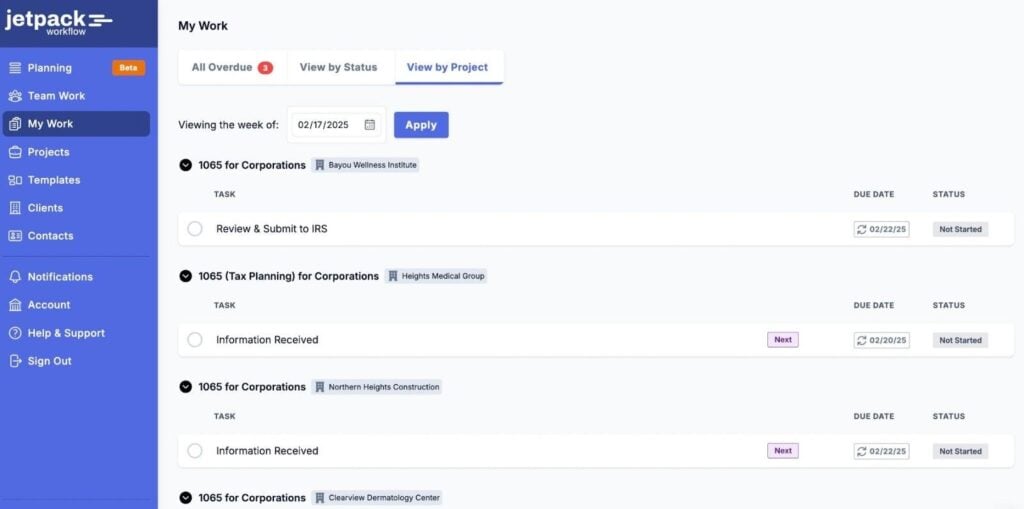
Jetpack Workflow is a project management and workflow automation toolkit for accountants. Instead of Trello’s Kanban approach, it gives you a more traditional list-based system for managing projects and tasks.
As a result, it’s more capable of managing complex projects and client jobs, which is reinforced by its stronger automation features.
Key Jetpack Workflow features:
- Project management
- Task management
- Capacity planning
- Workflow automation
- Team collaboration
- Client task management
- Custom reports
Jetpack Workflow is a more capable project management system for accountants. You can manage client details and work in one system with templates for accounting tasks, tax documents, and other essentials.
However, its ability to automate accounting workflows and recurring tasks really sets it apart from Trello. This might be the simplest Trello alternative we’re looking at today, but it’s already a big upgrade for sole practitioners and smaller accounting teams.
Why choose Jetpack Workflow over Trello?
You want the simplest upgrade from Trello for accountants with superior project management and workflow automation.
2. Financial Cents
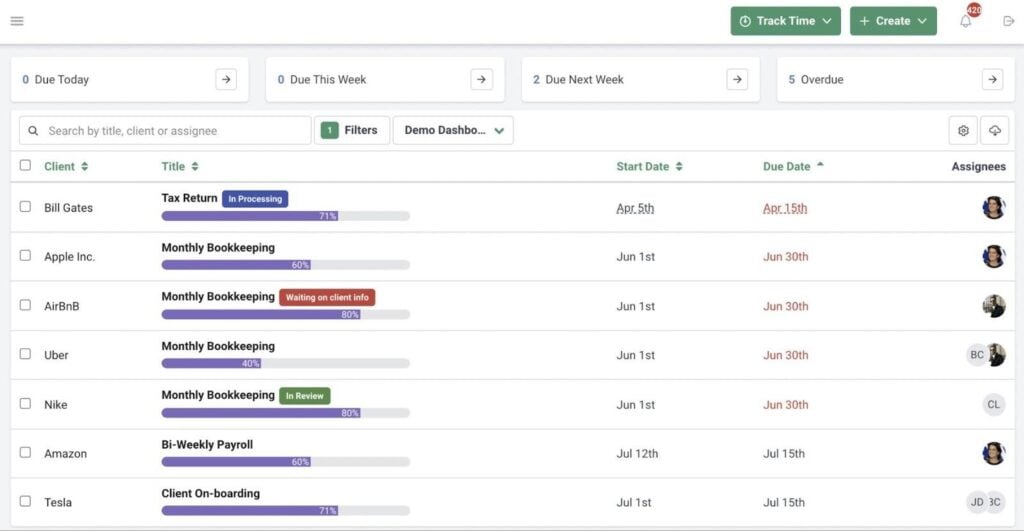
Financial Cents is a simple practice management system for sole practitioners and accounting teams. Where Jetpack Workflow improves on Trello’s project management and automation, Financial Cents offers a more complete system for managing accounting workloads.
Key Financial Cents features:
- Team management
- Team collaboration
- Workflow automation
- Client management
- Document management
- CRM
- Integrated email
- Time tracking
- Billing and payments
You get a dedicated CRM for managing client data, and a client portal to unify document sharing, communication, and invoicing. With built-in time tracking, billing and payments, and client management features, you’re far less reliant on integrations.
Even on its cheapest plan, Financial Cents offers an upgrade from both Trello and Jetpack Workflow for accountants. It’s not the most capable tool we’re looking at today, but it offers an affordable entry price into practice management software.
Why choose Financial Cents over Trello?
You want an affordable entry point to practice management software for accounting workloads, team collaboration, and client interactions.
3. Uku
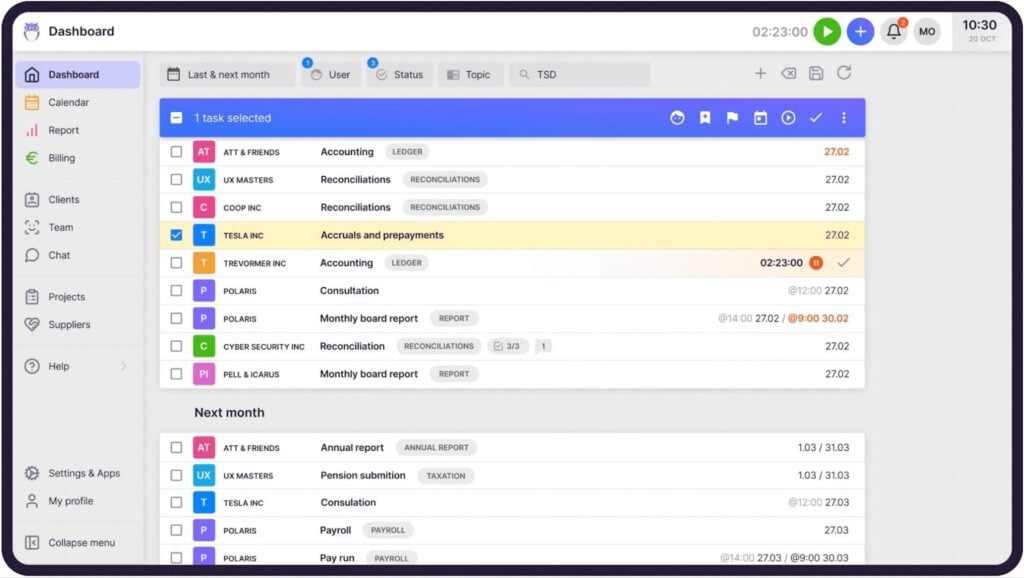
Uku is similar to Financial Cents in many regards. It’s a similar improvement upon Trello for accountants, but it also offers a capable free plan for sole practitioners. With project management, an accounting CRM, and time tracking, Uku’s free plan is an excellent alternative to Tello for solo accountants.
Key Uku features:
- Project management
- Workflow automation
- CRM
- Client portal
- Time tracking
- Billing and invoices
- Reporting and analysis
You only get access to workflow automation features on the paid plans, but pricing is good value compared to Jetpack Workflow and Financial Cents. You’re getting a serious upgrade from Trello at every price point, but Uku runs into the same problem as the other tools we’ve looked at on its more expensive plans.
As the monthly fees increase, Uku struggles to keep up with the more advanced practice management platforms we’re about to look at.
Why choose Uku over Trello?
You want a free upgrade from Trello’s project management system with a built-in CRM, accounting templates, time tracking, and more.
4. Karbon
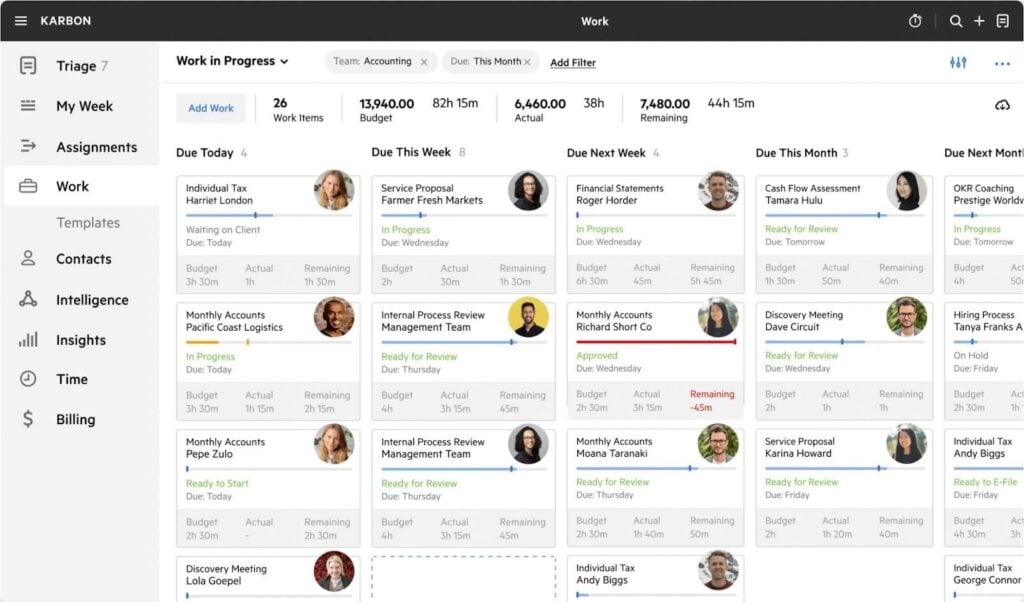
Karbon takes a more collaborative approach to practice management for accounting teams. Where Trello supports the most basic collaboration features, Karbon integrates team communication and workflow automation into a comprehensive toolkit for project management.
Karbon key features:
- Project management
- Workflow automation
- Client portal
- Integrated email inbox
- Billing and payments
- Time tracking
- Document management
- Accounting integrations
- Reporting and analytics
This isn’t a fair comparison, since Karbon is a far more advanced platform than Trello — and priced accordingly. This is the most expensive product we’re looking at today, designed for accounting teams that need advanced collaboration and workflow automation.
The main issue with Karbon is the lack of depth in its client management features. Considering it’s far more expensive than the likes of Uku and Financial Cents, you would expect a complete accounting CRM and stronger client collaboration tools.
Why choose Karbon over Trello?
Karbon sits in an awkward place in this list. It’s a major upgrade from Trello in every way, and it delivers the strongest collaboration system we’ve seen so far. Yet it lacks some key features available on cheaper alternatives, while our next recommendation offers a more complete product at a lower asking price.
5. TaxDome
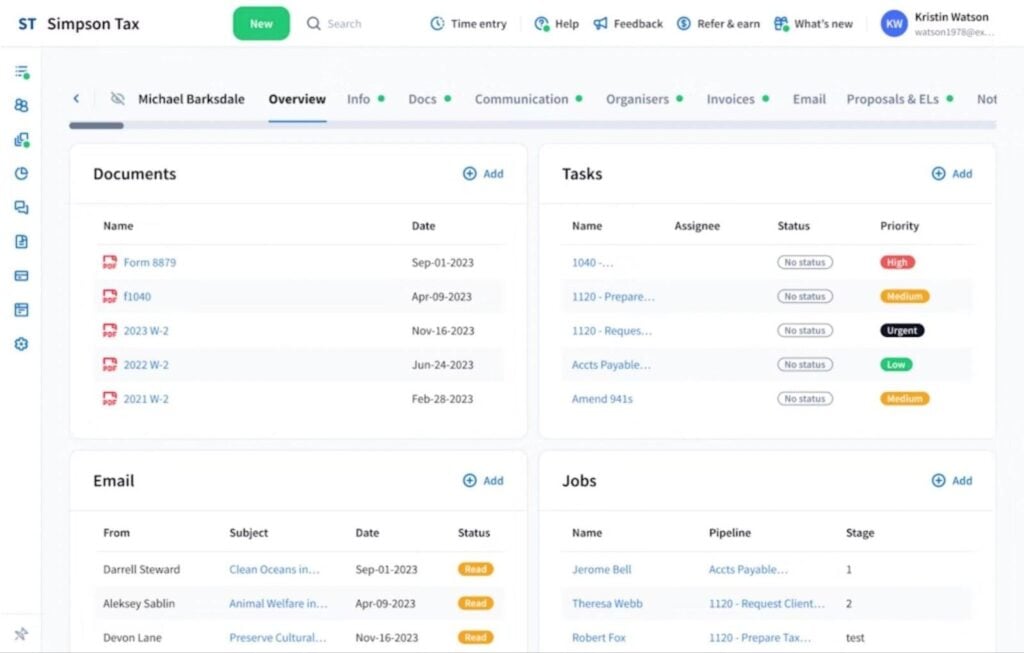
TaxDome is the complete practice management system for accounting firms. Where Trello leaves you reliant on integrations for features beyond project management, TaxDome incorporates everything you need to grow your accounting business.
TaxDome key features:
- Project and task management
- Advanced accounting workflow automation
- Team collaboration
- Accounting CRM with unlimited contacts
- Bookkeeping Hub
- Secure client portal
- The top-rated client mobile app in the App Store and Google Play
- Complete communication system with secure chats, email, and SMS
- Secure document storage
- IRS-compliant e-signatures
- Time tracking
- Billing and payments
- Website builder and branding
- AI-powered reporting
- Intelligent document renaming with TaxDome AI
In addition to a project management platform designed for accountants, you get the most advanced automation features on the market. You can fully automate recurring services — from the client onboarding process and document collection to e-signatures and invoice payments.
TaxDome also delivers the most comprehensive system for client management and collaboration. In addition to a built-in CRM with unlimited contacts, you get the most functional client portal currently available, and the top-rated client mobile app available on iOS and Android.
Tying everything together, you get universal client communication with integrated email, chat, comments, and two-way SMS. Plus, unlimited document storage, IRS-compliant e-signatures, billing and payments, and more.
Why choose TaxDome over Trello?
More than a Trello alternative, TaxDome is a step up from Karbon and the other practice management platforms we’ve recommended so far. Although Karbon is more expensive, TaxDome gives you an unlimited CRM, extensive client management features, and the most complete accounting workflow automation features.
Take a look at our TaxDome vs Karbon comparison for a more detailed head-to-head.
Is Trello the best project management software for accountants?
It’s difficult to recommend Trello as a project management tool for accounting work. While it’s great for planning and managing personal tasks, it isn’t designed to handle accounting processes. At a stretch, we could recommend it as a free starter tool for sole practitioners and new teams, but Uku’s free plan is a stronger option here.
Ultimately, accountants need more than a project management platform. You want all the features Trello offers — and so much more — in one system for managing every aspect of your accounting business.
This is why we built TaxDome, the most complete practice management platform for accounting firms and professionals.
You shouldn’t need separate tools to manage projects, automate workflows, onboard clients, or exchange documents. And, with TaxDome, you don’t — because you get the complete ecosystem for building a high-growth accounting firm.

Aaron produces practical content for TaxDome, drawing on 11 years in SaaS copywriting and marketing. He helps accounting and tax professionals get the most from TaxDome and other tools, making complex topics clear and actionable.

Get your free guide

Thank you!
The guide copy has been sent to your email. Please check your inbox!
Recommended articles
Niche Business Accounting Report statistics: what business clients will pay for specialized expertise

Buy Now, Pay Later: offer clients payment flexibility

Top AI tools for accountants in 2026: key features and use cases compared