 US – English
 UK – English
 Canada – English
 Australia – English
 Danmark – Dansk
 DACH - Deutsch
 France – Français
 España – Español
 Sverige – Svenska
 Italia – Italiano
 Nederland – Nederlands
 Portugal – Português
 Suomi – Suomi
 Norge – Norsk
 日本 – 日本語
 Romanian – Română












Bookkeeping clean-up made simple: A step-by-step guide + free checklist

Run your entire firm on one platform

Clean books are the foundation of a healthy business, but clients don’t always realize this until it’s too late. They wonder why budgets are stretched and late payment fees are piling up, but their books don’t have the answers.
This is where you step in with a bookkeeping clean-up and put their financial records back in order. You’ve saved the day, but you know their books will be a mess again by Q4 without regular maintenance. So, how do you make recurring clean-ups as painless as possible — for you and your clients?
Table of сontents
Your clients need to know the value of clean books
Whether you’re doing a clean-up for new clients, or as an ongoing service, getting all the information you need is imperative. Unfortunately, business owners don’t always share the same enthusiasm for accounting — in fact, nearly 35% of business leaders say they struggle to keep track of expenses and cash flow.
This is great for drumming up business, but not so good when you spend all day chasing clients for the documents you need. Sometimes, you need to remind clients why clean books matter to them to start off on the right foot:
- Improve business decision-making
- Simplify compliance with regulations
- Avoid fines and penalties
- Minimize the stresses of tax prep and audits
Your bookkeeping proposals are the best place to get this message across with new clients. With TaxDome, creating professional proposals is quick and easy: you can customize our templates, automatically pull customer details from invoices and send them out with personalized messages.
Explore our library of accounting templates to try them out for yourself.
Bookkeeping clean-up checklist (+ template)
The ideal bookkeeping service is efficient for you and effortless for the client. Every clean-up is different, but this template sets out a step-by-step process that you can adapt for each project.
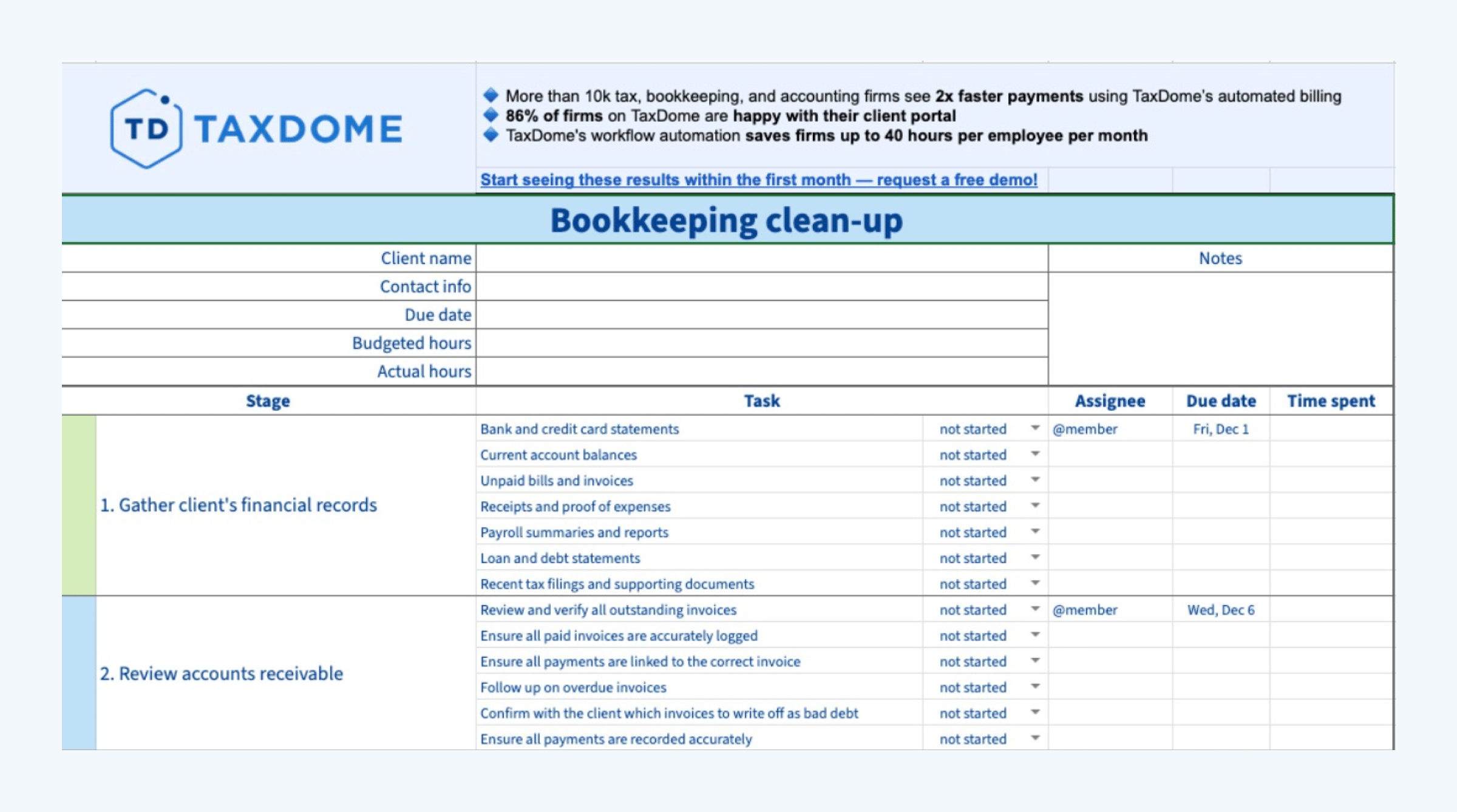
Now, let’s run through each step of this bookkeeping clean-up template to make sure you’re familiar with everything. We’ll also show you how to use tools and automation to make your bookkeeping process more efficient.
1. Gather your client’s financial records and docs
Start by collecting everything you need from your client to complete the clean-up. Be comprehensive here. Missing documents creates extra work and increases the risk of errors — for you and your clients.
Every client is different, but you typically need the following for a clean-up:
- Bank and credit card statements
- Current account balances
- Unpaid bills and invoices
- Receipts and proof of expenses
- Payroll summaries and reports
- Loan and debt statements
- Recent tax filings and supporting documents
Get clients used to providing all the information you need on a regular basis. This reinforces good habits for record keeping, in general, and makes ongoing clean-ups easier for everyone involved.
We know how challenging it can be to get what you need from clients. This is why we built our client portal and client mobile apps: for seamless interactions between bookkeepers and clients.
You can request documents in TaxDome, and all they have to do is scan the docs with their phone camera. The app converts their photo into high-quality PDFs and links it to the relevant job. Meanwhile, all documents are safely stored in TaxDome’s secure document storage system.
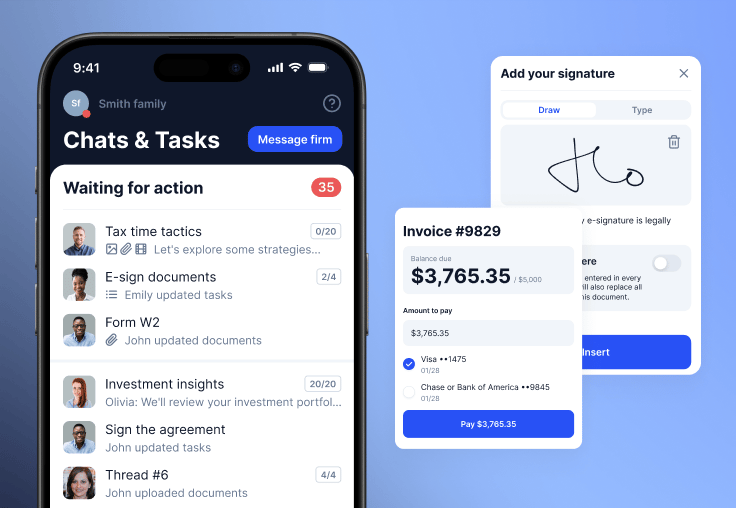
Clients can ask you questions in the app’s chat system if they run into any problems. You can reply and manage conversations in TaxDome. All documents and messages are linked to the relevant contact.
Your clients will love the portal and mobile app just as much as you do. Don’t take our word for it, though. Check reviews on the App Store and Google Play to see why ours is the top-rated client mobile app for accounting and bookkeeping.
Find out why TaxDome is the #1 rated end-to-end firm management system for bookkeepers, accountants and tax professionals.
2. Review accounts receivable
Verify accounts receivable balances and transactions to ensure they match records. Pay close attention to customer invoices, payment receipts, and other supporting documentation.
- Review and verify all outstanding invoices
- Ensure all paid invoices are accurately logged
- Ensure all payments are linked to the correct invoice
- Follow up on overdue invoices
- Confirm with the client which invoices to write off as bad debt
- Ensure all payments are recorded accurately
Resolving issues here can prevent your clients from overestimating income and, potentially, overpaying tax.
3. Review accounts payable
Verify accounts payable balances and transactions. Make sure they match purchase orders, supplier invoices, and other supporting documentation.
- Review the accuracy of all unpaid bills
- Identify and resolve any duplicate invoices
- Identify any overpayments or other discrepancies
- Prioritize payments to avoid late payment fees
- Ensure all payments are recorded accurately
Aside from contributing to accurate financial reports, this protects your clients from overpaying vendors.
4. Reconcile bank and credit card accounts
With accounts receivable and payable reconciled, ensure your client’s bank records match their books. Compare transaction records with official bank and credit card statements to identify any discrepancies:
- Missing entries
- Duplicate transactions
- Transactions recorded in one place but not elsewhere
- Incorrect amounts or dates
- Unrecorded bank fees, refunds, and other expenses
- Deposits in transit
- Bank errors (rare, but they do happen)
You need to identify every missing transaction and discrepancy, so you can investigate with the client and resolve them. Once you’ve reconciled their accounts, all transactions and ending balances in your client’s software should match the relevant statements.
5. Review and categorize transactions
Now that you know all transactions are accounted for, you need to make sure they’re categorized correctly. This is crucial for accurate revenue and expenses reporting, as well as making tax preparation and audits easier.
This is a perfect example of how regular clean-ups save hassle with future tasks, such as tax preparation — especially when time is short.
You’ve got two key issues to look out for here:
- Uncategorized transactions: entries with no category applied to them at all
- Miscategorized transactions: entries with inaccurate or unclear categories applied to them
Requesting this info from clients is one of the biggest time drags in a bookkeeping clean-up.
To deal with this, we’re launching a Bookkeeping Hub in TaxDome. The hub connects to your clients’ QuickBooks Online (QBO) accounts and pulls their transaction data into a Transactions Table.
Each transaction includes the date, type, amount, and other details automatically pulled from QBO.
If anything is missing, you can click “Ask client” in the “Communication with client” column to request information.
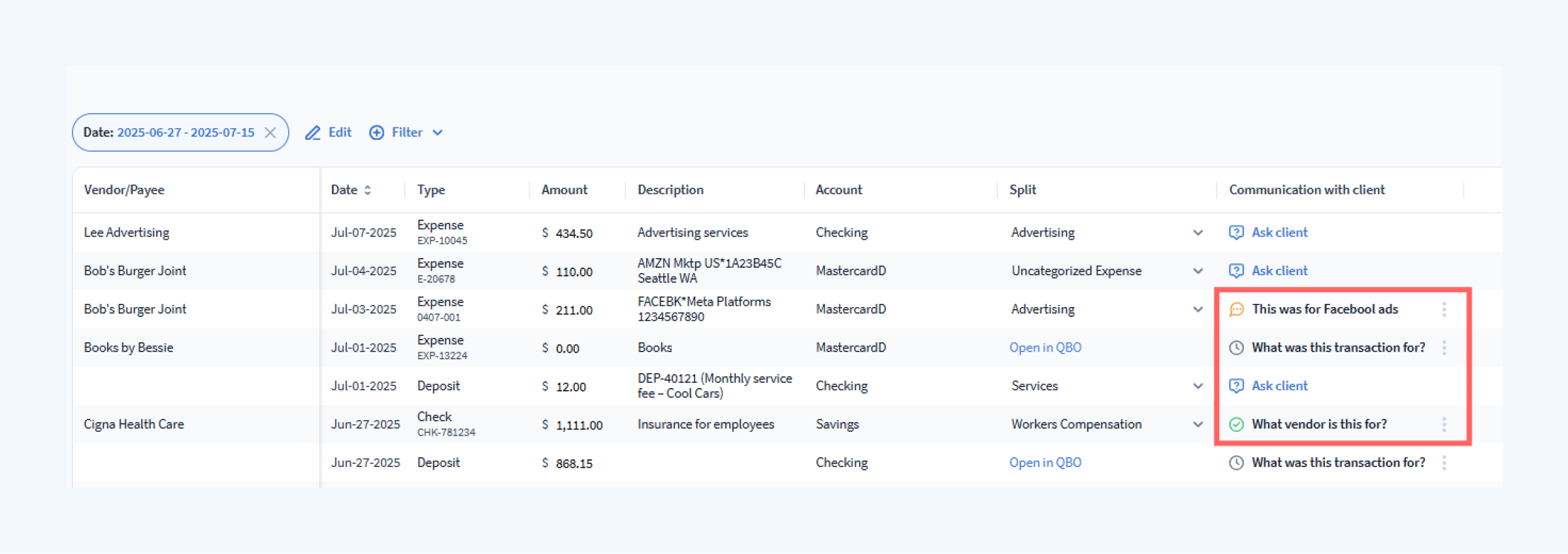
Once the client replies, the status is automatically updated to Answer received. Simply hover over the status to reveal the full details of the communication.
No more endless email exchanges, and no more requests disappearing in inboxes.
When 1 in 5 clients says they’re willing to pay up to 50% extra for a faster service, you can’t underestimate the value of convenience.
6. Review payroll records
For clients with employees, it’s time to review their payroll records. You need to check they’re paying staff correctly, paying their tax obligations, and recording everything accurately.
- Examine payroll summaries, timesheets, and pay stubs
- Verify the accuracy of wages, overtime, bonuses, and deductions
- Check payroll expenses in the accounting system match bank statements and payroll reports
- Ensure tax withholdings and benefits payments align
- Identify any unpaid payroll liabilities — eg: tax or contributions
Payroll mistakes can result in tax penalties and compliance violations, not to mention unhappy employees.
7. Review assets and inventory
Assets and inventory are a common source of confusion for business owners. Aside from checking everything’s in order, you may need to explain some technicalities to clients — for example, how depreciation impacts the value of certain assets.
Common mistakes to look out for include:
- Overestimating the value of assets
- Overlooking the depreciation of non-current (or fixed) assets
- Listing inventory as an expense where it’s an asset until sold
- Miscategorizing personal and business assets
- Missing or miscategorizing non-tangible assets — eg: brand, intellectual property rights, trademarks and patents, software products, etc.
Accurately reporting assets ensures your clients pay the right amount of tax and receive the tax credits they’re entitled to.
8. Verify tax readiness
Verifying tax readiness helps clients deal with potential issues quickly, and avoid headaches during tax season.
- Ensure your client’s balance sheet is in balance
- Review their general ledger and chart of accounts
- Confirm the correct tax rates on all transactions
- Verify income tax calculations
- Verify payroll tax calculations
- Check for any tax liabilities, including amounts paid and owed
- Review your client’s tax forms for accuracy
Even if you’re not involved in filing tax returns yourself, you want to ensure the accountants doing so have all the information they need.
9. Review and update financial reports
The final step of your bookkeeping clean-up is to review and update all relevant financial reports for the client.
Some clients may require additional reports, but the three most common are:
- Balance sheet: a review of the company’s assets, liabilities, and shareholder equity
- Profit and Loss (P&L) statement: a summary of revenues, expenses, net income, and gross earnings
- Cash flow statement: shows the movement of cash into and out of the business through operation, investment, and finance
Share the updated reports with your client, including a summary of your clean-up. Highlight the issues resolved, and show the impact of resolutions to demonstrate the value of ongoing clean-ups.
Simplifying bookkeeping clean-ups with tools and automation
Bookkeeping is filled with inefficiencies. You spend more time chasing documents than working with them, and more time “communicating” with clients than providing the service they actually pay you for.
These inefficiencies limit the number of clients you can manage and make clean-ups more frustrating for the ones you do.
Automating workflows frees up the time wasted on these repetitive tasks. The problem is, you’re using half a dozen tools before you know it. Your software expenses skyrocket, and constantly switching between tools makes your workflows less efficient, not more.
All you’ve done is swap one inefficiency for another.
This is why we built TaxDome: to bring everything your team needs into one, complete firm management platform. From client onboarding to billing, payments and retention, you can automate your bookkeeping services from start to finish.
TaxDome simplifies bookkeeping on both ends of the client relationship. This means you can manage more clients and keep them happier — without overstretching yourself or hiring new staff.
Our customers save up to 40 hours every month on routine tasks, which they can dedicate to handling more clients and earning more revenue. Don’t take our word for it, though. See how this firm with 10 staff turned client frustration into 5-star reviews with TaxDome.
We’re constantly working to help firms do more with existing resources, as evident in our new Bookkeeping Hub. Find out what else is coming to TaxDome later this year in our Summer Update 2025 Webinar.

Mari develops TaxDome content by combining customer insights, industry research, and real-world trends. Her structured, automation-driven approach ensures messaging is clear, relevant, and supports more connected and efficient accounting firms.

Get your free guide

Thank you!
The guide copy has been sent to your email. Please check your inbox!
Recommended articles

Niche Business Accounting Report statistics: what business clients will pay for specialized expertise

Buy Now, Pay Later: offer clients payment flexibility

Top AI tools for accountants in 2026: key features and use cases compared